Recover Deleted Recordings/Shows on DirecTV
DirecTV is a streaming app that provides access to local digital broadcasts, HD programs, and series shows for users worldwide. If you've lost recordings or accidentally deleted programs or shows on your DirecTV HD DVR, there are likely solutions available.
If you've lost hundreds of videos, games, and photos that you've collected over time, it's not the end of the world. You can always try to recover them or recreate them.
5 Solutions to Recover Deleted DircTV Recordings and Shows
Can I recover deleted recordings on DirecTV Genie? Can you recover deleted DirecTV DVR recordings? Here, we collected 5 workable solutions to help you undelete and bring back DirecTV shows and recordings immediately:
| Applicable Cases | Workable Solutions |
|---|---|
| Delete recordings or TV shows in TiVo software | Fix 1. Recover from TiVo Software |
| Deleted programs or shows in DirecTV application | Fix 2. Recover from DirecTV History |
| Delete recordings & shows on DirecTV hard drive | Fix 3. Recover from DirecTV Hard Drive |
| Missing shows on DirecTV for no reason | Fix 4. Recover from DirecTV Genie HD DVR |
| Reset DirecTV mistakenly, missing all shows | Fix 5. Turn to DirecTV Support Team |
Quick Guide: If you're looking for a quick solution, try Fix 1 and Fix 2 first, even if neither method works. The most reliable way to recover deleted shows and recordings from a DirecTV hard drive or external USB is to use capable third-party DRV data recovery software, as shown in Fix 3.
You May Also Interest In:
If you have a similar issue on Dish DVR, We have a solution for you.
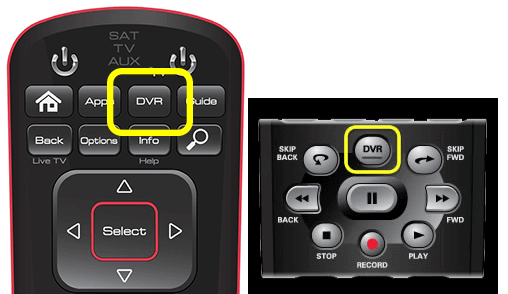
How to Recover Deleted Shows or Recordings on DirecTV
If you've deleted a show on your DirecTV DVR, there are ways to recover it. Unlike Dish DVR, DirecTV doesn't have a "recycle bin" folder, but there are 5 alternative methods to undelete your missing or lost recordings.
Follow to bring back your series, TV shows, movies, or programs immediately.
Method 1. Recover Deleted DirecTV Recordings from TiVo Software
The DirecTV DVR runs on TiVo software, which offers various features when connected to a home network, including film and TV downloads.
If you accidentally deleted a TV show or program from your TiVo DVR, you can find it in the "Recently Deleted" gallery, where you can recover and restore it.
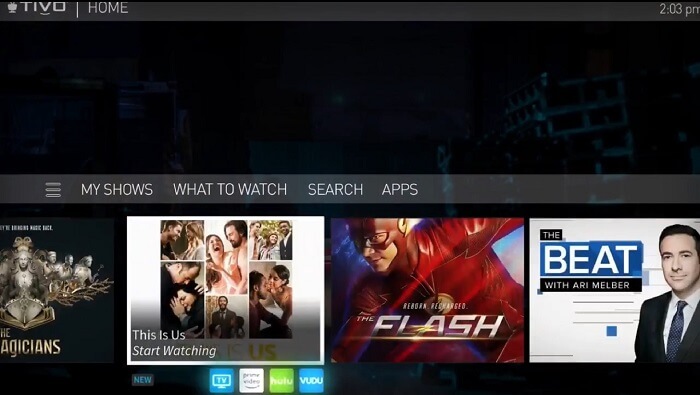
Here are the steps to recover deleted DirecTV shows using TiVo models:
Recover Deleted Shows from DirecTV via TiVo Software with HD:
Step 1.To delete recently deleted shows on your TiVo, go to the TiVo Central menu and select "My Shows," then choose "Recently Deleted."
Step 2. To recover a show, highlight the show you want to recover and press the "Select" button on the remote.
Step 3. Select "Recover this show" when given the option.
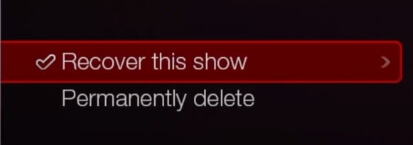
To recover a deleted recording, go to the "Settings" menu and select "System" or "TV", then choose "Recover deleted recordings". Select the recording you want to recover, and confirm the recovery. If you want to recover multiple recordings, repeat the process for each one.
Recover Deleted Recordings from TiVo Software with SD:
Step 1. Press "Tivo Central" button on your remote controller.
Step 2. Select "Now Playing List" and then select "Recently Deleted Recordings".
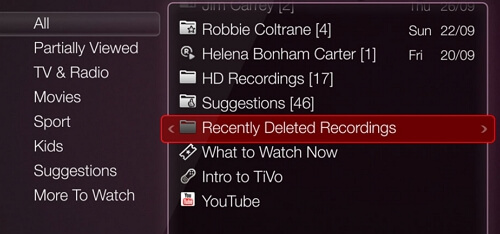
Step 3. Move to highlight the shows or recordings, and press "Select".
Step 4. On the Deleted Program screen, highlight "Recover" and click "OK".
Step 5. After the system finishes the recovery process, select one of the following options on the "Recovery Complete" screen: "Keep until I delete", "Keep through", or "Don't change date".
Step 6. To view deleted recordings, press the "Tivo Central" button on your remote control, and the deleted recordings will appear in the "Now Playing" list.
Method 2. Recover from DirecTV History
If DirecTV delete recordings or you mistakenly deleted DirecTV shows, recordings, or programs, you can try to recover them from the DirecTV history.
Here are the steps:
Step 1. Turn on your PC and DirecTV Genie HD DVR.
Step 2. Press "Menu" on the remote controller.
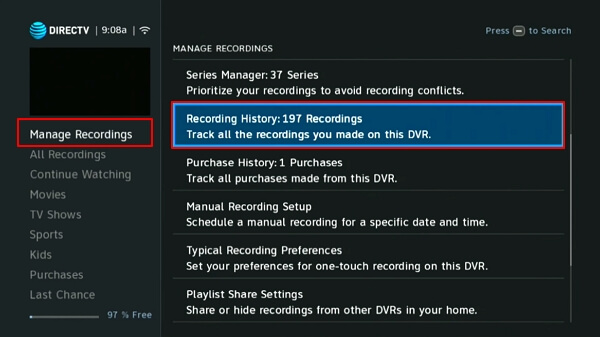
Step 3. Highlight the Manage Recording menu, and select "History".
Find the deleted recordings in the list and restore them immediately.
Method 3. Recover Deleted DirecTV Shows from Hard Drive
To recover lost recordings from a Genie HD DVR, simply remove the internal hard drive, connect it to your computer, and you can recover deleted or lost shows and recordings from the DirecTV hard drive.
Here, you can try reliable file recovery software - Deep Data Recovery to fully scan and recover all deleted DirecTV DVR recordings.
Step 1. Run Deep Data Recovery, select the desired file types, and click "Fast Scan" to initiate the recovery process.

Note: You can choose different search modes based on where and why the data was lost.
Step 2. To recover deleted videos, select the location where they were lost or deleted, then click "Scan" to begin the recovery process. This will search for any remaining video files on the device.

Step 3. After scanning, select "Videos" in the left panel and go to "Lost" or "All" to find the desired videos. Then, select the found videos and click "Preview" to view them.

Step 4. Select the video files you want to restore, then click "Recover" to save them to a secure location.
For some DirecTV DVR recordings with special file formats, you may need to find a suitable file viewer to preview the recovered files.
You May Also Interest In:
How to Recover Deleted Files from Recycle Bin?
Want to recover deleted files from the Recycle Bin? Follow these steps to do so immediately. (Note: I removed the "shortly" as it didn't make sense in this context)

Method 4. Recover Missing DirecTV Shows or Recordings from Genie HD DVR
If you find some of your recordings or shows just disappeared on your DirecTV, it might be a program loading error, not a cause for concern.
You can directly try to re-load and find them from your DirecTV Genie HD DVR:
Step 1. Turn on your TV and DirecTV Genie HD DVR.
Step 2. Check your shows.
Step 3. To reset the DirecTV Genie HD DVR, locate the reset button, which is usually found on the back or bottom of the device. Press the reset button using a paper clip or a similar object to create a small hole in the button.
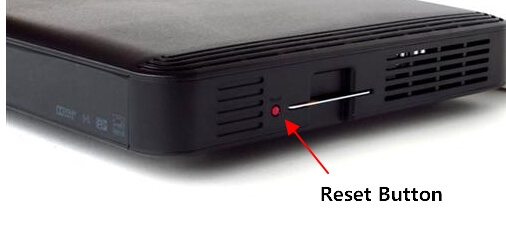
Step 4. When the process is finished, unplug both your TV and DirecTV DVR, wait 30 seconds, then plug them back in. This will help reset the system and resolve any connectivity issues.
Your missing recordings and shows will show up on your TV, and you can play them again.
Method 5. Turn to DirecTV Support Team for Help
If your Directv recordings or shows disappeared for no reason, first check if your account has exceeded the payment, and if so, you'll need to recharge your account.
If everything is all right, you can call the DirecTV support team for help. They can assist you with troubleshooting or scheduling a technician visit, depending on the issue you're experiencing.
- 1. DirecTV's app allows you to restore missing or lost recordings remotely. This feature can be accessed through the app's "My DirecTV" section, where you can view and manage your recorded content.
- 2. Send repair stuff and check if it's a device error that causes your shows missing.
Deleting DirecTV Recording Is Not Terrible, You Can Restore Them All
If you've accidentally deleted your fancy DirecTV shows and recordings, On this page, we've collected 5 complete ways to help you restore them. We've can help, so you can easily recover your deleted content without any hassle.
Deleting the DirecTV recording is not the end, and you still have a chance to bring them back. To undelete your shows, take action now and consider using a program like Deep Data Recovery for effective recovery.
Related Articles
- How to Recover Deleted Recordings on Sky Q and Sky Plus Box
- Fix Micro SD Card Not Detected in PC, Android Mobile Phone or 3DS
- Fix the Error that Memory Card Not Show Up or Detected in Mobile/PC
- QNAP Recovery: How to Recover Deleted Files from QNAP Drive for Free
- 3 Ways to Delete Files in Windows PC
If you want to permanently delete files in Windows, here are at least 3 basic ways you can try out: use windows force delete, use SDelete and File Shredder. - 4 Ways to Recover Deleted Files in Windows 8
If you deleted files or folder in Windows 8/8.1 accidently, you can try the following 4 ways to recover deleted files in Windows 8 or 8.1 computer.
Products
Articles & Tutorials
- Data Recovery
- Data Backup
- File Recovery
- File Backup
- System Backup and Restore
- Disk and Partition Clone
- Technical articles
- Mobile articles
- Disk Master Help
- Windows Data Recovery Tutorials
- Windows Secure Delete Tutorials
- Windows Partition Management Tutorials
- Windows File Backup and Restore Tutorials
- Windows System Backup and Restore Tutorials
- Windows Disk Backup and Restore Tutorials
- Windows Clone Tutorials