Where and How Do I Find or Recover Origin Password
| Workable Solutions | Step-by-step Troubleshooting |
|---|---|
| Find Origin Account | To access your Origin account, you need to provide login credentials such as your user ID and password. If you've lost these, you can recover your account by following the in-app instructions or by contacting Origin support for assistance. However, note that this may not be possible if you've created a new account or if your account has been deleted. If you're having trouble accessing your account, it's recommended to try the in-app recovery process first, and if that doesn't work, contact support for further guidance.Full steps |
| Find Origin Password without Email | Step 1. Click "Internet & Network" under Password; Step 2. Check Browser Accounts & Passwords of...Full steps |
| Reset Origin Password | Step 1: Open Update My details; Step 2: Type the new password in the Your New Password field...Full steps |
Origin, developed by Electronic Arts, is a digital distribution platform that offers various features to its users, including profile management, group chat, and streaming capabilities. It also integrates with other gaming communities, allowing users to connect with others across different platforms. The platform provides access to a vast library of Electronic Arts games, which can be purchased and downloaded through the Origin Store, allowing users to play them for an unlimited time after payment.
Losing your Origin account password can be frustrating, but the retrieval process is straightforward. Follow the steps below to get back access to your account.
Forgot Origin Password? How Do I Find or Recover It
As a hardcore gamer, you know how crucial Origin account details are for buying and playing games on your device. To set a secure password for your Origin account, follow a specific pattern: use alphanumeric characters between 8 and 16 characters, including at least one lowercase letter, one uppercase letter, and a number. Note that you shouldn't include any special characters in your password.
You need the password of your Origin account to access and manage your account securely, protect your personal and gaming data, and ensure that only you can make changes to your account settings and transactions. This is to maintain the integrity and security of your account across the Origin platform.
- To protect your account, be sure to keep your password details secure, as millions of people use Origin and your account could be vulnerable to hackers.
- A strong password can safeguard your Origin account.
- To make it easier to access games, you could remove the password requirement for buying or downloading games, allowing users to simply sign in with their account information without needing a password. This would simplify the process and make it more user-friendly.
- Your username is like your name, and the password is like the key to your house. Without the key, you can't enter your house, and without the password, you can't access your account.
Without the password, your account becomes unused, and without access, you cannot move further for any activities. As we have mentioned earlier, you need not panic as we come forward with the solution to find or recover the Origin password.
How to Find Origin Account
To access your Origin account, you need to provide a user ID and password. If you've lost your password, contact the Origin support team to regain access. They'll assist you in retrieving your account from their database.
To log in to the Help Page, go to the Help Page and click "Need help logging in?"
Enter the email address associated with your Origin account into the provided field and click "Send."
You need to reset your Origin password. Check your email for an email from Origin, follow the instructions in the email to reset your password.
Finally, you can log in with your new password.
If the support team takes time to respond, you can consider the other option, which we'll discuss further in the next part.
How to Find Origin Password without Email
Qiling Key Finder software can recover Origin passwords, product keys, and licenses, even from crashed hard drives, allowing users to access their accounts and data quickly and easily. This tool can also back up data to prevent further loss and offers additional recovery features to help users in various situations.
What can you do if you install Qiling Key Finder?
- You can retrieve or recover your origin password.
- You could recover your web browser password if you forgot.
- The tool can recover Microsoft Office and Adobe product keys.
- If you've lost your Windows system key, a tool can help you recover the code.
- You can find the product serials of 1000+ popular programs.
- If you forgot to save your WiFi password, you can still find it out.
- You can recover the key from a dead operating system or hard disc.
- The tool backs up all recoveries to prevent further damage.
If you're a forgetful person dealing with large amounts of data like emails and accounts, installing this software can be a huge relief. It allows you to easily trace any password you've saved, making it a helpful tool for both professionals and non-professionals alike. The user interface is simple to use, and the software is compatible with all Windows versions, including the latest and previous ones, and performs consistently on any computer model.
Step 1. Click "Internet & Network" under Password.
Step 2. To check the browser accounts and passwords of Chrome, Edge, Firefox, and IE, you can follow these steps. For Chrome, go to Settings > Accounts, and then click on the three vertical dots next to each account to view the password.
"Copy" - Click it, then directly paste.
"Save" - Save as a PDF file.
"Print" - Connect Printer to print.
If you encounter any issues during installation or use, the tech team is available to help you throughout the process. You can download the software from the official website, install it, and begin recovering your Origin password.
How to Reset Origin Password
The Origin platform is crowded with millions of gamers worldwide, and your unique identity is your username. To keep your account secure, it's essential to keep your password safe from hackers who are actively trying to steal your data from your Origin account. It's recommended to change your password every two weeks to prevent unauthorized access and ensure you can enjoy playing games with your friends.
Follow the below steps to change your Origin password:
Step 1: Open Update My details.
Step 2: Type the new password in the Your New Password field.
Step 3: In the Confirm Field, type again the new password.
Step 4: Click on Update.
Step 5: Your new password has been set.
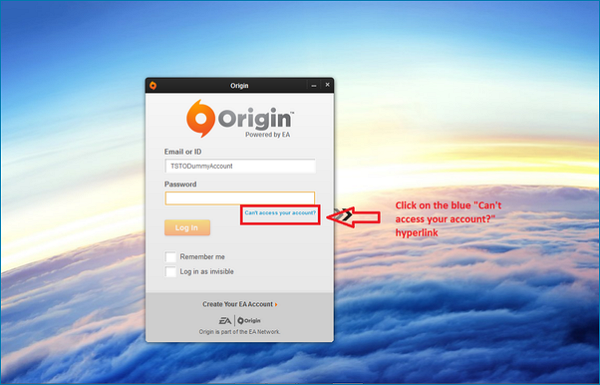
To keep your password safe from hacking, follow these easy steps to change it regularly:
Step 1: Open your login screen.
Step 2: Tap on Forgot or Create my Password.
Step 3: Type your email address.
Step 4: You will receive a password reset link via email shortly.
Step 5: To reset your password, click on the link provided and follow the instructions to create a new password.
Step 6: Once you create a new password, click the Update button, and your new password will be updated.
To protect your account from suspicious activities, it's necessary to change or reset your password for an Origin account.
Conclusion
Origin platform is growing every year, and users worldwide create accounts to play new release games. To access and continue playing, having a valid Origin account with correct login details is essential. Therefore, recovering or finding the Origin password is crucial to log in and remain part of one of the largest gaming communities globally.
Related Articles
- How To Find Windows Server 2019 Product Key
- How to Find Wifi Password on iPhone [Detailed Guide]
- WiFi Password Finder: How to See WiFi Password for PC/Mac/Android/iPhone
- Check Out the Best Portable SSD | 2024 List🔥
Are you looking for the best portable SSD in 2024? You can read this guide, and it will show you 5 best portable SSD in terms of their different specifications. - macOS Sonoma Runs Slow After Update | 8 Ways to Fix
Fix macOS Sonoma running slow after update. Learn how to free space, check startup items, reset settings, and improve performance. - Sorry, No Manipulations with Clipboard Allowed on Mac [with 5 Proven Fixes]
Are you facing Mac's frustrating 'Sorry, no manipulations with clipboard allowed' prompt? You'd be glad to know that we can help you with this. Here's how!
Products
Articles & Tutorials
- Data Recovery
- Data Backup
- File Recovery
- File Backup
- System Backup and Restore
- Disk and Partition Clone
- Technical articles
- Mobile articles
- Disk Master Help
- Windows Data Recovery Tutorials
- Windows Secure Delete Tutorials
- Windows Partition Management Tutorials
- Windows File Backup and Restore Tutorials
- Windows System Backup and Restore Tutorials
- Windows Disk Backup and Restore Tutorials
- Windows Clone Tutorials