Motherboard: An Indispensable Part of Your PC
When buying a new motherboard, it's essential to ask yourself a few questions to ensure you get the best model that suits your needs. This article will help clarify the complexities and guide you in selecting the perfect motherboard. Additionally, we will introduce you to the top five gaming motherboards in 2022.
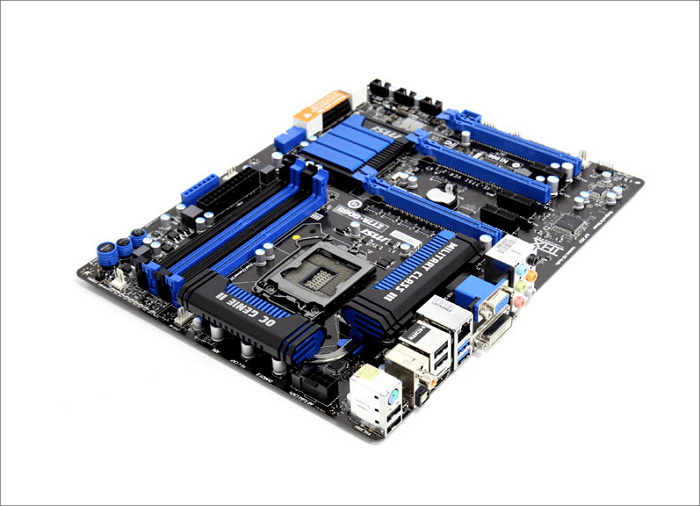
What Is Motherboard?
The motherboard is a printed circuit board that connects various computer components, such as the CPU, GPU, memory, and storage, acting as a central hub for communication between them.
Types of Motherboard Form Factors
A motherboard's form factor determines its overall layout, including size, shape, casing, power supply, and mounting holes, with common form factors including ATX, Micro-ATX, Mini-ITX, and others.
1) Form Factor ATX (Advanced Technology Extended)
The ATX motherboard configuration and dimensions are standardized to improve compatibility and simplify design. Measuring 11.2 x 8.2 inches, ATX motherboards offer advanced software-controlled facilities, reduced interference with drive bays, and excellent airflow, making them an evolution of the Baby AT form factor developed by Intel in 1995.
2) Form Micro ATX
Micro ATX is a smaller version of the standard ATX, measuring 9.6 × 9.6 inches, and supports up to four expansion slots for various interfaces. Despite its compact size, it is compatible with most ATX cabinets, with different mounting holes. Micro ATX is suitable for both Intel and AMD processors.
3) Form Micro Nano-ITX
Nano-ITX is a motherboard form factor designed by VIA Technologies in 2003, compatible with low-power-consuming devices like PVRs, in-vehicle devices, and smart TVs.
Best Gaming Motherboards in 2022
The best gaming motherboard for you depends on your budget and system expectations, with top options available in 2022. These top five gaming motherboards offer a range of features and performance.
1. Asus ROG Maximus Z690 Hero
The Asus Maximus Z690 Hero is the entry-level model of the Maximus Series, which is the highest-end consumer motherboard offering from ROG. Based on Intel's "Alder Lake" processors and DDR5 memory, it features dual PCIe x16 Gen4 slots, making it ideal for high-end GPUs, storage, and networking.
SPECIFICATIONS
Form factor: ATX
CPU support: 12th Gen Intel Core
Video outputs: 1x HDMI 2.1
Storage slots: 3x M.2, 6x SATA 6Gb/s
Network: x1 Intel 2.5Gb Ethernet, Wi-Fi 6E
RAM support: 4x DIMM, up to 128GB, DDR5 6,400+ (OC)
Expansion slots: The motherboard features two PCIe 5.0 x16 slots and one PCIe 4.0 x16 slot, which can be used in x4 mode.
USB ports: The device has two Thunderbolt 4 ports, seven USB 3.2 Gen 2 ports, and two USB 2.0 ports.
2. Gigabyte X570 Aorus Xtreme
The AMD motherboard ranks second on our list due to its advanced power and design, allowing users to boost their performance. It's the best X570 limited edition motherboard for your system, featuring a combined chipset and CPU heatsink. While its price may be as substantial as its e-ATX form factor, it's packed with affluent features that outshine other models.
SPECIFICATIONS
Form factor: E-ATX
CPU support : AMD Ryzen 5000 / 4000 / 3000 / 2000 / 1000
Video outputs: N/A
Storage slots : 3x M.2, 6x SATA 6Gb/s
Network: x1 Aquantia 10Gb Ethernet, Intel Wi-Fi 6E
RAM support : 4x DIMM, up to 128GB, DDR4 5,400 (OC)
Expansion slots: This system features one PCIe 4.0 x16 slot and a second PCIe 4.0 x16 slot that can be used in x8 mode.
USB ports: The motherboard has six USB 3.2 Gen 2 ports, two USB 3.2 Gen 1 ports, and four USB 2.0 ports.
3. ASRock Z690 Taichi
The Razer-themed Z690 Taichi motherboard stands out with its RGB splash and moving cogs over the I/O, making it a unique and elegant option. Although it may be pricey, it integrates well with the Chroma ecosystem, making it a great choice for Razer fans. It also features multiple aesthetic features such as Dual Thunderbolt 4 ports and a solid audio solution, and has strong initial memory support, making it a top contender.
SPECIFICATIONS
Form factor: ATX
CPU support: Intel 12th Gen
Video output: 1x HDMI 2.0, 2x Thunderbolt Type-C
Storage slots: 3x M.2, 6x SATA 6Gbps
Network: The Killer Wi-Fi 6E, Killer E3100G 2.5G Ethernet, and Intel I219V 1G LAN provide a high-speed internet connection, with Wi-Fi 6E supporting speeds of up to 9.6 Gbps, the 2.
RAM support: 4x DIMM, up to 128GB, DDR5-6400 (OC)
Expansion slots: This motherboard has two PCIe 5.0 x16 slots, one PCIe 4.0 x16 slot, and one PCIe 3.0 x1 slot, providing a range of expansion options for high-performance graphics cards, storage devices, and other peripherals.
USB ports: This device has 2 Thunderbolt 4 Type-C ports and supports up to 1 USB 3.2 Gen2x2, 2 USB 3.2 Gen 2, 9 USB 3.1 Gen 1, and 3 USB 2.0 ports.
4. MSI Pro B660M-A
MSI's Pro B660M-A DDR4 Micro-ATX motherboard supports the latest Intel 12th Gen processors and the B660 chipset, making it a reliable choice for budget-friendly or mid-range gaming computer systems.
SPECIFICATIONS
Form factor: microATX
CPU support: 12th Gen Intel Core
Video outputs: 2x DisplayPort 1.4, 2x HDMI 2.1
Storage slots: 2x M.2, 4x SATA 6Gb/s
Network: x1 2.5Gb Ethernet
RAM support: 4x DIMM, up to 128GB, DDR4 4,800 (OC)
Expansion slots: 1x PCIe 4.0 x16, 1x PCIe 3.0 x4
USB ports: 2x USB 3.2 Gen 2, 2x USB 3.2 Gen 1
5. Asus TUF Gaming X570-Plus (Wi-Fi)
The chipset is a good option for consumers who want a balance between affordability, functionality, and performance without breaking the bank, making it a worthwhile investment for those seeking a one-stop solution.
SPECIFICATIONS
Form factor: ATX
CPU support: AMD Ryzen 5000 / 4000 / 3000 / 2000
Video outputs: 1x DisplayPort, 1x HDMI
Storage slots: 2x M.2, 8x SATA 6Gb/s
Network: x1 Gigabit Ethernet, Intel Wi-Fi 5
RAM support: 4x DIMM, up to 128GB, DDR4 5,100 (OC)
Expansion slots: The computer has one PCIe 4.0 x16 slot and one PCIe 4.0 x16 slot that can be used in x4 mode.
USB ports: 3x USB 3.2 Gen 2, 4x USB 3.2 Gen 1
How Does A Motherboard Work?
The motherboard is the main circuit board of a computer, connecting and housing various components, including the microprocessor, memory, and storage devices. It enables communication between different parts of the computer and holds the microprocessor chip, which runs the computer's operations. The motherboard can either be the primary component that runs the computer or have components plugged into it to enhance its performance.
What Are the Common Components of A motherboard?
The motherboard includes the following main components:
- CPU: The Central Processing Unit (CPU) is the main component that controls the overall functionality of a computer system, processing instructions to ensure the performance of the operating system and other computer components with its logic circuitry.
- RAM: A hard disk drive stores applications and data, while RAM (Random Access Memory) is a component in a motherboard where applications and data are stored and executed. A motherboard typically has two to four RAM slots.
- Keyboard and mouse: There are two types of keyboard and mouse connectors in a motherboard which are known as PS/2 and USB connectors.
- ROM BIOS: The term refers to a type of memory that retains data even when the power is turned off, and is used to store firmware, such as the Basic Input/Output System (BIOS).
- Power connector: A 20-pin power connector is a type of power supply connector that provides an external power source to a computer. It typically delivers a power supply of around 110 AC volts and is used to connect a power supply unit (PSU) to the computer's motherboard.
Tips for Handling the Motherboard
- When removing the motherboard, place it on an antistatic surface, such as a plastic bag or a cloth, to prevent damage from static electricity. This will help protect the components from potential harm.
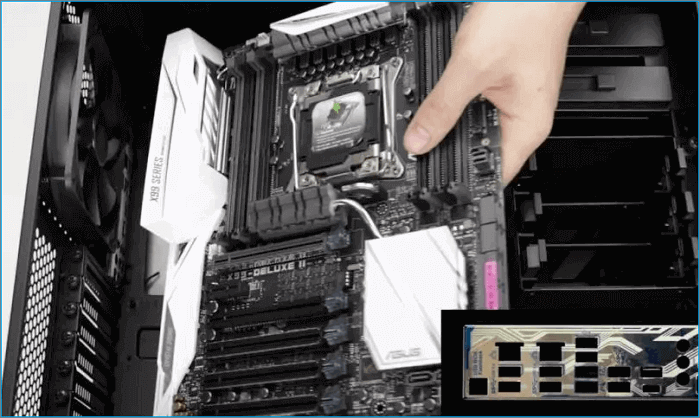
- Hold a motherboard carefully, placing your fingers underneath and above the RAM sockets, rather than directly on the PCB, which is a delicate area.
- Unplug all external connections and wait a minute after the system has fully powered off before removing the motherboard.
- Clean your motherboard periodically to maintain its components' cleanliness and functionality.
- To assemble the computer, start by installing the motherboard sideways. Begin by connecting the rear connector, then carefully add the other connections to the system.
In Summary
A good motherboard is the central hub of a computer system, defining its overall performance. It transmits data over data buses, making it a crucial component that should be carefully chosen.
When handling the motherboard, follow the recommended tips to ensure better maintenance. Additionally, familiarize yourself with the various specifications of motherboards, which can be tailored to your needs, budget, performance, and speed requirements. You can also consider other top motherboard brands like ASUS, Gigabyte, MSI, and ASRock for alternative options.
FAQs about Motherboard
More questions about motherboards you may be interested in:
1. Is it OK to touch the motherboard with your hands?
When handling the motherboard, you can touch it with your hands, but first, make sure to discharge any static electricity from your body. This can be done by touching a grounded metal object or waiting a minute after turning off the system, allowing the electric elements to fully discharge. This precaution helps prevent damage to the motherboard's sensitive components.
2. What kills a motherboard?
Overheating, improperly seated components, electrical surges, and incorrect cable connections can all potentially destroy a motherboard. Ensuring the CPU has adequate cooling and handling these components with care can help prevent damage.
3. What is the lifespan of a motherboard?
Maintaining and cleaning your motherboard can extend its lifespan by up to 20 years or more, and upgrading its hardware will likely be necessary as it becomes obsolete.
Related Articles
- What Is A Modem and How Does It Work?
- Complete Introduction to Searchindexer.exe
- Raid 6 vs Raid 10: Which is better in Speed and Security?
- Backup vs. Replication: Which One to Choose
- Is It Safe to Update BIOS? A Complete Guide
Is it safe to update BIOS? This article answers that question thoroughly, covering what to do to avoid data loss and important things about updating BIOS. - Is RAID 0 SSD Worth It for Gaming [Complete Guide in 2023]
Are you curious about this question: is RAID 0 SSD worth it for gaming? This article covers everything about RAID 0, and you can know the complete answer about RAID 0 SSD for gaming.
Products
Articles & Tutorials
- Data Recovery
- Data Backup
- File Recovery
- File Backup
- System Backup and Restore
- Disk and Partition Clone
- Technical articles
- Mobile articles
- Disk Master Help
- Windows Data Recovery Tutorials
- Windows Secure Delete Tutorials
- Windows Partition Management Tutorials
- Windows File Backup and Restore Tutorials
- Windows System Backup and Restore Tutorials
- Windows Disk Backup and Restore Tutorials
- Windows Clone Tutorials