Raid 6 vs Raid 10: Which is better in Speed and Security?
RAID (redundant array of independent disks) is a technique used to improve data storage performance and reliability, commonly applied to HDDs but also previously seen in SSDs. Various levels of RAID exist, including RAID 0, RAID 1, RAID 5, RAID 6, and RAID 10, each offering distinct benefits and configurations.
Comparing RAID 6 and RAID 10 storage configurations, we'll examine their respective trade-offs in speed, security, and disk utilization. RAID 6 offers improved security with two parity blocks, but sacrifices some speed and disk space compared to RAID 10, which prioritizes speed and redundancy with a single parity block. Meanwhile, a reliable backup software like Qiling Backup can be used to safeguard your RAID data and ensure uninterrupted uptime, providing an additional layer of protection against data loss.
Brief Overview of RAID 6 vs. RAID 10
RAID 6 and RAID 10 are two popular disk array configurations. RAID 6, which stands for Redundant Array of Independent Disks 6, provides a higher level of data protection by using two parity blocks per disk, allowing for up to two disk failures without losing data. On the other hand, RAID 10, which stands for Redundant Array of Independent Disks 10, offers a balance of performance and data protection by mirroring data across two disks and striping it across multiple disks, providing a higher level of protection than RAID 5 but less than RAID 6.
RAID 6
RAID 6 is the safest and most secure RAID process, using block-level data stripping and dual parity blocks on array disks, storing parity checksums on two disks.

RAID 10
RAID 10 is a combination of RAID 1 and RAID 0, offering both data mirroring and stripping. It mirrors data on all secondary drives, ensuring that if one drive fails, the data remains accessible on the mirrored drive. This setup aims to enhance data security and provide a high level of redundancy, making it a reliable storage solution.
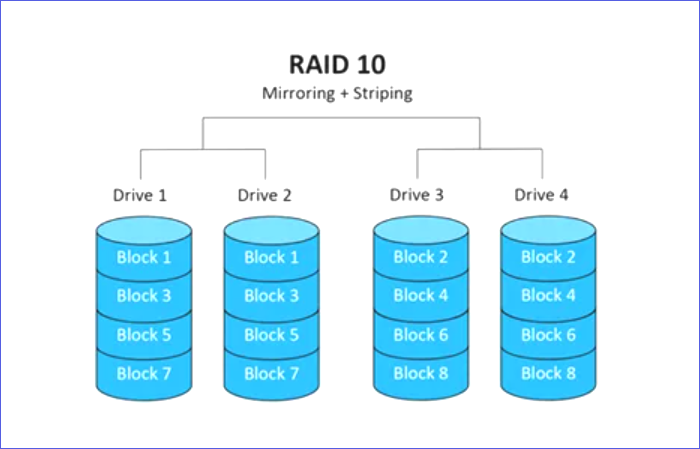
Comparison Between RAID 6 vs. RAID 10 In Terms of Speed, Security, and Disk Utilization
RAID 6 and RAID 10 differ in their performance speeds, data safety, and disk utilization, making it essential to understand how each behaves in these areas before choosing the best option. RAID 6 offers higher data safety with two parity blocks, but this comes at the cost of lower performance speeds and higher disk utilization. In contrast, RAID 10 provides a balance between data safety and performance, with two sets of mirroring and parity, but it requires more disks and has lower data safety than RAID 6. Ultimately, the choice between RAID 6 and RAID 10 depends on the specific needs and priorities of the user.
RAID 6 vs. RAID 10: Speed
RAID 10 boosts the data transfer rate across drives due to its "data stripping" feature, allowing all drives to have improved performance when accessing data in different storage devices, making data more accessible.
While RAID 10 has a significant impact on data transfer rates due to its data stripping feature, RAID 6 has a less noticeable effect. Instead of data stripping, RAID 6 uses double parity to ensure data accessibility even if two drives fail, making it a more robust option.
RAID 6 vs. RAID 10: Security
RAID 6 has an efficient security feature that allows data access even when the primary drive fails, and its data parity feature guarantees data security by resisting up to two disk failures, providing a backup solution for your data.
RAID 10 offers improved data security through data mirroring, similar to RAID 1, and guarantees protection for your data. It also ensures that a copy of your data is kept on a second drive, allowing access to it even if the first drive fails. However, this comes at the cost of consuming a larger disk space compared to RAID 6, as it maintains identical copies of data.
RAID 6 vs. RAID 10: Disk Utilization
RAID 6 outperforms RAID 10 in terms of disk utilization, using a smaller disk space. With four drives, for example, RAID 6 will only utilize half of the total space, leaving the other half available for other tasks. As the number of disks in RAID 6 increases, so does the usable space.
Unlike RAID 6, RAID 10 consumes more disk space due to its data mirroring feature, which requires double the space of RAID 6. This means that RAID 10 needs to create data duplicates, resulting in a higher storage cost compared to other valuable tasks.
| FEATURE | RAID 6 | RAID 10 |
|---|---|---|
| Reliability | Highly reliable due to the data dual parity feature | Less reliable since it's prone to data corruption |
| Fault Tolerance | Can withstand two simultaneous failures | It can only withstand a single failure |
| Writing Speed | When running on a single sector, the speed is the original drive speed. However, when running on full stripes, the speed becomes 'n-2' times the original drive speed. | 'n' times the original drive speed |
| Reading Speed | 'n' times the original drive speed | 'n' times the original drive speed |
| Redundancy | Maintains dual parity on two distinct backup disks | Stripes the data first before copying it to another disk with no parity, which can improve the performance and reduce the risk of data loss during the copy process. |
| Capacity | 32 for SSD (Solid State Drive), HDD (Hard Disk Drive), or Hybrid | 144 for an equal number of SDDs or HDDs |
| Space Efficiency | Up to 93.75% when using a maximum number of drives | Levels up at 50% no matter the number of drives |
| Minimum Number of Drives | 4 | 4 |
RAID 6 vs. RAID 10: Which One Is Better?
RAID 6 and RAID 10 have distinct advantages and disadvantages, making it challenging to determine which is better. RAID 6 is ideal for users prioritizing data safety while minimizing storage space, as it can withstand up to two concurrent disk failures. On the other hand, RAID 10 excels in scenarios where disk failures are a concern, offering efficient redundancy. Ultimately, the choice between the two depends on individual user requirements and priorities.
RAID 10 offers data protection and quicker data access due to its data stripping feature, making it ideal for boosting system data transfer speed, although it consumes a lot of disk space.
In conclusion, if you want to experience speed and security, RAID 10 is the way to go. Although it consumes a lot of space, it still offers efficient data safety, just like RAID 6. Our final pick is RAID 10, which stands out in terms of security and speed.
Protect Data and Uptime Using a Backup Software
While RAID 6 and RAID 10 offer data redundancy, they don't provide complete protection against data loss. These processes focus on keeping your system running after a disk failure, but they don't ensure the backup and restoration of essential files, making software-based backup solutions a crucial addition to data protection.
Qiling Backup Home is a software that allows you to back up your RAID data regularly and have a place to fall back to in case of a malware or ransomware attack. It's easy to use and offers a free cloud storage space of up to 250GB, providing a convenient and secure solution for protecting your data.
Final Remarks
RAID 6 offers better security than RAID 10, as it can handle up to two concurrent disk failures, whereas RAID 10 can only withstand one. However, RAID 10 is faster than RAID 6 due to its data stripping feature, which enables quicker data access.
RAID 6 uses disk space more efficiently than RAID 10, but RAID 10 is faster and more secure overall. It still provides data protection while using less disk space compared to RAID 10.
RAID 6 vs. RAID 10 FAQs
1. How Many Disks Can Fail in RAID 6?
RAID 6 has higher fault tolerance than RAID 10 because it can withstand up to two disk failures.
2. What Makes RAID 10 The Best?
RAID 10 is considered the best due to its exceptional speed and security. Although it requires a significant amount of disk space, it offers efficient data protection, and its data stripping feature enhances overall drive performance.
3. What Is The Total Number of Drives You Can Lose In RAID 10?
In RAID 10, you can lose up to 4 drives.
4. What Is The Writing Speed of RAID 6?
The writing speed is 'n' times the actual drive speed when running on a single sector, but becomes 'n-2' times the actual drive speed when running on full stripes.
Related Articles
- MTS File : What Is It and How To Open It [Updated 2022]
- What Is Verbose Mode Mac and How to Boot into It? [2022 Guide]
- What Is Boot Disk? Get A Boot Disk for Abnormal System Startup
- How to Boot from USB on Different OSs [Step-by-Step Guide]
- [BSOD Error] How to Fix the Stop Code Memory Management in Windows
Are you receiving stop codes from memory management in Windows? Then check out these solutions which help you resolve the problem and ensure the stop code doesn't reappear. Even if it does, you always know how to resolve it. - Solve System Reserved Partition on Wrong Drive: Everything You Should Know
Fix a System Reserved partition on the wrong drive. Learn why it happens and how to move or repair boot files safely.
Products
Articles & Tutorials
- Data Recovery
- Data Backup
- File Recovery
- File Backup
- System Backup and Restore
- Disk and Partition Clone
- Technical articles
- Mobile articles
- Disk Master Help
- Windows Data Recovery Tutorials
- Windows Secure Delete Tutorials
- Windows Partition Management Tutorials
- Windows File Backup and Restore Tutorials
- Windows System Backup and Restore Tutorials
- Windows Disk Backup and Restore Tutorials
- Windows Clone Tutorials