What is USB to HDMI Adapter? What Is It Used for?
PAGE CONTENT:
- 1. What Is the USB to HDMI Adapter? What Is It Used for?
- 2. What's the Difference Between USB and HDMI
- 3. The Working Principle of USB to HDMI Adapter
- 4. How to Use USB to HDMI Adapter in Windows 10
- 5. The Difference Between USB-C to HDMI and USB to HDMI Adapters
What Is the USB to HDMI Adapter? What Is It Used for?
A USB to HDMI adapter is a device that connects a USB port to an HDMI-enabled device, typically used to connect a computer or laptop to an HDTV or other multimedia displays.
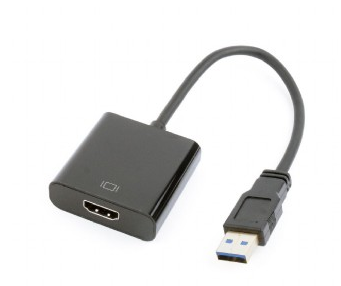
A traditional computer often comes with limited ports, such as one HDMI port and two USB ports. If the HDMI port is occupied or damaged, or if a laptop has removed the HDMI interface, a USB to HDMI adapter can be a helpful solution to connect the computer to a display, such as a projector or TV.
What's the Difference Between USB and HDMI
They are different mainly in two aspects:
Function: USB (Universal Serial Bus) is a hardware interface that allows for the connection of external devices such as keyboards, mice, and mobile devices. One of its advantages is its broad compatibility, supporting various data formats. In contrast, HDMI (High-Definition Multimedia Interface) is a type of audio/video interface that enables the transmission of audio/video signals to high-definition devices like projectors, HDTVs, and monitors.
Speed:HDMI has faster speeds than USB when transferring video and audio content.
The Working Principle of USB to HDMI Adapter
USB to HDMI adapters convert a computer's USB signal into an HDMI signal, allowing you to connect your computer to an HDMI-equipped display, such as a monitor or TV. The adapters typically require software to be installed on the computer to work properly, and once installed, they appear as an additional display device in the computer's Display settings. This enables you to select the adapter as your primary display, extend your desktop across multiple displays, or mirror your main display on the USB-connected device, making them a valuable addition to your computing setup.
How to Use A USB to HDMI Adapter in Windows 10?
Using a USB to HDMI adapter is simple.
Step 1. Connect the adapter to your computer's USB port using the USB head.
Step 2. Connect the other end of the adapter to an HDMI-enabled device, such as a TV, monitor, or projector.
Step 3. Once the connection is finished, you can view high-definition content from your computer on your HDTV, and you may need to adjust your PC's display settings to optimize the image quality.
What's the Difference Between USB C to HDMI & USB to HDMI Adapter?
USB Type-C USB Type-C is the latest USB standard, gaining popularity due to its small size and high data transfer speeds, but it's not yet as widely used as older standards, so a USB to HDMI adapter may be needed to connect a device with a USB Type-C port to a projector or TV with an HDMI input.
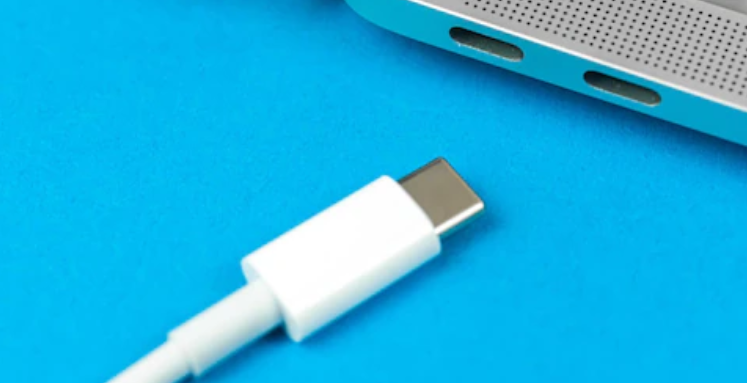
USB to HDMI ConvertersUSB to HDMI adapters come in two main types: active and passive. Active adapters are typically more expensive but offer better performance and compatibility, while passive adapters are less expensive but may not work with all devices. It's essential to choose a USB to HDMI adapter that is compatible with your device and supports the resolution and features you need.
The differences between USB and USB-C include power delivery, data transfer speeds, and physical size, among other distinctions. If you'd like to learn more about these differences and discuss the topic with others, this platform is a great place to do so.Quora questionabout their difference is right here for you.
Sum Up
We hope this article has provided a clear understanding of USB to HDMI adapters, covering their definition, working principle, and key differences between USB Type-C to HDMI, enabling you to use the adapter correctly.
Related Articles
- 2022 Top 5 Mac Cleaning Software [Unbiased] - Qiling
- How to Open Task Manager on Windows 10/11
- Windows 11 Free Upgrade from Windows 10 [How-to] Step by Step
- What Is Hyper-V Snapshot [Full Explanation]
Hyper-V snapshot is a feature that allows you to capture a virtual machine's state at a specific point in time. Learn how to create, manage, and restore Hyper-V snapshots (checkpoints) for testing and disaster recovery. - Hyper-V vs. VMware: Which Is the Better Choice for You?
When it comes to choosing between Hyper-V and VMware for your virtualization needs, there are several factors to consider. Compare features, pricing, scalability, and security to find the best hypervisor for your business.
Products
Articles & Tutorials
- Data Recovery
- Data Backup
- File Recovery
- File Backup
- System Backup and Restore
- Disk and Partition Clone
- Technical articles
- Mobile articles
- Disk Master Help
- Windows Data Recovery Tutorials
- Windows Secure Delete Tutorials
- Windows Partition Management Tutorials
- Windows File Backup and Restore Tutorials
- Windows System Backup and Restore Tutorials
- Windows Disk Backup and Restore Tutorials
- Windows Clone Tutorials