What Is DAS(Direct Attached Storage)?A Beginner Guide for DAS
PAGE CONTENT:
What Is DAS? How Does It Work?
DAS (Direct Attached Storage) refers to a type of storage system that is directly connected to a computer, server, or workstation without the need for a network, allowing for fast and efficient data access.
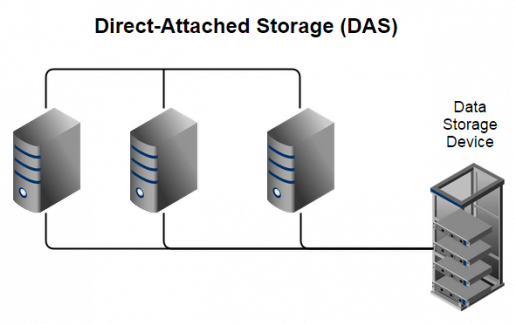
Direct-attached storage (DAS) is a type of storage system where storage devices are directly connected to a server or computer, without using a network. This means that storage is not shared across multiple devices, but rather is dedicated to a single machine.
A Direct Attached Storage (DAS) system is connected directly to a single computer or server, making its data accessible only to that device. Unlike networked storage, a DAS system is not connected to a network, so if a computer on the network wants to access data stored in DAS, it must communicate with the computer to which DAS is attached. This setup provides a secure and dedicated storage solution for a specific device.
Different Types of DAS
DAS (Direct Attached Storage) can be divided into two types based on the device storage location: internal DAS, where the storage device is located within the computer or server, and external DAS, where the storage device is located outside the computer or server but still connected directly.
Internal DAS — Internal Direct Attached Storage (DAS) refers to a storage device connected directly to a computer or server, typically through a serial or parallel bus. A common example is an internal Hard Disk Drive (HDD) or Solid State Drive (SSD) connected to a computer's motherboard, providing storage capacity and serving as a primary or secondary storage device.
External DAS — External storage devices are placed outside the computer device, connecting to a server or workstation with USB, eSATA, SAS, or SCSI. Examples include external hard drives or hard enclosures that allow connecting multiple devices.
DAS (Direct Attached Storage) comes in various forms, including SSDs, hard drives, and optical devices like CDs, DVDs, and tape storage, which connect directly to a computer or server via different interfaces.
Pros& Cons of DAS
DAS provides safe data protection by not requiring users to access data without a network, reducing the risk of data leakage, and is also more cost-effective and simpler than NAS.
DAS has its advantages and disadvantages. On one hand, it provides direct access to data, allowing for high performance and low latency, making it suitable for applications that require fast data transfer. However, it also has some drawbacks, such as being limited to a single server or system, which can lead to scalability issues and make it difficult to manage and maintain.
Pros
- Provide better performance for users;
- Lower cost compared with NAS and SAN;
- This software is designed to be user-friendly, eliminating the need for IT professionals, making it ideal for small business owners who want to manage their online presence without requiring extensive technical expertise.
- Minimal maintenance cost.
Cons
- DAS has limited scalability;
- Lacks centralized management and backup capabilities;
- It can't be shared easily;
- If the driver fails, DAS isn't convenient to transfer;
- Difficult to upgrade.
Conclusion
You've likely learned about what DAS is, its working principles, and its pros and cons through the article. DAS plays a significant role in expanding network connections, but it's not the only option. NAS and SAN also exist for data connection, each with different data transfer modes. If you're unsure which one suits you, comparing DAS vs. NAS or NAS vs. SAN can be a great way to make an informed decision.
Related Articles
- USB Splitter vs. USB Hub - Which is Better[ A Thorough Guide]
- Difference Between Cloud Sync and Backup and Cloud Storage
- What is the Thinking Behind 32GB Windows Format Limit on FAT32?
- What Is Netstat Command and How to Use It
- What Is System Partition? [Best Explained in 2023]
A system partition is a specific partition on a computer's hard drive where the operating system is installed. It's a crucial part of the computer's setup, and in this article, we'll explore what a system partition is, its importance, and how to create one if needed. - Tape Data Recovery Glossary
A comprehensive glossary of tape data recovery terms from A to Z, covering magnetic tape, recording, storage, and data retrieval concepts.
Products
Articles & Tutorials
- Data Recovery
- Data Backup
- File Recovery
- File Backup
- System Backup and Restore
- Disk and Partition Clone
- Technical articles
- Mobile articles
- Disk Master Help
- Windows Data Recovery Tutorials
- Windows Secure Delete Tutorials
- Windows Partition Management Tutorials
- Windows File Backup and Restore Tutorials
- Windows System Backup and Restore Tutorials
- Windows Disk Backup and Restore Tutorials
- Windows Clone Tutorials