NAS vs. DAS: Which Is Better & How to Choose
PAGE CONTENT:
- 1. NAS vs. DAS [Concept & Working Principle]
- 2. NAS vs. DAS [Application Scenarios]
- 3. NAS vs. DAS [Features]
- 4. Sum Up: Which One Is Suitable for You
NAS vs. DAS [Concept & Working Principle]
What is NAS?
NAS stands for Network-Attached Storage, which is a computer data storage server that connects to a network, allowing multiple users and devices to access and share stored data via Local Area Network or WiFi, ensuring fast and easy access.
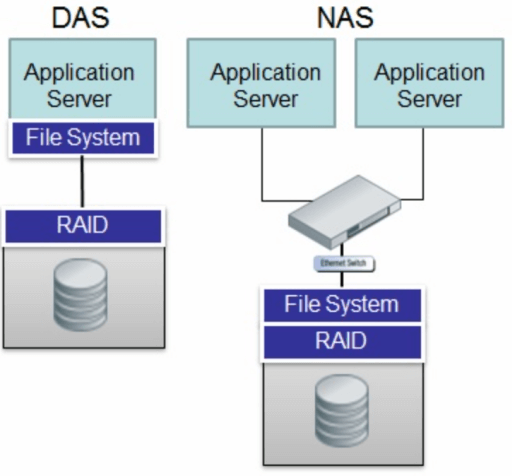
Devices and NAS are connected to a network, allowing multiple computers to access and share data on the NAS through a switch or server.
What is DAS?
DAS stands for Direct-Attached Storage, which is a type of data storage server that directly connects to a computer through interfaces like SCSI, USB, or eSATA, rather than working over a network. This setup means that the data in DAS is only accessible to the specific computer it's attached to, providing a simple and secure storage solution that outperforms Network-Attached Storage (NAS) due to its lack of network complexity.
NAS vs. DAS[Application Scenarios]
NAS is usually used for data storage and sharing, especially for unstructured data like videos, audio, and text files, and is suitable for large volume data storage.
A Network-Attached Storage (NAS) system is a versatile solution for various organizations, offering three types (enterprise, midmarket, and desktop NAS) to cater to different needs. By providing a centralized platform for file sharing and collaboration, NAS can significantly boost productivity and save time and storage space. With a sufficient budget and substantial data storage requirements, NAS is an ideal choice for businesses looking to streamline their file management and maximize efficiency.
DAS (Direct-Attached Storage) is a more budget-friendly option suitable for small companies or organizations with limited budgets. Compared to NAS and other advanced storage solutions, DAS offers a lower price point while still addressing storage needs.
DAS (Direct Attached Storage) has several advantages, including its simplicity. It provides an easy solution to sharing data without a network, allowing users to access data by connecting it to their computer device with a USB, SCSI, etc., interface, making it suitable for local small volume data sharing.
NAS vs. DAS[Features]
The main difference between NAS and DAS lies in their features, apart from the aspects mentioned earlier. A comprehensive comparison of the two storage servers can help you choose the one that suits your needs.
| NAS(Network-Attached Storage) | DAS(Direct-Attached Storage) | |
|---|---|---|
| Main Functions | For data backups and recovery, Files are used | For data backups and recovery, Sectors are used |
| Working Method | Transferring and sharing through network | Directly connected to devices, work without network |
| Installation & Use | A little complicated compared with DAS | Very easy to install and use |
| Price | More expensive than DAS | Cheaper than NAS |
| Data Transferring Method | TCP/IP, Ethernet | IDE/SCSI |
| Capacity in Bytes | 10^9 to 10^12 | 10^9 |
| Data Access Rights | Available for multiple users and devices through the network | Only available to devices that DAS is connected |
Sum Up: Which One Is Suitable for You
NAS and DAS both provide advantages and exclusive features. The choice between them depends on your actual needs, specifically regarding data storage volume, budget, and backup and recovery requirements.
If your company has a sufficient budget, needs large-capacity data storage, multiple employees need to share data, and has dedicated IT personnel responsible for data management and maintenance, NAS is a perfect choice for you.
If you have a limited budget and less need for data sharing, DAS is a good fit, allowing employees to share data locally.
Related Articles
- What Is Control Panel? [All You Need to Know]
- What Is SFC Scannow Command? How to Fix Corrupted Files Using This System File Checker
- What is NVRAM and How Can You Reset it on Mac
- Does Wireless Network Switch Exist? Find the Answer
- How to Fix No Bootable Device Acer in Windows 11/10/7
We've discussed all the efficient solutions in this guide for no bootable device Acer problem. And you should be able to deal with the related issues. - [Quick Fixed] No Login Screen on Windows 10/11 Issue
No login screen on startup may sometimes occur when you boot into your computer, resulting in you can't enter your account and password. This issue can be resolved by trying six quick and practical solutions, which are provided in the post to help you fix the problem.
Products
Articles & Tutorials
- Data Recovery
- Data Backup
- File Recovery
- File Backup
- System Backup and Restore
- Disk and Partition Clone
- Technical articles
- Mobile articles
- Disk Master Help
- Windows Data Recovery Tutorials
- Windows Secure Delete Tutorials
- Windows Partition Management Tutorials
- Windows File Backup and Restore Tutorials
- Windows System Backup and Restore Tutorials
- Windows Disk Backup and Restore Tutorials
- Windows Clone Tutorials