What Is A NAS Storage? How Does NAS Work?
PAGE CONTENT:
- 1. What is A NAS Storage?
- 2. Three Common Types of NAS
- 3. How Does NAS Work?
- 4. NAS vs. DAS, Which Is Better?
What Is A NAS Storage?
NAS, Network-Attached Storage (NAS) is a centralized storage server that combines one or more drives, often arranged into logical, redundant storage containers or RAID, allowing multiple users to access and collaborate data through Ethernet. This setup makes it faster and easier to access data among multiple computers or devices remotely.
NAS is designed to handle unstructured data, such as videos, audio, web pages, texts, and Microsoft Office documents.
(information source: https://cloudian.com/guides/data-backup/nas-backup/)
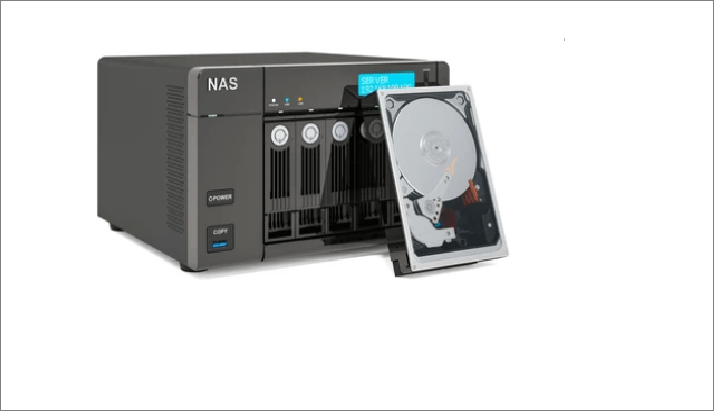
NAS has been a popular choice since the 1990s, offering a convenient way to share files between multiple computers. Its security and reliability have made it a preferred option for many individuals and companies, who continue to use NAS today.
Companies and individuals choose different types of NAS based on their specific needs. NAS can be classified into various types, each catering to specific requirements. For example, there are NAS for home use, which are compact and user-friendly, while others are designed for businesses, offering advanced features and scalability.
Three Common Types of NAS
NAS (Network-Attached Storage) can be categorized into three types based on driver capacity, support, and scalability: enterprise NAS, midmarket NAS, and desktop NAS.
Enterprise NAS This high-end category is ideal for companies requiring large data storage quantities, offering fast data access and NAS clustering capabilities.
Desktop NAS is the low-end version of NAS, designed for home users and small offices with basic file sharing needs.
Midmarket NAS is suitable for small companies that require a few hundred terabytes (TB) of data, offering a balance between features and cost.
How Does NAS Work?
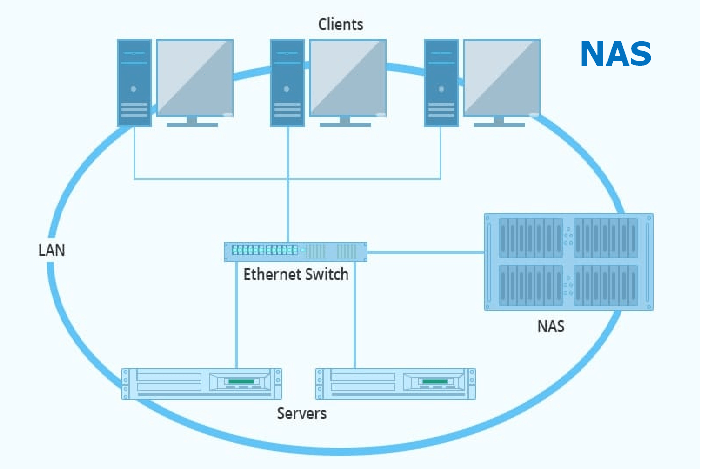
The NAS (Network-Attached Storage) device works by connecting to a network, allowing users to access and share files across the network. The image provided visually illustrates how this process works.
Multiple devices and a Network Attached Storage (NAS) are connected to the same network, allowing shared access to the NAS data through a central switch or server.
NAS (Network-Attached Storage) enables simultaneous access to a shared database across multiple devices, making work more accessible and efficient by allowing users to access and share files quickly and easily.
NAS vs. DAS, Which Is Better?
DAS stands for Direct-attached storage, which is a dedicated server or storage device not connected to a network, unlike NAS. An example is a PC's internal HDD, where data access requires physical storage retrieval.
NAS and DAS have several key differences. A chart can provide more detailed information on these distinctions, but some of the main differences include.
| NAS | DAS | |
|---|---|---|
| Whether needs network | An easy and self-contained solution for sharing files over the network | An addition to an existing server that is not necessarily networked. |
| Performance | NAS devices are generally better than DAS for performance because they can be optimized specifically for file serving, allowing for faster and more efficient data access. | |
| Management | Multi-device share and manage data | Manage every DAS separately |
DAS prioritizes data storage, whereas NAS prioritizes data sharing convenience. They serve distinct purposes, and users should select based on their specific needs.
Conclusion
NAS (Network-Attached Storage) is a shared database that allows multiple devices to access and store data across a network, making it more convenient to use and share files with others. There are three types of NAS available, catering to different storage needs, and it differs from DAS (Direct-Attached Storage) which focuses on storing data locally and is suitable for those who only need to save data on their own device.
Related Articles
- What Is CD-RW? Compact Disc Re-Writable Explained
- What Is Control Panel? [All You Need to Know]
- Hyper-V vs. VMware: Which Is the Better Choice for You?
- What Is WSUS? Windows Server Update Services Explained
- Rufus vs. Win32 Disk Imager: Similarities and Differences
In true sense, Win32 Disk Imager is a Rufus alternative because the performance is exceptionally great and the flashing speed is in its own league. Learn all about the Rufus and win32 disk imager similarities and differences. Go through the rufus vs win32 disk imager in details. - Samsung Launches 'Repair Mode' to Protect Users' Data Security When Repairing Phones
Samsung has recently launched a repair mode, and this article will give you the information about Samsung Repair Mode.
Products
Articles & Tutorials
- Data Recovery
- Data Backup
- File Recovery
- File Backup
- System Backup and Restore
- Disk and Partition Clone
- Technical articles
- Mobile articles
- Disk Master Help
- Windows Data Recovery Tutorials
- Windows Secure Delete Tutorials
- Windows Partition Management Tutorials
- Windows File Backup and Restore Tutorials
- Windows System Backup and Restore Tutorials
- Windows Disk Backup and Restore Tutorials
- Windows Clone Tutorials