Best Way to Restore Windows 10 to Dissimilar Hardware
To restore Windows 10 to dissimilar hardware, you can follow a reliable method. This solution allows you to transfer your Windows 10 installation to a new computer with different hardware, while preserving your data and settings. By using this method, you can easily upgrade to a new device without losing any of your important files or configurations. It's a straightforward and effective way to transition to a new machine, making it a great option for those looking to upgrade their hardware.
Page Content:
What Is Dissimilar Hardware?
Can I Restore Windows 10 to Dissimilar Hardware?
Best Backup Software for Restoring Windows 10/11 to Dissimilar Hardware
How to Restore Windows 10 to Dissimilar Hardware
Restoring to Dissimilar Hardware FAQs
What Is Dissimilar Hardware?
Dissimilar hardware refers to computer components that are not the same, such as different types of CPUs, GPUs, motherboards, and other components, often used in contrast to similar hardware, which refers to identical components.
Two identical CPUs would be considered similar hardware, while two different CPU models would be considered dissimilar hardware, with the latter potentially causing compatibility issues during system restoration.
Using dissimilar hardware in a system can introduce complexity and potential problems, but it also offers benefits such as increased flexibility and cost-effectiveness. A careful weighing of the pros and cons is necessary before making a decision.

How to Clone Windows OS & Disk to Dissimilar Hardware
Cloning to dissimilar hardware can be a convenient way to migrate from an old system to a new one, allowing users to transfer their operating system and applications without having to reinstall them, as explained in a guide from Qiling.

Can I Restore Windows 10 to Dissimilar Hardware?
Two issues:
#1. Hardware Incompatibility
Windows 10 can be restored to dissimilar hardware, but there might be compatibility issues with certain hardware components.
What aspects should we check:
1. Driver
The issue of incompatible hardware drivers can be resolved by booting in Safe Mode and installing the latest drivers. This allows the system to function with the minimum required drivers, enabling the installation of new drivers without conflicts.
2. Windows Re-activation
After restoring Windows 10 to a computer with different hardware, you'll need to reactivate Windows due to Microsoft's policy, which requires reactivation on systems with distinct hardware configurations.
#2. License Type: Retail and Volume Can Be Moved
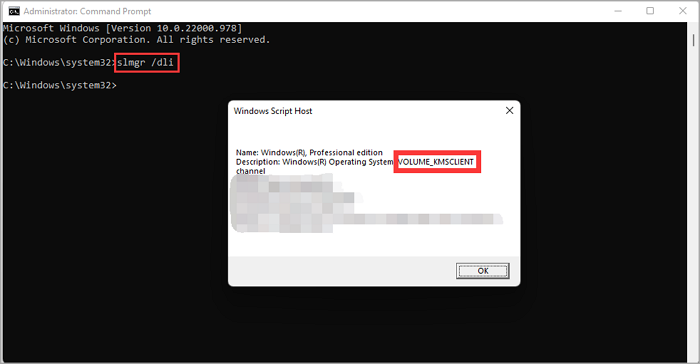
OEM licenses are tied to a specific computer and can't be transferred, while retail licenses can be deactivated on one computer and activated on another, and volume licenses can be transferred but require a more complex process.
How to check Windows 10 License:
- Run Command Prompt as an administrator.
- Enter the command slmgr /dli and press Enter.
- Check the Windows Script Host.
Trying to move Windows 10 to a new computer with dissimilar hardware? Don't worry, there's a great software that can help you with that.
Best Backup Software for Restoring Windows 10/11 to Dissimilar Hardware
Qiling Disk Master is an automatic backup and restore solution that can restore Windows 10 to dissimilar hardware, using its "Universal Restore" feature to overcome hardware incompatibility issues.
Qiling Disk Master allows you to quickly create a system image and restore your Windows 10 installation to dissimilar hardware, making it an ideal solution for businesses and individuals who frequently change hardware or need to restore systems after a hardware failure.
Are you experiencing issues with Qiling Disk Master for backup and recovery? If so, let's start a live chat with a Qiling Expert to create a customized backup solution tailored to your specific needs.
- Unable to back up
- Backup process stuck
- Recovery failed
How to Restore Windows 10 to Dissimilar Hardware?
Step 1. On the main page, click "backup" tab page.
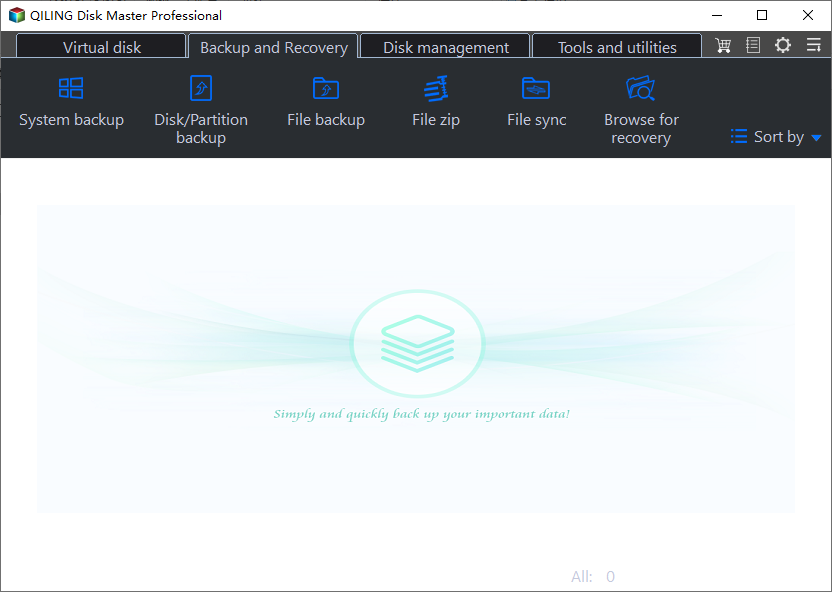
Step 2. Among the four available categories, click System backup.
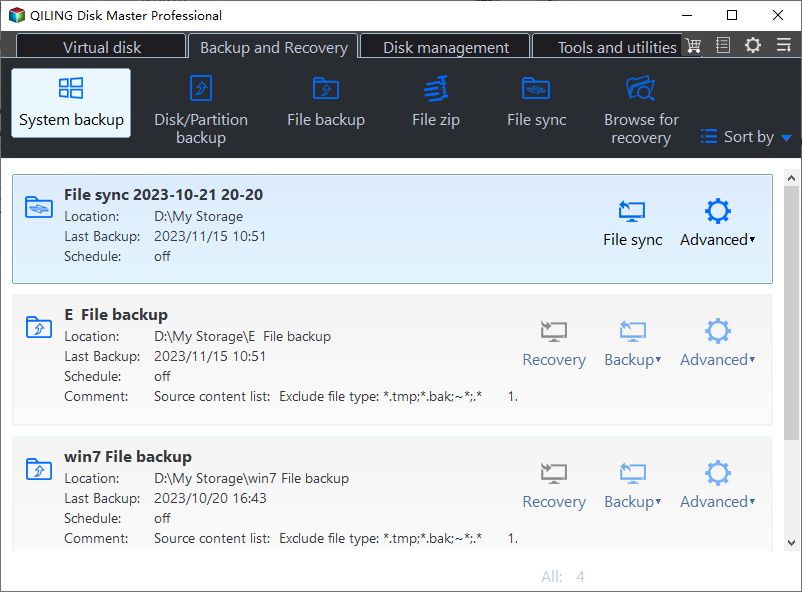
Step 3. Qiling Disk Master will automatically select your system partition, requiring only the selection of a backup destination.

Step 4. You can save the backup file to either your local drive or a network-attached storage (NAS) device.
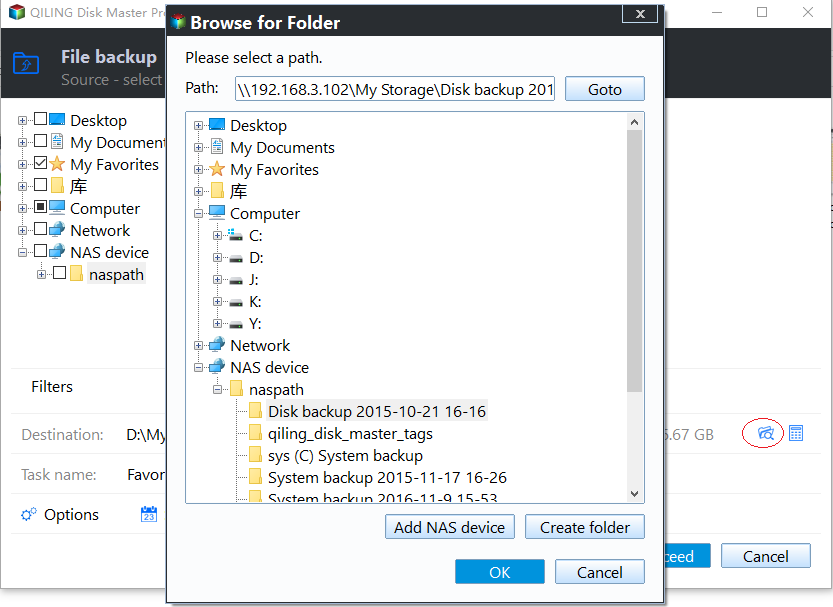
Step 5. After completing the backup process, you can view the backup status, restore, open, or remove the backup by right-clicking on the backup task on the left-hand side.
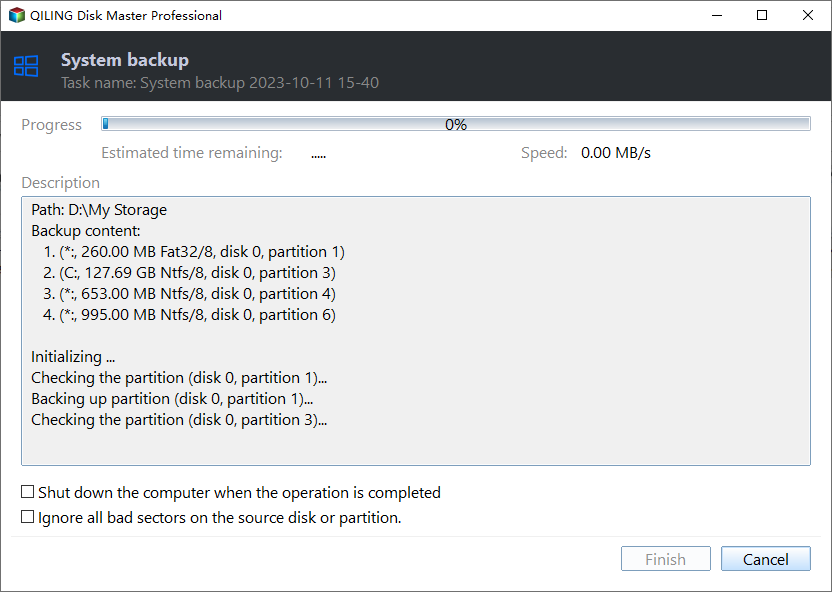
*Try to boot the computer with the Qiling Disk Master emergency disk to accomplish system recovery on a non-bootable machine.
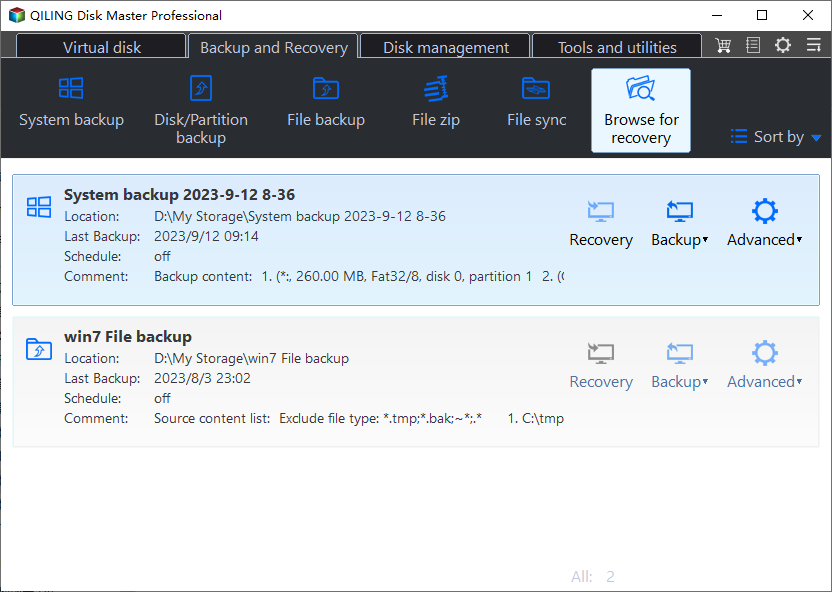
Step 1. Click Browse to Recover to launch Qiling Disk Master.
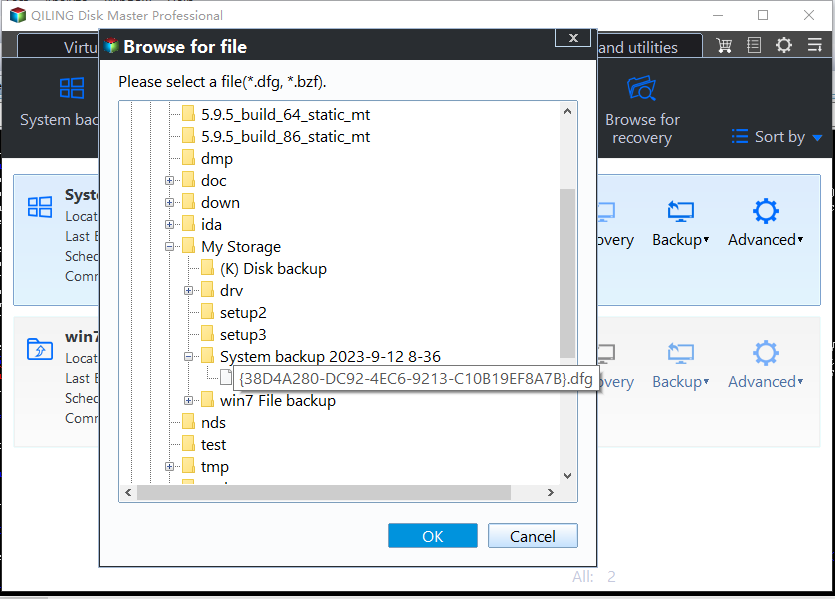
Step 2. To restore your system, go to the backup location and select the system backup file you need, which is a pbd file created by Qiling Disk Master.
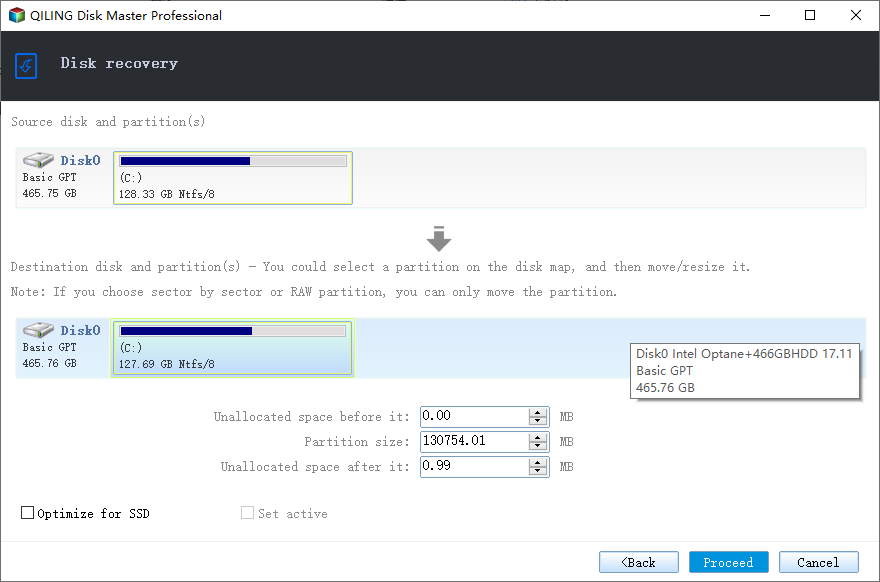
Step 3. Verify that the partition styles on the source and recovery disks are the same, then select a recovery disk.
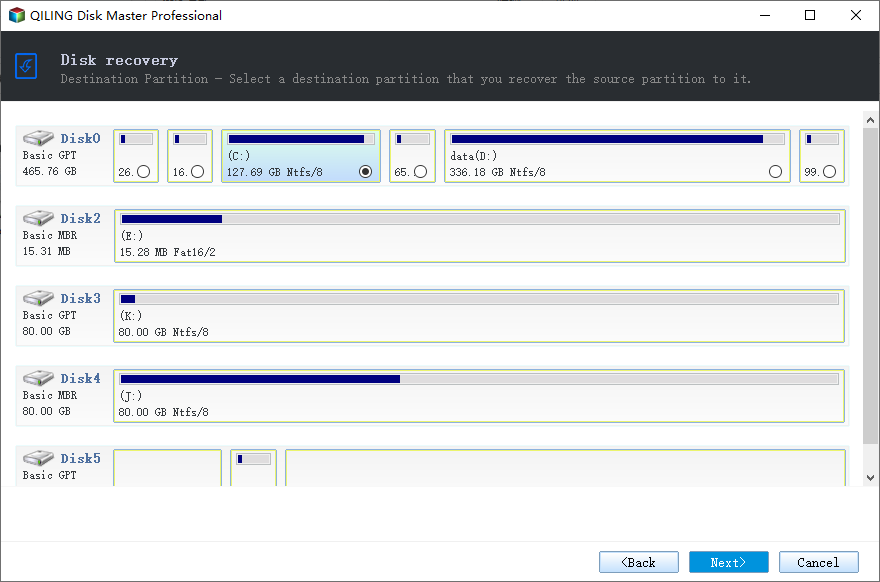
Step 4. You can modify the disk layout as needed, and then select "Proceed" to start the system backup recovery process.
Video Guide: Restoring an Image Backup from One Computer to Another
This video offers a step-by-step guide on how to restore an image backup to a new computer, providing a correct solution to this common issue.
Timestamps:
0:54 You can restore an image to a new machine
1:15 Probably won't work
1:25 What your backup is for
2:00 Windows configures itself for your machine
3:01 Three possible outcomes
6:58 What should you do instead?
7:47 Possible tools
Restoring to Dissimilar Hardware FAQs
How do I restore to dissimilar hardware?
To restore to dissimilar hardware, you can create a disk image backup of your current system using software like Qiling Disk Master, which captures the entire contents of your hard drive, including the OS, apps, and settings. This backup can then be used to restore your system to new or different hardware, allowing you to refresh your setup with a single click.
Can you restore Windows 10 to another computer?
To restore Windows 10 on another computer, you need to have a backup of your system, which can be created using the built-in Windows Backup feature or a third-party software. In most cases, you'll need to boot from a USB drive or optical disc, then follow prompts to restore your system. Restored systems often need additional configuration, so it's best to restore to a computer similar to the one you backed up.
Can I restore a system image to a different computer?
You can restore a system image to a different computer, as long as it has the same CPU architecture (32-bit or 64-bit) and uses the same edition of Windows 10, but it will overwrite the existing Windows installation on the target computer.
When restoring a system image to a computer with different hardware, use the "Universal Restore" feature to ensure a successful recovery.
How do I clone Windows to another hardware?
You can clone Windows to another piece of hardware using a disk cloning tool like Qiling Disk Master, which allows for a straightforward transfer of the operating system and all installed applications to a new device.
You can clone your entire hard drive, including Windows, to a new piece of hardware using a cloning software, or use Microsoft's Backup and Restore to create a Windows image, which will effectively transfer your entire system to the new hardware.
Related Articles
- Try the Best Alternative of Norton Ghost Windows 11!
- [Solved] This Application Was Unable to Start Correctly (Error Code: 0xc000007b)
- How to Fix Error Code 0x80070002 in Windows 10/11 Update
- How to Upgrade Windows 7 to Windows 11 with 2 Options
- Compare Windows 11 and Windows 10: Five Facts You Should Know and common FAQs
- (Step-by-step Guide) How to Install Windows 10 on Hard Drive for Another Computer
Learn how to install Windows 10 on a hard drive for another computer. Use universal restore, cloning, or installation media safely.
Products
Articles & Tutorials
- Data Recovery
- Data Backup
- File Recovery
- File Backup
- System Backup and Restore
- Disk and Partition Clone
- Technical articles
- Mobile articles
- Disk Master Help
- Windows Data Recovery Tutorials
- Windows Secure Delete Tutorials
- Windows Partition Management Tutorials
- Windows File Backup and Restore Tutorials
- Windows System Backup and Restore Tutorials
- Windows Disk Backup and Restore Tutorials
- Windows Clone Tutorials