(Step-by-step Guide) How to Install Windows 10 on Hard Drive for Another Computer
Computers are essential for work and daily use, and you may need to move to a new one when hardware or software problems appear. One option is to install or restore Windows 10 on a hard drive for another computer.
Can You Install Windows 10 on Hard Drive for Another PC
Yes, it is possible to install Windows 10 on a hard drive for another PC. You can use bootable installation media for a clean install, or use backup and restore software to move an existing Windows system when hardware compatibility and licensing allow it.
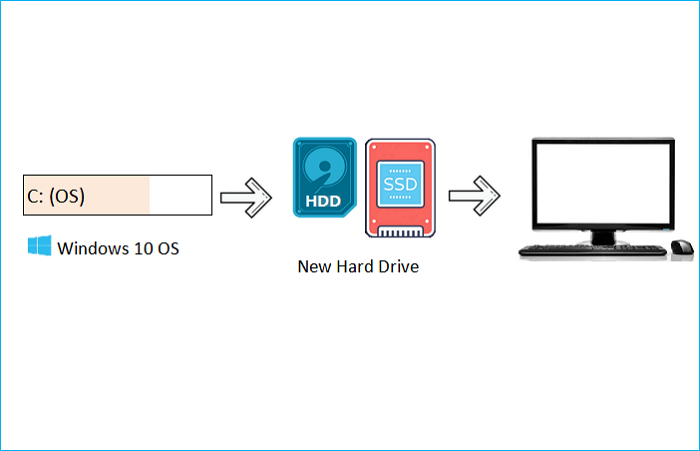
You can install Windows 10 on an external drive for another computer by performing a universal restore.
Universal Restore can restore a system image to new hardware and also allows restoring the operating system to a PC with dissimilar hardware, enabling recovery of the OS in case of hardware failure and applying the same OS to different computers.
To install Windows 10 for another computer, you can use the Media Creation Tool to create bootable installation media, or restore a system image with universal restore software. The second method is more suitable when you want to keep programs, settings, and system data.
Preparations for Installing Windows 10 on an External Hard Drive
To successfully install Windows 10 on an external hard drive for another PC, prepare the external hard drive by formatting it to NTFS, creating a new partition, and assigning a drive letter. Then, download the Windows 10 installation media from Microsoft's official website.
- Prepare an external hard drive. To install Windows on an external drive, you'll need a large enough drive to hold the operating system, and you should back up any data on the drive since the installation process will format it. You'll also need a USB-to-SATA adapter to connect the drive to your computer via a USB port.
- Choose the universal restore software. Since Windows To Go has been removed from Windows 10, you can try other ways to install Windows 10 on a hard drive. Performing a universal restore is a good choice and worth trying, and Qiling Disk Master can assist you in this process.
Best Universal Restore Software Free Download
Universal restore allows you to run the same operating system on a new computer. For instance, if you want to install your Windows 10 on an external drive for a new computer, performing a universal restore is the easiest and quickest way. You simply create a system image of your Windows 10 computer, store the system backup on a hard drive, and then restore it on a new computer.
With the rise of digital data, the risk of data loss due to various reasons has increased. In such situations, professional universal restore software, like Qiling Disk Master, can be a lifesaver.
Qiling Disk Master Pro is a practical and easy-to-use backup and recovery utility for Windows 11/10/8/7, allowing you to automatically back up files, systems, and disks, and store backups in different locations. It also enables you to create an iso image of your current operating system and image your SD card, among other features.
- Create full, incremental, and differential backups.
- Compress a backup to save space.
- Migrate Windows 10 to SSD.
- Clone a hard drive.
- Image a hard drive on Windows 10.
- 250GB of free cloud storage and a dedicated Security Zone to safeguard your data, all available for free.
Qiling Disk Master can help you install Windows 10 on a hard drive for another computer.
How to Install Windows 10 on a Hard Drive for Another PC
Qiling Disk Master is a powerful and user-friendly software that provides a simple and effective solution for recovering lost data from corrupted or damaged hard drives, solid-state drives, and other storage devices. Its advanced algorithms and techniques allow it to scan and recover data quickly and accurately, even in situations where other software may fail.
Qiling Disk Master is a user-friendly tool that makes it easy to install Windows 10 on a hard drive for another computer. The installation process is straightforward and can be completed in just a few clicks, making it simple to use. To use this tool, you can follow the steps to install Windows 10 on a hard drive for another computer, which involves a few easy clicks to complete the installation.
Part 1. Create a system image of the Windows 10 computer.
Step 1. Launch Qiling Disk Master on your computer, click Create Backup on the home screen, and select backup contents by hitting the big question mark.
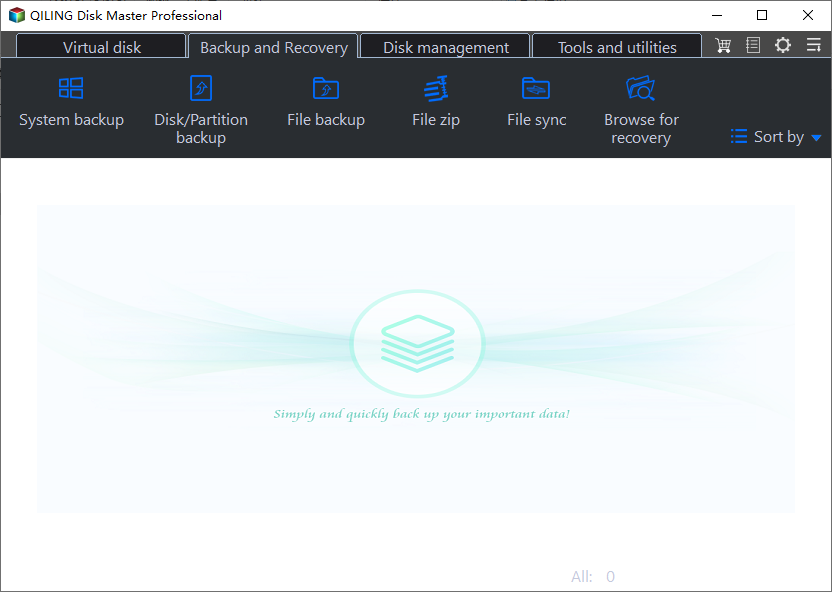
Step 2. To back up your Windows operating system, simply click on "System backup" to initiate the backup process.
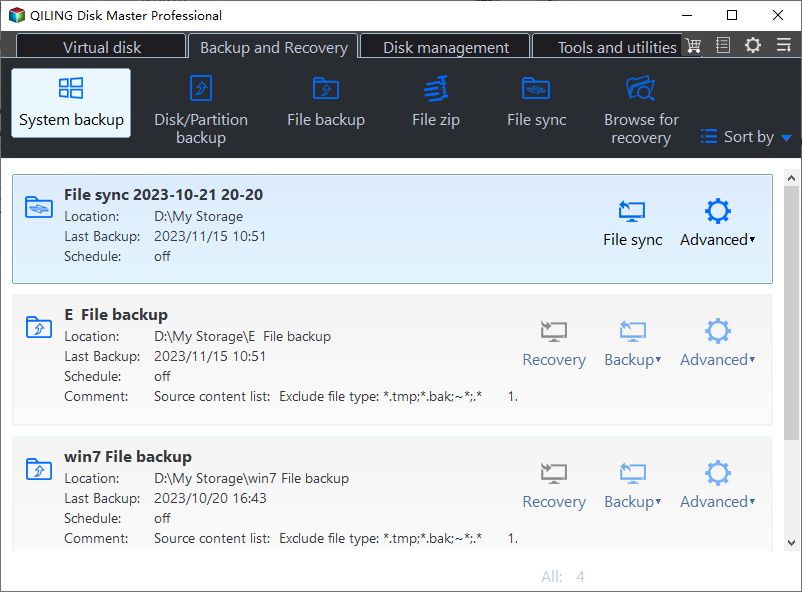
Step 3. Your Windows operating system information and all system related files and partitions will be automatically selected, so you don't need to manually select anything at this step. Next, you'll need to choose a location to save the system image backup by clicking on the illustrated area.

Step 4. The backup location can be a local drive, external hard drive, network, cloud, or NAS, with external physical drives and cloud being recommended for preserving system backup files.
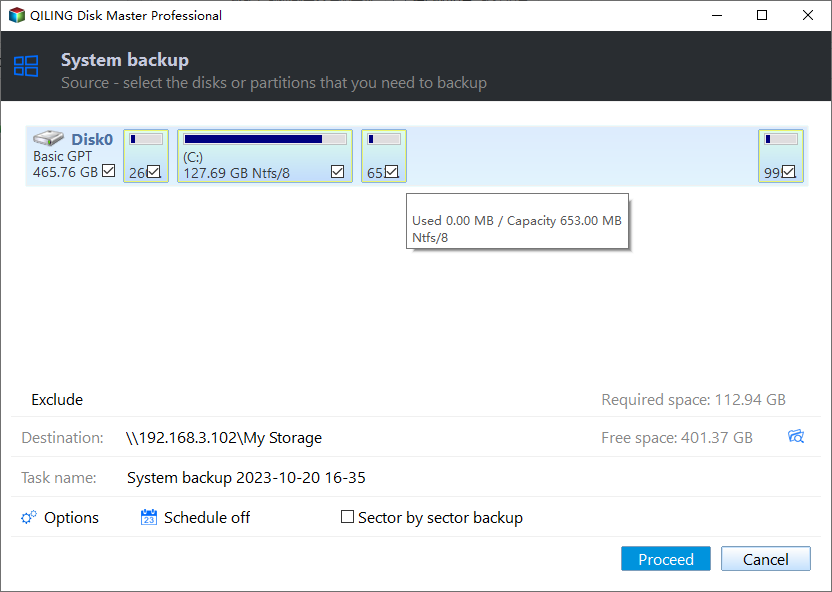
Step 5. The Windows system backup process allows for customization settings such as enabling an automatic backup schedule in daily, weekly, monthly, or upon an event, and making a differential and incremental backup, which can be accessed through the Options button. After selecting the desired settings, clicking "Proceed" initiates the backup process, and the completed task is displayed on the left side in a card style.
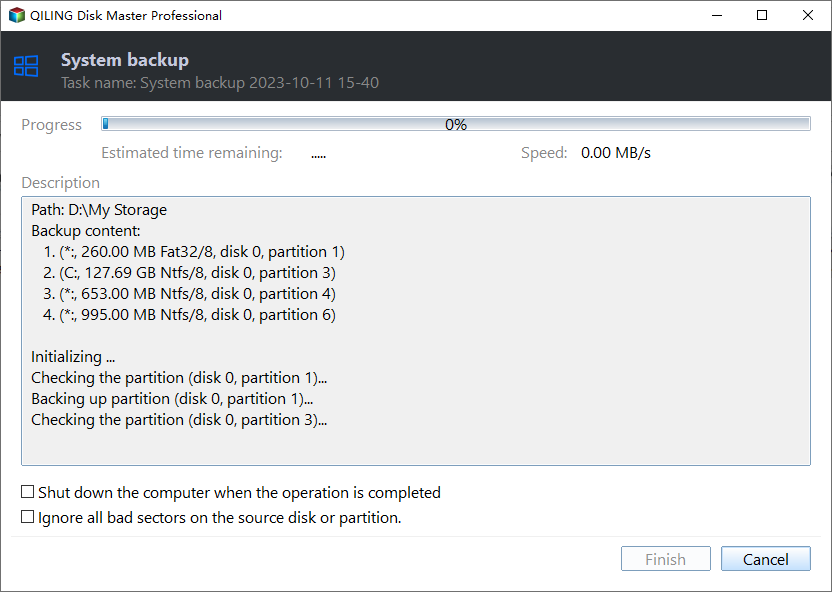
Part 2. Restore the backup image to another computer.
To perform system recovery on a non-bootable machine, try booting the computer through the Recovery Console or the Windows Recovery Environment (WinRE).Qiling Disk Master emergency disk.
Step 1. Launch Qiling Disk Master, click "Browse to Recover".
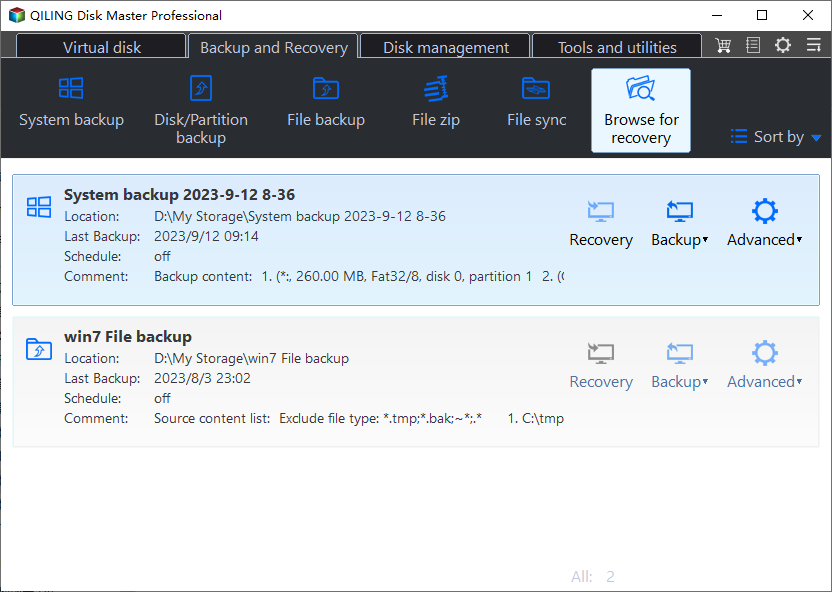
Step 2. To access your backup, navigate to your chosen backup destination and select the system backup file you need, which is typically a .pbd file created by Qiling Disk Master.
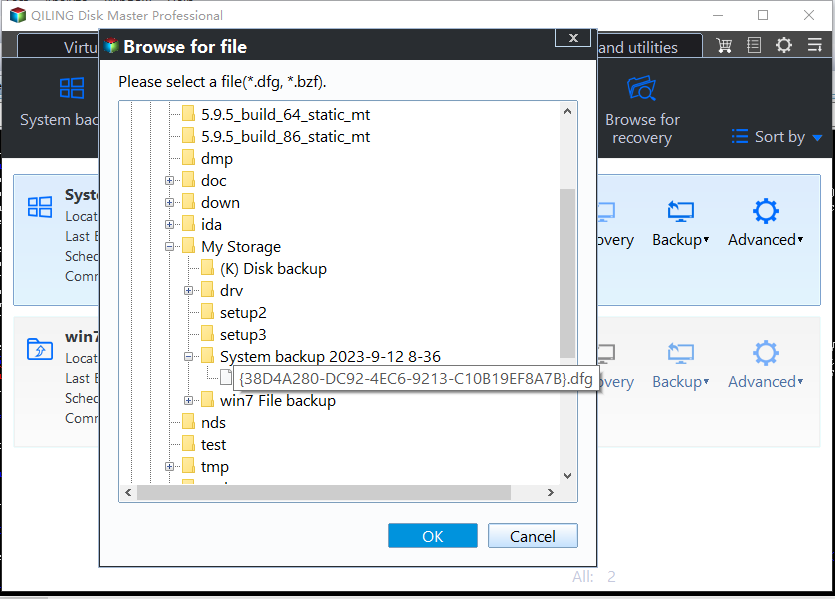
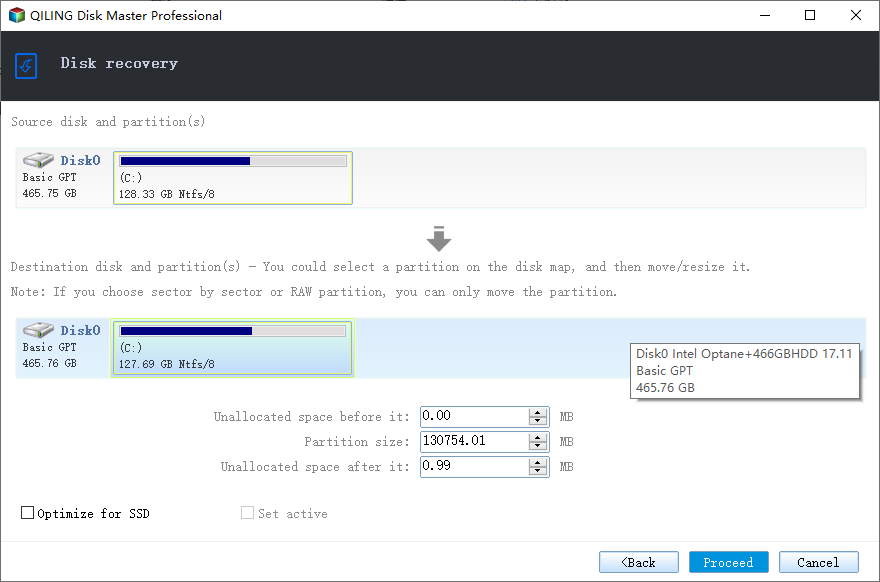
Step 3. Ensure that the recovery disk and the source disk have the same partition style, allowing for a smooth recovery process.
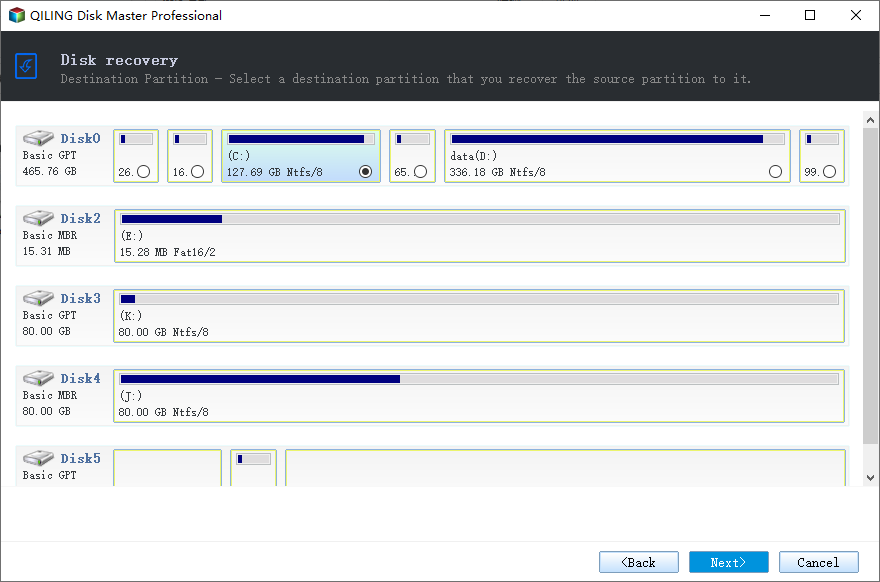
Step 4. You can customize the disk layout according to your needs, then click Proceed to start system backup recovery.
The Bottom Line
Installing Windows 10 on a hard drive for another computer is a practical and common approach, and using Qiling Disk Master makes it easy. With this tool, you can successfully install your Windows on an external hard drive for another PC, making it a convenient solution for multiple computer needs.
Qiling Disk Master Pro The software can perform a universal restore, create a WinPE emergency bootable disk, and help resolve the Windows cannot create a recovery drive error, offering additional practical features to be discovered. It can be downloaded and tried.
FAQs
1. Can I boot Windows from another hard drive?
To boot your computer from another drive, you can either use a third-party tool to migrate your operating system from your old boot drive to the new hard drive or perform a clean install of Windows 10 on the new drive.
2. How do I install Windows 10 from one computer to another?
To remove Windows 10 from your old device, install it on your new computer, and activate it, log into your Microsoft account on the Microsoft website.
3. Can I clone Windows 10 to another PC?
You can clone Windows 10 to another PC using software like Qiling Disk Master, creating a replica of your Windows 10 installation on the other computer.
4. Can I install Windows on a hard drive and put it in another computer?
Windows will load normally if installed on the same hardware, but will first detect additional hardware and install required drivers before being used.
Related Articles
- [2 Ways] How to Backup HP Laptop on Windows 11/10/8/7
- Can I Clone BitLocker Encrypted Drive Without Disabling It? Yes! [3 Minutes Guide]
- Five Ways to Backup Your Data on Windows [2023 Update]
- How to Backup Chrome Settings Without Sync [Step-by-Step Tutorial]
- How to Clone Windows 11/10/8/7 to Another Computer
- [Easy] How to Clone USB Drive to Another Windows 10
- How Do I Reset Windows 10/11 and Make It Like New Again [No Data Loss]
If your computer is getting slow or you want to reset your Windows 10/11 and make it like new again, this page is here to help. Follow this tutorial to reset Windows 10 and make your computer as fresh as new.
Products
Articles & Tutorials
- Data Recovery
- Data Backup
- File Recovery
- File Backup
- System Backup and Restore
- Disk and Partition Clone
- Technical articles
- Mobile articles
- Disk Master Help
- Windows Data Recovery Tutorials
- Windows Secure Delete Tutorials
- Windows Partition Management Tutorials
- Windows File Backup and Restore Tutorials
- Windows System Backup and Restore Tutorials
- Windows Disk Backup and Restore Tutorials
- Windows Clone Tutorials