Top 2 Best Cloning Software for HDD and SSD of 2024
Overview of Disk Cloning
Disk cloning software creates an exact copy of one hard drive on another disk, including files, partitions, and system data. It is useful when upgrading to a larger drive, replacing a failing disk, or migrating an operating system.
- To recover lost/damaged data
- To upgrade a hard drive
- To save a failing drive
- To transfer system, applications, or a large amount of data onto a new computer, hard drive, or SSD, you can use a process called cloning or imaging, which involves creating an exact copy of the original device, or use a transfer software to move the data, or simply connect the old device to the new one and use the operating system's built-in transfer feature, such as Windows' "Transfer my files" or macOS's "Migration Assistant".
When you need to upgrade or replace an HDD or SSD, disk cloning software can save time by moving data directly instead of reinstalling Windows and applications manually. This article compares two practical cloning tools for HDD and SSD cloning.
Top 1. Qiling Disk Master
Qiling Disk Master software offers backup, recovery, copy, and clone functions for laptops, PCs, and workstations. It supports system, disk, and file backup, disk and partition cloning, and image recovery, making it a reliable tool for users who need a safer cloning workflow.
Key features:
- Copy HDD to SSD or clone SSD to larger SSD
- To migrate your Windows 10 OS to a new SSD, you can clone the existing OS to the new SSD.
- Make cloned OS, HDD/SSD bootable after cloning
- Support Cloning OS to a Portable External USB
- Set a backup schedule to automatically backup data and ensure it's safe and secure.
- The device supports a wide range of storage devices, including PCs and laptops, internal and external hard drives, USB drives, micro cards, and even camcorders.
Price: $29.95
Supported OS: Windows 10/8.1/8/7/Vista/XP; Windows Server 2016/2012/2008/2003
The supported file system includes FAT 12/16/32, exFAT, NTFS, NTFS5, ext2/ext3, HFS+, and ReFS.
This video and word tutorial will guide you through the simple process of using the best cloning software to clone a hard drive, making it easy to replicate your hard drive with just a few clicks.
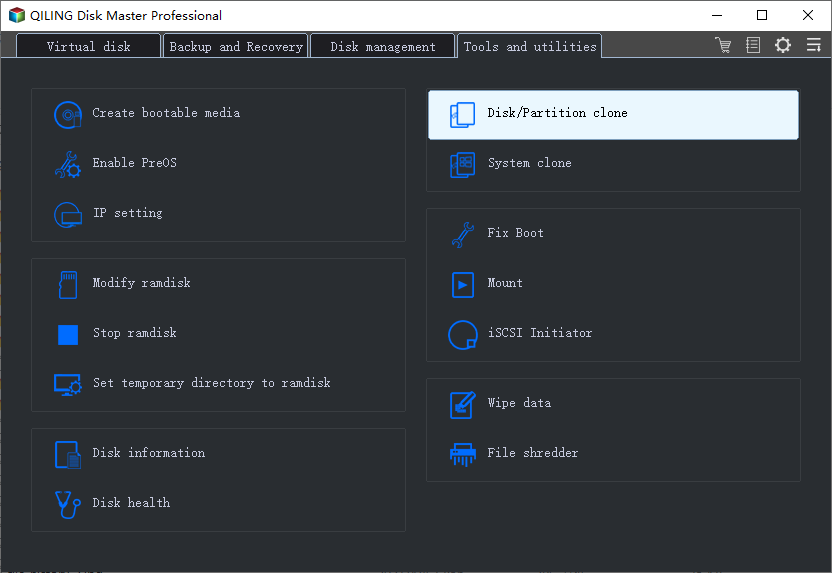
Step 1. On the main page, click on "Tools" to access the clone and other utilities.
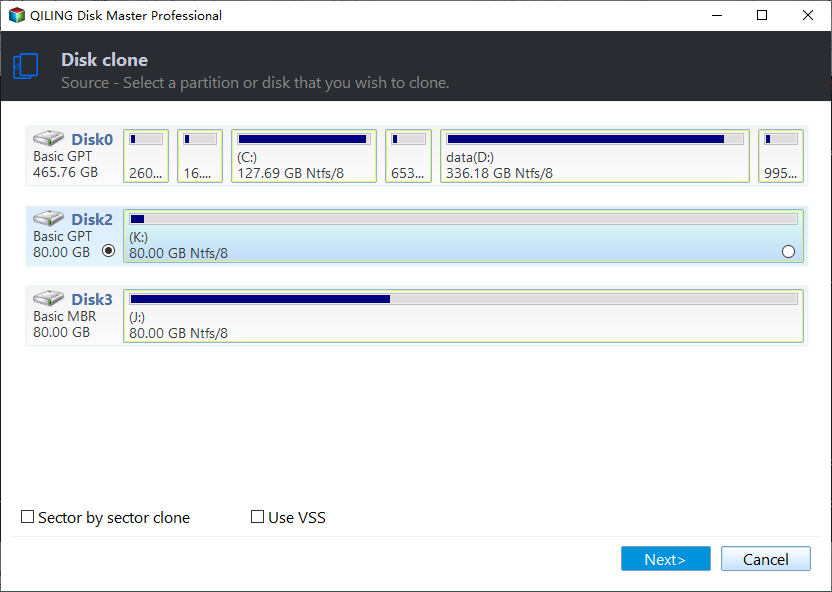
Step 2. Choose the source disk or partition, click "Next".
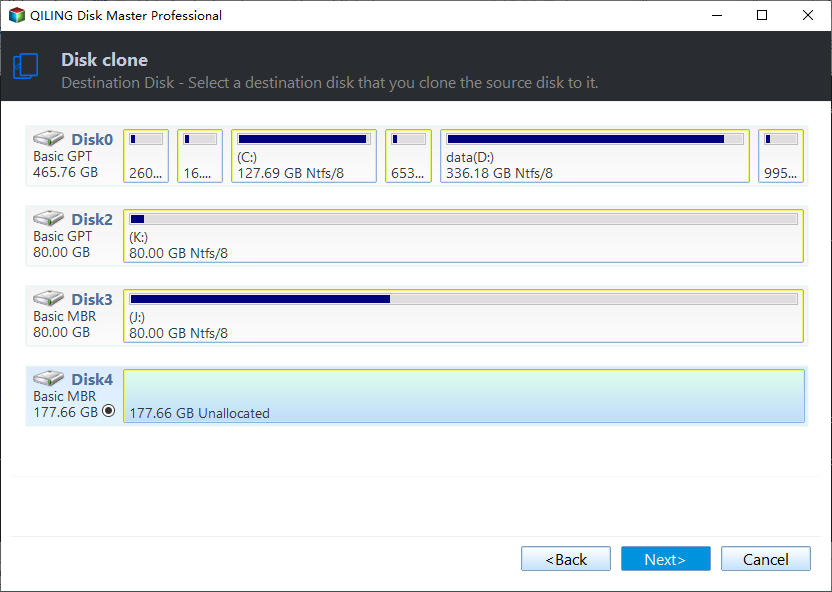
Step 3. To upgrade the source disk or partition, you need to choose a target disk that is larger than the source disk or partition. This ensures that there is enough space to accommodate the increased size of the source disk or partition.
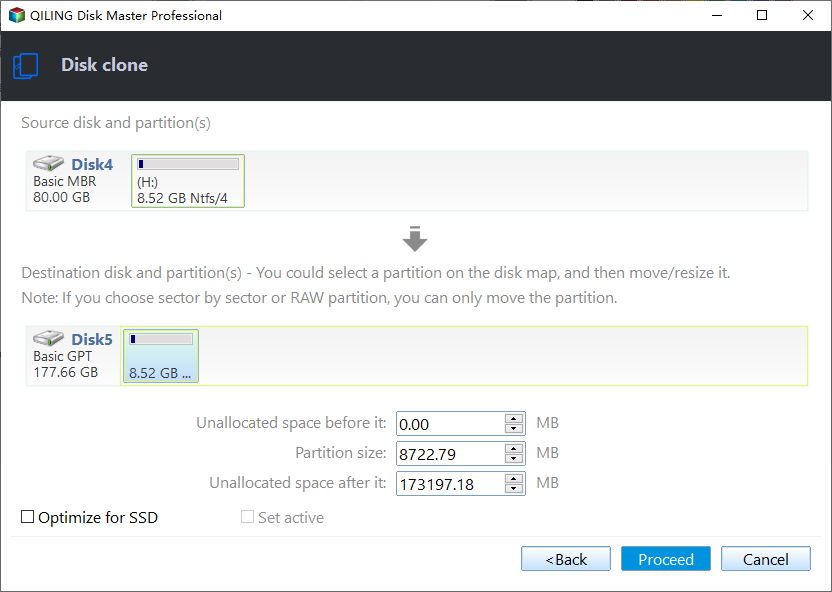
Step 4. A warning window will inform you that cloning would permanently wipe out all data on the target disk/partition. If you want to proceed, click "Proceed".
Top 2. Clonezilla
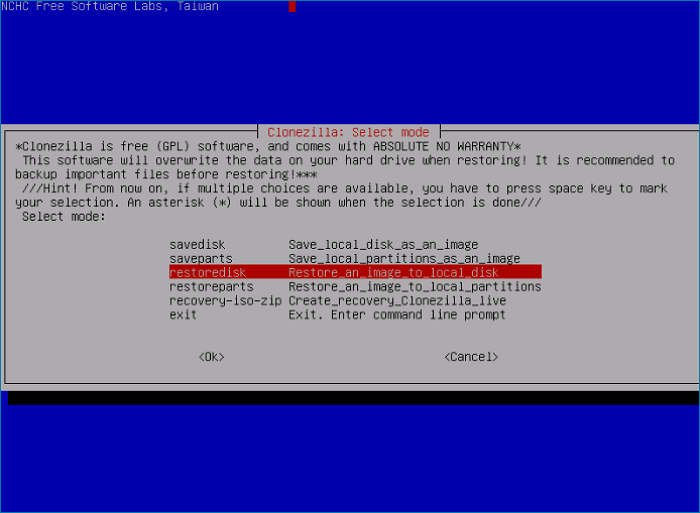
Clonezilla is a disk cloning, imaging, and data recovery program that offers three versions: Clonezilla live, Clonezilla lite server, and Clonezilla SE (server edition). The live version is suitable for a single device, while the lite server and SE versions are designed for multiple device deployment, backup, and recovery.
Key features:
- It allows you to clone a disk or partition to a separate hard drive, effectively creating an exact copy of the original.
- The cloned data can be saved as an image file or as a duplicated copy of the data.
- The clone file can be used to restore the original system to its previous state by simply running the clone file, which will revert all changes made to the system since the clone was created. This allows for a quick and easy recovery in case of any issues or errors that may have occurred during the system update or configuration process.
- Online imaging/cloning is not implemented yet
- The partition to be imaged or cloned needs to be unmounted.
Price: Free
Supported OS: Windows, Linux
Supported file system: FAT 12/16/32, ext2/3/4, NTFS, HFS+, UFS
Final Comparison
Qiling Disk Master VS Clonezilla
Qiling Disk Master is more convenient in terms of cloning functions and operational ease, with a user-friendly graphical interface. In contrast, Clonezilla's developer-oriented screen may not be suitable for average users, making Qiling a more accessible option.
Related Articles
- How to Backup Laptop to Google Drive Step by Step
- Copy/Move Windows.old Folder to External Hard Drive
- How to Transfer OEM Windows 10 to New Hard Drive [2024 Guideline]
- How to Clone RAID Disk with RAID Cloning Software
- Why Does Windows 10 Backup Say Windows 7? [Methods Provided]
- Outlook Data Files PST Usage is Disabled on This Computer[Fixed]
If you're encountering the issue of Outlook Data File (.pst) usage being disabled on your computer, it can be frustrating as it prevents access to all Outlook data files, impacting your work. To resolve this issue, consider professional solutions that can quickly and efficiently fix the problem.
Products
Articles & Tutorials
- Data Recovery
- Data Backup
- File Recovery
- File Backup
- System Backup and Restore
- Disk and Partition Clone
- Technical articles
- Mobile articles
- Disk Master Help
- Windows Data Recovery Tutorials
- Windows Secure Delete Tutorials
- Windows Partition Management Tutorials
- Windows File Backup and Restore Tutorials
- Windows System Backup and Restore Tutorials
- Windows Disk Backup and Restore Tutorials
- Windows Clone Tutorials