Optimize SSD Performance with 4K Alignment Software
SSD drives are known for their high reading and writing speeds, low power consumption, and high portability, making them a popular choice. However, as their use has become more widespread, so have various problems faced by SSD users.
Improper operations, low disk space, and a large number of useless junk files can slow down computer performance, often resulting in SSD partitions that are not aligned. This can lead to various problems, including slow computer performance, and can be caused by other reasons such as low disk space. To optimize SSD drive and speed up your PC, solutions are available to address these issues and ensure proper SSD partition alignment.
How to optimize the SSD in my computer
"You're experiencing a slowdown in your computer's performance, which you attribute to your SSD becoming full, but you're not sure why. Some recommend trying 4K alignment to optimize your SSD. 4K alignment is a process that optimizes the alignment of files on your SSD to improve performance. It's a good idea to try it, but first, you should check if your SSD is actually full or if there are other factors contributing to the slowdown. You can also consider cleaning up unnecessary files, updating your operating system and drivers, and checking for any malware. Additionally, you can try running a disk cleanup and disk defragmentation to see if that improves performance."
4K alignment is a technique that allows SSDs to utilize the smallest 4K sector size in a file system, enabling faster read and write speeds, which can improve overall computer performance. If your computer is slowing down and your SSD is not functioning optimally, 4K aligning your SSD drive and optimizing it with specialized software can help.
Find 4K alignment software to optimize SSD drive
To find a reliable and secure 4k alignment software, you can try using a software that specializes in maximizing SSD performance and aligning the SSD partition and its sectors, such as a 4K alignment software, to speed up your PC.
Qiling Partition Master is a software that can help optimize your computer by 4K aligning your SSD drive, cleaning up junk files in the system, and optimizing disk space. It also allows you to remove large files from your system drive, making it a useful tool for maintaining your computer's performance. With just a few a few clicks, you can apply these features to your SSD drive and keep your computer running smoothly.
Steps to optimize SSD with 4K alignment software - Qiling Partition Master
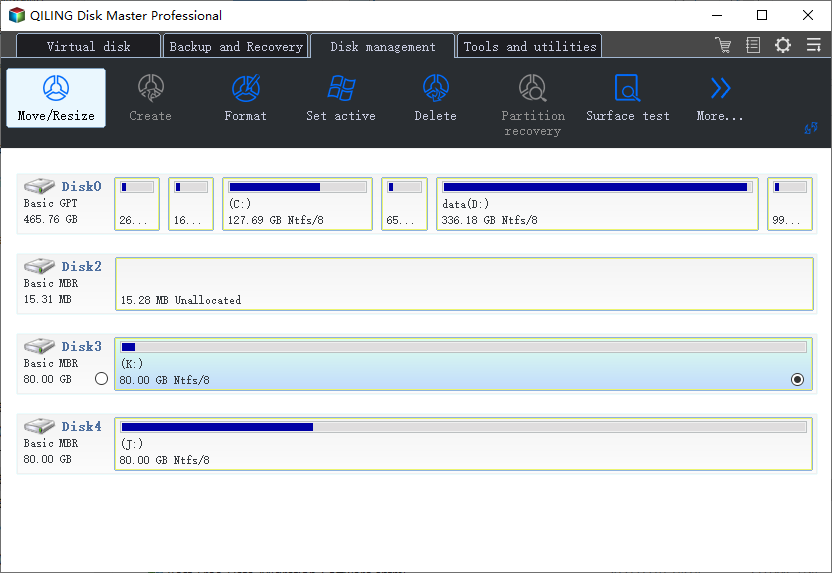
To 4K align your SSD and its partitions, download Qiling Partition Master and follow these steps: 4K align your SSD and every sector in SSD partitions.
Step 1. Select the SSD that want to 4K align and select "Resize/Move" in the "Disk management" page.
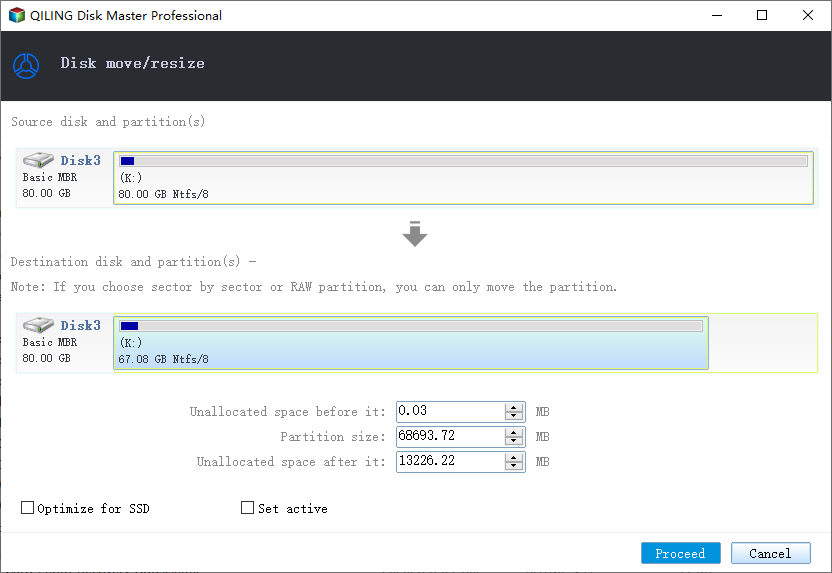
Step 2. Tick the "Optimize for SSD" option and click "Proceed" to start resize the partition.
After aligning the SSD drive partitions to 4K and cleaning up junk files, you can optimize the disk with Qiling Partition Master's Cleanup and Optimization feature. This will result in a faster running speed and higher reading and writing efficiency in your SSD drive.
Related Articles
- How to Clone IDE to SATA HDD/SSD (2 Ways)
- Clone Hard Drive to Larger Drive Without Reinstalling Windows and Programs
- Can't Skip Disk Check on Startup Windows 11 | What Should I Do?
- How to Change File Type in Windows 10
- How to Merge C and D Drive in Windows 11/10 Without Losing Data - Qiling
- Top 3 Easy Disk Drive Repair Software for Windows 10/8.1/8/7
- How to Create ASUS Recovery Disk in Windows 10 Efficiently
ASUS recovery disk is very useful when you're having problems with your computer. Learn how to create one in Windows 10 efficiently from this page.
Products
Articles & Tutorials
- Data Recovery
- Data Backup
- File Recovery
- File Backup
- System Backup and Restore
- Disk and Partition Clone
- Technical articles
- Mobile articles
- Disk Master Help
- Windows Data Recovery Tutorials
- Windows Secure Delete Tutorials
- Windows Partition Management Tutorials
- Windows File Backup and Restore Tutorials
- Windows System Backup and Restore Tutorials
- Windows Disk Backup and Restore Tutorials
- Windows Clone Tutorials