How to Clone Windows OS from HDD/SSD to M.2 SSD
Before diving into the detailed information, let's take a look at what you'll need to clone a HDD/SSD to an M.2 SSD. You'll need the original HDD/SSD, a compatible M.2 SSD, a computer with a free USB port, and a cloning software or tool, such as Qiling Disk Master.
| 🧰Tools You Will Use | Qiling Disk Copy |
|
📃Preparations |
|
Download this powerful disk cloning tool to migrate OS from SSD to M.2 SSD seamlessly without losing any data.
Transfer OS from SSD to M.2 SSD Problem
Most people are looking for effective ways to clone SSD to M.2. Here is the real user case from a technology forum:
To clone your 500GB Samsung 840 Evo SSD to a 1TB Samsung 961 M.2 SSD, you can use a cloning software. One option is to use the Samsung Magician software, which has a cloning feature. You can also use third-party software like Qiling Backup, which can clone your entire system, including Windows 10, applications, and settings, to the new M.2 SSD. Make sure to back up your important files and data before cloning, and also check that the new M.2 SSD is properly recognized by your system. Follow the software's instructions to complete the cloning process.
If you need to upgrade your SATA SSD or HDD and don't know how to clone it to an M.2 or NVMe M.2 SSD, you're in the right place. This article will guide you through the process of cloning an HDD/SSD to an M.2 SSD using the professional disk cloning software, Qiling Disk Copy.
Cloning Windows 10 to an M.2 SSD requires additional steps, including booting the computer from the cloned drive, which can be learned from the provided information.
🚩Extend Reading: How to Clone M.2 SSD with Only One Slot
How to Clone SSD to M.2 SSD/ NVMe M.2 SSD in Windows 10
M.2 SSDs, especially those with NVMe protocol, outshine traditional SSDs in terms of speed, with some models like Samsung's SM960/961 boasting reading speeds of up to 3200MB/S, a significant improvement of over 6 times that of regular SSDs. This makes them ideal for users with heavy file transfers and high-performance operation requirements, making upgrading from HDD or traditional SSD to M.2 or NVMe M.2 SSD a worthwhile consideration.
To clone an HDD/SSD to an M.2 SSD, follow these five steps: First, prepare the M.2 SSD by formatting it if necessary, then install it into the computer.
1. Install M.2 SSD or NVMe M.2 SSD on Your Computer
Turn off the laptop and disconnect the power cable and any other cables. Unscrew and remove the back panel to install the new NVMe SSD properly into the M.2 slot on the motherboard.
If your SSD is not showing up in Windows 10, make sure your computer detects the newly added M.2 SSD. Fix the issue in time.
📖You may be interested: How to Clone M.2 SSD with Only One Slot (2022 Guide)
2. Start Windows 10 from the Source/Original SSD
After connecting the M.2 SSD to a computer, it typically won't boot from the empty new M.2 SSD. However, if you connect both the original SSD and M.2 SSD to another computer, it may start from the blank M.2 SSD and fail to boot.
To avoid the startup problem, check your computer's BIOS to confirm whether it has booted from the original SSD.
3. Free Download Disk Cloning Software to Clone Hard Drive to M.2
Cloning a disk can be a convenient way to upgrade or transfer data, allowing you to skip the time-consuming process of reinstalling Windows and applications. This can be done for various purposes, such as upgrading from an older disk to a newer SSD, migrating a system to a new disk, transferring data from one disk to another, backing up files, and more.
Qiling Disk Copy Clonezilla is a powerful and flexible cloning software that can easily clone a source disk to a destination disk, including cloning an SSD to an M.2 SSD, without the common issue of a cloned HDD not booting. This software can help users achieve these highlights. Would you like to know more about it?
Disk Copy Highlights:
- An easy and fast cloning process
- Clone a hard drive with bad sectors
- Professional technical support
- Replace the laptop's hard drive without losing data
- Compatible with Windows 11/10/8.1/8/7
4. Clone SSD to M.2 SSD with Step by Step
Download and activate this software, and follow these steps to clone a hard drive to M.2 NVMe SSD.
Video tutorial on how to HDD to M.2 SSD:
Steps to clone an HDD to M.2 SSD
Prior Notice:
- The "Sector by sector copy" feature requires the destination disk to be at least as large as the source disk, so if you want to clone a larger hard disk to a smaller one, this feature should be left unchecked.
- All data on the destination disk will be completely erased, so take care.
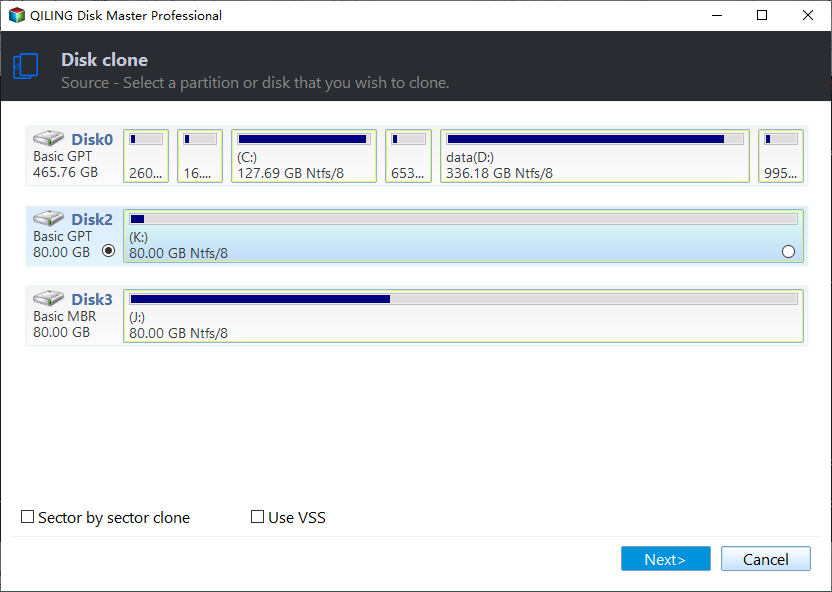
Step 1. To start copying/cloning an entire disk to another, choose this disk as the source disk under "Disk clone" and click "Next".
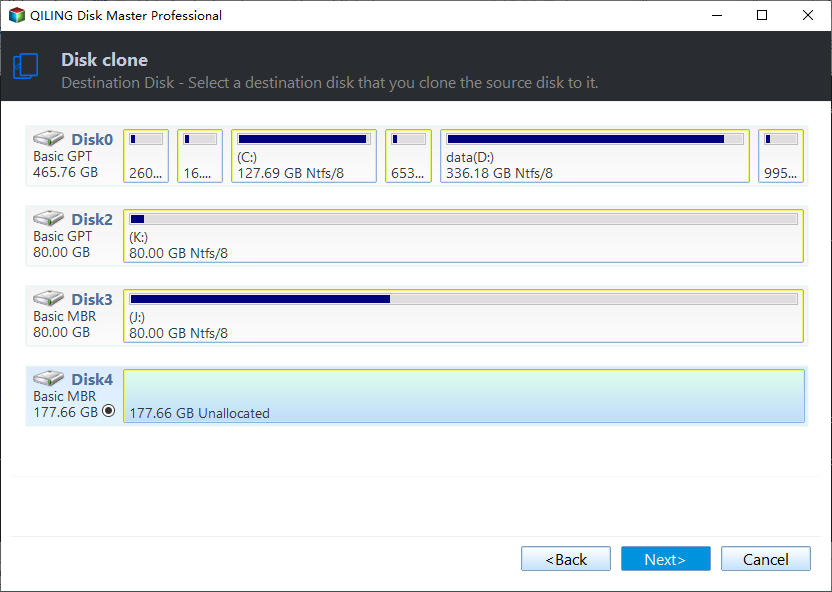
Step 2. Choose the other disk as the destination disk.
Step 3. Check the disk layout of the two disks. You can manage the disk layout of the destination disk by dragging the side of the disk.
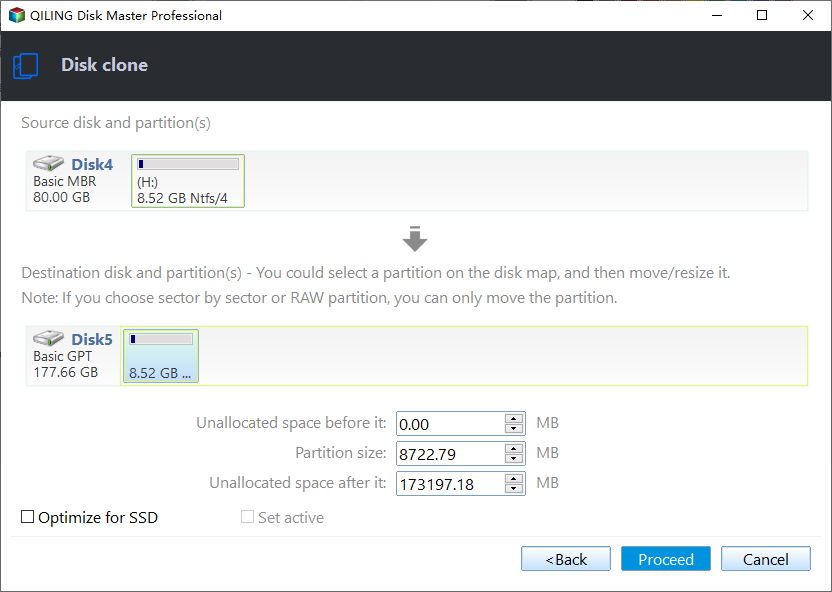
To put your SSD in its best performance, tick the "Check the option if the target is SSD" option.
Step 4. Click "Proceed" to officially execute the task.
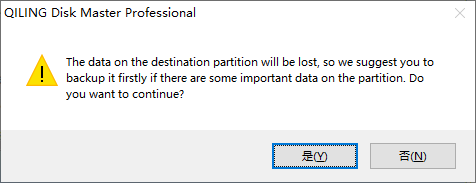
A message now appears, warning you that data will be lost. Please confirm this message by clicking "OK".
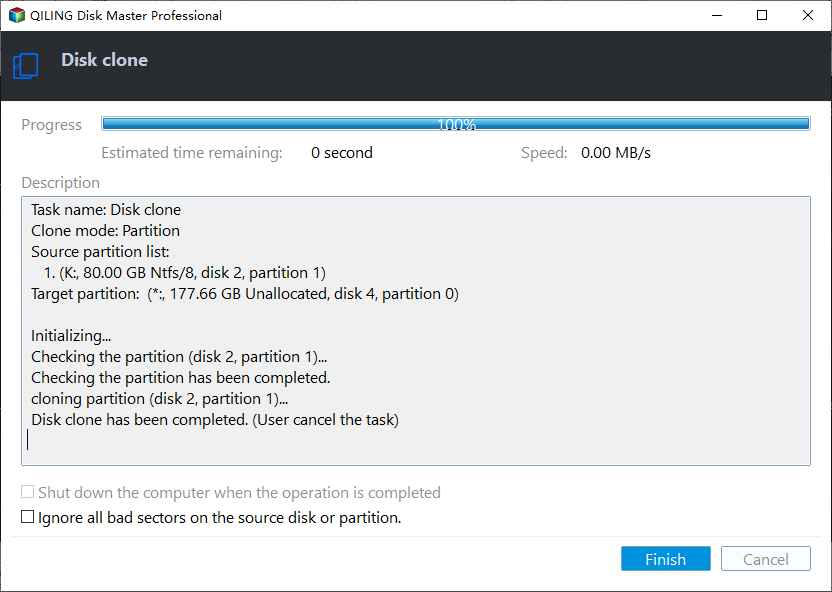
If you want to learn how to clone a hard disk drive (HDD) to a faster M.2 NVMe solid state drive (SSD) on Windows 10 using Ghost, this post will provide the answer.
5. Set Your Computer to Boot from Cloned M.2 SSD/NVMe M.2 SSD
After cloning Windows 10 from an SSD/HDD to an M.2 NVMe SSD, you'll need to manually set the boot sequence. Restart your computer and press F2, Esc, or F8 to enter the BIOS, then set the computer to boot from the cloned M.2 SSD. You may need to disable Secure Boot Control to see the SSD as a bootable drive, allowing you to complete the boot process.
- Tip
- If a source HDD or SSD is in MBR boot mode but the cloned or migrated SSD is in GPT, it's necessary to make the SSD first in the BIOS device boot order and change the boot mode to EFI to ensure proper startup.
The laptop's operating system was successfully upgraded, and everything appears to be functioning as it should, with noticeable improvements in speed.
Share this article on your social media to help more people.
Additional Information About M.2 SSD
An M.2 SSD is used in small form factor storage expansion cards, enabling high-performance storage in thin, power-constrained devices like ultrabooks and tablets. It supports multiple protocols and applications, including Wi-Fi, USB, PCIe, and SATA.
Pros:
- Takes up less space and uses much less power
- Can read and write at much faster rates
- Supports PCIe, SATA, USB 3.0, Bluetooth, and Wi-Fi
Cons:
- 1 TB SATA SSD can cost about $100 (expensive)
- Limited capacity (Maximum 2 TB)
If your laptop is compatible with the M.2 spec, the operating system should already have the necessary drivers to install the M.2 storage card. If it doesn't meet your needs, consider a different SSD, but if it does, you can enjoy the high performance of your new SSD.
Conclusion
In order to clone a hard drive to an M.2 or M.2 NVMe SSD, one must use third-party cloning software such as Qiling Disk Copy, as Windows lacks a built-in cloning tool.
Qiling Disk Copy Clonezilla is an easy-to-use cloning program for Windows PC that allows you to clone a hard drive in just a few simple clicks. You can download it to your PC to clone your hard drive with ease.
If you're unable to set an SSD as a boot drive or encounter issues with a cloned SSD not booting, you can reach out to our technical support team at support@idiskhome.com for assistance.
FAQs on How to Clone HDD/SSD to M.2 SSD
1. Can I clone just the operating system to NVMe SSD?
You can clone only the OS to an SSD using professional disk cloning software like Qiling Disk Copy, which helps transfer the C drive to a new SSD or another destination disk, cloning only Windows OS to another drive and cloning a hard drive sector-by-sector.
2. How to upgrade m.2 SSD without reinstalling Windows?
To upgrade an M.2 SSD or M.2 NVMe SSD without reinstalling Windows, you can clone it to a larger or smaller one without losing data or reinstalling Windows, using a professional disk cloning utility since Windows has no built-in cloning feature.
3. Can I transfer OS from SSD to SSD?
You can easily transfer your operating system from an SSD to another one using software like Qiling Disk Copy, which helps to migrate the OS to a new SSD.
Was this page helpful? Your support is truly important to us!
Qiling Disk Copy
Qiling Disk Copy is a user-friendly tool for quickly and easily migrating an existing system disk to a new disk or SSD, requiring minimal configuration.
For cloning an HDD to a Crucial SSD, read How to Clone an HDD to a Crucial SSD.
Related Articles
- Acronis True Image WD Edition Clone Not Working - Try These Fixes
- Step-by-step Guide | How to Clone Hard Drive to SanDisk SSD
- How to Free up Space on PlayStation 4 [Four methods]?
Learn how to free up space on PS4 in this post if it says there is not enough storage to download or install games. - How to Migrate Hard Drive to SSD without Reinstalling OS?
You can migrate your hard drive to an SSD without reinstalling your operating system using Qiling Disk Master Professional, which makes the process easy and safe. - Clone Hard Drive to Larger Drive Safely and Easily
With Qiling Disk Master Professional, you can easily clone hard drive to larger drive in Windows 11, 10, 8, 7 and you don't need to reinstall Windows operating system and other applications from scratch. - How to Clone Hard Drive to USB Flash Drive in Windows 10, 8, 7?
How to clone hard drive to USB flash drive in Windows 11, 10, 8, 7? With this step-by-step guide, you can easily clone HDD or SSD to USB flash drive using Qiling Disk Master.
Products
Articles & Tutorials
- Data Recovery
- Data Backup
- File Recovery
- File Backup
- System Backup and Restore
- Disk and Partition Clone
- Technical articles
- Mobile articles
- Disk Master Help
- Windows Data Recovery Tutorials
- Windows Secure Delete Tutorials
- Windows Partition Management Tutorials
- Windows File Backup and Restore Tutorials
- Windows System Backup and Restore Tutorials
- Windows Disk Backup and Restore Tutorials
- Windows Clone Tutorials