M.2 Key B vs Key M: Which Slot Fits Your SSD
An M.2 SSD is smaller than a stick of gum, but it is not universal. The edge connector has a notch, called a key, and the socket has a matching block. A B-key drive will not fit an M-key socket, and an M-key drive will not fit a B-key socket. Getting this wrong is one of the most common upgrade mistakes.
The good news is that the labels are printable and the motherboard manual states exactly what each slot supports. This guide explains what the keys mean in practice.
What the Notches Mean
The M.2 specification defines several keys, each with a different notch position. Two matter for storage:
- B key sits on the left side of the connector as you look at the contacts. It can carry PCIe x2, SATA, USB 2.0 and other signals.
- M key sits on the right side. It is designed for PCIe x4, which is what NVMe drives need to reach full speed.
- B+M has both notches. These drives fit either socket, but they are usually SATA or PCIe x2 designs.
B, M and B+M Compared
| Key | Typical drive | What it means for speed |
|---|---|---|
| B | Older SATA or PCIe x2 modules | Up to about 550 MB/s over SATA, or roughly 1 GB/s over PCIe x2 |
| M | NVMe PCIe x3/x4 modules | Full NVMe speed, up to the slot's generation and lane count |
| B+M | SATA modules and some budget NVMe | Fits both sockets, but the drive itself may be limited |
The key determines fit, not performance by itself. A B+M NVMe drive can still be fast, and an M-key socket can still run at PCIe 3.0 x4 if that is what the board provides.
How to Read Your Motherboard Spec
Look for a line such as "M.2_1: PCIe 4.0 x4" or "M.2_2: SATA/PCIe 3.0 x2". That single line tells you three things:
- Protocol: PCIe means NVMe; SATA means a SATA M.2 module.
- Lanes: x4 is full speed for NVMe; x2 halves the ceiling.
- Generation: PCIe 3.0, 4.0 or 5.0 sets the maximum bandwidth.
Some boards share lanes between an M.2 slot and a SATA port. Installing an M.2 drive can disable one SATA port, and the manual lists which one. Check before you plan a multi-drive build.
What Happens If You Buy the Wrong Drive
- It does not fit. The notch and the socket block are mechanical stops. Do not force a drive; you will damage the connector.
- It fits but is not detected. A SATA M.2 module in a PCIe-only slot has no data path. The drive is fine; the slot cannot use it.
- It works at half speed. A PCIe x2 drive in a x4 slot runs at its own limit, which is normal and not a fault.
- It works until the port is shared. A drive may disappear when another slot is populated, because the board splits lanes between them.
If a drive is not detected, check the slot type before you blame the drive. A short M.2 drive in a longer socket is fine if you screw it into the correct standoff; the connector is the same.
Moving an Installation to the New Drive
Once the correct drive is installed and visible in Disk Management, cloning avoids a Windows reinstall.
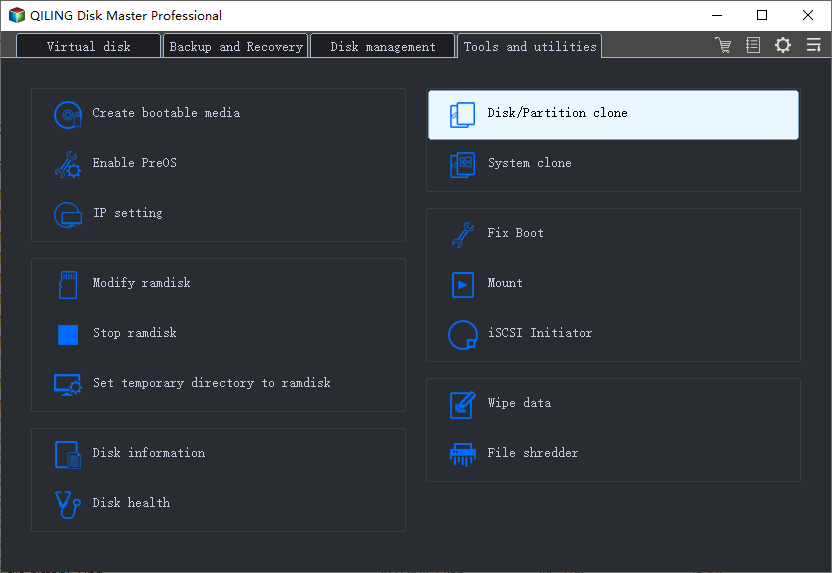
Step 1. Launch Qiling Disk Master, open Tools and utilities and click Disk/Partition clone.
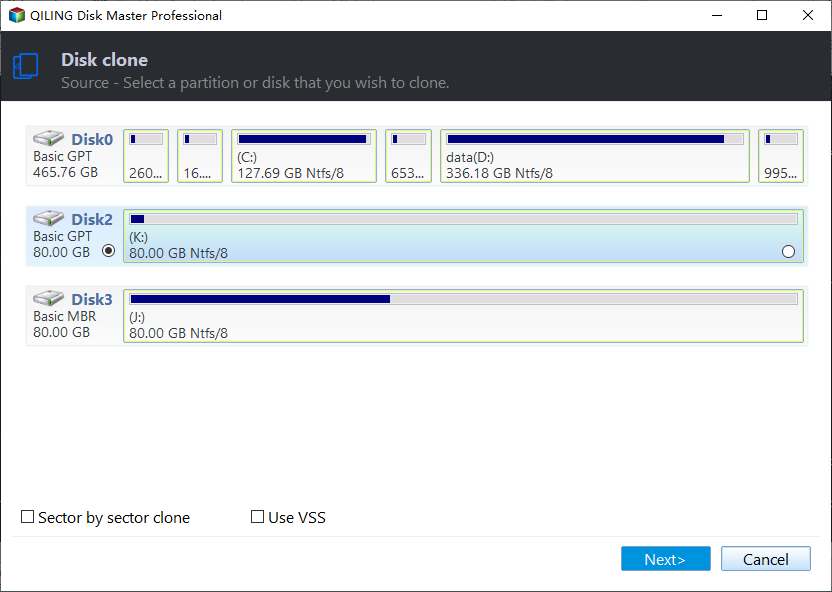
Step 2. Select the current system disk as the source and click Next.
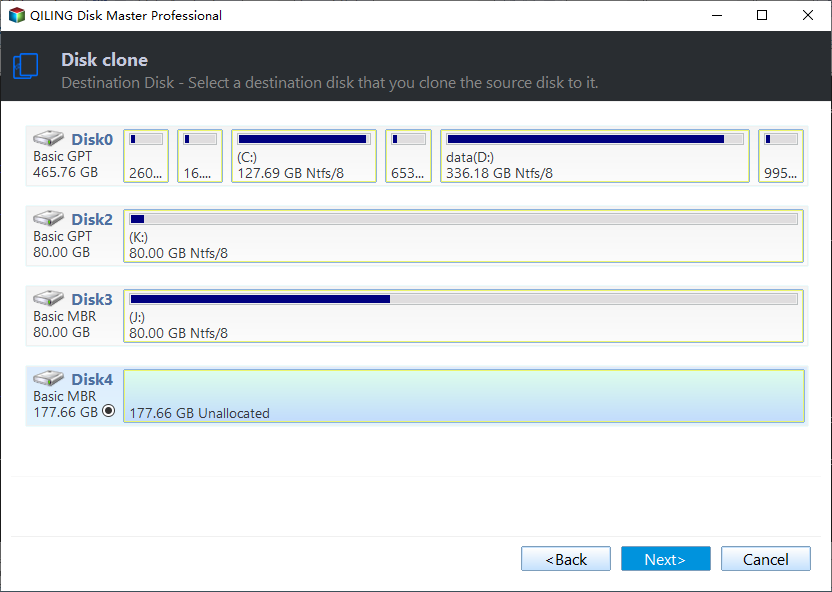
Step 3. Select the new M.2 drive as the destination and click Next.
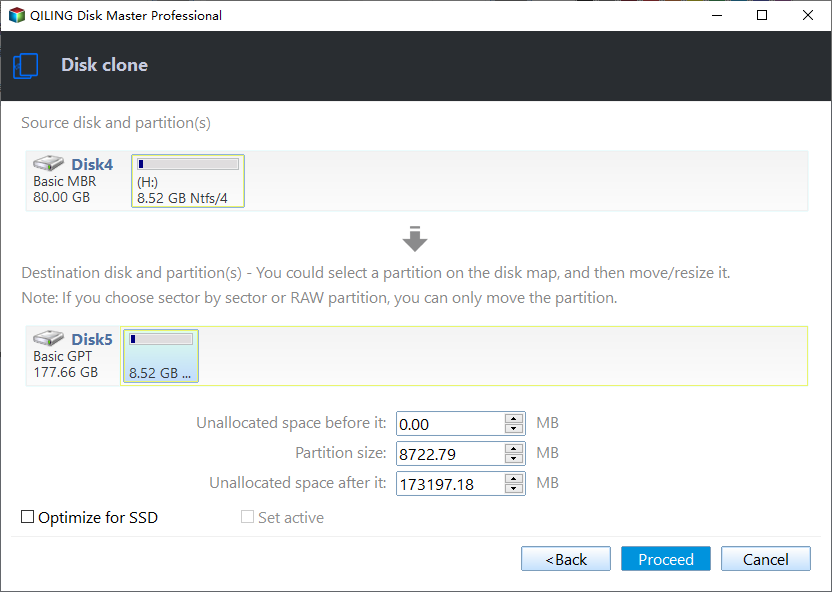
Step 4. Review the layout and click Proceed. Boot from the new drive before you erase or remove the old one.
Can I use an M-key drive in a B+M socket?
No. The B+M socket has a block where the M key would sit, so a pure M-key drive cannot be inserted. Use a B+M drive or choose a different slot.
Does an M.2 drive need a heatsink?
PCIe 4.0 and 5.0 drives can throttle under sustained writes. A heatsink helps in a desktop; in a laptop, use the one the manufacturer provides.
Are all M.2 2280 drives the same length?
The four digits give width and length in millimetres. 2280 means 22 mm wide and 80 mm long. A 2230 drive fits a 2280 slot only if you can secure it at the shorter standoff.
Related Articles
- Host Memory Buffer (HMB) in SSDs
Why some NVMe drives use system RAM instead of their own cache chip. - How to Format an NVMe SSD
Choosing the partition style and file system for a new M.2 drive. - Clone a Drive with an NVMe Enclosure
Cloning when the new drive must stay outside the case.
Products
Articles & Tutorials
- Data Recovery
- Data Backup
- File Recovery
- File Backup
- System Backup and Restore
- Disk and Partition Clone
- Technical articles
- Mobile articles
- Disk Master Help
- Windows Data Recovery Tutorials
- Windows Secure Delete Tutorials
- Windows Partition Management Tutorials
- Windows File Backup and Restore Tutorials
- Windows System Backup and Restore Tutorials
- Windows Disk Backup and Restore Tutorials
- Windows Clone Tutorials