PCIe Bifurcation: How One x16 Slot Becomes Four NVMe Drives
A desktop CPU typically offers 16 or 20 PCIe lanes for add-in cards. PCIe bifurcation lets the firmware split one x16 slot into smaller links, usually x8/x8 or x4/x4/x4/x4, so a single adapter card can host several NVMe drives without a RAID controller.
It is a hardware and firmware feature, not a Windows setting. If the CPU root port or the BIOS does not support it, a four-drive adapter will show only one drive, or none at all.
What Bifurcation Does
A PCIe slot is wired as a group of lanes. Bifurcation divides that group into independent links, each with its own reference clock and data pairs. The drives behind the adapter behave as separate PCIe devices, and Windows sees each one as a separate disk.
Common splits are x8/x8 for two devices, x4/x4/x4/x4 for four, and x4/x4/x8 combinations on some platforms. The setting lives in the BIOS under names such as PCIe Bifurcation, PCIe Slot Configuration or CPU PCIe Configuration.
What Must Support It
- The CPU root port. Bifurcation requires a root complex that can split its lanes. Many desktop CPUs support x8/x8; support for x4/x4/x4/x4 varies by generation and chipset.
- The BIOS. The option must be exposed. Some boards hide it until a CPU with the right capability is installed, and some never expose it on consumer models.
- The slot. Only CPU-attached slots usually bifurcate. Slots fed by the chipset share a different set of lanes and often cannot be split.
- The adapter. A passive adapter relies entirely on the slot's bifurcation. A card with a PCIe switch can split lanes itself, at extra cost and power.
Choosing an Adapter Card
Passive four-slot NVMe adapters are inexpensive, but they need a bifurcation-capable slot and reasonable signal integrity. Look for:
- Explicit support for x4/x4/x4/x4, not just "four M.2 slots".
- Power delivery from the slot or a SATA connector, depending on the drives.
- Cooling for the drives, especially PCIe 4.0 or 5.0 models that throttle without airflow.
- Mechanical clearance in the case; a four-drive card is tall and long.
A card with a built-in switch is the safer choice on a board whose bifurcation support is unclear, because it presents a single x16 device and manages the drives internally.
Limits and Trade-Offs
- Lanes are shared. Splitting x16 into four x4 links leaves nothing for a graphics card in the same group. Plan the whole build.
- Speed per drive. Each drive gets four lanes, which is enough for PCIe 3.0 and 4.0 NVMe but not for the fastest PCIe 5.0 models.
- Boot support. Booting from a drive behind a passive adapter depends on firmware support. Data drives are more reliable than boot drives in this setup.
- Thermals and power. Four NVMe drives in one card generate significant heat and can exceed what a small case can remove.
Bifurcation is popular in home servers and workstations that need fast local storage without a RAID controller. It is not a way to add lanes; it only rearranges the lanes you already have.
Preparing the System
Before you change the slot configuration, back up the disks that already hold data. A failed experiment can leave the array unrecognised until the old setting is restored.
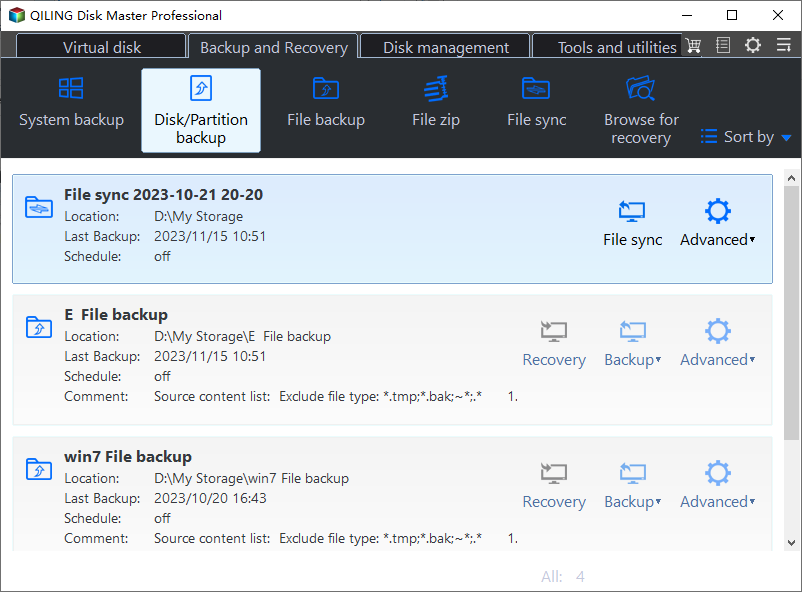
Step 1. Connect an external drive, launch Qiling Disk Master and open the Backup and Recovery tab.
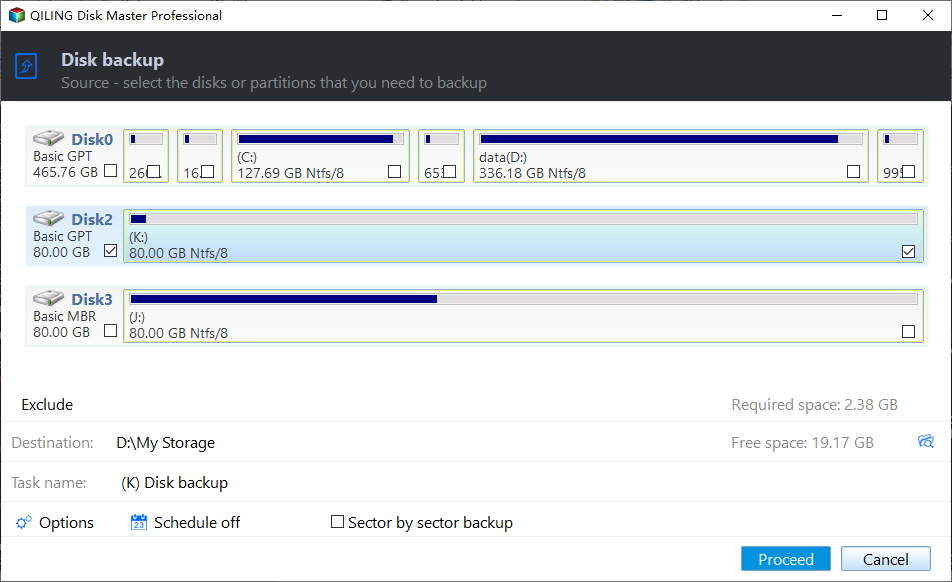
Step 2. Tick the disks you want to protect and click the folder icon to choose a destination.
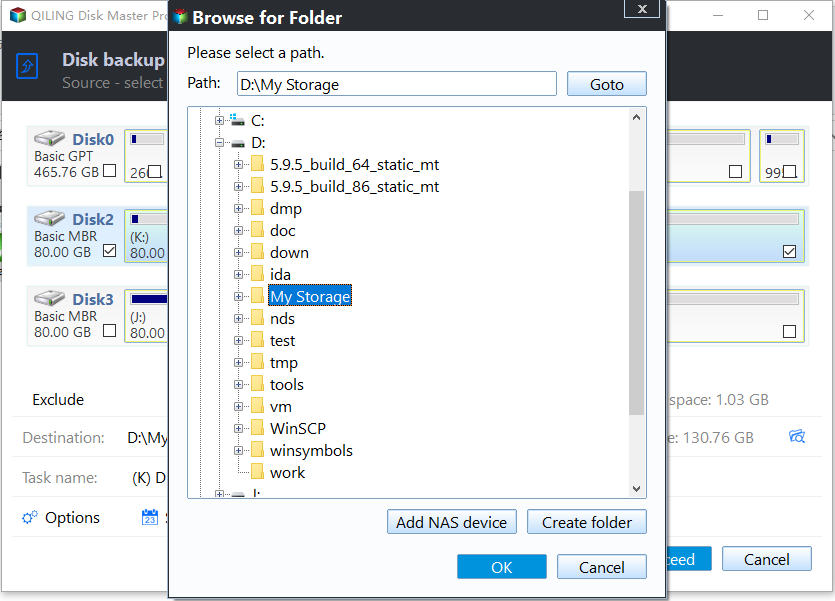
Step 3. Choose a folder on the external drive and click OK.
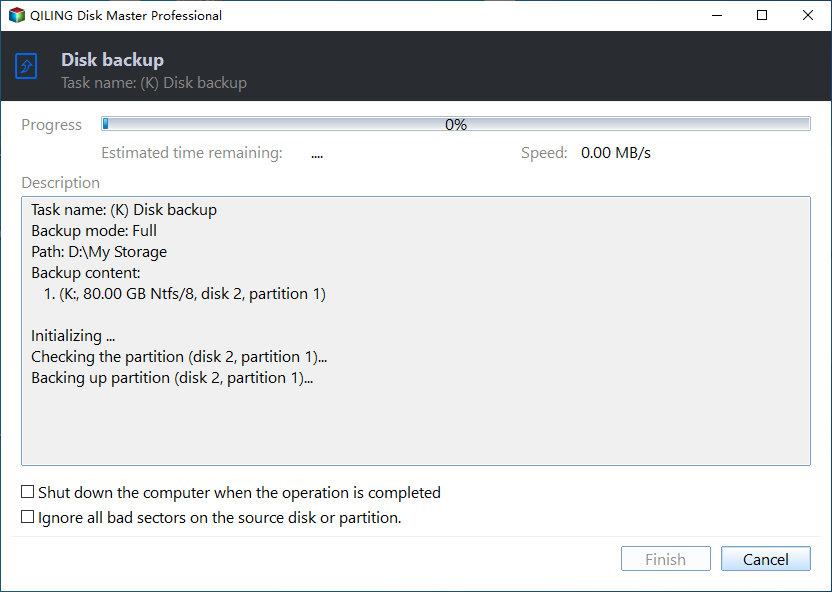
Step 4. Click Proceed and confirm the image opens before you change the hardware configuration.
Does bifurcation increase bandwidth?
No. It divides the existing lanes. Four drives share the same total bandwidth the slot would give one device, but each drive gets a dedicated x4 link.
Can I bifurcate a chipset slot?
Rarely. Chipset lanes are usually fixed or shared with other devices, and the BIOS option often applies only to CPU-attached slots.
Why does only one drive appear?
The slot is probably running as a single x16 link. Set the BIOS to x4/x4/x4/x4, confirm the adapter is fully seated and check that the drives are NVMe rather than SATA.
Related Articles
- M.2 Key B vs Key M: Which Slot Fits Your SSD
Why an adapter card may accept a drive physically but not electrically. - U.2 SSD: The Enterprise Drive You Can Use in a Desktop
Another way to add several NVMe drives without an M.2 socket for each one. - RAID Rebuild Time
What happens when one of those drives fails in an array.
Products
Articles & Tutorials
- Data Recovery
- Data Backup
- File Recovery
- File Backup
- System Backup and Restore
- Disk and Partition Clone
- Technical articles
- Mobile articles
- Disk Master Help
- Windows Data Recovery Tutorials
- Windows Secure Delete Tutorials
- Windows Partition Management Tutorials
- Windows File Backup and Restore Tutorials
- Windows System Backup and Restore Tutorials
- Windows Disk Backup and Restore Tutorials
- Windows Clone Tutorials