U.2 SSD: The Enterprise Drive You Can Use in a Desktop
A U.2 SSD looks like a thick 2.5-inch hard drive, but it is a full NVMe drive with a connector designed for servers. Enterprise systems use U.2 bays because the drives can be swapped without opening the case, and the same drive can be installed in a desktop with an adapter.
The interface is worth understanding before you buy one, because "U.2" describes a physical connector, not one protocol or one speed.
What a U.2 SSD Is
U.2 is the consumer-friendly name for SFF-8639, a 2.5-inch, 15 mm drive format. The connector combines the pins of SAS, SATA and PCIe x4 in one shell, so a backplane can wire a bay for any of those protocols and the drive negotiates what it needs.
Most U.2 drives sold today are NVMe over PCIe 3.0 or 4.0 x4. They offer the same bandwidth as an M.2 NVMe drive, but in a housing with more room for NAND, capacitors and cooling. That is why high-endurance and power-loss-protected models often appear in this form factor.
What the Connector Supports
| Protocol | Typical use | Notes |
|---|---|---|
| NVMe (PCIe x4) | Fast storage in servers and workstations | Same electrical link as M.2 NVMe |
| SAS 12 Gb/s | Enterprise arrays | Needs a SAS controller, not a plain SATA port |
| SATA 6 Gb/s | Legacy compatibility | The bay works, but speed is SATA-limited |
A U.2 drive does not automatically mean "faster than M.2". Both use up to four PCIe lanes. The advantage is mechanical: hot-swap, better cooling and space for enterprise features.
Using One in a Desktop
Consumer motherboards rarely have a U.2 port. The usual route is an adapter card that converts a PCIe slot or an M.2 socket to a U.2 connector. Two details decide whether it works:
- Power. The U.2 connector carries 12 V and 5 V. Many adapter cards include a SATA power input, and the drive will not appear without it.
- Lanes. A U.2 drive needs four PCIe lanes. An adapter in an x4 slot or a bifurcated x16 slot works; an M.2 adapter must use a PCIe (NVMe) socket, not a SATA-only M.2 key.
Cooling is easier than with M.2 because the drive has its own metal case, but enterprise models can run hot. Leave some airflow over the bay.
What to Check Before Buying
- Protocol. Confirm the model is NVMe, not SAS, unless you have a SAS controller.
- Endurance. Enterprise U.2 drives often quote DWPD rather than TBW. A high DWPD rating is useful for databases and virtual machines.
- Power loss protection. Capacitors on the drive protect data in flight. This is a real advantage over most consumer M.2 drives.
- Boot support. Most modern UEFI systems boot from NVMe, but very old boards may not see the drive until Windows loads.
- Noise and heat. Some enterprise drives are designed for server airflow; in a quiet desktop they may run warmer than expected.
Cloning to a U.2 Drive
If the U.2 drive replaces a system disk, cloning keeps Windows, programs and settings in place. Connect the drive through its adapter before you start.
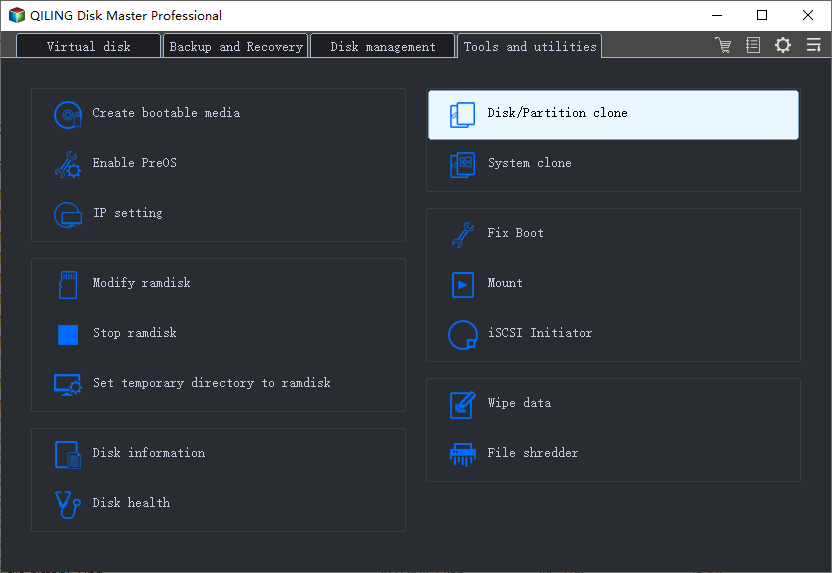
Step 1. Launch Qiling Disk Master, open the Tools and utilities tab and click Disk/Partition clone.
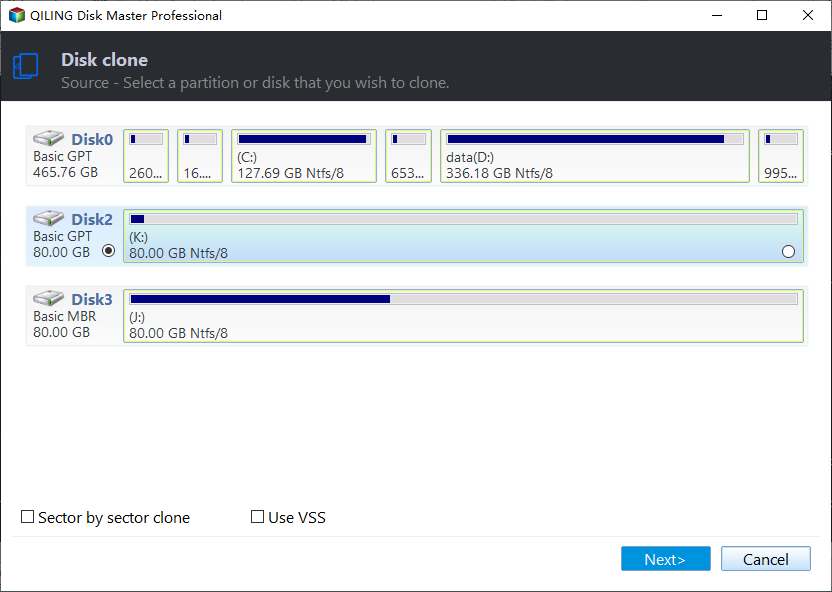
Step 2. Select the current system disk as the source and click Next.
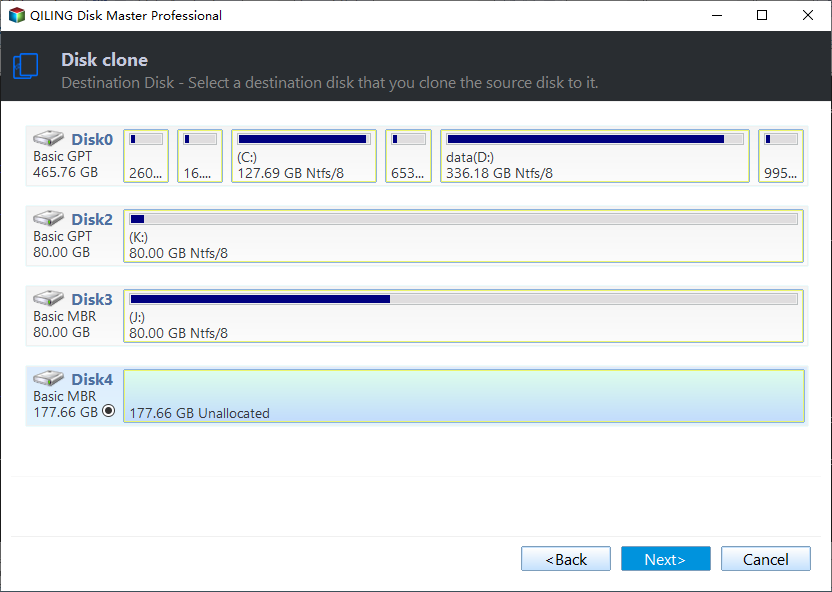
Step 3. Select the U.2 drive as the destination and click Next.
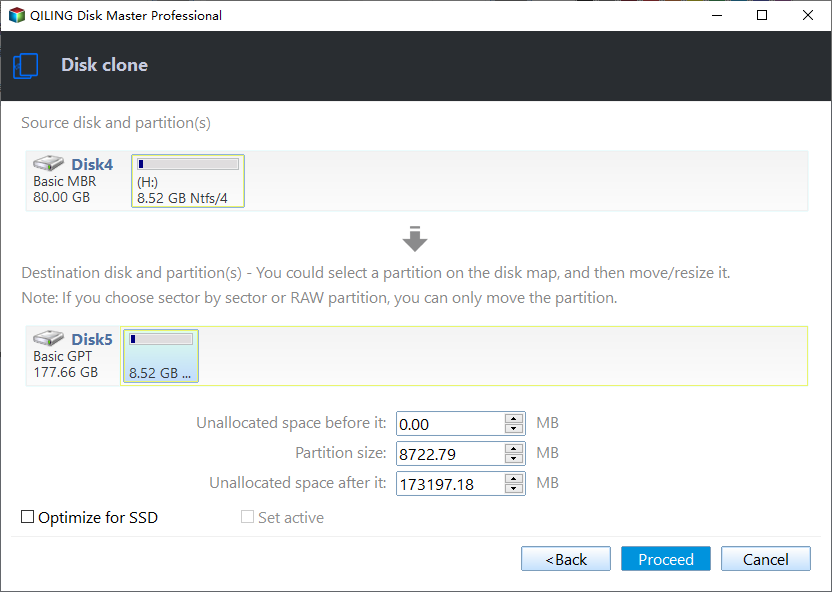
Step 4. Review the layout, click Proceed, then boot from the U.2 drive before you reuse the old disk.
Is U.2 the same as M.2?
No. Both can carry NVMe over four PCIe lanes, but the connectors and physical formats differ. U.2 is a 2.5-inch hot-swap bay; M.2 is a small board socket.
Can I use a U.2 drive in a laptop?
Practically no. The drive is 15 mm thick and needs a cabled adapter and external power, which a laptop cannot provide.
Does a U.2 drive need a special driver?
Windows 10 and 11 include a native NVMe driver. No vendor driver is required for the drive to appear as a normal disk.
Related Articles
- Clone a Drive with an NVMe Enclosure
Moving an installation when the destination NVMe drive has no free slot. - How to Format an NVMe SSD
Preparing a new NVMe drive with the right partition style and file system. - Host Memory Buffer (HMB) in SSDs
Why DRAM-less NVMe drives behave differently from enterprise models.
Products
Articles & Tutorials
- Data Recovery
- Data Backup
- File Recovery
- File Backup
- System Backup and Restore
- Disk and Partition Clone
- Technical articles
- Mobile articles
- Disk Master Help
- Windows Data Recovery Tutorials
- Windows Secure Delete Tutorials
- Windows Partition Management Tutorials
- Windows File Backup and Restore Tutorials
- Windows System Backup and Restore Tutorials
- Windows Disk Backup and Restore Tutorials
- Windows Clone Tutorials