SSD Temperature Range: Everything You Should Know
A Solid State Drive (SSD), also known as a solid-state disc, is a computer storage device. However, SSDs have a high vulnerability of overheating quickly, which can lead to slow performance, frequent BSOD errors, and severe damage to your computer.
Knowing the SSD temperature range is crucial, as monitoring it can help identify potential disk failure. To ensure optimal performance, it's essential to keep a check on your SSD temperature range, which is typically within a specific range. In this article, we'll explain the optimal range of SSD temperature and provide guidance on how to monitor it.
What Is SSD Temperature Range
SSDs typically operate between 30°C to 65°C and can experience temperatures above the safe level due to heavy workload, lack of airflow, nearby component heat, or using low-quality SSDs, which can affect performance and lifespan.
- Simple read/write jobs do not significantly raise the SSD temperature unless it exceeds 70°C, in which case it may be a cause for concern.
- The SSD's performance will drop quickly if its temperature exceeds 60 degrees, a phenomenon known as thermal throttling.
- If the SSD runs hotter than 50 degrees while idling, it's worth investigating the issue.
- A computer's system temperature should not exceed 40 to 50 degrees Celsius when it's not in use, and the same limit applies to the SSD.
Temperatures below 70°C are safe, but be cautious when temperatures are too high or low. To effectively check SSD temperature on Windows 10/11, read on to learn about helpful software.
SSD Temperature Range Monitor
Qiling Disk Master is an excellent tool for examining your SSD's condition, displaying the SSD status and temperature in the discovery section, with a percentage and label indicating the condition and a temperature figure with a label indicating if it's normal or high.
This user-Qiling Disk Master makes it super easy for anyone, even beginners, to keep an eye on their SSD's temperature. And the best part? It's compatible with all Windows versions! To check your SSD temperature with Qiling Disk Master, you can simply the steps below.
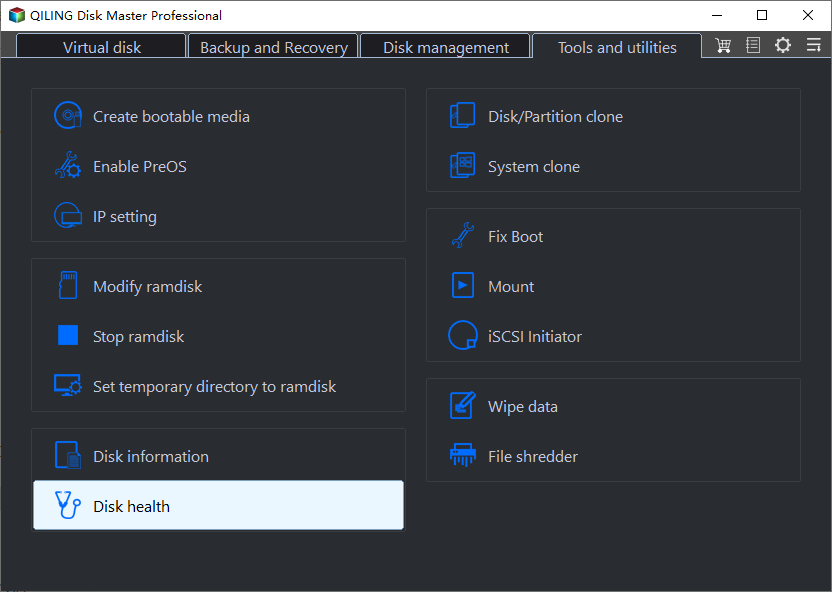
Step 1. Launch Qiling Disk Master and click the blue arrow to activate the "Disk Health" feature under the "Discovery" section.
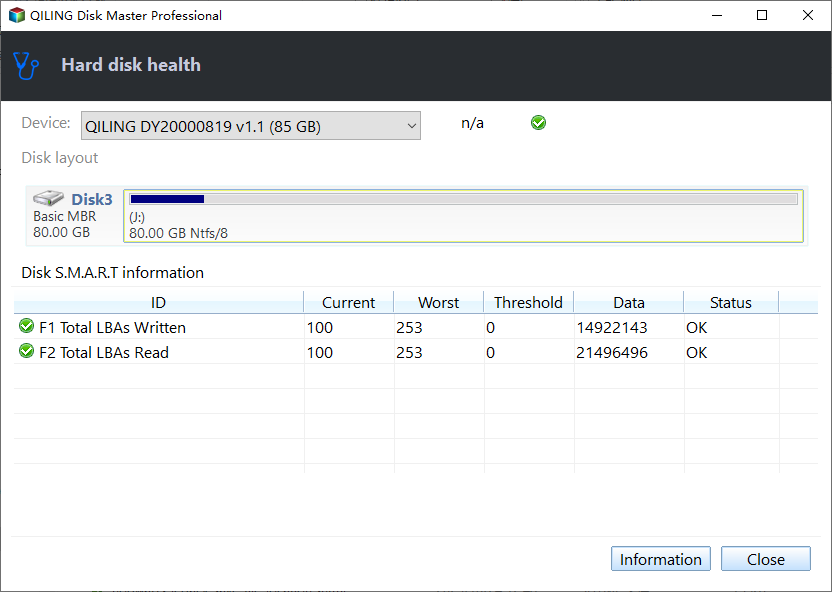
Step 2. To check the health condition of your disk, select the target disk and click the "Refresh" button. This will display the health status of your disk.
Also, there are multiple other features of Qiling Disk Master, including:
- It can check hard drive temperature.
- It offers a Disk Surface Test to identify and repair file system errors and bad sectors on the hard drive.
- The software has the capability to migrate OS to SSD.
- It optimizes SSD performance to keep your system running at its best.
Download the software and experience its full features firsthand.
Conclusion
The optimal SSD temperature range is between 0°C and 70°C, and monitoring it is crucial to ensure the longevity of your solid-state drive. To do this, you can use a reliable tool like Qiling Disk Master, which can provide real-time temperature monitoring and other essential information about your SSD.
Download it since it is an easy-to-use SSD health check software made for Windows beginners, which is a powerful tool to check hard drive health, fix bad sectors or corrupted file systems, and extend/shrink volumes and merge, create, format, and remove partitions.
FAQs About SSD Temperature Range
If you've read this post, you likely already know the answers, but we've still listed some frequently asked questions (FAQs) to address any remaining queries you may have.
1. What temperature should an SSD run at?
Solid-state drives (SSDs) operate within a temperature range of 0°C to 70°C (32°F to 158°F). The maximum temperature tolerance varies depending on the specific SSD model and form factor. The solid-state storage, used for data transfer, is typically designed to be permanently configured in the SSD's form factor.
2. Is 60 degrees Celsius hot for an SSD?
SSDs typically operate within a relatively narrow temperature range, with normal temperatures ranging from 86°F to 149°F (30°C to 65°C), which is generally cooler than the typical operating temperatures of traditional hard drives.
If your SSD reaches 60°C, even when not in use, it may be a sign of a problem, but if it goes above 70°C, it will likely fail and reach the end of its product life.
3. Is 40 degrees Celsius hot for SSD?
SSDs can safely operate in temperatures between 30°C to 65°C (86°F to 149°F). A temperature of 40°C is within this range and not unusually high. While intense usage can cause temperatures to rise, typical read/write operations do not significantly increase the temperature.
Related Articles
- 9 Ways to Fix "The Remote Computer Requires Network Level Authentication"
- How to Fix MacBook Keeps Shutting Down | 2023 Updated
- Solve System Reserved Partition on Wrong Drive: Everything You Should Know
- Reset Mac Password if You Forgot the Password [with Four Simple Methods]
- How to Fix No Bootable Device Acer in Windows 11/10/7
We've discussed all the efficient solutions in this guide for no bootable device Acer problem. And you should be able to deal with the related issues. - [Quick Fixed] No Login Screen on Windows 10/11 Issue
No login screen on startup may sometimes occur when you boot into your computer, resulting in you can't enter your account and password. This issue can be resolved by trying six quick and practical solutions, which are provided in the post to help you fix the problem.
Products
Articles & Tutorials
- Data Recovery
- Data Backup
- File Recovery
- File Backup
- System Backup and Restore
- Disk and Partition Clone
- Technical articles
- Mobile articles
- Disk Master Help
- Windows Data Recovery Tutorials
- Windows Secure Delete Tutorials
- Windows Partition Management Tutorials
- Windows File Backup and Restore Tutorials
- Windows System Backup and Restore Tutorials
- Windows Disk Backup and Restore Tutorials
- Windows Clone Tutorials