Does exFAT Work on Mac and PC? Learning the Usage of exFAT
ExFAT, a file system developed by Microsoft, is compatible with both Mac and PC operating systems. This allows for seamless file transfer and data sharing between computers with different operating systems, making it a convenient solution for those who need to exchange files between Mac and PC. With ExFAT, users can easily transfer files, photos, and other data between Mac and PC, eliminating compatibility issues and making it a popular choice for those who need to share files across different platforms.
Why Some File Systems Are Incompatible
Windows and Mac OS have different file systems, NTFS and HFS respectively, making it impossible to transfer data directly between them. This incompatibility is a common issue among various file systems, and understanding the different types is the first step to solving this problem.
What Is exFAT
The Extended File Allocation Table, or exFAT, is a file system primarily used to format flash drives like USB and SD cards. Developed by Microsoft as a replacement for FAT32, exFAT allows for a maximum file size of 1EB, making it suitable for storing large files. Its compatibility with various operating systems, including Mac OS, Windows, Linux, and some Android systems, further enhances its utility.
exFat VS FAT VS NTFS
The exFAT file system is a compromise between FAT and NTFS, with FAT being its predecessor and NTFS being a more advanced version. exFAT can support various operating systems, making it compatible with almost every OS after converting file formats. Understanding the differences between these file systems and how to convert them is essential.
Here is a comparison table of the three file systems.
| Comparison | exFat | FAT | NTFS |
|---|---|---|---|
|
Pros |
It can work with different operating systems It supports a maximum file size of 16 EB |
Its compatibility is the best of all file systems, and almost all operating systems can use it. |
1. It almost has no file size storage limit 2. It has a built-in logging function |
| Cons |
The system lacks a logging function, which makes it difficult to track any issues or errors that may occur. Additionally, it is susceptible to data loss in the event of interruptions, which can result in lost or corrupted data. exFAT is not as compatible as FAT |
1. The software only supports a maximum single file size capacity of 4GB. 2. It partitions up to 32GB |
Incompatible with a different operating system. |
To transform your file system from NTFS to exFAT, you can simply right-click on the drive and select "Change Drive Letter and Paths" from the context menu. Then, you can choose the exFAT file system and follow the instructions to complete the transformation.
To transfer data, external tools like portable hard drives, SD cards, or USB flash drives are often used. These tools need to be formatted on your computer, and then you can change the file system from NTFS to exFAT in the drop-down list. Once formatted, you can use these tools to transfer data.
Guide To Convert NTFS File Systems to exFAT
To start the process, we need to prepare a suitable tool like a USB flash drive or an external hard drive. Once we have the tool ready, we can proceed with the formatting.
Before formatting your external drive, make sure to copy any important files and data to a safe location for backup, to prevent losing them.
Here is the guide:
Step1. Insert the drive into the USB port of your computer, then open File Explorer, right-click on the drive, and choose Format.
Step2. In the file system drop-down list, choose exFAT. You may get NTFS or FAT32.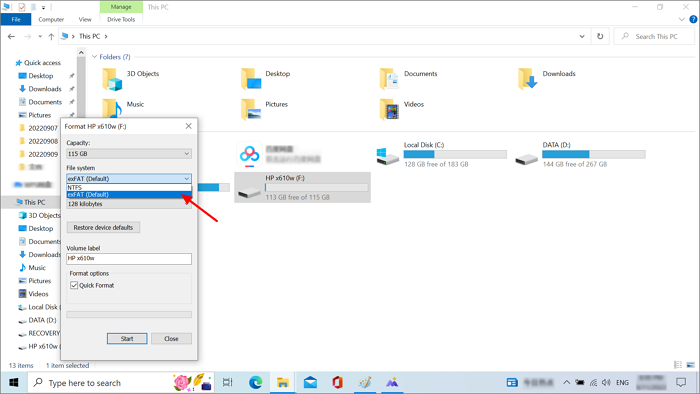
Step3. Click Start when you are done, and close this window.
Q&A: All Queries About Making exFAT Work on Mac and Windows PC
Is exFAT the Same as FAT32 Format?
FAT32 and exFAT are the main file system options for external drives, but FAT32 has a 4GB file size limit and only works with partitions of 8TB or less, making it less suitable for larger drives.
exFAT is an updated version of the old FAT32 file system, offering a compromise between FAT32 and the more advanced NTFS file system. Unlike FAT32, exFAT overcomes its shortcomings, has no capacity limits, and provides faster read and write speeds.
Is exFAT Cross Compatible?
exFAT is compatible with all Windows and modern macOS versions, but it's not suitable for built-in backup tools, which require the local file system of the computer. Additionally, exFAT is not a logging file system, making it more prone to data corruption after an error.
Is exFAT a Good Format?
If you frequently use Windows and Mac computers and need to transfer data between them, exFAT is a suitable choice. It allows for easy file transfer between the two operating systems without needing to constantly back up and reformat. Additionally, exFAT is supported in some Linux versions, but only if the necessary software conversion is installed.
Related Articles
- NTFS VS Share Permissions, What's the Difference and How to Set Them?
- Fixed: Windows 10 Reset Stuck or Windows 10 Fails to Reset
- Steam Deck SD Card Format | What's It & How to Format [Ultimate Solution]
- TF Card vs. SD Card: 10+ Things You Want to Know
- Ubisoft Game Save Folder (Everything You Need to Know)
People often use Ubisoft to save game files when their games don't support Cloud, or they prefer local storage for backup purposes. - What Is An Expansion Card? (One-Stop Info Collection)
This post provides a comprehensive guide to expansion cards, covering what they are, their physical appearance, functions, and common types. By reading this one-stop information collection, you'll gain a thorough understanding of expansion cards and their role in computing systems.
Products
Articles & Tutorials
- Data Recovery
- Data Backup
- File Recovery
- File Backup
- System Backup and Restore
- Disk and Partition Clone
- Technical articles
- Mobile articles
- Disk Master Help
- Windows Data Recovery Tutorials
- Windows Secure Delete Tutorials
- Windows Partition Management Tutorials
- Windows File Backup and Restore Tutorials
- Windows System Backup and Restore Tutorials
- Windows Disk Backup and Restore Tutorials
- Windows Clone Tutorials