TF Card vs. SD Card: 10+ Things You Want to Know
To determine which memory card to use for a specific digital device, consider the device's type and compatibility. For example, CF cards are commonly used in high-end cameras and camcorders, while TF cards are typically used in digital cameras and some smartphones. SD cards are widely used in various devices, including cameras, camcorders, smartphones, and tablets. Check the device's manual or manufacturer's website to see which type of memory card is recommended or supported. Additionally, consider the storage capacity and speed requirements of the device when selecting a memory card. Some devices may require faster or higher-capacity memory cards, so be sure to choose one that meets the device's needs. By taking these factors into account, you can select the right memory card for your device and ensure optimal performance.
We've can help - let's dive into the comparison between TF cards and SD cards, answering the most frequently asked questions and shedding light on the key differences between these two types of memory cards.
CF Card vs. SD Card FAQs:
1. What Is A TF Card
2. What Is An SD Card
3. What's The Difference Between TF Card and SD Card
A TF card (TransFlash card) is a small memory card used to expand storage capacity on various devices such as mobile phones, tablets, GPS, dash cams, and more. It works by being inserted into a compatible slot on the device, allowing the device to access the additional storage space on the TF card. This enables users to store more photos, videos, music, and other files on their device, freeing up space on the internal memory and improving overall performance. The TF card can be easily removed and replaced with a new one, making it a convenient and portable way to add extra storage to a device.
To ensure your CF card is in good condition and lasts long, it's essential to handle it with care in daily use. First, avoid touching the gold contacts on the card as the oils from your skin can damage it. Instead, use the provided adapter to insert and remove the card from your device.
What Is A TF Card
For mobile phone users, it's not unusual to see a very small and thin expandable memory card, which is commonly referred to as a TF card.
A TF card, also known as a TransFlash card, is the smallest type of memory card, measuring just a few millimeters in size. It was jointly developed by Toshiba and SanDisk in 2004 and later became a micro SD card after the acquisition of the SD Association at the end of that year, becoming an official member of the SD product family.
Motorola was the first mobile phone to feature a TF card, which was later adopted by competitors using microSD cards. Although modern Android phones have largely moved away from expandable storage, Samsung still uses microSD cards. Meanwhile, TF cards have largely disappeared from mobile phones but continue to appear in other compact digital devices like dashcams, flying drones, and GPS devices.
Thereof, the following names/texts all suggest the very type of TF card:
TF card = T-Flash = TransFlash = micro SD = microSD
What Is An SD Card
The SD card, released in August 1999 by Panasonic, Toshiba, and SanDisk, predates the TF card and is based on Semiconductor Flash memory, marking a new generation of memory devices.
When choosing an SD card, it's essential to note that a microSD card is actually a type of TF card, not an SD card. The "micro" prefix in microSD card is what differentiates it from a standard SD card. So, if you're looking to purchase an SD card, make sure to select the correct type to avoid confusion.
An SD card is a small, portable, and lightweight storage device that is smaller than a TF card and can fit into larger digital devices such as cameras, personal assistants, and multimedia players, and sometimes even desktops or laptops.
What's The Difference Between TF Card and SD Card
The main difference between TF card and SD card lies in their storage, size, and price, among other aspects. By comparing 10 key points, we can distinguish between the two types of memory cards, helping you decide which one is best for your device and how to use it effectively. Understanding the difference between TF card and SD card will allow you to choose the right memory card for your needs and use it properly on your digital device.
1.Different Names
Indeed, either type owns its unique identity.
A TF card, also known as a T-Flash, TransFlash, or microSD, is a type of flash memory card.
Secure Digital (SD) is a proprietary non-volatile memory card format, with its derivatives including SDHC, SDXC, and SDUC, which offer various capacity standards.
2.Different Origins
The TF card was first introduced to the market in 2004, but at that time it was not part of the SD product family. However, later that year, the SD Association acquired the TF card from Motorola and SanDisk, and it became part of the SD family, along with other memory cards like miniSD and SD cards.
The SD card was initially developed by Panasonic, Toshiba, and SanDisk in August 1999, but is now a product of the SD Association, a consortium of companies that oversees the SD card standard.
3.Different Size and Appearance
On one hand, we can find out the difference by dimension.
The standard size for a TF card/microSD is 15mm x 11mm x 1mm.
A standard SD card measures 32mm x 24mm x 1.4mm.
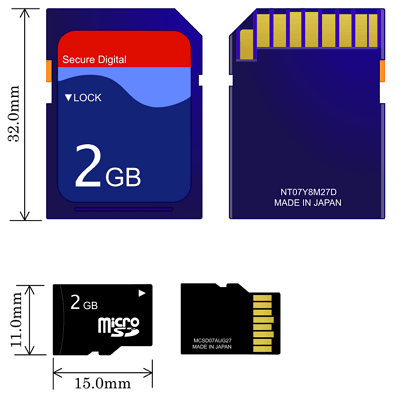
4.Different Structure
The ribs on the backside are also structured in a different distribution way, providing additional protection to the metal contacts from static electricity or contact damage.
5.Different Security
The SD card has a lock switch, but the TF card does not. The lock switch, also known as a write protection switch, can be slid to the "Lock" position to prevent data from being modified or erased by others.
The lock switch design on SD cards provides enhanced data security. However, to secure TF cards which don't have a write protection notch, a full-size adapter can be used to insert the TF card, providing an additional layer of protection.
To format a write-protected SD card, you'll need to remove the write protection first. This can usually be done by sliding a small switch on the SD card itself, or by using a tool to physically remove the write protection tab.
6.Different Definition
The SD card is a new generation of memory cards that utilize semiconductor flash memory, whereas the TF card is a smaller flash memory card that employs the latest NAND MLC technology and controller from SanDisk.
7.Different Conversion
You cannot use an SD card in place of a TF card, as they are not interchangeable. An SD card cannot be used on a device that only accepts a TF card.
You can turn a TF card into an SD card by using a proper card adapter, which allows devices to recognize the TF card as an SD card.
8.Different Application
The TF card is primarily used to expand storage capacity in mobile phones, taking advantage of its compact size and increasing storage capacity. As a result, it's becoming increasingly common to see TF cards in devices like GPS units, portable music players, and other flash memory devices.
SD cards are generally used on portable digital devices such as digital cameras, DSLRs, and handheld game consoles, offering more storage capacity than TF cards.
9.Different Capacity
TF cards and SD cards with various capacities can be purchased on Amazon and other eCommerce websites.
- 128GB, 64GB, 32GB, 16GB, 8GB, 6GB, 4GB, 2GB, 1GB, 512MB, 256MB, 128MB TF cards are listed.
- Here are the storage capacities of SD cards listed in descending order, condensed into a single paragraph: SD cards come in various storage capacities, ranging from 1TB (1 terabyte) to 128MB (128 megabytes). The most common sizes are 512GB, 128GB, 64GB, 32GB, 16GB, 8GB, 6GB, 4GB, 2GB, 1GB, 512MB, and 256MB, with the 128MB size being the smallest.
10.Different Price
In theory, under the same manufacturer, brand, capacity, and speed, a TF card is generally priced lower than an SD card.
How Does TF Card Work
By walking through the long comparison of 10 primary differences, I believe that you should have a clear brain now. But what is the best TF card on the market?
Before shopping for a microSD card, consider your needs and budget. With a card for your mobile phone, you'll likely find a compatible microSD card within your budget. Avoid cheap, nameless products, as they may require costly repairs to fix damage and recover data.
Popular brands like SanDisk, Toshiba, Samsung, Lexar, Kingston, Transcend, and Sony are well-known for their reliable customer service and high-quality products.
When choosing a suitable TF card, another important factor to consider is the "class speed", which ranges from 1 to 10. A higher speed rating indicates faster performance, making it ideal for applications like 4K recording. However, even if you're not recording in 4K, a faster TF card can still be beneficial for expanding storage in devices like smartphones or cameras, as it enables faster read and write speeds, resulting in smoother performance and a more responsive device.
When choosing a suitable SD card, the most crucial step is to understand how it works on a specific type of digital device. This involves considering the price and purpose of the SD card, as well as its compatibility with the device.
To ensure your phone, dashcam, drone, or GPS device can read and write data correctly on a microSD card, you need to format it with a proper file system. This file system organizes how data is stored and retrieved, giving meaning to the information placed on the storage medium. Without a file system, the data would be meaningless and unorganized.
When formatting a new microSD card, it's best to use the format utility provided by the SD Association. This will help you achieve the best performance, and you can refer to the classification guidelines to determine the optimal format for your specific card capacity.
- Up to 2GB: FAT12/16
- More than 2GB and up to 32GB: FAT32
- More than 32GB and up to 2TB: exFAT
The most common microSD card sizes vary depending on the device, with 32GB being typical for phones, 2GB for dashcams, and larger sizes often used for digital cameras. For those seeking a user-friendly disk format utility that supports all file system formats on a storage medium, Qiling Partition Master is a helpful tool.
Step 1. Find your SD card, right-click on the partition you want to format, and select "Format" from the menu.
Step 2. Create a new partition label, file system, and cluster size on the selected partition.
Step 3. Click "OK" on the pop-up window to continue.
Step 4. Click the "Proceed" button to start formatting your SD card.
How to Take Care of Your CF Card in Daily Use
Memory cards are portable, which means you can take them anywhere and use them across different devices. However, this convenience comes with some risks, as they can be prone to virus infection or developing bad sectors due to improper handling, vibration, or abrupt removal instead of safe ejection. Eventually, they will reach their lifespan and need to be replaced. To export media from the card, you typically need to remove it from your camera or phone and connect it to a PC or laptop via a card reader or adapter.
Factors that can cause trouble with your TF card include physical damage, water or fire exposure, software issues, and accidental deletion or formatting of files.
As long as we have the right tools, we can prevent suffering from card corruption or data loss. Human beings are skilled at using tools to solve problems, so with the right approach, we can avoid these issues.
1. Check disk errors and auto repair a corrupted TF card
Some tutorials recommend running CHKDSK to check disk errors, but a simpler tool is available.
If you're not a fan of using the command line, you can use the Qiling CleanGenius tool instead. This one-click tool allows you to fix file system errors on your hard drive with ease.
Step 1. Download Qiling CleanGenius on your computer for free.
Step 2. Run the software and click on "Optimization" on the left panel, then choose "File Showing".
Step 3.Go to "Choose drive" and select the drive with a file system error, then check "Check and fix file system error" and click "Execute".
Step 4. Once the Qiling CleanGenius completes the repairing process, click on the "here" link to view the result of the repair.
2. Recover deleted or formatted data from a TF card
Deep Data Recovery is a top-rated software for recovering data from TF and micro SD cards, with over a decade of market recognition. Since its release in 2004, it has continuously optimized its data scanning and analyzing technology, and its advanced algorithm has enabled it to track data files on every sector, resulting in a high success rate of retrieving lost files for millions of customers worldwide.
Step 1. Select the file type and click "USB/SD Scan" to start

Note: You can choose different search modes based on where and why the data was lost.
Step 2. Select the SD card to scan
- Download and install Deep Data Recovery on your Windows PC.
- To connect your SanDisk/Lexar/Transcend SD card to a computer, insert the SD card into the card reader, then insert the card reader into the computer's USB port. Alternatively, you can use a USB cable to connect the SD card directly to the computer. Make sure the card is securely seated in the card reader or the USB port to ensure proper data transfer.
- Open Qiling SD card recovery software and select your SD card, then click "Scan" to begin the recovery process.

Step 3. Check for scan results
- Wait for the scanning process to complete.
- To narrow down the search results, click on the "Filter" button and select one or multiple file types from the list, such as Pictures, Word documents, Excel spreadsheets, PDFs, and Videos.
- Click "Preview" to check if they are the wanted files.

Step 4. Recover SD card data
- Choose desired files and click "Recover".
- To avoid overwriting the original data, it's recommended to save the recovered files to a different location, such as a computer, external hard drive, or another SD card. This ensures that the recovered files are kept safe and separate from the original SD card, allowing for further analysis or use without risking data loss.
Related Articles
- Hard Drive Not Spinning? Causes and Fixes Here!
- 6 Solutions to Fix Unmountable Boot Volume Windows 10/8/7
- Fixed: Windows 10 File History Doesn't Recognize the Hard Drive
- Fixed: CPU Isn't Supported | CPU Isn't Compatible with Windows 10/8.1/8
- Best Way to Backup OST File in Outlook 365 [2022]
In this post, we will tell you what is the OST file. We will provide the full guide on how to back up OST files on Windows. You can try Qiling Backup to back up and recover your OST files. - How to Backup Outlook PST Files [2022 Complete Tutorial]
Do you know what is Outlook PST file and how to back up it? Read this complete 2022 tutorial. We'll explain the definition of Outlook, and show you three methods to backup Outlook PST files step-by-step with ease.
Products
Articles & Tutorials
- Data Recovery
- Data Backup
- File Recovery
- File Backup
- System Backup and Restore
- Disk and Partition Clone
- Technical articles
- Mobile articles
- Disk Master Help
- Windows Data Recovery Tutorials
- Windows Secure Delete Tutorials
- Windows Partition Management Tutorials
- Windows File Backup and Restore Tutorials
- Windows System Backup and Restore Tutorials
- Windows Disk Backup and Restore Tutorials
- Windows Clone Tutorials