How to Decide the Raid Redundancy over Performance [Everything You Should Know]
If you're concerned about the safety of data on your computer, you may want to consider using a RAID (Redundant Array of Independent Disks) array, which offers redundancy over performance. However, this technique can be complex, and understanding the trade-offs between data safety and system speed is crucial. In this blog, we'll delve into the world of RAID and redundancy, exploring the options and considerations for choosing the right RAID array for your device.
Raid Redundancy is a data storage technique that duplicates data across multiple disks to ensure its availability and integrity in case of hardware failure. However, this redundancy can also impact performance, as the system must read and write data to multiple disks, which can slow down data access and transfer speeds. In this blog, we'll delve into the details of Raid Redundancy and its effects on performance.
Raid Redundancy Definition
Raid Redundancy is a method of storing large data on multiple hard drives to ensure its safety in case of drive failure, allowing the user to keep their data safe and work seamlessly with the device.
Raid Redundancy is a collection of multiple hard disks performing the same function, providing data storage and redundancy. There are different types of Raid levels available, each with its own method of storing data, and users can choose a specific level based on their needs and analysis of the various Raid levels.
A RAID (Redundant Array of Independent Disks) system can improve device performance by resolving issues caused by faulty disks. If one disk in the array fails, the other disks can continue to function normally, allowing you to use your device without interruption.
How Does Redundancy Influence Raid Performance?
Raid Redundancy over performance is a technique where data is duplicated across multiple disks to ensure its availability in case of a disk failure, but this approach can come at the cost of reduced performance. This trade-off between data protection and system speed is a topic of ongoing debate, but it can be a useful strategy for applications where data integrity is paramount. By duplicating data across multiple disks, Raid Redundancy can provide a level of protection against data loss due to hardware failure, making it a valuable consideration for systems that require high uptime and reliability.
Raid uses a technique called disk mirroring and disk striping to ensure data safety. This technique involves copying data to multiple hard disks, rather than just one, to keep it saved on multiple drives. This provides a safeguard against data loss in the event of a single drive failure.
By using this method, you'll be able to keep working as instructed even when opening multiple sections, without slowing down your device's processing speed or causing issues accessing files.
Using Raid Redundancy allows for seamless data access, with the processor able to quickly search for data across multiple drives. This setup also ensures that data is not lost if one of the disks is damaged, providing a safeguard against data loss.
Raid will enable you to work smoothly by allowing other disks to work side by side, enhancing the processing of your personal computer and work station.
What to Consider When Choosing Raid Redundancy over Performance?
In summary, implementing Raid Redundancy over performance can improve your device's performance, but choosing the right Raid Redundancy level is crucial to achieve this goal.
To choose the right Raid, it's essential to know about the different types of this technique, which will help you select the most suitable one based on your specific requirements.
1. Raid 0
In Raid 0, data is striped across multiple disks, providing no redundancy or fault tolerance, but maintaining data safety through striping.

2. Raid 1
In this configuration, two disks are connected to ensure data safety by mirroring it on multiple disks, utilizing the concept of Data Mirroring, which allows simultaneous mirroring of data on different disks.

Raid 1 configuration allows you to easily access and copy data across multiple drives, ensuring uninterrupted access even if one disk is damaged, providing a solution to the problem of fault tolerance.
3. Raid 4
In this Raid type, large stripes are used and connected, similar to other Raid Redundancy techniques, to store data on multiple hard disks, ensuring smooth input/output operations.
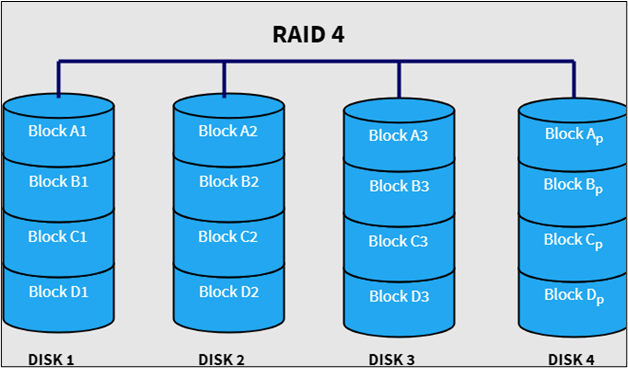
This system allows for fast processing and eliminates the feeling of slowness due to the overlapping of operations. Additionally, it provides access to data through different stripes, which can be accessed with a single clip.
4. Raid 5
In this configuration, the parity block-level stripping concept is used, where a single file is stripped across all disks, making it perfect for maintaining functionality even if one or more disks fail.
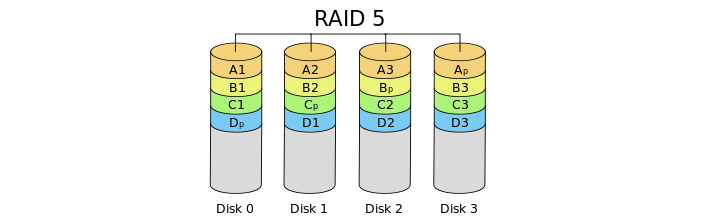
The configuration will display results and keep working smoothly, but rebuilding the array after a disk failure may take a long time.
5. Raid 10
This Raid configuration is a modified level that combines the benefits of Raid 1 and Raid 0, enabling you to achieve better performance from your device while maintaining smooth operation.
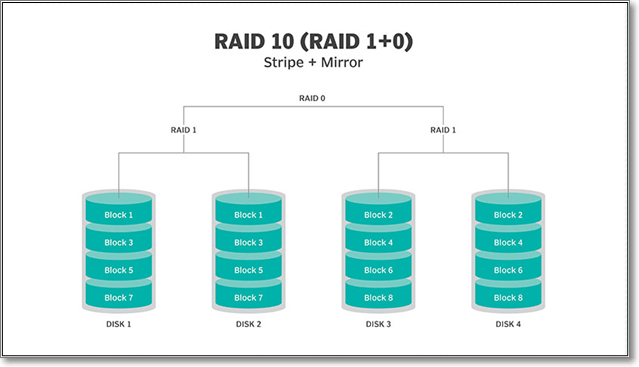
The Raid system is a costly option, making it suitable only for those with a high budget, as it is significantly pricier than other types available in the market.
Learn More About Raid Redundancy
Raid technology offers advanced data protection, but it's essential to compare it to traditional backup methods. Both have the primary advantage of saving your data, but they differ in their approach.
Raid vs Backup
Raid offers redundancy, allowing you to continue working and saving data even if one or two disks fail. However, it won't protect you if all disks are corrupted, leaving your data at risk despite using Raid redundancy.
Backing up your data is a way to save a copy of your device's information on another device, such as an external hard drive, USB, or other storage device, allowing you to have a duplicate of your data in case something goes wrong.
With this, your data will be saved even if you have formatted your computer's hard disk, as it will remain on an external device. You can also take backup of your data daily, weekly, or monthly, depending on your needs. This ensures your data's safety and availability.
You can't use the Raid technique to ensure file saving on multiple hard disks because it's automated, making it impossible to know if any files failed to save.
Conclusion
Raid is a good choice for keeping your data safe and preventing unexpected loss. It allows you to store data directly on your device, eliminating the need for external storage devices like hard disks.
Consider taking a backup of your data to be prepared for any unexpected situation, such as a simultaneous failure of all hard disks.
Related Articles
- Linux File Backup - 5 Best Softeware for Linux Desktop and Server
- Solved: CMD.exe/CMD Keeps Popping up in Windows 10
- How to Fix Desktop Refers to A Location That Is Unavailable Error
- Excel AutoSave Not Working Error in Windows 10/8/7
- Hard Drive Recovery| Recover Files from a Hard Disk
Have you ever lost your hard drive data? We compiled super easy methods to perform hard drive data recovery on Windows 11/10/8/7 and restore hard drive data on Mac. Read on to get the full guide to recover hard drive data in no time. - What Is Intranet? Everything You Need to Kow about It
Still new to the concept of the intranet? As it is involved from the networking family, here is a detailed guide containing everything you need to know about the intranet, from the basic concept to its benefits and drawbacks.
Products
Articles & Tutorials
- Data Recovery
- Data Backup
- File Recovery
- File Backup
- System Backup and Restore
- Disk and Partition Clone
- Technical articles
- Mobile articles
- Disk Master Help
- Windows Data Recovery Tutorials
- Windows Secure Delete Tutorials
- Windows Partition Management Tutorials
- Windows File Backup and Restore Tutorials
- Windows System Backup and Restore Tutorials
- Windows Disk Backup and Restore Tutorials
- Windows Clone Tutorials