Xbox One External Hard Drive Format: NTFS, FAT32, exFAT? [Best Choice]
When choosing an external hard drive for your Xbox One, you have several format options to consider, including exFAT, NTFS, and FAT32, all of which are compatible with the console. This is because Xbox One is a home video game console developed by Microsoft, and these formats are commonly used in Windows.
When choosing a file system format for an external drive to use with Xbox One, consider the size and function of the drive. If you're unsure, this guide provides a detailed explanation to help you make the correct choice.
What Is the Best Xbox One External Hard Drive Format?
Microsoft develops Xbox One. The three general Microsoft file system formats are exFAT, NTFS, and FAT32. exFAT is a modern file system that supports large files and is widely used in modern devices. NTFS is a more secure file system with built-in encryption and access control. FAT32 is an older file system that is still widely supported but has limitations on file size and security.
1. NTFS
NTFS is a proprietary file system developed by Microsoft, serving as the standard file system for modern Windows operating systems.
2. FAT32
FAT (File Allocation Table) and FAT32 are file systems widely accepted by almost all operating systems, including Windows, which used them as a standard before NTFS.
3. exFAT
exFAT is similar to FAT32 but without its limitations, making it a suitable alternative for solutions where NTFS is not feasible.
| File System Format | Compatibility | Pros | Cons |
|---|---|---|---|
| NTFS | Windows XP/7/8/10, Linux, Xbox One |
|
|
| FAT32 | Windows, Mac, Linux, Chrome OS, Xbox 360/One, PS3, PS4 |
|
|
| exFAT | Windows, Mac OSX 10.6.5 and above, Xbox One, Android |
|
|
The table shows that all formats can be used for Xbox One, but NTFS is the most powerful and strongest, while FAT32 is more compatible with external devices. However, FAT32 has its limitations, as it cannot support files over 4GB. Therefore, the choice between NTFS and FAT32 depends on the specific situation, with FAT32 being suitable for devices that require compatibility, but NTFS being ideal for larger files.
- Choose exFAT for external hard drive of Xbox One
- Choose FAT32 for Xbox 360
- Choose NTFS for internal hard drive of Xbox One
The most suitable format for an Xbox One external hard drive is exFAT, which offers efficient power and memory management, making it ideal for the console. Additionally, ensure the USB port is 3.0 compatible for seamless integration with the Xbox One.
NTFS is typically used for internal drives, while exFAT is suitable for external drives. This distinction is based on the characteristics and purposes of each file system. NTFS is ideal for internal drives due to its features and performance, whereas exFAT is used for external drives, such as USB drives, due to its simplicity and compatibility.
Xbox One uses the exFAT file format, but most external hard drives are pre-formatted to NTFS. To use an external hard drive with Xbox One, you'll need to format it to exFAT. I'll provide instructions on how to do this. If you're interested in learning more, keep reading.
Set the Xbox One External Hard Drive Format to exFAT
To improve your Xbox One's gaming performance, format your external hard drive to exFAT, which is the recommended file system for Xbox One. You can use a tool like Qiling Partition Master Free to easily convert NTFS to exFAT. This process involves a few simple steps: first, download and install the software; next, launch the program and select the external hard drive you want to format; then, choose the exFAT file system from the available options; finally, confirm the changes and let the software do the rest. By following these steps, you can ensure that your external hard drive is properly formatted for use with your Xbox One.
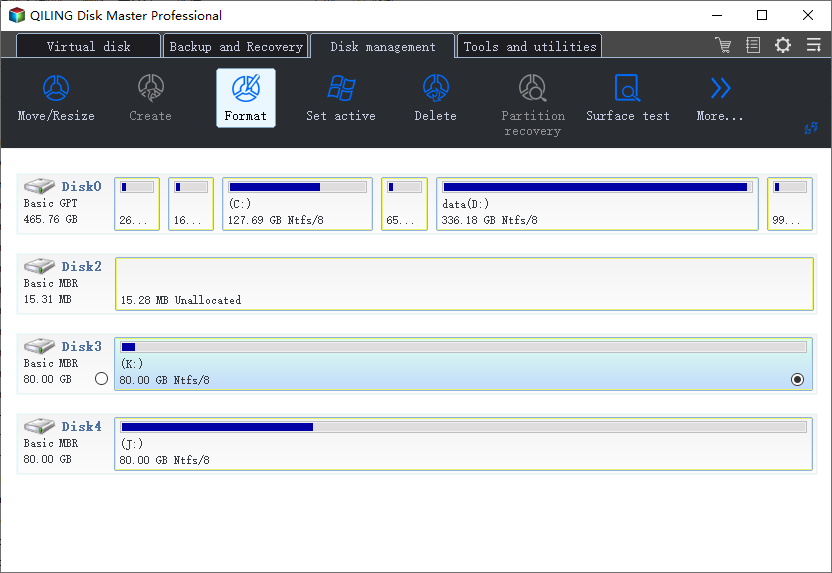
Step 1. To format a partition on your external hard drive, USB, or SD card, launch Qiling Partition Master, right-click the desired partition, and select the "Format" option from the context menu.
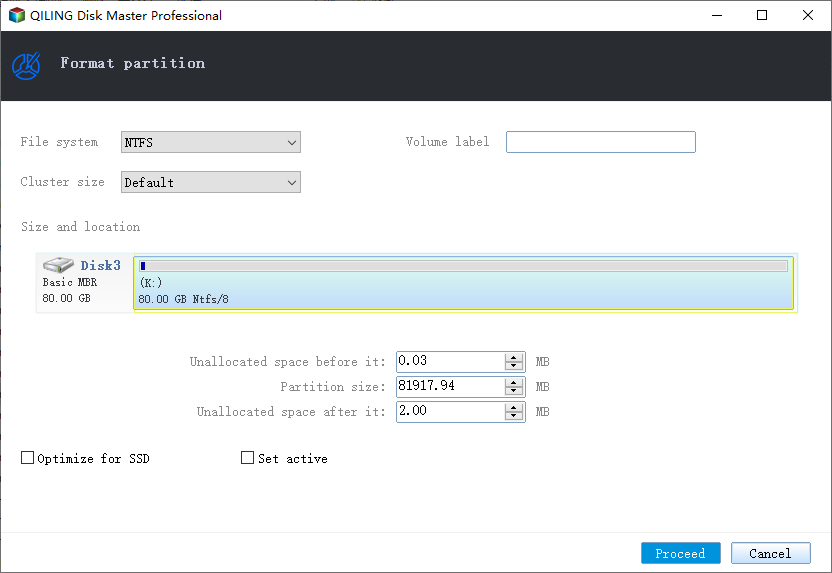
Step 2. Assign a new partition label, file system, and cluster size to the selected partition, then click Proceed.
Step 3. Click "Yes" to start formatting your external hard drive/USB/SD card in the Warning window.
If your external hard drive is in a different format, you can use Qiling Partition Master to convert it. For instance, if you want to format it as FAT32 for Xbox 360, you can use the software to convert NTFS to FAT32.
Conclusion
The best format for an Xbox One external hard drive is exFAT, offering more compatibility and better file size capabilities.
This article also provides a way to format other formats to exFAT easily with Qiling Partition Master, allowing you to download it and enjoy a better gaming experience.
FAQs About Xbox One External Hard Drive Format
The Xbox One supports three formats for external hard drives: FAT32, exFAT, and NTFS. These formats are suitable for storing and playing games, as well as storing game saves and other data. Additionally, there are some frequently asked questions regarding external hard drives for Xbox One.
1. Is Xbox One NTFS or FAT32?
NTFS and FAT32 are both suitable for Xbox One, but NTFS is more suitable for the internal hard drive, while FAT32 is ideal for external hard drives.
2. Does Xbox use NTFS or exFAT?
The best format for external hard drives to use with an Xbox is exFAT, as it is well-suited for portable storage devices and has efficient memory management, making it the ideal choice.
3. How can I format an external hard drive for Xbox?
Formatting an external hard drive on Xbox One can be done using Qiling Partition Master, among other methods. To do this, you can follow a series of steps that involve using this partition manager to format the external hard drive, making it compatible with your Xbox One console. This process allows you to prepare the drive for use with your Xbox One, enabling you to store games, data, and other content on the external hard drive.
Step 1. Link the external hard drive to the Xbox One USB port.
Step 2. Select "Format storage device."
Step 3. Enter a name for the drive and format the drive.
Related Articles
- A Beginner's Guide | How to Install Hard Drive in PC?
- Fixed: System Image Restore Failed, Windows Cannot Restore a System Image in Windows 10/8/7
- How to Clean Install macOS Ventura [2022 Detailed Guide]
- Step-by-Step Guide to Backup Drivers Windows 10 [Powerful Solutions]
- How to Factory Reset Lenovo Laptop without Novo Button [2024 Full Guide]
If your Lenovo laptop needs a refresh or you want to erase all data, resetting it is a good option. This post will guide you through the process of factory resetting your Lenovo laptop without using the Novo button, in three simple ways. - How to Factory Reset Lenovo Laptop Without Password [with 4 Practical Ways]
Factory resetting a Lenovo laptop without a password can be done in four practical ways, but be aware that this process will completely eliminate all files and folders, returning the PC to its original configuration.
Products
Articles & Tutorials
- Data Recovery
- Data Backup
- File Recovery
- File Backup
- System Backup and Restore
- Disk and Partition Clone
- Technical articles
- Mobile articles
- Disk Master Help
- Windows Data Recovery Tutorials
- Windows Secure Delete Tutorials
- Windows Partition Management Tutorials
- Windows File Backup and Restore Tutorials
- Windows System Backup and Restore Tutorials
- Windows Disk Backup and Restore Tutorials
- Windows Clone Tutorials