Genshin Impact Screenshot Folder Missing? Get It Back Now!
- Method 1. Find Genshin Impact Screenshot Folder PC
- Method 2. See Genshin Impact Screenshot Folder on iPhone
- Method 3. Check Genshin Impact Screenshot Folder on Android
Genshin Impact is a highly popular game among teenagers, known for its engaging storyline, stunning animations, and numerous in-game features such as daily quests, rewards, and multiplayer roleplay options. This immersive experience often leads to players becoming deeply invested in the game, with many taking screenshots to commemorate their progress, such as unlocking new characters or acquiring a 5-star weapon.
Players who take screenshots in Genshin Impact often find themselves frustrated when they can't locate their saved images. This can be especially disappointing when the screenshots are the only proof of accomplishment. Fortunately, this article will provide a brief guide on where to find the missing screenshot folder on both laptop and mobile devices, and also offer a solution to recover lost screenshots using a data recovery tool.
Guess My Screenshot Folder Is Missing
Some Genshin Impact players have experienced the frustrating issue of their screenshot folder going missing, which can be particularly annoying if you were planning to share your gaming achievements or memories with friends.
The user was unable to locate their screenshot folder, despite the game continuing to save newer screenshots there. This can be a frustrating experience for gamers, and there are several possible reasons for this issue, including issues with the game's file management system, incorrect folder settings, or problems with the user's operating system.
Saved screenshots elsewhere: Players may have saved their screenshots to a different location, causing the Genshin Impact screenshot folder to appear empty despite the data still being on the computer.
Accidentally deleted screenshots: Players may accidentally delete the screenshots folder while cleaning up their computer or trying to free up storage space, which can lead to lost screenshots.
Genshin Impact game bug: A possible reason for an empty screenshot folder in Genshin Impact is a bug in the game itself, which can cause the game folder to be empty.
Virus or malware: If a computer is infected with a virus or malware, it can cause serious problems, including data corruption or loss, which can result in the loss of sensitive information. This includes screenshots, which may be compromised or deleted, making it difficult to recover them.
Incorrect installation or update process: If the Genshin Impact game is not installed or updated correctly, it can lead to data loss or corruption, causing problems with the game's functionality and potentially resulting in lost progress or corrupted save files.
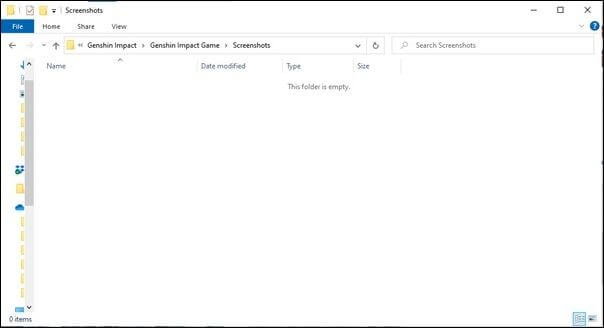
Where to Find Screenshots in Genshin Impact
If you're curious about the location of your Genshin Impact screenshots, this is the right place! We'll show you three easy methods to find the screenshots folder on your Windows-based computer, iPhone, or Android device. Each method has simple steps to follow, so you can quickly locate the folder and access your saved screenshots. Let's get started!
Method 1. Find Genshin Impact Screenshot Folder PC
If you're a Windows user struggling to find your Genshin Impact screenshots, don't worry! They might be saved in the "Download" or "Pictures" folders on your PC. If not, you can easily locate them by following the simple steps outlined in this section.
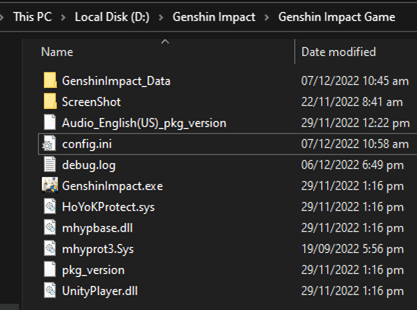
Step 1. To access the This PC folder, click on "This PC" from the Desktop or search for it in the "Start" menu at the bottom.
Step 2. Now navigate to the "Local Disk" or "C drive (C:)" and double-click it.
Step 3. Now trace the "Genshin Impact" folder inside the "Program Files".
Step 4. Go to the "Genshin Impact Game" folder, then search and click on the "Screenshot" folder.
Method 2. See Genshin Impact Screenshot Folder on iPhone
If you're an iPhone user curious about where your screenshots are saved, the answer is simple: they're stored in the gallery, just like any other screenshot you take on your device. To access them, open Photos, go to Albums, and check Recents or Screenshots.
Step 1. On your iPhone, launch the "Photos" app.

Step 2. Select "Albums" from the drop-down menu.
Step 3. Scroll down to the "Screenshots" section and tap on it.
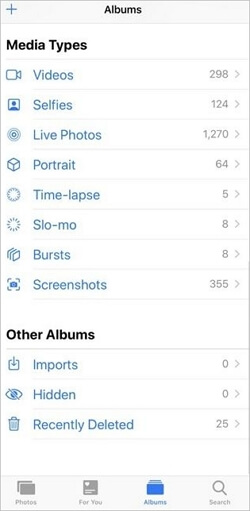
Step 4. The screenshots for Genshin Impact can be found in this folder.
Method 3. Check Genshin Impact Screenshot Folder on Android
If you're looking for screenshots of Genshin Impact on your Android phone, this section can guide you through the process with simple steps. You can find the screenshots by following these quick and easy steps. Let's get started!
Step 1. To access your photos on an Android device, start by locating the "Photos" or "Gallery" app on your device. This app is usually found on the home screen or in the app drawer.
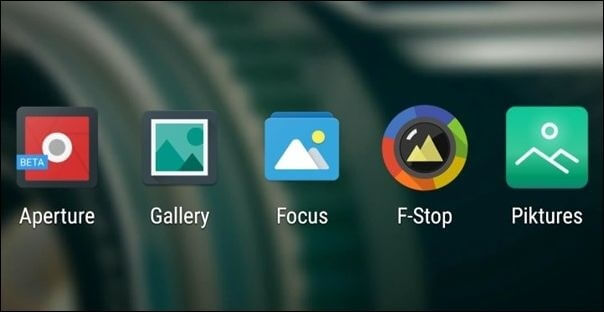
Step 2. Select "Library screen" in the bottom menu.
Step 3. To choose the "Screenshots" album from the "Photos on the device" section, select the "Photos on the device" tab, then find and select the "Screenshots" album in the list of albums.
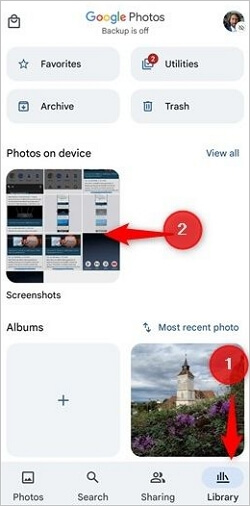
Step 4. This folder contains screenshots of the Genshin Impact.
How to Recover Missing Genshin Impact Screenshots
If you've accidentally deleted important screenshots, don't panic! There is a software solution available to help you recover them on your Windows 11/10/8/7 device. Deep Data Recovery is a tool that can assist you in retrieving your lost screenshots, saving you from the frustration of trying to recover your data on your own.
Qiling offers various solutions for everyday issues and has a data recovery tool that can recover deleted files on both Windows and Mac. This tool is compatible with all data-holding hardware, regardless of type, and features a user-friendly interface and multiple scanning and recovery options, making it a simple and practical solution.
- It can recover lost files, including games, media, etc.
- A thorough search option is available to locate lost files.
- The software offers options for file filtering and search.
- It also provides a variety of data recovery options.
- The tool rapidly retrieves lost data using advanced scanning techniques.
Download this data recovery software to recover PC game data.
Step 1. Run Deep Data Recovery software on your computer, choose the drive where the lost files were located, click "Scan", and if the lost files were on an external storage device, connect it to your computer first.

Step 2. The software will rapidly scan deleted files, followed by an in-depth scan to locate more lost files. Once the scan is complete, users can utilize the "Filter" feature to rapidly narrow down specific file types.

Step 3. Click the "Preview" button or double-click on a file for a full preview. Select the desired files, click "Recover" and choose another safe location to save them.

Conclusion
To summarize, the Genshin Impact screenshot folder may be missing due to various reasons, causing stress for gamers who lose proof of their achievements after hours of gameplay. To avoid this, backing up in-game screenshots and game files is essential. A third-party tool is required, and a free data recovery software is a recommended option. This can help locate the Genshin Impact screenshot folder on PC and mobile devices.
Genshin Impact Screenshot Folder Missing FAQs
The Genshin Impact screenshot folder is a location where the game saves all the screenshots taken by the player. The folder can be found in the game's installation directory, and its location may vary depending on the operating system being used. On Windows, the folder is usually located in the "C:\Users\[username]\AppData\Local\Packages\Microsoft.MinecraftUWP_8wekyb3d8bbwe\LocalCache\Roaming\GenshinImpact" directory, while on macOS, it can be found in the "/Users/[username]/Library/Application Support/GenshinImpact" directory.
1. Where do my Genshin Impact screenshots go
The default location for Genshin Impact screenshots is the "screenshots" folder within the "Genshin Impact" folder in the "Program Files". However, if you take a screenshot using the snipping tool or other keyboard shortcuts, the location can vary based on your personal preference.
2. Why is my screenshot folder missing?
The screenshot folder might not be available or have gone missing due to reasons such as it being deleted, corrupted, or moved to a different location, potentially due to a system crash, software malfunction, or user error.
- The screenshot folder is accidentally deleted.
- The file is hidden in the Genshin Impact game folder.
- It was not saved due to an outdated game version.
- A virus or malware is causing the memory leak, which resulted in the screenshots being deleted.
3. How to recover lost Genshin game data
To recover lost Genshin Impact game data, you can use a handy tool called Deep Data Recovery. The process is straightforward: simply download and install the tool, then follow the prompts to scan your device for lost data.
Step 1. Choose a location, say "Local Disk," and click "Scan".
Step 2. Now preview the scanned files and filter the outliers.
Step 3. If you see your screenshot folder, click "Recover".
4. How do I recover a screenshot I didn't save?
Unfortunately, if you didn't save the screenshot and it's not in your clipboard, there's no easy way to recover it. You can try checking your screenshot folder or looking for any recent screenshots in your computer's history, but if it's not there, it's likely gone for good.
- Check the default save location for screenshots.
- Use file recovery software.
- Check your cloud storage.
- Check your recycle bin.
If none of these methods work, it's highly unlikely that you can recover the screenshot. Saving important screenshots to a location where you can easily access them later is always a good idea.
Related Articles
- Recycle Bin Emptying Not Working Synology/QNAP [Resolved]
- Lost Bitlocker Recovery Key? Here's How to Get It Back Easily
- How to Fix The Directory Name Is Invalid in Windows 10/11
- The Best 7 Data Recovery Services in San Francisco, CA
- How to Recover Data from exFAT SD Card on Mac/Windows
To recover data from an exFAT SD card, download Qiling exFAT SD card recovery software for Mac or Windows, then scan the card to restore deleted or formatted files. - How to Recover Deleted DCIM Folder on Samsung Galaxy
This article guides you on how to locate the DCIM folder in a Samsung Galaxy device and also provides a solution to recover a deleted DCIM folder using a DCIM folder recovery tool.
Products
Articles & Tutorials
- Data Recovery
- Data Backup
- File Recovery
- File Backup
- System Backup and Restore
- Disk and Partition Clone
- Technical articles
- Mobile articles
- Disk Master Help
- Windows Data Recovery Tutorials
- Windows Secure Delete Tutorials
- Windows Partition Management Tutorials
- Windows File Backup and Restore Tutorials
- Windows System Backup and Restore Tutorials
- Windows Disk Backup and Restore Tutorials
- Windows Clone Tutorials