Hogwarts Legacy Save Data Gone on PS5/PS4, Recover It Now!
Hogwarts Legacy Save File Gone PS5 - Anyone Else?
"So, after dropping 4 hours into the game, and saving manually, I turned off the game to go eat. Once I came back the game started over, from scratch, and my save game is gone. Is anyone else having this issue?? This is pissing me off, as starting over already, is not really what I had in mind."
If you're a PS5 Hogwarts Legacy player who has misplaced or lost saved data, you can still recover it. On PS5 and PS4, follow these steps to restore saved files and continue exploring Hogwarts Legacy.
Does PS5 Have Auto Sync for Your Games
The PS5 typically saves your game data automatically, with the option to make manual saves as well. When you close a game or put your console in rest mode, you can also sync your saved data with cloud storage, allowing you to access your games and progress from any device. To do this, follow the steps to sync your PS5 console data with cloud storage.
Step 1. To enable the feature of staying connected to the internet while in rest mode, go to the "Settings" menu, then select "System", followed by "Power Saving", then "Features Available in Rest Mode" and finally "Stay Connected to the Internet".
Step 2. To access your saved data on your PS5, go to the "Settings" menu, then select "Saved Data and Game/App Settings" and finally choose "Saved Data (PS5)".
Step 3. Select "Sync Saved Data > Auto-Sync Saved Data".
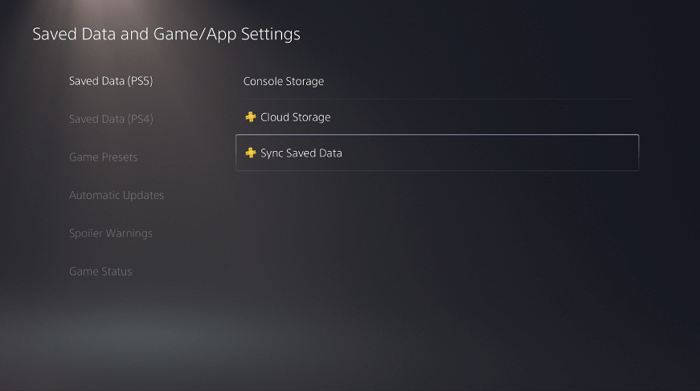
If you've lost your game data on PS5, don't worry! You can sync your console and cloud storage to the most recent data, making it easier to recover. If you had enabled the auto-save feature, this process would be even simpler. If not, you can try using free data recovery software to restore game data from your PS5 hard drive.
#1. Recover Hogwarts Legacy Save Data with PS5 Cloud Storage
If you've turned on Auto-Sync, you can easily restore lost PS5 game data by downloading the latest game save. To recover Hogwarts Legacy's lost progress, follow these steps:
Step 1. To access your saved data and game/app settings on your PS5, go to the "Settings" menu, select "Saved Data and Game/App Settings", and then choose "Saved Data (PS5)" from the options.
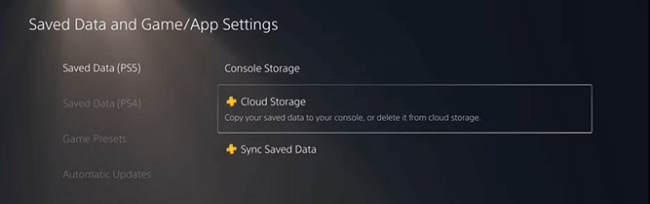
Step 2. To download an asset to the console storage, select "Cloud Storage" and then click on "Download to Console Storage" in the following options.
Step 3. Pick Hogwarts Legacy and download the game save on PS5.
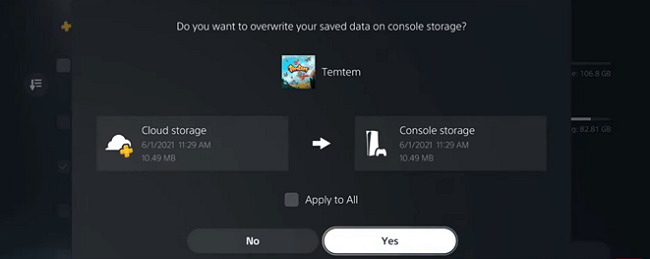
You can try playing Hogwarts Legacy on your PS5 to see if the method works. To restore PS5 game data, you can watch a video that provides a detailed guide on how to do it.
- 0:18 - How to recover game save data
- 0:50 - Open Cloud Storage
- 1:18 - Download saved data
If you can't fix the "Hogwarts Legacy save data gone" error, you can contact PlayStation support or try the second method.
#2. Recover Hogwarts Legacy Save File with Software
If you can connect your PS5 to your computer or take out the PS5 hard drive and connect it to your laptop or PC, you can recover game data from PS5 using a practical data recovery tool like Deep Data Recovery. This software allows you to retrieve data from a hard drive, SSD, USB flash drive, SD card, and more in a few simple steps, making it a convenient option for recovering lost game data.
Qiling Game Data Recovery Software
- This service supports the recovery of various game data, including Hogwarts Legacy game saves, Geshin Impact, Monster Hunter, Call of Duty, Stray, and Civilization VI, among others.
- A user-friendly interface helps users recover deleted files with minimal effort by following a few simple steps.
- Support data recovery on Windows 11/10/8/7.
To recover lost game data, download a data recovery software and follow these steps: 1. Install the software on your device, 2.
Step 1. Scan the hard drive partition
To recover lost or deleted files, select the drive on your hard disk where the files were lost, click "Scan", and let Qiling data recovery software scan for all lost data and files on the selected drive.

Step 2. Check the results
After the scan is complete, you can use the "Filter" feature to narrow down the search results or click the "Search files or folders" option to locate the lost files on the hard drive.

Step 3. Restore lost hard drive data
Select the files you want to recover and click "Recover" to save them to a safe location.

To check if you can play your game with the same progress on your PS5, copy the data from your PS4 to the PS5. This will allow you to see if the game's progress is compatible and if you can continue playing from where you left off.
Conclusion
If you've tried both of the methods above and still can't find your lost Hogwarts Legacy save file on PS5, don't give up. Contact PlayStation customer support or professional data recovery services for more help. They may offer additional suggestions or point you in the right direction.
Consult with Qiling data recovery experts for a one-on-one manual recovery service, which includes a free diagnosis and the following services offered after that.
- Recover data from various storage devices, including internal hard drives (HDD), solid-state drives (SSD), external hard drives, USB flash drives, and pen drives, using data recovery software or a professional data recovery service. This can be done by connecting the device to a computer, running data recovery software, and following the on-screen instructions to scan for and recover lost or deleted files.
- Bad sectors on a disk can be fixed using the built-in disk checking tool in Windows, called Check Disk (chkdsk). To fix bad sectors, you can run the command `chkdsk /f` in the Command Prompt, followed by the drive letter of the disk that needs to be checked.
- Fix disks that become GPT-protected partitions
- To repair a damaged RAW drive that needs to be reformatted, you can try using a data recovery software like Deep Data Recovery Wizard. This software can help recover data from the damaged drive, and then you can format the drive once the data is recovered.
- Repair wiped data, unformat hard drive, install/uninstall software or driver, etc.
Hogwarts Legacy Save File Gone on PS5 FAQs
These questions and answers may give you additional help. Read on and fix other PS5/PS4 problems.
1. How do I recover deleted files on PS4?
Follow the steps below to recover lost PS4 games:
- Go to Settings > click Application Saved Data Management.
- Save the data from the online storage to your system's storage, making it available for download.
- To download saved games from Online Storage, select the games you want to download and click the "Download" button.
2. What can I do to solve PS4 not turning on?
There are eight ways to fix PS4 won't turn on:
- Disconnect the power cable
- Connect the console to the wall outlet
- Clear the dust in your PS4
- Restart PS4 in safe mode
- Replace the broken components
- Fix the power button
- Insert a disk into your PS4
- Get specialized manual services
3. How do I recover deleted files on PS5?
To restore your PS5 console data from a USB drive, you can follow these steps:
- Connect your USB drive to your PS5 console.
- Select Settings > System.
- To restore your PS5, go to Settings > System Software > Back Up and Restore > Restore PS5. This process will overwrite your current system software with the latest version, so ensure you have a stable internet connection and that your PS5 is fully charged before proceeding.
- When multiple USB drives are connected, select the desired one from the list.
- Select the data you want to restore.
- Select Restore > Yes.
- Your console restarts and restore begins.
If you found this post helpful, consider sharing it with others on social media platforms like Twitter, Facebook, or Instagram to spread the knowledge and help more people benefit from it.
Related Articles
- How to Recover Shift Deleted Files Windows 11[Recover Readily]
- Elden Ring Stuck on Loading Screen on PC/PS4/XBOX
- 7 Data Recovery Software Crack with Serial Key and Registration Code
- How to Repair Corrupt RAW Photos on Windows PC🖼️
- How to Recover Deleted Emails in Thunderbird
5 ways to recover deleted emails in Thunderbird are introduced here to help you learn how to recover deleted emails in Thunderbird, covering all the possible and useful ways. 1. - How to Recover Shift Deleted Files in Windows 7/8/10/11 in 4 Ways [2023]
To recover shift deleted files in Windows 11/10/8/7, you have four options: using File History, restoring from a previous version, recovering from a Windows backup, or employing specialized software. Choose the most suitable method to retrieve deleted files after a shift delete operation.
Products
Articles & Tutorials
- Data Recovery
- Data Backup
- File Recovery
- File Backup
- System Backup and Restore
- Disk and Partition Clone
- Technical articles
- Mobile articles
- Disk Master Help
- Windows Data Recovery Tutorials
- Windows Secure Delete Tutorials
- Windows Partition Management Tutorials
- Windows File Backup and Restore Tutorials
- Windows System Backup and Restore Tutorials
- Windows Disk Backup and Restore Tutorials
- Windows Clone Tutorials