How to Repair Corrupt RAW Photos on Windows PC🖼️
In this article, you'll learn:
RAW format is a popular choice for photographers, offering lossless editing possibilities. Before attempting to repair corrupt RAW photos, it's essential to identify the symptoms of damage or corruption to confirm the issue.
- 👀RAW photos cannot preview or open on a Windows PC.
- 📑Unnormal file size for a RAW photo.
- 🖼️Parts of the RAW photos are blank or greyed out.
- 🎨RAW photos show up with wired colors or patterns.
- 👓Photos become blurry or pixelated.
If your RAW photos have these symptoms, you'll need to repair them. This guide will introduce three tested methods to help you repair corrupt RAW photos.
Method 1. Repair Corrupt RAW Photos with Photo Repair Software
The best method to repair corrupt RAW photos is to use professional photo repair software like Deep Data Recovery. You can download the trial version of Qiling Fixo repair tool by clicking the provided button, which is a free and straightforward solution to fix your damaged photos.
To learn more about this photo repair software, we have compiled a list of pros and cons to help you make an informed decision.
Expert's Rating:
 Pros
Pros
- This software supports most photo formats, including JPEG, PNG, GIF, NRW, and CR3, and can even repair corrupted JPEG files.
- Qiling Fixo can help repair corrupt photos, including RAW CR2 files that won't open, and address other corruption issues.
- This system supports various types of storage devices, including local PCs, laptops, external hard drives, internal hard drives, USB flash drives, and SD cards, among others.
- A User-friendly interface can make photo/video/document repair even easier and faster.
- The preview option allows you to see if the photos have been successfully repaired.
 Cons
Cons
- Only has trial version
- Only repair existing files
If your RAW photos are corrupt, don't worry! Deep Data Recovery is a handy repair tool that can help. We've also created a detailed tutorial to guide you through the process, with a step-by-step guide to help you recover your damaged photos.
After reading this tutorial, we hope you've successfully repaired your RAW photos. If you found the information and Qiling Fixo helpful, please share This guide with others to spread the word!
Method 2. Open Corrupt RAW Photos with Other Photo Viewers
It's not uncommon for RAW photos to appear corrupted, but this is often due to the fact that they can't be opened with the photo viewer or editor you're using, not because they're actually damaged. Instead, you can try using other tools specifically designed to read and edit RAW files, which should allow you to access and work with them.
The following photo viewer/editor can open RAW photos perfectly:
- Adobe Photoshop
- Adobe Lightroom
- Raw Viewer
- Corel PHOTO-PAINT
- Affinity Photo 2
If you don't want to use Adobe software or other third-party programs, you can use the Windows Photos app to open RAW photos. The tutorial will guide you through the process.
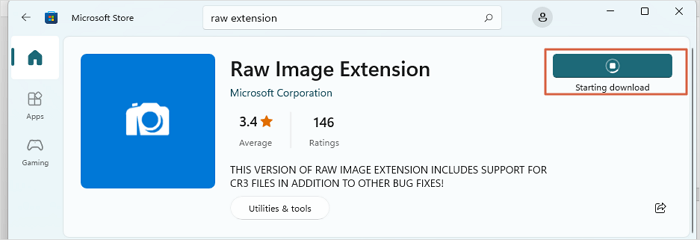
Step 1. Install the "Raw Image Extension" from the Microsoft Store on your PC.
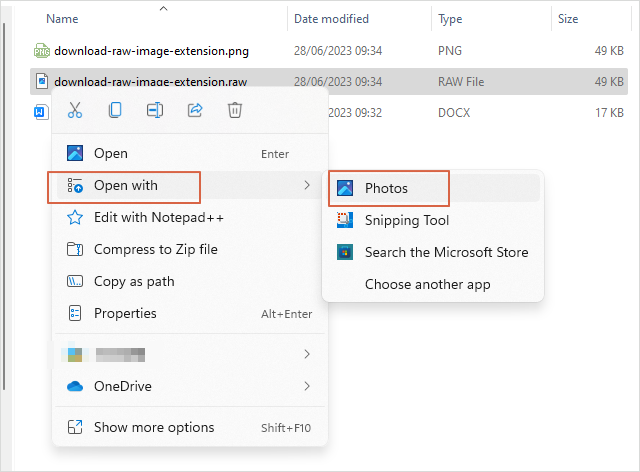
Step 2. Navigate to the RAW photos you cannot open, and open them with "Photos".
If you're having trouble opening JPG files, you can try troubleshooting the issue by checking the file's integrity and the software you're using to open it. Ensure the file is not corrupted and that the software is updated to the latest version.
Method 3. Change File Format to Fix Corrupt RAW Photos
If you're having trouble opening RAW photos with various viewers, you might consider converting them to a different format, such as JPEG or TIFF, which are generally more compatible with a wide range of software. This can be a good solution if you're unable to find a viewer that supports the RAW format.
Here are some online RAW photo converters:
- Adobe Camera Raw
- Affinity Photo
- Capture One Pro
- DxO PhotoLab
- Adobe Lightroom
- RAW Power
If you don't want to download any converters on your PC or laptop, you can try using online tools instead. These online tools can help you convert files without taking up space on your device, making it a convenient option for those who prefer not to install additional software.
- Raw.pics.io
- iLoveIMG
- CloudConvert
- FreeConvert
We've explained all the recommended methods in detail, and you can easily refer to them again by sharing this page on social media.
Bonus Tip: How to Avoid Corruption of RAW Photos
If you don't want to go through RAW photo corruption anymore, you'd better follow the tips below to avoid this nightmare:
- Create RAW photos' backup frequently before the corruption happens.
- To prevent corrupt RAW photos, consider investing in high-quality SD cards that are specifically designed for capturing and storing RAW images. Look for cards with high storage capacity, fast read and write speeds, and a reputation for reliability.
- Eject the SD card correctly, whether it is on the computer or camera.
- When transferring RAW photos to other devices using Bluetooth or Wi-Fi, it's recommended not to remove the battery. This is because the transfer process can be interrupted or even fail if the battery is removed, potentially resulting in lost or corrupted data.
- To ensure the security of your device, choose a safe and reliable RAW photo editor/viewer and keep it up to date with the latest updates.
- If you want to make changes to your photos, it's generally a good idea to edit the copied RAW photos instead of editing the original files on the SD card. This approach helps prevent accidental overwriting of the original images, which can be a disaster if you're trying to preserve the unedited files.
Losing RAW photos can happen due to various reasons such as corrupted SD cards, digital camera malfunctions, or accidental deletion from a local PC. Fortunately, there are ways to recover these photos, and the process involves understanding the possible causes and using appropriate recovery methods to retrieve the lost images.
Summary
After learning the top three methods to repair corrupt RAW photos, you should know that downloading a photo repair program is the most time-saving way. If you haven't downloaded and tried the Qiling Fixo repair tool yet, clicking the following button can directly lead to the download link and get the trial version of Qiling Fixo.
RAW Photo Repair FAQs
To learn more about RAW photo repair, you can explore various online resources, tutorials, and courses that provide in-depth information on the process. Websites like Adobe, Canon, and Nikon offer official guides and tips on how to repair and edit RAW files.
1. Can corrupt RAW photos be repaired?
Here are the methods to repair corrupt RAW photos:
- Professional RAW photo repair software
- Use other RAW photo viewers or editors
- Convert RAW photos to other formats
2. How to recover CR2, CRW, NEF, RAW photos from camera?
If you've accidentally deleted photos from your camera, it's best to use professional recovery software to retrieve them, as cameras don't have a recycle bin to recover lost files. A tool like Deep Data Recovery can help you recover photos from your digital camera.
3. Can you depixelate a RAW picture?
You can repair the pixel RAW picture with Deep Data Recovery, a software that specializes in recovering data from damaged or corrupted files, including pixel RAW images. This tool can help retrieve lost data and restore the image to its original quality, making it a valuable asset for photographers who have lost their work due to a corrupted file.
- Install and launch the Qiling Fixo repair tool.
- Add a target RAW photo and click "Repair".
- Preview the RAW picture and click "Save".
4. Why do my RAW pictures get corrupted?
Many reasons can cause RAW pictures to get corrupted:
- SD card issues
- Removed battery
- RAW editor or viewer bugs
- Camera damaged
- Virus and malware
- Storage device overheating
- Human errors
Related Articles
- ReFS Data Recovery: How to Get Data Back for ReFS
- Seagate External Hard Drive Data Recovery (A 3-Step Guide)
- The Top 9 Data Recovery Services in Washington, DC (2023)
- How to Recover Deleted Large Video Files | Reliable Video Recovery Software
- [SOLVED] Repair Corrupted Photos: JPG/JPEG Repair on Windows
Can I repair corrupted photos? You won't miss learning about five easy ways to repair corrupted photo issues! To understand more, continue to read the entire passage and download the practical image repair tool - Qiling Fixo. - How to Fix Starfield Save Games Missing and Restore Progress
If your Starfield save games are missing on Steam and Xbox. You can recover lost game data using Qiling data recovery software, which we recommend to help you restore your lost game data on your computer.
Products
Articles & Tutorials
- Data Recovery
- Data Backup
- File Recovery
- File Backup
- System Backup and Restore
- Disk and Partition Clone
- Technical articles
- Mobile articles
- Disk Master Help
- Windows Data Recovery Tutorials
- Windows Secure Delete Tutorials
- Windows Partition Management Tutorials
- Windows File Backup and Restore Tutorials
- Windows System Backup and Restore Tutorials
- Windows Disk Backup and Restore Tutorials
- Windows Clone Tutorials