What Is RAW: the Comprehensive Definition and Meaning of RAW Conditions
RAW: What Does RAW Drive Mean
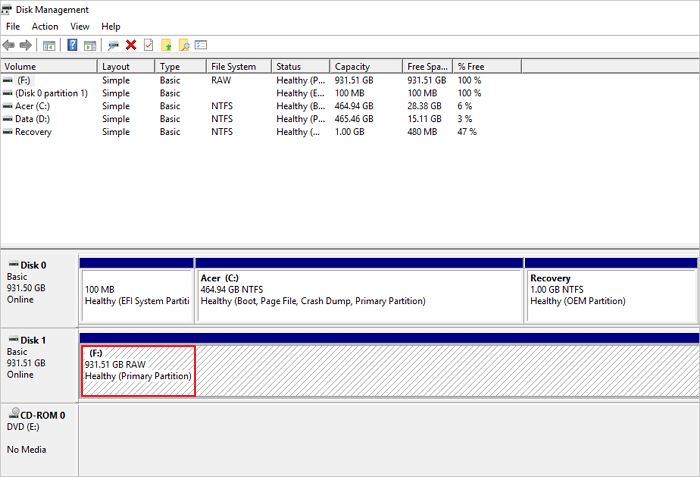
A RAW drive is a disk that has no file system or has file system failures, making it unrecognizable by the device, often due to inconsistent or missing system tables that contain information about the file system type.
A RAW drive is a storage device whose file system cannot be recognized by the operating system. When a drive becomes RAW, Windows cannot read or write data to it, and you may see error messages such as "The volume does not contain a recognized file system." This condition can affect hard drives, external drives, USB flash drives, and SD cards, often resulting from file system corruption, improper ejection, or sudden power failures.
When you try to access a RAW disk in Windows Explorer, a dialog box may appear prompting you to format the disk before using it, indicating that the disk likely contains file system errors or faults.
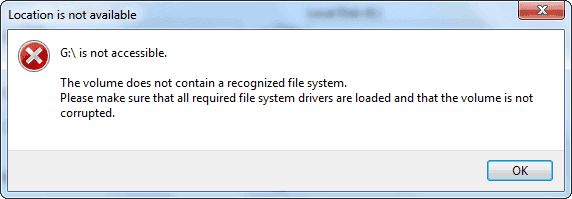
Formatting the disk usually solves the hard drive problem but erases all the data on it. If the drive isn't formatted, you'll get an error saying "There is no recognized file system on the volume. Please verify that the volume is uncorrupted and that all necessary file system drivers are loaded."
RAW: What Does RAW File System Mean
Many things can cause a hard drive or external storage device to go into a RAW state, such as a power outage, a sudden shutdown, or a software or hardware failure. This can result in the device being unable to be accessed or recognized by the operating system, and it may display a "RAW" or "uninitialized" status.
- ❌The drive's file system is corrupt or absent.
- 📃The FAT12/FAT16/FAT32 or NTFS/NTFS5 file systems have not been used to format the RAW disk.
- 💻The computer is unable to read the file system of the storage medium, such as a hard drive, solid-state drive, or USB drive, likely due to a corrupted or incompatible file system. This can occur when the storage medium is formatted with a file system that the computer does not recognize or support.
The RAW File System
The RAW file system is a condition where a storage device, such as an external hard drive, USB flash drive, or memory card, is recognized by Windows as having an unknown or no file system.
File systems like NTFS, FAT32, and exFAT govern data storage and retrieval. Without a file system, you cannot open a storage medium, such as a hard disk, USB flash drive, or SD card. A hard disk in the RAW file system has no or an unidentified file system, referred to as a raw disk or drive.
The RAW file system is not compatible with Windows, making it impossible to view or store files on RAW disks.
How to Convert RAW File System to NTFS
To read and write data in the RAW drive, you must convert the RAW file system to NTFS.
1. RAW to NTFS Conversion via Formatting
Step 1. To format a RAW drive or partition in Windows 10, open "This PC" and right-click on the RAW drive or partition, then select "Format" from the context menu.
Step 2. Choose the NTFS file system and set up the rest of the settings.
Step 3. Choose Start and then OK.
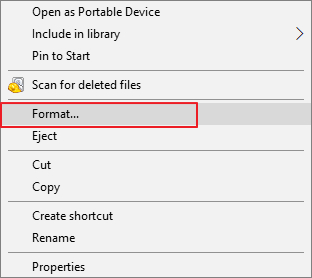
Once the process is complete, your hard disk or partition becomes usable again. You can then copy the recovered files from the initial phase back to the drive, if desired.
2. Convert RAW to NTFS Using CMD
To change your RAW hard drive or partition to NTFS, you can use a command in the Command Prompt. Simply type "chkdsk /f" followed by the drive letter of the RAW partition, and then "convert c: /fs:ntfs" (replace "c" with the actual drive letter), and press Enter. This will initiate the conversion process.
Step 1. To access the Command Prompt with administrator privileges, follow these steps: Locate the Command Prompt in the Start menu and right-click on it. From the context menu, select "Run as administrator".
Step 2. To convert a drive from one file system to another using the command line, you can use the `convert` command. To convert a drive from a different file system to NTFS, you would enter the command `convert X: /fs:ntfs`, replacing `X` with the drive letter of the drive you want to convert.
Step 3. To convert a disk or partition to NTFS, enter its name and press Enter.
After running the procedure, the RAW disk or partition should now be using the NTFS file system once it's finished.
How to Recover Data from RAW Drive
To fix an external storage device with file system issues, you can format it to assign a new file system, making it usable again. However, this will erase existing files, so perform RAW data recovery beforehand to avoid losing them.
- Recover data from the RAW drive
- Format the disk
1. Recover files on Windows
You can recover your files before or after formatting using the 100% secure Deep Data Recovery, which will help you prevent data loss.
Deep Data Recovery can quickly and safely recover data from a RAW drive, allowing you to format the external hard drive to NTFS without worrying about data loss.
2. Recover files on Mac
As a Mac user, you can breathe a sigh of relief with Deep Data Recovery Wizard for Mac, the top-rated recovery software that supports a wide range of file systems and offers various scanning modes, allowing you to recover deleted data from your Mac's trash, hard drives, external drives, and memory cards.
If the method above is helpful to recover lost data from a RAW drive, please share it on social media platforms such as Facebook, Twitter, Instagram, and others to help others who may be experiencing similar issues.
RAW: What Is RAW in Photography
In photography, a RAW file is a type of picture format that contains all the data captured by the camera's sensor, including the unprocessed image data, metadata, and other information. Unlike JPEG files, which are compressed and processed to reduce file size, RAW files are not compressed and retain all the original data captured by the camera.
This allows for greater flexibility in post-processing and editing, as the original data is preserved. As a result, photographers often prefer to shoot in RAW format to capture the maximum amount of image data and have more control over the final image.
What Is RAW File
A RAW file is a digital image file that is typically uncompressed and minimally processed, stored on a camera or smartphone's memory card. Each camera manufacturer has its own unique RAW file format, such as Canon's .CR2 or .CR3 and Nikon's .NEF.
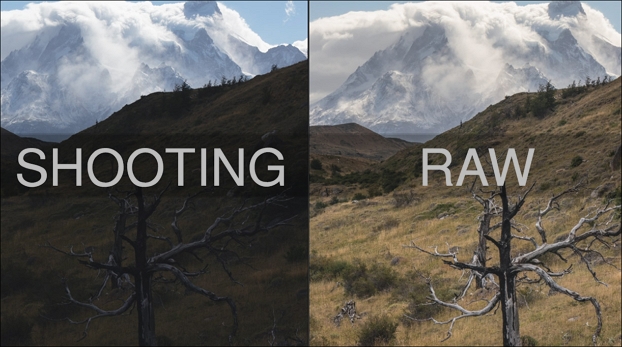
A RAW file is a lossless recording of the raw data from your camera's sensor, often referred to as a digital negative. It contains the unprocessed "ingredients" of a photograph, which must be further enhanced to realize its full potential. In contrast to JPEG files, RAW files are significantly larger as a trade-off for capturing these precise details.
RAW vs. JPEG
| RAW | JPEG | |
| File Size | Greater file size | Quarter the size of a RAW file |
| Exclusivity | Unique to each camera | Universal file format |
| Integrity | Has greater control over the final image | Can be shared without editing |
| Support | Only supported by specific cameras | Supported by the majority of cameras |
| Storage | 68 billion and 4.3 trillion color shades | Up to 16 million shades of color |
Conclusion
If you encounter a RAW drive issue, you can convert the file system using the methods mentioned. The article also introduces the RAW file format and its difference from JPEG.
Additionally, if you need to recover or repair corrupted RAW files from a digital camera, Qiling RAW recovery software is a recommended choice. It is a professional and easy-to-use tool for recovering lost or damaged RAW image files.
Related Articles
- What Is MacOS Extended Journaled? [Updated 2023]
- What Is User Folder Mac and How to Manage It? [Updated 2023]
- What Is Bootrec.exe? Everything You Need to Know About This Tool
- How to Solve Can't Delete Volume on USB [100% Working Solutions]
Are you facing issues of can't Delete Volume on USB in Windows? This article discusses the issue of why Disk Management does not delete the volume on USB and provides appropriate solutions with proper guidelines so that you can make space in your USB drive. - How Sonoma Game Mode Boosts Your Mac Performance
Are you wondering how sonoma game mode boosts your Mac performance? This article will guide you on how to do so with simple and easy steps! - macOS Sonoma Runs Slow After Update | 8 Ways to Fix
Fix macOS Sonoma running slow after update. Learn how to free space, check startup items, reset settings, and improve performance.
Products
Articles & Tutorials
- Data Recovery
- Data Backup
- File Recovery
- File Backup
- System Backup and Restore
- Disk and Partition Clone
- Technical articles
- Mobile articles
- Disk Master Help
- Windows Data Recovery Tutorials
- Windows Secure Delete Tutorials
- Windows Partition Management Tutorials
- Windows File Backup and Restore Tutorials
- Windows System Backup and Restore Tutorials
- Windows Disk Backup and Restore Tutorials
- Windows Clone Tutorials