ReFS Data Recovery: How to Get Data Back for ReFS
In this article, you'll learn:
Overview - What Is ReFS File System Format
Microsoft introduced Resilient File System (ReFS), also known as "Protogon," in September 2012 as a replacement for the NTFS file system, addressing its limitations.
Microsoft created ReFS using NTFS code, aiming to provide high data accessibility and accommodate increasing storage demands. Windows now supports ReFS, which also enables ReFS data recovery.
Data loss issues such as converting raw to NTFS or ReFS partitions can occur despite precautions, escalating quickly. This post provides a reliable method for recovering deleted data from ReFS storage.
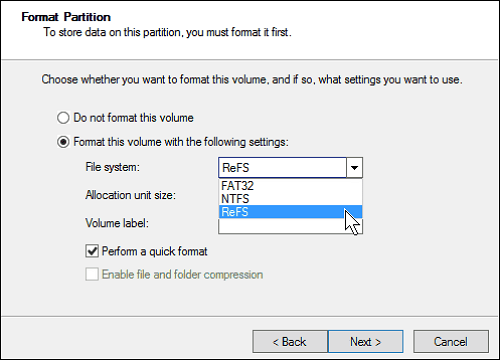
The ReFS file system offers increased dependability compared to NTFS, particularly for older drives or when the computer is shut off unexpectedly. This is due to fundamental changes in how file metadata is stored and updated, which contributes to improved reliability.
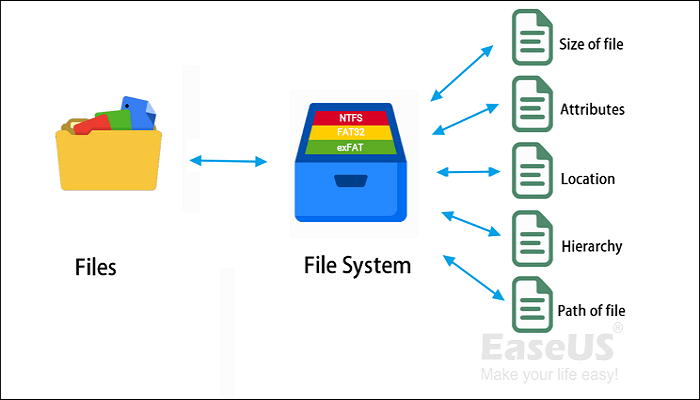
ReFS vs NTFS: Which Is a Better File System?
Discover 5 free and simple ways to recover deleted files on your Mac computer, whether the Trash has been emptied or not. These methods allow you to retrieve accidentally deleted files, giving you a second chance to restore them. ReFS vs NTFS comparison explains the differences in more detail.
How to Get Data Back from ReFS Disk
The benefits of the ReFS file system may make data recovery from a ReFS partition more challenging, but with the aid of professional data recovery software, it is still possible to recover ReFS data. These tools are designed specifically for this purpose, making it easier to retrieve lost data from ReFS partitions.
After much searching and experience, I recommend using the ReFS Deep Data Recovery tool, a professional tool for recovering data from ReFS volumes. If the ReFS partition itself wasn't lost, you can use Deep Data Recovery to recover the data from it. To recover data from a ReFS/NTFS/FAT32 hard drive partition, follow the instructions below.
Install the software on your PC, then follow the steps to recover lost data from the ReFS partition.
Step 1. Select and scan the lost partition
Launch Deep Data Recovery, select "Lost Partition" and click "Scan" to search for all the lost data, and identify lost partitions by their size.
Since the Windows system doesn't support the Linux file system, the Ext2 or Ext3 partition will be recognized as a lost partition with no drive letter. If you need to recover data from an Ext2/Ext3 partition, follow these steps.

Step 2. Filter the scanned results
You can quickly filter scanned files by category, such as Pictures, Videos, Documents, Audio, and Others, or search for a specific file by name in the search box at the top right corner.

Step 3. Preview and recover data from the lost partition
Before recovery, you can preview the file to ensure it's the data you need. Choose all the files you need and click "Recover" to restore them.

Feel free to share this useful ReFS data recovery tool with more users! This tool is designed to help recover data from ReFS-formatted drives, and it's been a game-changer for many people who've lost important files.
How to Restore When ReFS Volume Shows as RAW
To prevent data loss, if a ReFS volume appears as RAW, secure it to an external disk using the Windows Command Prompt, as File Explorer is unable to facilitate this in such a circumstance.
Step 1. Connect the external hard disk to your computer in step one. In step two, insert the recovery media into your computer.
Step 2. To open the Run dialog box, press the Win+R keys.
Step 3. To open the terminal with administrator permissions, type "cmd" or "WT" and press "Shift + Enter".
Step 4. In the Command prompt, type the following command.
To resolve the issue of "The type of the file system is RAW, chkdsk is not available for RAW drives," you can try the following fixes. Firstly, you can try to run the built-in Check Disk (chkdsk) utility on the RAW drive.
When you get the error message "The type of file system is RAW. Chkdsk is not available for RAW drives," it means your file system has been corrupted and you need to recover data from it. To do this, you can use data recovery software such as Deep Data Recovery Wizard, which can scan your RAW drive and recover lost files. Alternatively, you can try to convert the RAW drive to a healthy file system using a tool like Qiling Partition Recovery, which can help you recover data and repair the file system.
After trying to recover data from the partition, you may consider seeking data recovery services to resolve your issue.
Consult with Qiling data recovery experts for a one-on-one manual recovery service, which includes the following services after a FREE diagnosis:
- The system encountered issues with a RAID structure, resulting in an unbootable Windows OS, and a corrupted virtual disk file.
- Recover/repair lost partition and re-partitioned drive
- Unformat hard drive and repair raw drive(Bitlocker encrypted drive)
- Fix disks that become GPT-protected partitions
Conclusion
After recovering files from your ReFS drives, you can format them to make them usable again. If you found this guide helpful, consider sharing it with others.
Qiling provides reliable solutions to problems, such as recovering lost data from a ReFS partition, even if the ReFS is still operational. It's essential to make a backup of your data in advance to prevent loss and ensure its security.
ReFS Data Recovery FAQs
ReFS (Resilient File System) is a file system developed by Microsoft for Windows operating systems. It's designed to provide high reliability, integrity, and performance for data storage.
1. Can you return data and files from a formatted hard drive?
If you're about to make a backup, be careful not to accidentally format a disk using Windows Explorer, Windows Disk Management, or Command Prompt DiskPart. But if you do make this mistake, don't worry - Qiling data recovery software can help you recover your lost data.
2. Can you recover a deleted partition?
You can recover deleted partitions with Qiling Partition Recovery, a software that recovers deleted or lost partitions, including FAT, ReFS, Ext2, and Ext3 volumes in Windows.
3. Does CHKDSK work on ReFS?
Deep Data Recovery can recover deleted partitions, including Windows FAT, ReFS, Ext2, and Ext3 volumes, allowing you to retrieve lost or deleted partitions.
5. What is the ReFSUtil salvage command?
ReFSUtil's primary feature, ReFS salvage, assists in recovering data from disks that appear as RAW in Disk Management. The process involves two phases: Scan Phase and Copy Phase, which can be executed sequentially in automatic mode or independently in manual mode.
6. What does raw file system mean?
When a partition, USB flash drive, or external hard disk adopts the RAW format, three choices are indicated: to format, to recover data, or to check for bad sectors. This is typically done when the device is not recognized by the operating system, and the user is prompted to either format the device or check for errors.
- Your computer's operating system cannot identify the disk's file system.
- On your drive, there is no file system.
- Your hard drive's or partition's file system is compromised.
Windows supports FAT, NTFS, exFAT, Live File System, and ReFS file systems, but may show an external hard drive as RAW if it uses AFPS.
Related Articles
- How to Recover Deleted VHD and VHDX Files in Windows 10/11
- 2 Proven Ways to Recover Civilization VI Game Save
- 3 Proven Ways to Get Data Off an Old Hard Drive [SOLVED]
- Best Data Recovery Services in Denver, Colorado | Top 6
- How to Recover Deleted Files After Windows 10 Updates [Fast and Safe]
Windows 10 updates delete my files. What can I do? You can recover Windows 10 updates deleted files with the Backup and Restore utility, File History utility, File Recovery, or Recycle Bin. The easiest way to recover deleted files on Windows 10 is by applying Deep Data Recovery. - How to Repair Corrupt RAW Photos on Windows PC🖼️
Is it hard to repair corrupt RAW photos? The answer is NO. You can easily repair corrupt RAW photos with professional photo repair software, Deep Data Recovery. We'll also introduce how to open corrupt RAW photos with the Windows Photos app and convert RAW pictures to other formats.
Products
Articles & Tutorials
- Data Recovery
- Data Backup
- File Recovery
- File Backup
- System Backup and Restore
- Disk and Partition Clone
- Technical articles
- Mobile articles
- Disk Master Help
- Windows Data Recovery Tutorials
- Windows Secure Delete Tutorials
- Windows Partition Management Tutorials
- Windows File Backup and Restore Tutorials
- Windows System Backup and Restore Tutorials
- Windows Disk Backup and Restore Tutorials
- Windows Clone Tutorials