ReFS vs NTFS: Which Is a Better File System?
What's File System
The file system is a structure that helps the operating system organize data into groups based on logical rules. It's like a library where each file is a book, and the file system is like the bookshelves and librarians that keep the books organized and easily accessible.
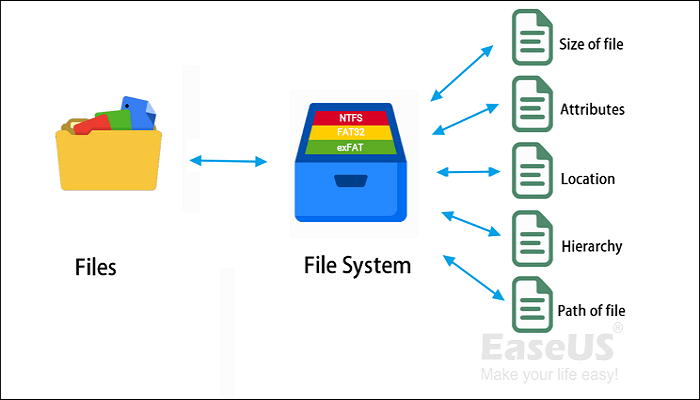
The existence of a file system allows the operating system to manage data and files in a more efficient and logical way, enabling users to easily read, access, write, modify and protect data on the device.
What's NTFS
NTFS is a file system launched by Microsoft.
In the era of Windows 98, Microsoft used the FAT32 file system and 32-bit file allocation table, which significantly enhanced disk management ability, breaking the 2 GB limit per partition of FAT16, and allowing for greater disk capacity since 2000.
Microsoft introduced the New Technology File System (NTFS) file system for Windows NT in 1993, which has been used from Windows 2000 to Windows 8, following the Win 98 operating system.
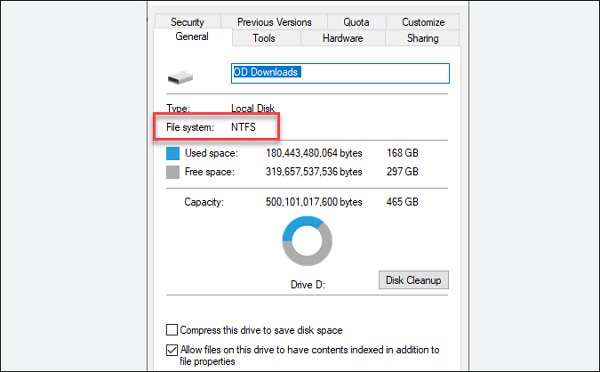
The NTFS format supports metadata, which takes up more disk space than FAT32. This results in FAT32 being able to support up to 32 GB partitions, while NTFS can support up to 2 TB partitions.
While NTFS has impressive capabilities, it has some drawbacks that become more apparent over time. Its limited compatibility can hinder its use in certain situations, and it struggles to scale to large datasets, making it less suitable for handling diverse workloads.
What's ReFS
Microsoft introduced the Resilient File System (ReFS), also known as "Protogon", in September 2012, as a new generation of the advanced file system to address NTFS file system issues.
ReFS is a file system designed by Microsoft, built from NTFS code, aiming to provide maximum data availability and meet increasing data storage needs, with Windows supporting its use.
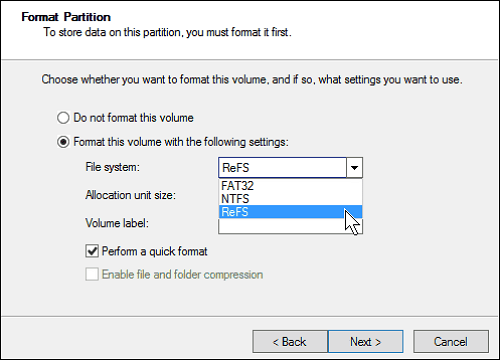
The ReFS file system offers improved reliability compared to NTFS, particularly for aging disks or in scenarios where the machine is powered off unexpectedly. This enhanced reliability stems from the way it stores and updates file metadata. Additionally, ReFS is compatible with Storage Spaces spanned volume technology, allowing it to detect and correct errors when a disk fails, ensuring accurate file copying.
Microsoft's ReFS has some design efforts, but it still has many shortcomings that need to be improved, and it cannot fully replace NTFS for now.
ReFS vs NTFS: 4 Aspects
Microsoft's ReFS and NTFS are two file systems with distinct differences, despite ReFS being built on NTFS code. The two file systems differ in four key aspects: reliability, scalability, performance, and features.
ReFS vs NTFS: Reliability
ReFS can automatically verify and repair file corruption without using Check Disk, unlike NTFS which needs CHKDSK's help.
ReFS is more flexible and better protects data integrity and availability compared to NTFS, due to its ability to handle complex data structures and ensure data consistency.
ReFS vs NTFS: Scalability
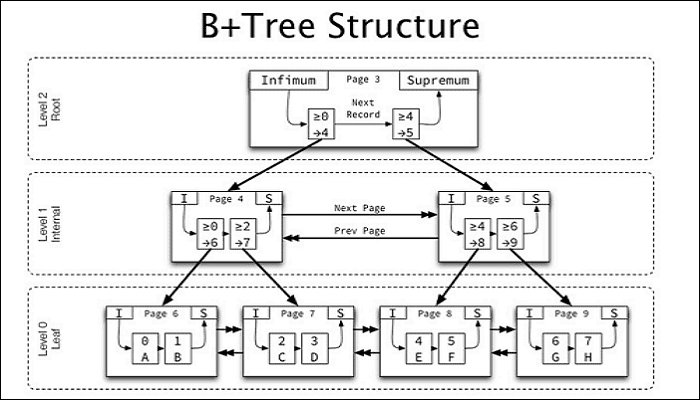
ReFS outperforms NTFS in storage performance due to its B+ tree structure, which allows for more data to be stored by branching. This results in NTFS having a maximum capacity of 16EB, compared to ReFS's 262,144EB. Additionally, ReFS has a much longer maximum file path of 32,768 characters, whereas NTFS is limited to 255 characters.
ReFS vs NTFS: Performance
ReFS's image accelerated parity feature allows for efficient data storage by allocating data to two layers on the drive. This enables the ReFS file system to quickly write data to the mirror layer, then transfer it to the parity layer, and finally recalculate each file for redundancy, resulting in optimized disk space utilization.
So, ReFS performs better than NTFS.
ReFS vs NTFS: Features
ReFS and NTFS have many similar functions, including file system structure, file allocation, file metadata, and file system integrity, due to ReFS being designed using NTFS's code.
| Comparison | ReFS | NTFS |
|---|---|---|
| Data Deduplication | √ | √ |
| Cluster Shared Volume (CSV) support | √ | √ |
| BitLocker encryption | √ | √ |
| Access-control lists | √ | √ |
| Soft links | √ | √ |
| Trim/Unmap | √ | √ |
| Changes notifications | √ | √ |
| Thin Provisioning | √ | √ |
| Junction points | √ | √ |
| USN journal | √ | √ |
| File IDs | √ | √ |
| Changes notifications | √ | √ |
| Mount points | √ | √ |
| Volume snapshots | √ | √ |
| Sparse files | √ | √ |
| Named streams | √ | √ |
ReFS and NTFS have different features, with some available only on ReFS. These exclusive ReFS features include capabilities not available on NTFS.
| Comparison | ReFS | NTFS |
|---|---|---|
| Mirror-accelerated parity | √ | × |
| Block clone | √ | × |
| Sparse VDL | √ | × |
Features available only on NTFS include (not available on ReFS):
| Comparison | ReFS | NTFS |
|---|---|---|
| Transactions | × | √ |
| Short names | × | √ |
| Extended attributes | × | √ |
| Hard links | × | √ |
| Bootable | × | √ |
| Supported on removable media | × | √ |
| Object IDs | × | √ |
| Page file support | × | √ |
| Disk quotas | × | √ |
| File system encryption | × | √ |
| File system compression | × | √ |
Which Is a Better File System
The two file systems, NTFS and ReFS, have different uses due to their distinct features and functionalities. NTFS is designed for various configurations and common uses in work, making it widely used and suitable for most situations. In contrast, ReFS is limited in its capabilities and cannot replace NTFS, but rather serves as a supplement to it.
ReFS is a more efficient file system for advanced users, offering advanced functions that protect and repair data for PCs handling large amounts of data, providing strong flexibility.
NTFS is a universal file system with more functions and wider uses, while ReFS may be more attractive to users who need to manage data in a large-scale environment and want to maintain data integrity in the event of file corruption.
Conclusion
In conclusion, there is no clear winner in the comparison between ReFS and NTFS, as both file systems have their own strengths and weaknesses, making them suitable for different users and needs.
Related Articles
- What Is macOS Base System [Everything You Need to Know]
- How to Fix Physxloader.dll Is Missing or Not Found Errors
- What is Windows Image Boot (WIMBoot)?
- What Are the Best External Hard Drive for PS5 [Pros & Cons]
- FIXED: PC Won't Boot to BIOS - 4 Ways Included
When you need to modify BIOS while your computer is running, you may find that it cannot enter BIOS. So what should you do if your PC cannot reach the BIOS? This article will describe how to fix the PC won't boot to bios issue. You can learn some troubleshooting advice in this post. - 3 Steps: How to Fix PCL XL Error in Printer Windows 10/11
If you're experiencing a PCL XL Error in your printer, try our suggested solutions to resolve the issue.
Products
Articles & Tutorials
- Data Recovery
- Data Backup
- File Recovery
- File Backup
- System Backup and Restore
- Disk and Partition Clone
- Technical articles
- Mobile articles
- Disk Master Help
- Windows Data Recovery Tutorials
- Windows Secure Delete Tutorials
- Windows Partition Management Tutorials
- Windows File Backup and Restore Tutorials
- Windows System Backup and Restore Tutorials
- Windows Disk Backup and Restore Tutorials
- Windows Clone Tutorials