Move from Server to Cloud: What to Check and How to Migrate
- Support: In 2022, migrating and moving server-hosted content to a cloud-host involves transferring data, applications, and services from on-premises servers to a cloud-based infrastructure. This process can be complex and requires careful planning, execution, and management to ensure minimal disruption and optimal performance.
- Applies to: Small and middle sized business.
In this article, you'll learn:
- Selecting a reliable cloud computing service is the first step in getting started with cloud computing. This involves choosing a service that fits your budget, as well as your specific needs and requirements. Consider factors such as storage capacity, data transfer rates, and scalability, to ensure that the service can handle your workload.
- To free up space on your device, you can move data or apps that you don't need to upload to cloud storage in advance. This way, you can remove them from your device and still have access to them online. For example, if you have a lot of photos or documents that you've already uploaded to cloud storage, you can delete them from your device to save space.
- Guide 3. Create a Server Backup Before Moving to Cloud
- Guide 4. How to Move Server to Cloud
Can You Move from Server to Cloud
Yes, sure. Most middle-Small and large businesses alike rely on a strong operation team to ensure their server machines run smoothly and rapidly. This team is crucial when a company decides to migrate its server to the cloud, as they handle the entire process.
However, when you own a small-To move server data from a local server machine to a cloud host without a dedicated IT team, I would follow these steps: First, I would ensure that the server data is backed up and ready for transfer. Then, I would use a cloud-based migration tool such as Amazon S3 or Google cloud storage to transfer the data. Alternatively, I would use a third-party tool like Rsync or Duplicati to securely transfer the data.
This page will discuss the pros and cons of using physical application servers versus cloud servers, as well as the complete process of successfully migrating a server to the cloud. Let's get started.
Why Would a Company Move Server to the Cloud
The comparison table highlights the differences between local server machines and cloud servers, making it clear why many companies are shifting their servers to the cloud.
Local Server vs. Cloud Server:
| Comparison | Local Server | Cloud |
|---|---|---|
| Management Burden | High | Low |
| Deploy Efficiency | Low | High |
| Deploy Flexibility Across Regions | Low | High |
| Security Level | High | Low |
| Security Maintenance Cost | High | Low |
| Expanding Space Cost | Low | High |
| Portability | Low | High |
| Access Speed |
|
Fast |
| Cost | High | Low |
| Free Trial | NO | YES |
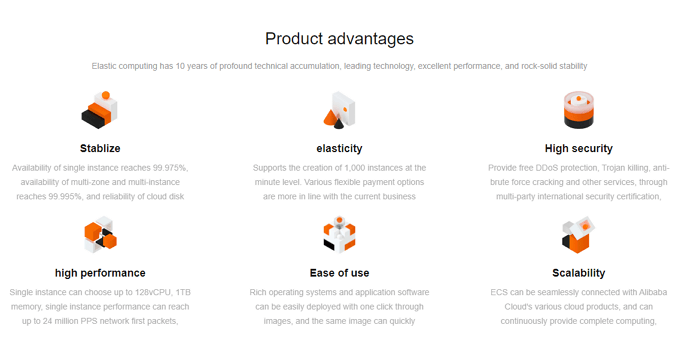
According to the comparison table, Cloud Server has obvious advantages over a local Server machine, making it a popular choice for companies. While big companies often have a team to manage Server and Cloud migration, small businesses may have to handle the task themselves. The image of Aliyun Product Advantages further highlights the benefits of moving from Server to Cloud, making it a trend among companies.
When migrating a server from a local environment to the cloud, several key considerations and preparations are necessary. This includes assessing the current server's hardware and software requirements to ensure compatibility with the chosen cloud platform, determining the optimal cloud deployment model (e.
Moving from a Client/Server to Cloud Computing, What Should I Consider
Before moving a physical server to the cloud, take a moment to think it through. Make sure you're clear on what needs to be prepared and considered in advance to ensure a smooth transition.
Here are the key factors to consider when moving from a client or server to a cloud that you shouldn't miss:
- #1. What Cloud Computing to Choose, and Your Budget
- #2. What Data You Don't Need to Upload to Cloud
- #3. Do You Need to Create a Server Backup
- #4. How to Move Server to Cloud
To move the Server to Cloud, you can start by creating a Cloud account and setting up a new server on the Cloud platform. Next, you'll need to migrate your existing server data to the Cloud server. This can be done by using a migration tool or by manually transferring the data. Once the data is transferred, you can then configure the Cloud server to match the settings of your existing server.
Guide 1. Select A Reliable Cloud Computing Service with Your Budget
This list provides a comparison of Cloud Server providers and their pricing for Cloud services, allowing you to assess your budget and choose a suitable Cloud for Server migration.
| Comparison | AWS | Azure | Google Cloud | Alibaba Cloud |
|---|---|---|---|---|
| Company | Amazon |
Microsoft |
Alibaba | |
| Website | https://aws.amazon.com/ | https://azure.microsoft.com/en-us/ | https://cloud.google.com/ | https://us.alibabacloud.com/en |
| Pricing | https://aws.amazon.com/pricing/ | https://azure.microsoft.com/en-us/pricing/ | https://cloud.google.com/pricing/list | https://www.alibabacloud.com/pricing?spm=a3c0i.239195.6791778070.dnavpricing0.618412bdnsihhg |
| Free Trial |
|
|
|
|
We recommend visiting the pricing link listed in the table to select a suitable cloud service for your company, as prices may vary. Small-sized businesses may consider AWS or Alibaba due to their low cost and excellent services, making them a suitable option for smaller companies.
Guide 2. Move Data or Apps that You Don't Need to Upload to Cloud In Advance
To safeguard your company's core database and user privacy, it's highly recommended that you relocate confidential data, documents, folders, and applications to a separate local drive in advance. This proactive measure will help protect sensitive information from potential cyber threats and unauthorized access.
Qiling Disk Master Technician is a reliable server PC transfer software that can help you move big files, folders, and apps to another local or external hard drive with ease, thanks to its Large File Cleanup and App Migration feature.
Qiling Partition Master Enterprise
Your trustworthy Windows Server disk manager.
- Extend System drive, combine/split partitions.
- Clone disk, migrate OS to HDD/SSD.
- Convert MBR to GPT, GPT to MBR, no data loss.
- 1-click adjust disk layout, create volumes at one time.
#1. Move Big Files to Another Drive
Step 1. Run Qiling Disk Master on your PC, select "Large File Cleanup", and click the "Start" button to proceed.
Step 2. Select the disk you want to scan, click "Scan."
Step 3. Once the scan is complete, files larger than 20M will be listed. You can then select the desired files and choose the target drive to move them to. To do this, you can either click the triangle icon to select the destination or click "Browse" to choose the desired location.
Step 4. Click the "Move" button, check the files in the pop-up window, and then click "Move" again.
#2. Migrate Apps to Another Drive
Step 1. Launch Qiling Disk Master on your computer. Click "File sync".

Step 2. Select the Apps or programs that you want to transfer.
List all movable applications and mark them as "Yes". Then, select the destination by choosing an external device or another local drive.
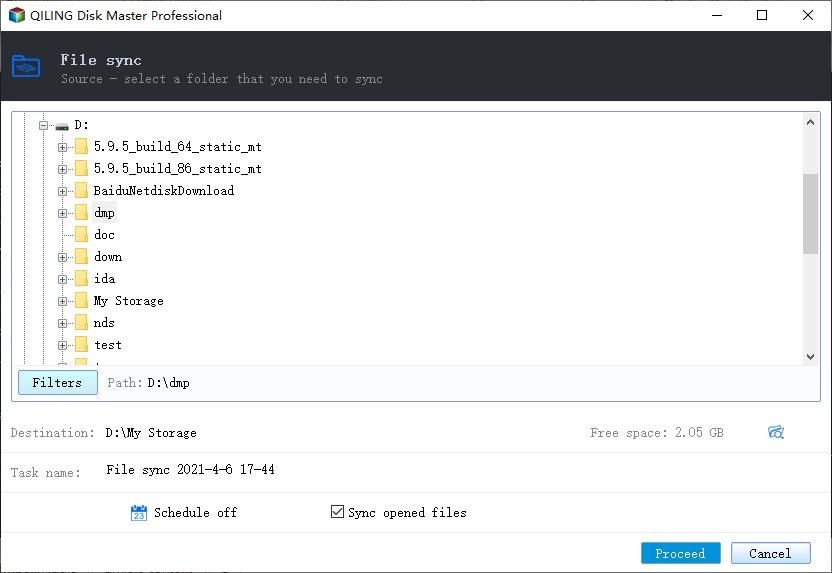
Step 3. Transfer the Apps. Click "Proceed" to start the process.
Guide 3. Create a Server Backup Before Moving to Cloud
Before moving to the cloud, create a full backup of your Server data and system in advance to ensure your data and clients' data are protected.
Creating a full backup is a traditional yet effective way to safeguard your site data on servers. Qiling Disk Master Technician, with its Backup and Restore features, can efficiently fulfill your backup needs.
For a step-by-step guide, check this out:
Windows Server Backup and Its Alternative
We'll provide you with a complete guide on how to install and back up Windows Server successfully on this page.
Guide 4. How to Move Server to Cloud
All major Cloud services have their own Server to Cloud migration guidelines on their official websites. Amazon, Microsoft, Google, and Alibaba offer official guides that can be followed to complete the migration process. These guides can be accessed by clicking on the respective links, and are recommended to be followed for a smooth migration experience.
#1. AWS
- Move Server to Cloud:https://aws.amazon.com/cloud-migration/how-to-migrate/
- Video Tutorial:
#2. Azure
- Move Physical Server to Azure:https://docs.microsoft.com/en-us/azure/migrate/tutorial-migrate-physical-virtual-machines
- Video Tutorial:
#3. Google Cloud
- Move Physical Server to Google Cloud:https://cloud.google.com/migrate/compute-engine/docs/4.5/how-to/prepare-vms-servers/physical-servers
#4. Alibaba Cloud
- Move Server to Alibaba Cloud:https://www.alibabacloud.com/blog/alibaba-cloud-migration-tool-server-migration-center_596498
- Video Tutorial:
Moving Server to Cloud Is Complex and Challenging, Be Sure You've Blocked Essential Content In Advance
Many companies have chosen to move their servers to the cloud due to its flexibility and ease of deployment, which offers a lower cost compared to physical servers.
Before moving server data to the cloud, consider four key factors: selecting the right cloud provider, blocking essential data and applications, ensuring server backups, and planning the migration process to minimize downtime and ensure a smooth transition.
Moving physical servers to the cloud can be a complex process that requires patience. However, cloud providers have strong support teams that can be relied upon to facilitate this process. Before starting, it's essential to ensure that confidential data, files, and apps are moved to a secondary or external disk to prevent them from being uploaded to the cloud.
Related Articles
- How to Transfer Twitter from One Account to Another
- How to Move Diablo III 3 to Another Drive/PC Without Re-downloading
- How to Move Installed Programs to Another Drive in Windows 11
- How Do I Transfer My Avira to New Computer/Another Drive
- Free disk cloning software for Windows 10/8/7
You can clone your hard disk drive partition with freely available software without losing any data. This process, combined with backup and restore, provides a complete solution to safeguard your hard disk drive partition data. - Free Download Qiling Backup Full Crack + Serial/Keygen
This article is about Qiling Backup full crack download, where we'll introduce its features and guide you on how to get the latest version for free on Windows 10/8/7.
Products
Articles & Tutorials
- Data Recovery
- Data Backup
- File Recovery
- File Backup
- System Backup and Restore
- Disk and Partition Clone
- Technical articles
- Mobile articles
- Disk Master Help
- Windows Data Recovery Tutorials
- Windows Secure Delete Tutorials
- Windows Partition Management Tutorials
- Windows File Backup and Restore Tutorials
- Windows System Backup and Restore Tutorials
- Windows Disk Backup and Restore Tutorials
- Windows Clone Tutorials