Five Excellent NAS for Small Business Backup 2022
For a small business, data is a critical asset that needs to be protected. Losing vital information due to a failed hard drive without a backup can be devastating. Therefore, it is essential to have a reliable backup system in place. A Network Attached Storage (NAS) device is an excellent choice for small businesses, offering a secure and efficient way to store and protect valuable data. This article aims to educate readers on what NAS is and provide guidance on selecting the best NAS for small business backup needs.
What Is a NAS for Small Business Backup?
Network Attached Storage (NAS) refers to a storage system that can be attached to a computer, allowing users to access their data over the network after it is stored on the NAS. A NAS system typically consists of a NAS device, which is a small computer-like unit that houses the necessary components, including a processor, memory, and storage, to provide a centralized storage solution for multiple users.
- One or more hard drives are required for data storage.
- To access data, a computer is required, which consists of an operating system and a processor.
- A transfer protocol is a set of rules that govern how data is transmitted between devices on a network. It ensures that data is sent and received correctly, and that the devices involved in the transfer can communicate with each other effectively.
- It requires a router or other distributor to connect the network storage to the network.
NAS (Network-Attached Storage) provides a centralized storage solution for small businesses, allowing them to store, manage, and protect their data across multiple devices. This can be particularly beneficial for small businesses, as it enables them to have a reliable backup system in place, reducing the risk of data loss due to hardware failure, user error, or other disasters.
Are NAS Drives Good for Small Business Backup?
NAS is a great option for small businesses looking for a reliable and secure backup solution. Without the need for professionals, NAS can store data safely and provide daily access, making it an efficient choice for small businesses. Additionally, NAS offers several benefits, including efficiency, that can help small businesses streamline their operations.
- Store data on another device to prevent data loss.
- Backup data on NAS to give double data protection.
- Manage data from different computers through the network.
- Share data with others through the internet.
- Enable employees to achieve timely assistance.
- Expand more storage space on the computer.
Using a Network-Attached Storage (NAS) device can greatly benefit small businesses by improving efficiency and convenience. With a NAS, employees can access and share files from anywhere, at any time, making it easier to collaborate and work remotely. This can be a significant advantage for businesses looking to boost productivity and flexibility. As we move forward, it's essential to consider various factors when selecting a NAS to ensure it meets the specific needs of your organization.
Factors to Consider When Choosing NAS for Small Business Backup
NAS devices serve the basic function of storing data, but they can also be used for more advanced purposes, such as running a media center for movie watching. With numerous NAS devices available on the market, choosing the right one for small business backup requires considering several factors, including the device's capabilities and features.
- The storage capacity of a NAS hard drive should be determined by the type and amount of content you plan to store on it, such as videos, photos, music, and documents.
- A trusted brand is likely to excel in research and development, after-sales service, and warranty, as it has earned the loyalty and confidence of its customers.
- The performance of a network-attached storage (NAS) device is a crucial factor in determining its overall usability and lifespan. It encompasses both the speed of operation and its endurance, which collectively determine how long the NAS will be used.
- Usage: Some will offer additional mail servers or web servers.
When choosing a NAS, consider not only its capacity and performance, but also other software and hardware factors that suit your habits and preferences. For small businesses, a reliable NAS is essential for backup purposes, and here are five recommendations to consider.
Best NAS for Small Business Backup 2022
There are five best NAS systems for small business backup:
1.Synology DiskStation DS220j
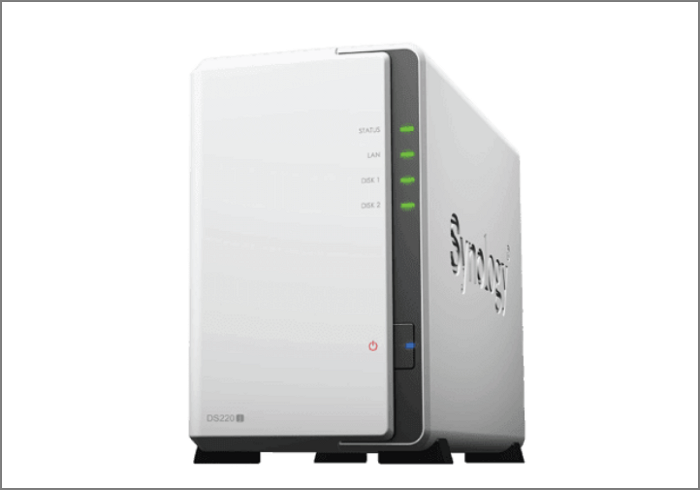
Synology is the top overall NAS device, offering quick support for various applications and delivering up to 32 TB of storage and 112 MBps of encrypted read and write speeds. It excels in multiple areas, but also has its pros and cons.
| Synology DiskStation DS220j | ||
|---|---|---|
| Pros | Full protection with military-grade encryption technology. | Doesn't consume much power: only 12w |
| Cons | Increased risk of plastic tread wear on the screws. | Only two of the 12 cameras can be connected for free. |
| Price | $549.99(4GB) | |
2.Seagate Desktop 8TB External Hard Drive
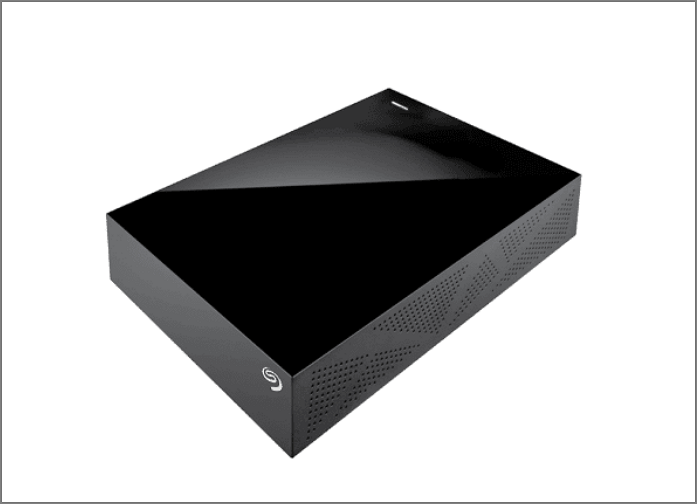
Seagate's security is highly regarded, and its NAS (Network-Attached Storage) system allows for secure data storage and remote access to up to 16 TB of data. Additionally, when sharing files, administrators have control over security levels and access rights, providing an extra layer of protection. This highlights the pros of Seagate, but there may also be some cons to consider.
| Seagate Desktop 8TB External Hard Drive | ||
|---|---|---|
| Pros | Simple setup, and most systems can recognize the drive. | Writing speed is fast for most purposes and runs quietly. |
| Cons | It is used for file storage, not streaming. | The transfer speed is a little slow. |
| Price | $261.98 | |
3.TerraMaster F4-210
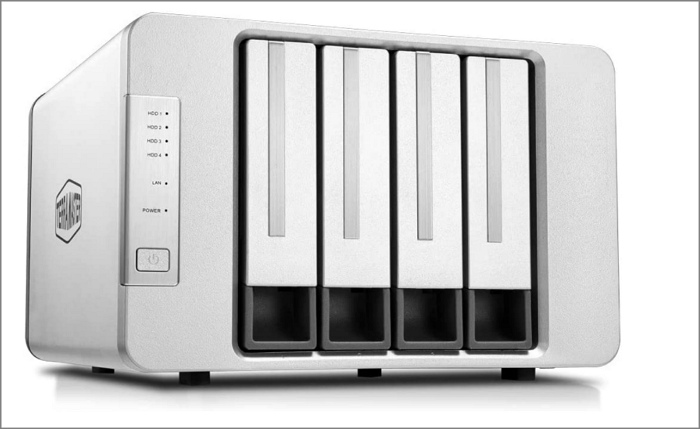
TerraMaster is a budget-friendly NAS option that can meet basic needs, offering up to 72TB of raw internal storage with a maximum individual drive capacity of 18TB. It's a cost-effective solution for those who don't require advanced features, making it a good starting point for small businesses or home users.
| TerraMaster F4-210 | ||
|---|---|---|
| Pros | It is easy to understand the operating system. | The base RAM is better. |
| Cons | It may be a little noisy when using the drive. | There is no unified cloud backup application. |
| Price | $450.78 | |
4.QNAP TS-253D
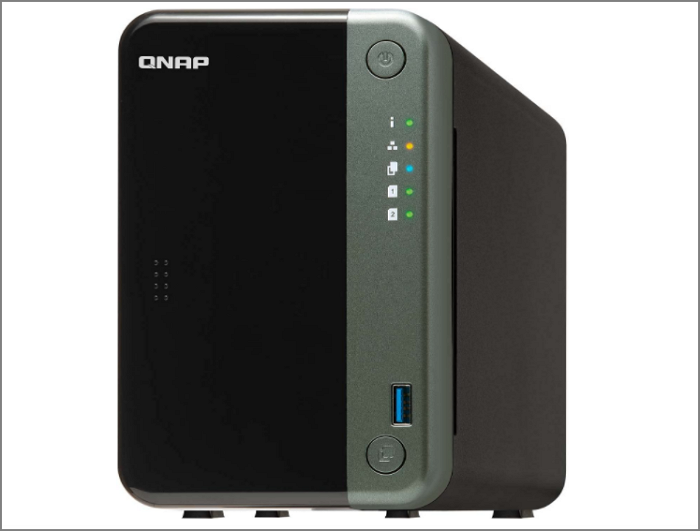
The QNAP is the best choice for backup functions due to its hardware specifications, upgradeable options, and extensive support for cloud storage solutions, supporting up to 30+ different cloud backup services.
| QNAP TS-253D | ||
|---|---|---|
| Pros | It has a large number of cloud and local backups. | It has Dual 2.5GbE ports. |
| Cons | Some settings and options are ambiguous. | For media software, the performance is poor. |
| Price | $514-$802(4GB) | |
5.WD My Cloud EX2 Ultra
Western Digital's WD My Cloud EX2 Ultra is a NAS device that offers a large selection of options, with a maximum capacity of 36TB. It provides significant value to a network, but its price tag is under $200. The pros and cons of this device include.
| WD My Cloud EX2 Ultra | ||
|---|---|---|
| Pros | The price is affordable. | It can stream video with no glitches. |
| Cons | The functions are limited. | There is no HDMI port. |
| Price | From $304- $2599 | |
Choosing the right NAS device for your company depends on specific needs, as each of the five options has its own advantages and disadvantages. The Synology DiskStation DS918+ offers high-performance and expandability, while the QNAP TS-253B provides robust security and scalability.
- If you're looking for an affordable option, the WD My Cloud EX2 Ultra and the TerraMaster F4-210 are both good choices.
- If you're looking to purchase a NAS primarily for backup purposes, the QNAP TS-253D is a suitable option.
- The Seagate Desktop 8TB External Hard Drive is a top-notch choice for securing your data, offering ample storage capacity and robust protection for your valuable files.
- Synology DiskStation DS220j is the best overall device.
Once you know your needs, you can select a NAS device that fits them. After that, you can follow the steps to back up your computer to the NAS.
How to Back Up to a NAS Device?
Using professional software to back up a computer to a Network-Attached Storage (NAS) is a convenient operation, and Qiling Backup Enterprise is a suitable choice for this task. It can perform the backup operation.
- Control all backups from different computers.
- Backup automatically weekly or monthly.
- Keep the backed-up data encrypted.
- Support local and offsite backups.
- Support system clone, hard drive clone, and partition clone.
- Backup multiple SQL databases.
Using Qiling Backup Enterprise to back up the NAS is the best choice. And all kinds of devices are available. It is also easy to operate. Here is the step-by-step guide.
Step 1. Open Qiling Backup Enterprise, then click on "File backup" to set a new backup.

Step 2. Then select the specific files you want to back up.
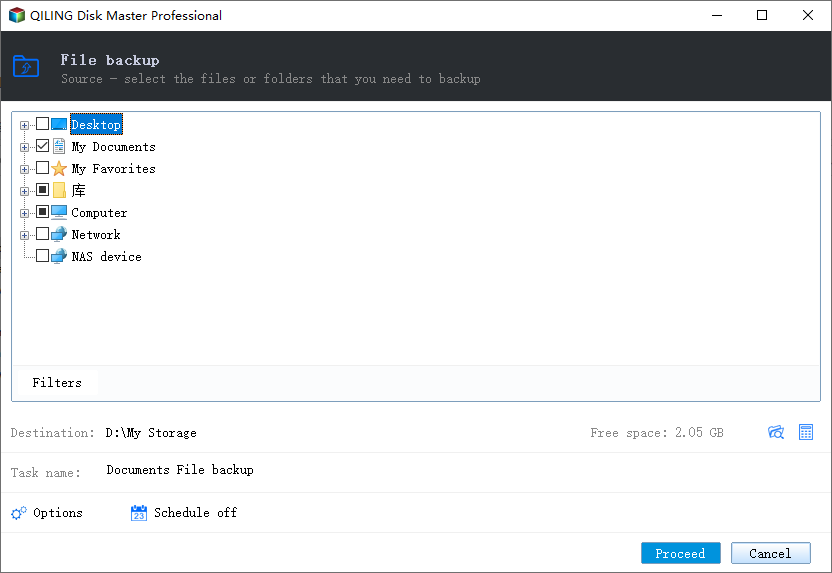
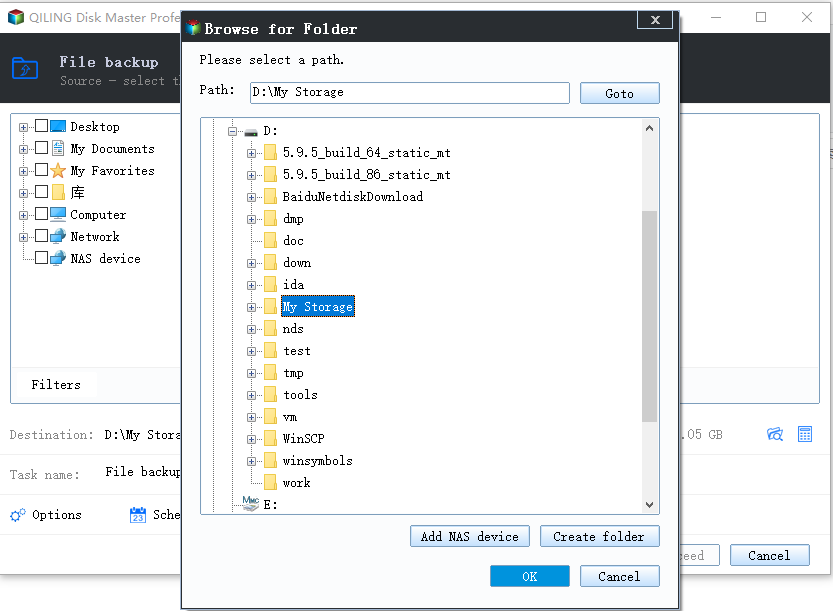
Step 3. To save a copy of your browser's data, click on the "Backup" option. Then, click on the "Browser" option to select the destination where you want to save the backup.
Step 4. To customize your backup scheme, click on "Schedule: Off" and select "New" under the "Schedule" catalog. This will allow you to set up a new backup schedule and access additional settings such as "Backup cleanup" and "Advanced Settings".
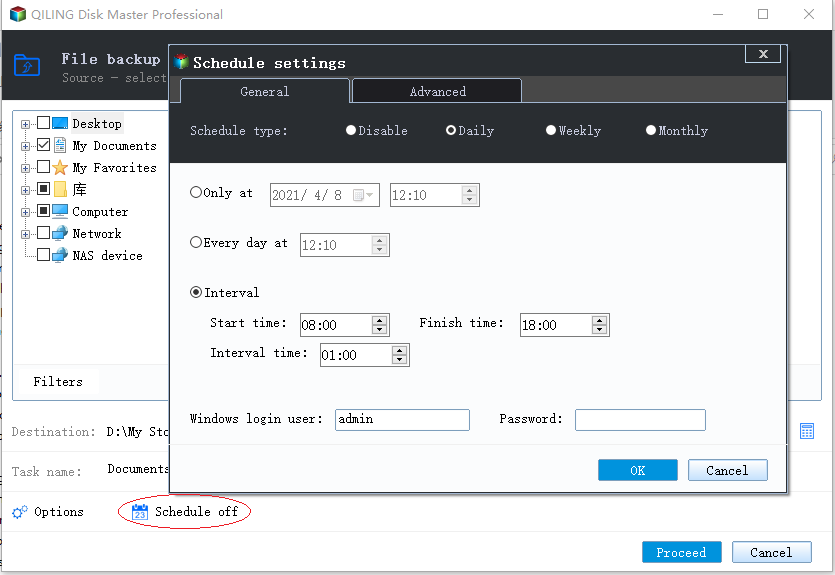
Then set the backup frequency based on your needs.
Step 5. Click "Backup options" on the bottom-left corner of the interface.
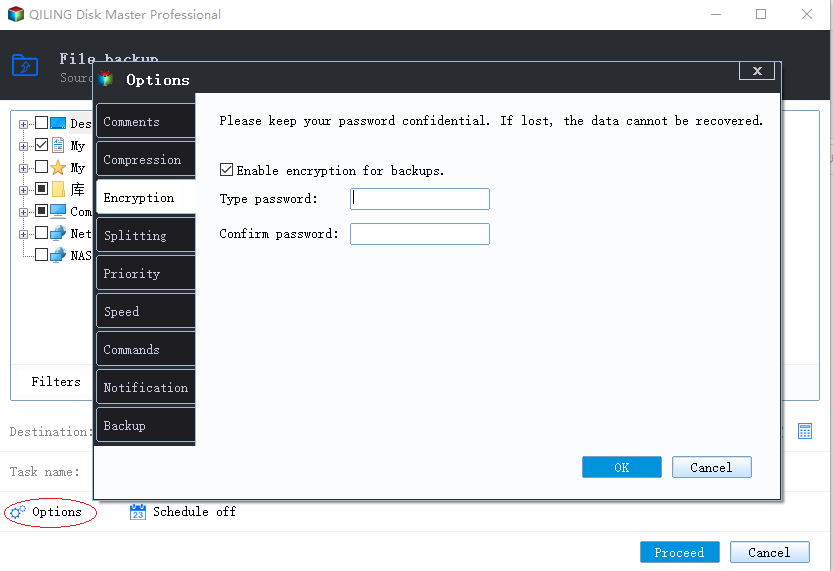
Here, you can customize various settings such as performance, encryption, email notifications, and more based on your preferences.
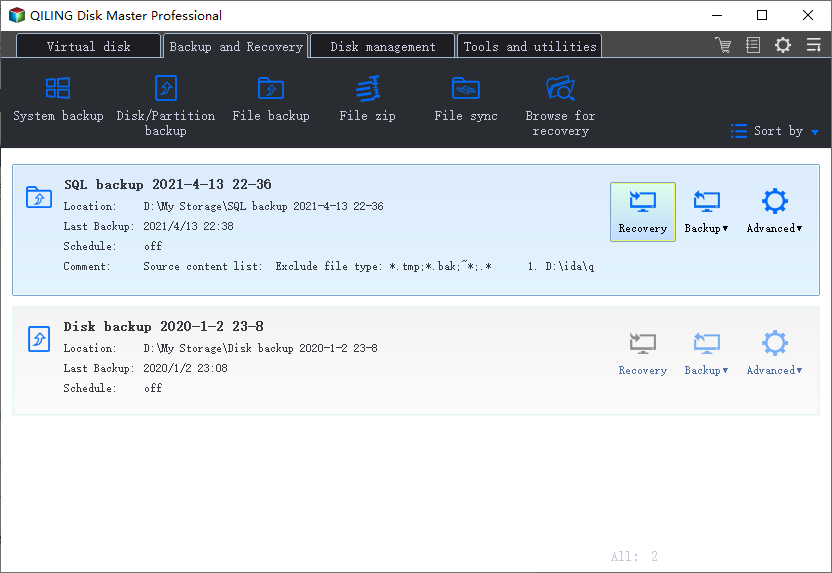
Step 6. After completing all settings, click the "Proceed" button to initiate the file backup process.
Conclusion
For small businesses, data security is crucial, and having a reliable NAS device for backup is essential. Among the top-rated options, Qiling Backup Enterprise stands out for its rapid data backup and recovery capabilities, making it a recommended choice for businesses looking to safeguard their data.
FQAs about Best NAS for Small Business Backup
Here are some frequently asked questions about NAS devices:
1. Can you use a NAS as a backup?
You can use a NAS to back up your files, and professional backup software like Qiling Backup Enterprise can help with that. However, it's also important to store your important data in multiple locations to ensure it's safe. Using a NAS as your sole backup solution may not be enough, so consider backing up your data to multiple places to keep it secure.
2. Is NAS good for business?
NAS is a great choice for businesses due to its large storage capacity, allowing for easy data storage. Its network-accessible feature also facilitates collaboration among employees, ensuring efficient work operations.
3. How much does a good NAS cost?
The cost of NAS devices varies, typically ranging from $500 to $2,000, with cheaper options available but often lacking certain features.
Related Articles
- Does Windows File History Backup Everything? Know More About File History
- How to Get Windows Activation Key and Start Windows 11
- Change Backup Location Windows 7: Manage Backup File & Space Saving
- An Ultimate Guide: How to Use Backup and Restore in Windows 7/10
- How Can You Transfer Files from an SD Card to a Desktop Computer?
How can you transfer files from an SD card to a desktop computer? Do you want to get the answer? This article will tell you how to transfer files from an SD card to a desktop computer. - How Do I Backup All My Programs in Windows?
If you want all the programs to be protected for security, you have to create a backup for all of them. This post will give you a simple answer and an easy-to-follow guide on how do I backup all my programs in Windows. Read on to learn more.
Products
Articles & Tutorials
- Data Recovery
- Data Backup
- File Recovery
- File Backup
- System Backup and Restore
- Disk and Partition Clone
- Technical articles
- Mobile articles
- Disk Master Help
- Windows Data Recovery Tutorials
- Windows Secure Delete Tutorials
- Windows Partition Management Tutorials
- Windows File Backup and Restore Tutorials
- Windows System Backup and Restore Tutorials
- Windows Disk Backup and Restore Tutorials
- Windows Clone Tutorials