How to Recover Deleted Photos After Deleting from Recently Deleted
Summary
Whether you want to retrieve photos from the recently deleted folder or recover deleted photos after they've been removed from the Recently deleted folder, you'll find the steps to do so in the steps below.
If you remove photos from the Recently Deleted folder on your iPhone, they will be permanently deleted and can't be recovered. However, if you had backed up your iPhone to iCloud or iTunes before deleting the photos, you might be able to recover them from the backup. To do this, you can restore your iPhone from the backup, which will bring back all the deleted photos. Alternatively, you can use a third-party recovery software to scan your iPhone and potentially recover the deleted photos. But be aware that the success of these methods depends on various factors, such as the type of device, the amount of data, and the timing of the deletion.
Whether you want to recover photos from the Recently Deleted album or retrieve deleted photos after they've been removed from Recently Deleted, this guide will walk you through the steps to get them back.
How to Get Photos Back from Recently Deleted
If you deleted photos within 40 days and didn't empty the Recently Deleted folder, you can easily recover them from your iPhone.
To get photos back from Recently Deleted:
Step 1. Open the Photos app on your iPhone and tap "Albums".
Step 2. Scroll down to find "Recently Deleted" and click it.
Step 3. To recover deleted files, tap the "Select" button in the top right corner and then tap to choose the items you want to recover.
Step 4. To recover deleted photos from the Recently Deleted album, go to the Photos app, tap "Recover" and then select "Recover Photos".
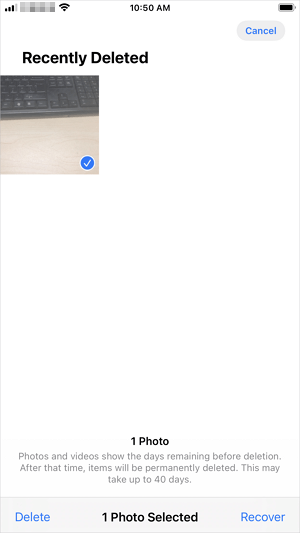
If you empty the Recently Deleted album on your device, the photos you've removed from it are permanently deleted. However, it's still possible to recover them, and the answer lies ahead. Keep reading to find out if you can get your photos back after deleting them from the Recently Deleted folder.
How to Recover Deleted Photos After Deleting from Recently Deleted
If you want to recover permanently deleted photos from your iPhone, there are multiple solutions depending on whether you've made a backup of your device or not. If you have a backup, you can restore your photos from there. If you haven't made a backup, you can try using third-party recovery software or contacting Apple support for assistance. Either way, it's essential to act quickly to increase the chances of recovering your deleted photos.
Method 1. Recover Recently Deleted Photos Without a Backup
If you don't have an iTunes or iCloud backup available, you can use a reliable iPhone data recovery tool like Qiling MobiSaver to retrieve your deleted photos. This tool can also help you recover other types of iOS data, such as contacts, messages, and WhatsApp messages, without a backup.
Even if you have an iTunes or iCloud backup, you can use this tool to selectively recover data from the backup, rather than restoring everything from the backup and replacing your existing data and settings.
To recover photos deleted from Recently Deleted:
Step 1. Connect iPhone to Your PC
Launch Qiling MobiSaver, choose "Recover from iOS Device" on the left, and click "Start".
Step 2. Scan for Lost iPhone Photos
Qiling MobiSaver will automatically scan your iPhone and find both present and lost photos for you.
Step 3. Preview and Restore Photos
To recover photos, select the "Photos" option on the left, view and choose the desired photos, then select either "Recover to PC" or "Recover to Device" to initiate the recovery process.
Method 2. Get Pictures Back After Deleting from Recently Deleted via iCloud Backup
If you've made an iTunes or iCloud backup before deleting photos, it's relatively easy to recover them, even after they've been permanently removed from the Recently Deleted folder.
The iPhone setup process requires erasing all data and settings on the device to restore it from an iCloud backup, unless you use a third-party app like Qiling MobiSaver to recover specific data such as photos from the backup.
To recover deleted photos from iCloud:
First of all, you need to check whether you've made an iCloud backup or not.
Step 1. Head to the Settings on your iPhone.
Step 2. Tap [your name].
Step 3. Tap "iCloud."
Step 4. Under "Storage," select "Manage Storage."
Step 5. See whether the iCloud backup appears at the bottom of the screen or not.
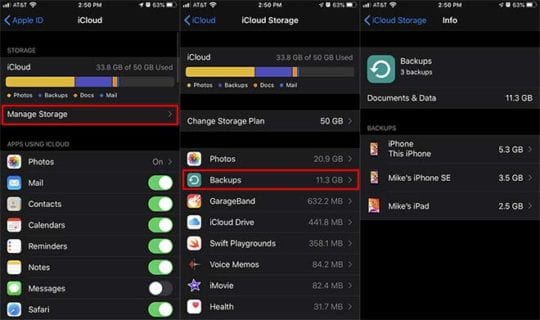
Then, you need to erase your iPhone.
Step 1. Go to the Settings app on your iPhone.
Step 2. Tap "General."
Step 3. Hit "Reset," then "Erase All Content and Settings."
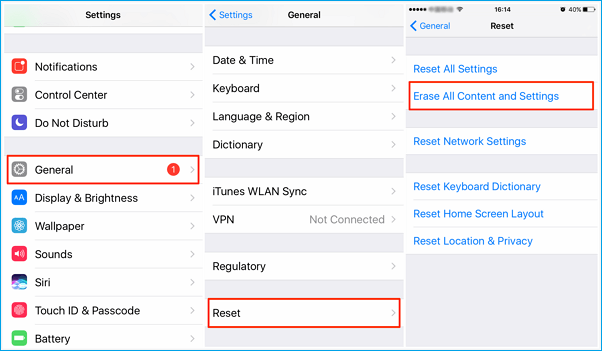
Finally, set your iPhone up as new.
Step 1. Find setup assistant and tap on "Set up your device."
Step 2. Tap "Restore from a Backup."
Step 3. Then, you can choose an available backup to restore.
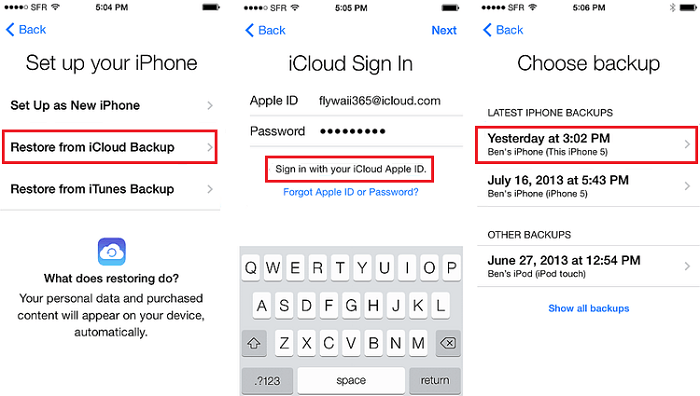
Method 3. Recover Deleted Photos After Deleting from Recently Deleted via iTunes Backup
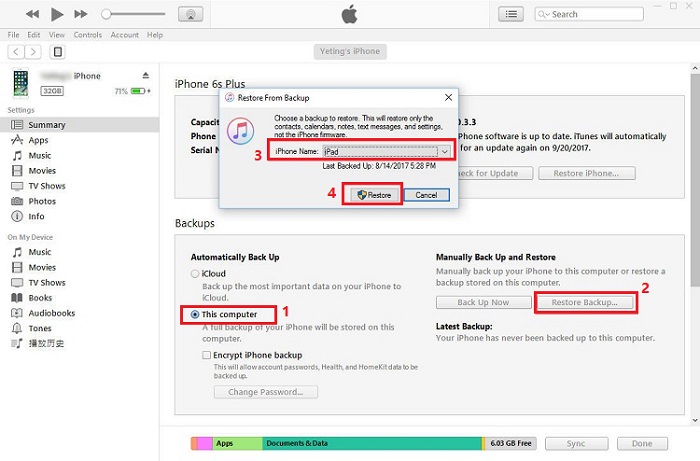
You can restore your iPhone from an iTunes backup to recover permanently deleted photos, but this will replace the existing data on your iPhone with the content in the backup. Alternatively, you can use Qiling MobiSaver to recover deleted photos without replacing existing data.
To recover deleted photos from iTunes:
Step 1. Connect your iPhone to the computer.
Step 2. Launch the latest iTunes on your computer.
Step 3. Click on your device icon in the upper-left corner.
Step 4. To restore your data from a backup, select the "Restore Backup" option and choose the most recent backup you made, ensuring that you select the correct backup file to avoid overwriting newer data with older data.
Step 5. Click "Restore" to start restoring your iPhone from the backup.
How to Recover Deleted Photos After Deleting from Recently Deleted FAQs
To recover photos from the Recently Deleted folder, you can follow these steps. First, open the Photos app on your iPhone or iPad.
1. Can you retrieve photos after deleting from recently deleted iPhone?
Yes, you can recover photos after deleting them from the Recently Deleted folder on your iPhone. If you've already deleted them, you can try restoring from an iTunes backup, which may contain the deleted photos. This way, you can recover them and save them to your device or computer.
Step 1. Start iTunes and choose your iPhone.
Step 2. Click on the Restore Backup button on the right panel.
Step 3. Select your backup file and start restoring.
2. Where do permanently deleted photos go after recently deleted?
On an iPhone, temporarily deleted files go to the "Recently Deleted" album for 30 days, after which they are permanently erased. If deleted permanently, they can only be recovered using a professional iPhone data recovery program.
Qiling iPhone data recovery software allows you to recover lost data from your iPhone and iPad, including photos, videos, contacts, messages, and more.
3. How can I recover permanently deleted photos from my iPhone after 30 days?
To recover permanently deleted photos from an iPhone, you can use specialized iPhone data recovery software, which can help retrieve the lost images from the device.
Step 1. Download and launch Qiling MobiSaver.
Step 2. Select Recover from iOS Device and scan your iPhone for lost photos.
Step 3. Recover the found pictures.
How to Back Up Photos on iPhone
To avoid losing precious photos, it's a good idea to regularly back up your iPhone photos. This will ensure that your memories are safe and secure.
When it comes to photo backup on iPhone, there are five effective ways to do so. For more detailed information on how to back up photos from your iPhone, you can refer to the guide on the topic.
In Conclusion
After recovering permanently deleted photos from your iPhone, it's highly recommended to make a backup of your precious files on your device. Regular backups can help minimize the chance of data loss, which can occur unexpectedly. By backing up your data regularly, you can ensure that your important files, including photos, are safe and easily recoverable if needed.
Related Articles
- Free Download Qiling MobiSaver Full with Serial Key
- How to Recover Hike Chats, Messages and Images on Android & iPhone
- What Is the Latest Version of iTunes 2022
- How to Restore LINE Chat History from PC to iPhone/Android
- How to Recover Deleted Files After Windows 10 Updates [Fast and Safe]
Windows 10 updates delete my files. What can I do? You can recover Windows 10 updates deleted files with the Backup and Restore utility, File History utility, File Recovery, or Recycle Bin. The easiest way to recover deleted files on Windows 10 is by applying Deep Data Recovery. - ReFS Data Recovery: How to Get Data Back for ReFS
ReFS Data recovery software that recognizes and reads ReFS-formatted disks, USB flash drives, and SD cards can quickly recover data from ReFS hard drives. Such a strong ReFS data recovery tool is Deep Data Recovery.
Products
Articles & Tutorials
- Data Recovery
- Data Backup
- File Recovery
- File Backup
- System Backup and Restore
- Disk and Partition Clone
- Technical articles
- Mobile articles
- Disk Master Help
- Windows Data Recovery Tutorials
- Windows Secure Delete Tutorials
- Windows Partition Management Tutorials
- Windows File Backup and Restore Tutorials
- Windows System Backup and Restore Tutorials
- Windows Disk Backup and Restore Tutorials
- Windows Clone Tutorials