How to Recover WhatsApp Messages Without Backup on iPhone/Android
Summary
Wondering how to recover one-If you're worried about losing your WhatsApp messages from last year without a backup, don't panic! Qiling MobiSaver is here to help, allowing you to easily restore your WhatsApp messages with just a few clicks.
Lost WhatsApp Messages on My Phone
Billions of people worldwide use WhatsApp for personal and commercial conversations, as well as everyday communications, regardless of whether they use an iOS or Android smartphone. However, the reality is that you can lose any data or chats on the device, which can be frustrating, especially if you delete chats or experience damage to your phone.
If you're looking to recover WhatsApp messages, whether it's from a backup or without one, there are ways to do so. You can recover data from WhatsApp backup, but if you don't have a backup, you can still recover your conversations. However, many people are unaware of how to recover 1-year-old WhatsApp messages without a backup. This article will explore some of the best methods to recover WhatsApp messages with or without a backup, making it easier for you to retrieve your conversations.

Recover WhatsApp Messages without Backup on iPhone/Android
If you've mistakenly deleted essential WhatsApp conversations on your iPhone or Android, there's still a chance to recover them without needing a backup. The process may be a bit challenging, but it's possible to recover WhatsApp messages even if you don't have a backup. To do this, you'll need to follow specific methods for both Android and iPhone devices.
Method 1. Recover WhatsApp Messages without Backup on iPhone
While WhatsApp is a popular platform for everyday communication, there's no built-in way to recover deleted messages without a backup, making a data recovery tool necessary for this purpose. However, many people are interested in knowing how to retrieve deleted WhatsApp messages without using a data recovery tool.
If you're looking to recover deleted conversations without a backup, Qiling MobiSaver for iPhone is a reliable and secure tool to consider. Unfortunately, many other tools that promise to help you discover or recover lost conversations are actually ad-filled hoaxes. In today's world, it's essential to be cautious and choose a trustworthy solution, making Qiling MobiSaver for iPhone your best bet.
This software allows users to recover iOS data without the added complexities, enabling them to retrieve essential media from iPhones or iPads, as well as WhatsApp messages and other data.
Qiling MobiSaver, a data recovery software, can easily recover various iPhone data types, including images and videos, contacts and SMS messages, Safari bookmarks, notes, voicemail, WhatsApp photos, videos, and chat history.
- QualityiPhone data recovery app for Windows and Mac.
- This software can recover data from iOS devices, iTunes backups, and iCloud backups.
- The app can be used with the most recent versions of iOS 13 and the iPhone 11 (all models).
- On Windows 7 and above versions and Mac OS 10.15, it works well.
Download Qiling MobiSaver for a simple and secure way to recover deleted WhatsApp messages on your iPhone.
Step 1. Connect iPhone to PC
Launch Qiling MobiSaver, select the "WhatsApp" button, and choose "Device Storage" from the menu.
Step 2. Make Sure Your Device Is Connected
If WhatsApp is not installed on your iPhone, Qiling MobiSaver won't be able to find your data.
Step 3. Scan iPhone and Find Important Data
Qiling MobiSaver will automatically scan your iPhone to find lost WhatsApp chats, history, photos, videos, and other files, which may take a few minutes.
Step 4. Preview and Restore WhatsApp Data
Tap the WhatsApp button on the left, preview and select the data you want to recover, then click "Recover to PC" or "Recover to Device" to get the data back.
Method 2. Recover WhatsApp Messages without Backup on Android
WhatsApp conversations are crucial because they may contain essential messages. If you've accidentally deleted or lost WhatsApp messages on your Android device and don't have a backup, a recovery tool is your best bet to retrieve them.
Recovery solutions like Qiling MobiSaver for Android offer a dependable and practical means of retrieving both old and fresh WhatsApp conversation histories without putting the user under undue pressure, making them a reliable tool for retrieving WhatsApp messages.
Qiling MobiSaver helps recover deleted or lost WhatsApp messages on Android by scanning the WhatsApp database and retrieving lost conversations.
Qiling MobiSaver for Android, a top-notch Android data recovery program, successfully recovers lost or formatted Android files such as pictures, videos, messages, contacts, music, documents, and more from various Android phones. It sends real-time recovery updates to your Android device's notification area, allowing you to track any changes to your data.
For easy and safe WhatsApp message recovery, you can download Qiling MobiSaver for your Android device.
- Intuitive user interface design enables users to restore lost data on Android in a straightforward and user-friendly manner, typically requiring just three simple steps.
- Automatically detects Android devices connected to a PC, and quickly scans them to recover lost data.
- Android data recovery software that is completely risk-free protects your privacy while finding and recovering lost information, all without overwriting existing data.
- You can preview and confirm the quality of recoverable data types such as SMS, contacts, photos, and documents before starting the recovery process.
Step 1. Connect your Android phone to the computer
Install Qiling MobiSaver for Android on your computer and connect your Android phone to the computer with a USB cable. Then, click the "Start" button to initiate the software's recognition and connection with your device.
Step 2. Scan Android phone to find the lost data
After connecting your Android phone, the software will quickly scan the device to find all existing and lost data. You can easily locate the lost files you're looking for by selecting the correct file types.
Step 3. Preview and recover data from Android phone
Preview all the recoverable files and select the items you want to recover quickly. Then, click the "Recover" button to get the selected files back once.
2 Ways to Recover WhatsApp Messages with Backup
To recover WhatsApp messages on your smartphone with backup, follow these methods: you can restore your WhatsApp chat history from Google Drive, check your Google Drive account for any available backups, and then restore them to your device. Alternatively, you can use third-party apps to recover deleted WhatsApp messages, but be aware that these apps may have limitations and may not work for all devices. Additionally, you can also contact WhatsApp support for assistance with recovering deleted messages.
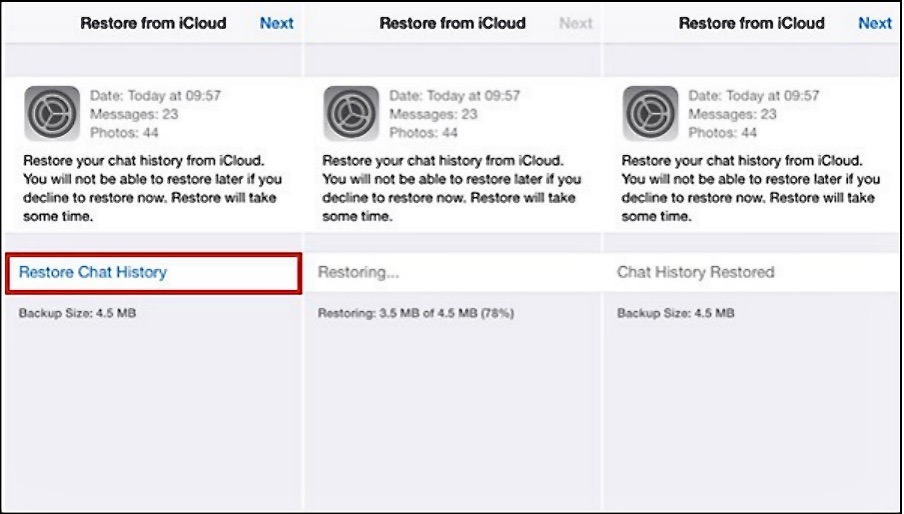
Method 1. Recover WhatsApp Messages on iPhone from iCloud
iCloud is now accessible on every iPhone model available, offering a range of features. While it may store messages by default, users can prevent this by generating backups of their communications. This convenience makes it a valuable tool for many, especially those who are new to iCloud.
The tool is only accessible on iOS 7 and later versions, so ensure you have the correct iOS version before proceeding. Once you're ready, follow the instructions.
Step 1. Open WhatsApp and go to the "Settings" menu.
Step 2. To access the restore chat history page, select "Chat Backup" from the menu.
Step 3. Select "Restore Chat History" and wait for the process to be completed.
Method 2. Recover WhatsApp Messages on Android from Google Drive
Android phones come with a useful feature called Google Drive, available on all models. This app helps you save your photos, data, and even WhatsApp communications. If you've already created a backup, you can easily restore your WhatsApp messages by following the provided instructions.
Step 1. To use WhatsApp on your Android smartphone, first remove the existing app from your device. Then, download and install the WhatsApp app again. After installation, use the OTP (One-Time Password) verification process to confirm your phone number.
Step 2. If the messenger asks for the WhatsApp backup, choose "Restore".
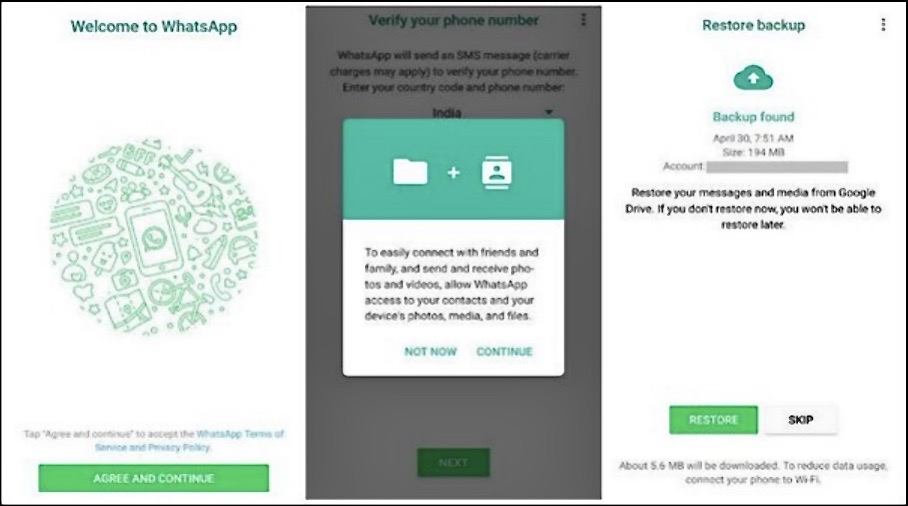
Step 3. Once the restoration is done, click "Next" to see your conversations in your WhatsApp messenger.
Conclusion
WhatsApp conversations are crucial as they may contain important work files or messages that you may need in the future. However, sometimes you might accidentally delete these messages or conversations. Fortunately, you can use the methods outlined in this article to recover 1-year-old WhatsApp messages without a backup.
We recommend using Qiling MobiSaver to recover deleted or lost WhatsApp messages, as it is a secure and reliable data recovery tool.
Related Articles
- Where Do AirDrop Files (Including Photos) Go on iPhone/Mac [Solved]
- How to Restore Old & Deleted Voice Memos on iPhone
- How to Unlock A Disabled iPhone Without iTunes
- How to Put iPhone in Recovery Mode [2022 Update]
- iPhone Photos Gray Box | How to Fix Grey Boxes Photos on iPhone/Android
If your pictures are appearing gray on your iPhone or Android, you can figure out why and easily fix the issue. Whether you're seeing a gray box over photos or contacts on both iPhone and Android, you can resolve the problem with a few simple steps. - How to Recover Data from Time Capsule Hard Drive
If you've lost or deleted files from your Time Capsule, a device with an internal hard drive, you can recover them using Deep Data Recovery software. This reliable and easy-to-use tool can help you recover data from your Time Capsule hard drive in a simple and straightforward process.
Products
Articles & Tutorials
- Data Recovery
- Data Backup
- File Recovery
- File Backup
- System Backup and Restore
- Disk and Partition Clone
- Technical articles
- Mobile articles
- Disk Master Help
- Windows Data Recovery Tutorials
- Windows Secure Delete Tutorials
- Windows Partition Management Tutorials
- Windows File Backup and Restore Tutorials
- Windows System Backup and Restore Tutorials
- Windows Disk Backup and Restore Tutorials
- Windows Clone Tutorials