[Get the Answer!] Can I Safely Clone an HDD to an SSHD?
Why Do You Clone HDD to SSHD
As technology advances, storage devices such as HDD, SSD, and SSHD are becoming increasingly popular. A hard disk drive (HDD) offers high capacity at a low cost per gigabyte, while a solid-state drive (SSD) provides better performance but at a higher cost per gigabyte. In contrast, a solid-state hybrid drive (SSHD) combines the benefits of both, blending flash memory and HDD storage into a single device, offering a balance between capacity and performance.
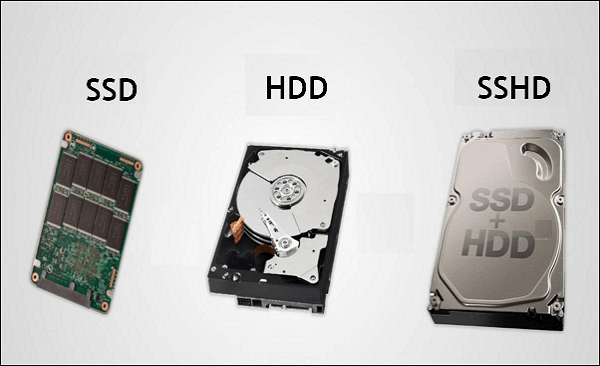
The SSHD (Solid-State Hybrid Drive) offers a good balance between a hard disk and a solid-state drive, making it suitable for laptops and desktops. Unlike traditional hard disks, SSHDs don't require manual storage decisions, as they have a controller chip that automatically determines where to store files and programs. They boast a good storage capacity and response time, outperforming hard disks while being more affordable than SSDs. By reducing read and write times, SSHDs also help minimize power consumption and extend battery life in laptops.
Best Disk Cloning Software Free Download
To clone an HDD to an SSHD, using proper disk cloning software is crucial. If you want to clone an SSHD from an HDD, a reliable disk cloning utility like Qiling Disk Copy can help you easily and quickly achieve this task. With Qiling Disk Copy, you can clone your HDD to an SSHD with minimal effort and hassle.
Qiling Disk Copy is a versatile utility that can clone a system, disk, and partition, making it an excellent tool for upgrading to a larger disk without reinstalling Windows. It can run smoothly on various Windows versions, including Windows 11/10/8/7, and is capable of cloning an HDD to SSD for improved performance, as well as migrating Windows 10 to NVME without reinstallation. Additionally, it can help clone the C drive to an external hard drive, clone a 2.5 SSD to M.2 SSD, and even prevent the need to reinstall Windows after installing a new M.2 SSD.
- Time-saving. It has a fast cloning speed, allowing for quick cloning of a hard drive.
- Various cloning sources. It can clone disks, systems, partitions, etc.
- Migrate Windows system. It can clone Windows 10 from HDD to SSD.
- Safety. Your computer can be successfully booted from the cloned disk.
- Flexibility. The tool can only clone either the entire operating system or only the used sectors of the target disk to a smaller SSD.
Step-by-step Guide to Clone SSHD from HDD
We recommend using Qiling Disk Copy because it offers several features, including sector-by-sector copying, support for various file systems, and the ability to clone an HDD to an SSHD. Additionally, it is easy to use and completes the cloning process in a few simple steps. To use Qiling Disk Copy, follow these steps to clone an HDD to an SSHD.
Prior Notice:
- The "Sector by sector copy" feature requires the destination disk to be at least as large as the source disk, so it can be unchecked when cloning a larger disk to a smaller one.
- This process will completely erase all data on the destination disk. Please be careful.
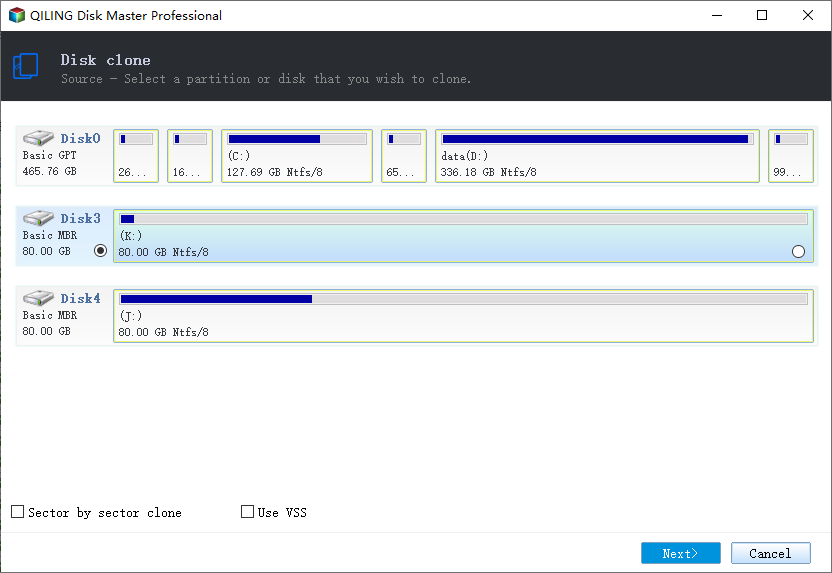
Step 1. To start copying/cloning an entire disk to another, click the "Disk clone" button in the tools page, select the disk you want to clone as the source disk, and proceed to the next step.
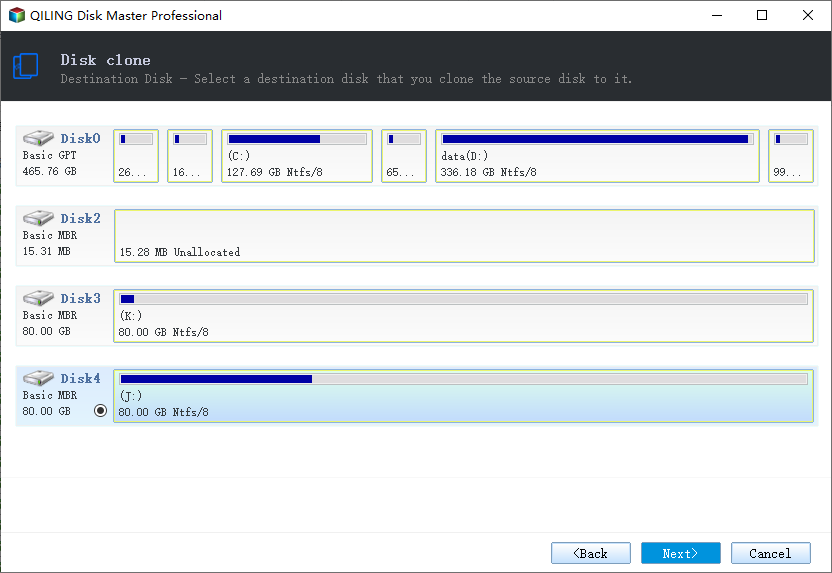
Step 2. Choose the other disk as the destination disk.
Step 3. Check the disk layout of the two disks. You can manage the disk layout of the destination disk by selecting "Autofit the disk", "Copy as the source" or "Edit disk layout".
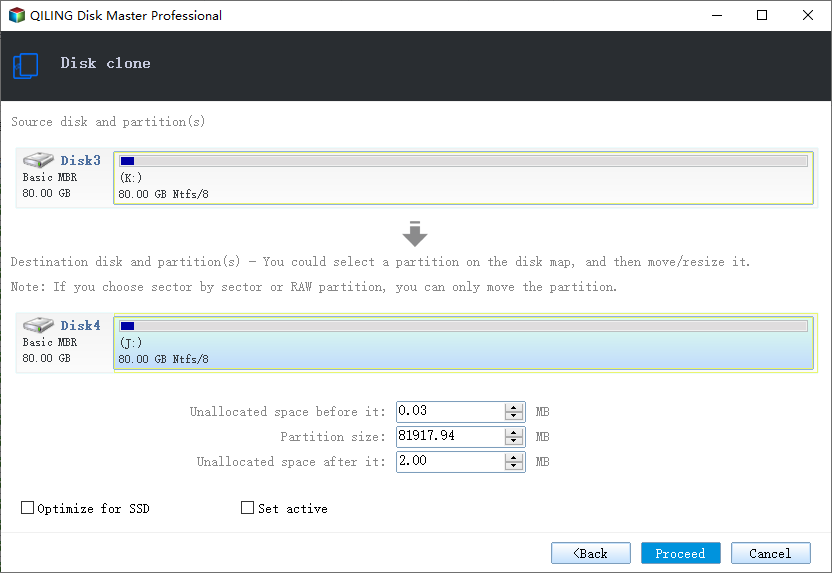
- "Autofit the disk" makes some changes by default on the destination disk layout to optimize its performance.
- The "Copy as source" option doesn't modify the destination disk and maintains the same layout as the source disk.
- "Edit disk layout" allows you to manually resize or move partition layout on the destination disk.
To optimize your SSD's performance, select the "Check the option if the target is SSD" option. This will help ensure your solid-state drive operates at its best.
Step 4. Click "Proceed" to officially execute the task.
A message now appears, warning you that data will be lost. Please confirm this message by clicking "OK".
The Bottom Line
You can safely clone an HDD to an SSHD using Qiling Disk Copy, which can handle cloning even if the old HDD has bad sectors, unlike most other disk cloning software. This tool is excellent for cloning different kinds of disks and can complete the cloning process without interruption. You can try it without hesitation.
FAQs
1. Is SSHD reliable?
SSHDs have similar failure rates to SSDs and HDDs, and their combined technology makes them more efficient and reliable than using separate flash and HDD storage.
2. What are the advantages of SSHD?
SSHDs can provide a cost-effective way to enhance performance without sacrificing storage capacity, making them suitable for those looking to upgrade their existing laptop or desktop, or seeking a balance between performance and storage in a new system.
3. Is a SSHD better than a SSD?
An SSHD is a good compromise between storage space and speed, offering more storage than an SSD but less speed, and is faster than a traditional hard drive. If you need a lot of storage, an SSHD is a good choice, but if speed is your priority, an SSD is a better option.
4. Should I clone SSD or fresh install?
Cloning is a better option if you don't have issues with your current OS and software, as it saves time by preserving the same setup, including drivers, software, and configurations.
Related Articles
- Western Digital HDD Repair Tool | Repair WD HDD Without Losing Data
- Download Samsung M.2 SSD Clone Software
- Do You Have to Reinstall Windows After Installing a New M2 SSD? [Check the Answer]
- Do I Need to Format a New SSD Before Cloning
- How to Copy Your Windows Installation to an SSD with 4 Steps
This article will provide a detailed guide on how to copy your Windows installation to an SSD, offering a solution for those looking to move their Windows installation drive to an SSD. - Create Image from USB Drive with Best USB Cloning Software
Making an image of your USB drive is crucial to duplicate it and keep your data safe. This article guides you through the process of creating an image of your USB drive using Qiling Disk Copy, a useful tool for achieving this.
Products
Articles & Tutorials
- Data Recovery
- Data Backup
- File Recovery
- File Backup
- System Backup and Restore
- Disk and Partition Clone
- Technical articles
- Mobile articles
- Disk Master Help
- Windows Data Recovery Tutorials
- Windows Secure Delete Tutorials
- Windows Partition Management Tutorials
- Windows File Backup and Restore Tutorials
- Windows System Backup and Restore Tutorials
- Windows Disk Backup and Restore Tutorials
- Windows Clone Tutorials