Drive Letter Changed After a Clone
Quick Navigation:
- Why the Copy Takes Another Letter
- Read Both Disks on the Map
- Change the Letter on the Copy
- Keep the Source Intact
- Frequently Asked Questions
A cloned disk carries the same volumes as the source, and Windows resolves a drive letter by volume identity rather than by disk order. When both disks are attached, the second one cannot take a letter that is already in use, so it appears as E: or F: instead of the D: you expect. Nothing has been lost; only the path to the files has changed, and the letter can be set back deliberately.
Why the Copy Takes Another Letter
A drive letter is not stored inside the partition. Windows keeps it against the volume identifier in its own configuration, and the mount manager assigns it when the volume appears during startup.
A clone reproduces the volume contents and usually a new disk signature. That leaves the copy as a different volume holding the same data, so both disks ask for the same letter. Windows gives the letter to the disk that arrives first and moves the other one to the next free letter.
Which disk arrives first depends on the controller port, the boot order, and the timing of device detection. That is why the change often shows up after a reboot rather than immediately after the clone, and why it can differ between two machines.
Once the letter moves, shortcuts, mapped network drives, and programs that store absolute paths stop working. A project file that points at D:\Projects no longer resolves when the volume is mounted as E:.
Read Both Disks on the Map
Attach one disk at a time, or read the map with both connected and identify each disk by model and capacity. Disk numbers follow the port order and are not a reliable way to tell the original from the copy.
Windows Disk Management shows the same picture another way: one row per disk, the volumes in order, the letters in use, and a marker on the disk that holds the running system. Use it to confirm that the letter you want is free before you change anything.
Write the target down before you act: the letter each volume should end with on the copy, and the letter the source keeps. Never assign one letter to both disks while they are attached, because the next boot will move one of them again.
Change the Letter on the Copy
Do the change on the copy, not on the original. The source is the known good disk, and renaming its volumes makes it harder to tell the two apart if you have to fall back to it.
In Disk Management, right-click the volume, choose Change Drive Letter and Paths, then Change and select a free letter. The new letter applies at once and no data is moved.
If the letter you need is listed as in use but no disk shows it, the assignment belongs to a volume that is not attached. Remove the stale entry for the missing disk, or take the source offline, then assign the letter to the copy.
Keep the Source Intact
Qiling Disk Master lists every disk with its volumes and letters on one map and changes a letter without touching the files on either disk. Keep the source disconnected while you work on the copy, so the two assignments cannot swap back.
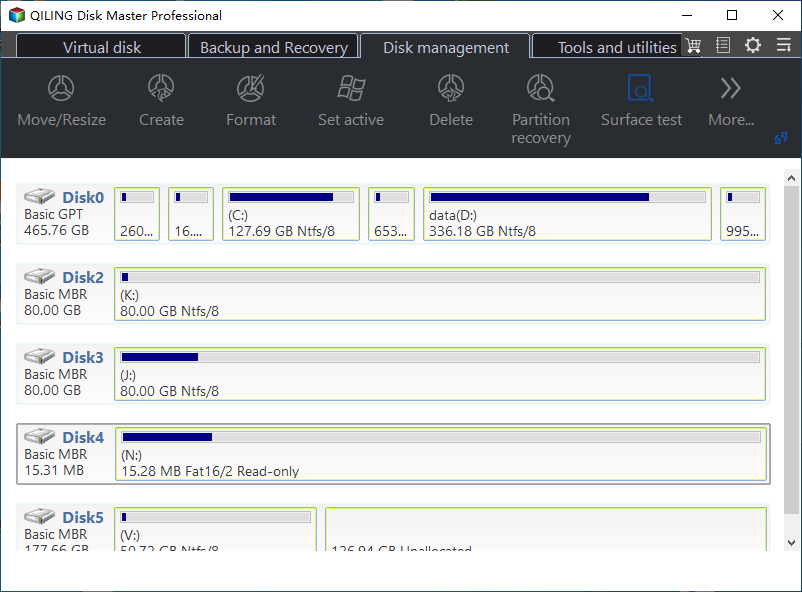
Step 1. Compare the Letters on the Map
Each row names the disk, its partition style, and its capacity, and each volume shows its letter and file system. In the example the system disk carries C: and data(D:), while two 80 GB disks hold K: and T:, so the letters already in use are visible before anything changes.
Step 2. Change the Letter on the Copy
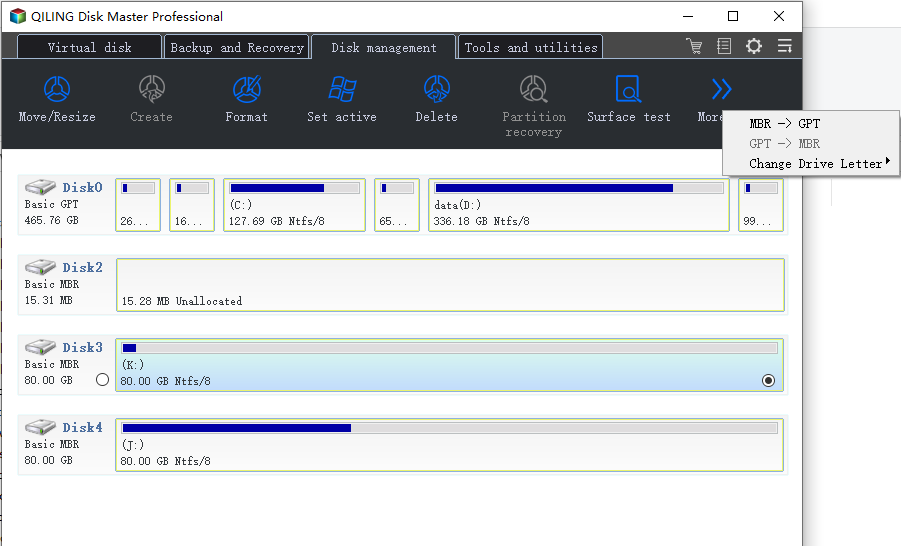
Right-click the partition on the cloned disk, open More, and choose Change Drive Letter. Select the target letter in the list and confirm; the map updates immediately, with no pending operation and no Proceed step to wait for.
Open Explorer and confirm that the volume appears under the new letter with its files readable. Leave the source disk untouched until the copy has booted on its own at least once.
Frequently Asked Questions
Will the letter change again after a reboot?
Not while the new assignment is in place and the old disk stays offline. Reconnect the source and the conflict returns, because both disks still hold volumes that ask for the same letter.
Do installed programs break when the letter changes?
Programs installed on that volume keep working, because their registry entries point at the volume rather than at a fixed path. Shortcuts and project references written with the old letter do not.
Can both disks keep the same letter if only one is connected?
Yes. Letters are assigned when a volume appears, so the copy reclaims the original letter once the source is disconnected and the machine restarts.
Related Articles
- Cloned Drive Shows as RAW: Recover Data and Fix It
- No Bootable Device After Cloning: BIOS and BCD Fixes
- How to Clone Windows 11 to a Smaller SSD
- Migrate Windows to a New SSD and Keep Recovery
- Clone a Drive with an NVMe Enclosure
Products
Articles & Tutorials
- Data Recovery
- Data Backup
- File Recovery
- File Backup
- System Backup and Restore
- Disk and Partition Clone
- Technical articles
- Mobile articles
- Disk Master Help
- Windows Data Recovery Tutorials
- Windows Secure Delete Tutorials
- Windows Partition Management Tutorials
- Windows File Backup and Restore Tutorials
- Windows System Backup and Restore Tutorials
- Windows Disk Backup and Restore Tutorials
- Windows Clone Tutorials