No Bootable Device After Cloning: BIOS and BCD Fixes
A machine that reports no bootable device straight after a clone is not necessarily broken. The message means the firmware looked for a boot loader, found nothing it recognised, and stopped before handing control to Windows.
There are only a few places this can fail: the disk is not detected, the boot order is wrong, the disk style does not match the firmware mode, or the boot entry itself is missing. Each of them has a clear fix.
PAGE CONTENT
- Why Firmware Finds No Bootable Device
- Check BIOS and the Hardware
- Repair the Boot Entry
- Re-clone with Qiling Disk Master
- Confirm Windows Starts
- FAQs About Boot Failures
- Back Up Before You Repair
Why Firmware Finds No Bootable Device
- Boot order unchanged. Firmware still looks for the old disk that was removed.
- Legacy versus UEFI. The clone was made in the boot mode the firmware is not using.
- No active partition. An MBR disk needs its system partition marked active.
- No EFI partition. A GPT clone of a data disk carries no boot loader at all.
- Disk not detected. A loose cable or an unsupported NVMe slot hides the drive.
The wording changes between vendors, so treat no bootable device, no boot device found and reboot and select proper boot device as the same firmware-level message.
Check BIOS and the Hardware
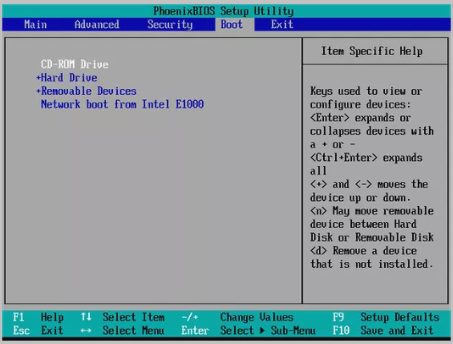
- Enter firmware setup. Use the vendor key shown at power-on.
- Confirm detection. The SSD must appear in the storage device list.
- Match the boot mode. Switch UEFI or Legacy to match how the clone was made.
- Disable Secure Boot. Test with it off, then re-enable once Windows starts.
- Remove other disks. Leave only the clone connected for the first boot.
If the SSD is absent from the list, the problem is cabling or the slot, not Windows. If it is present but not bootable, the fault is in the partition layout or the boot entry.
Repair the Boot Entry
- Put the SSD first. Set the clone as boot device one and save the change.
- Mark the partition active. Use diskpart to set the system partition active on MBR.
- Rebuild the BCD. bootrec /rebuildbcd from a Windows USB restores the entry.
- Recreate the EFI partition. A GPT disk needs a FAT32 EFI system partition.
- Convert if needed. MBR2GPT or a fresh clone resolves a style mismatch.
Rebuilding the BCD repairs a missing entry but cannot create a boot loader that was never copied. If the clone contains no EFI or reserved partition, only a re-clone of the whole disk will make it start.
Re-clone with Qiling Disk Master
When the cloned disk has no boot partition at all, a full disk clone is faster than rebuilding one by hand.
Watch the video tutorial below to clone the drive step by step with Qiling Disk Master.
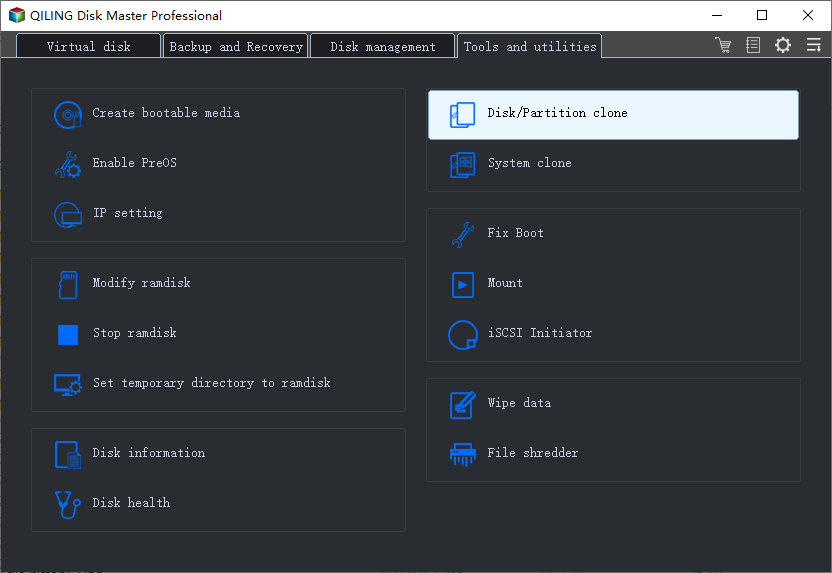
Step 1. Open Qiling Disk Master, choose Clone, and then select Disk Clone.
Step 2. Select the source disk and click Next.
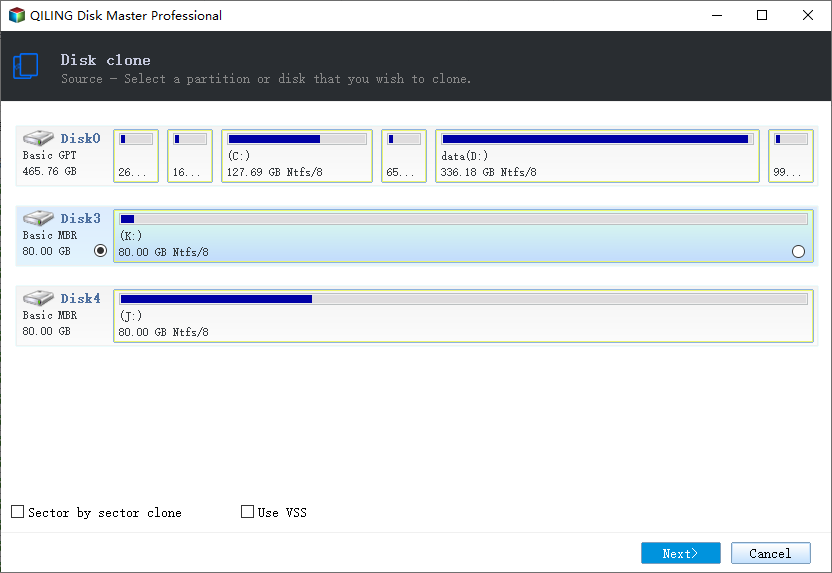
Step 3. Select the destination SSD and confirm that its data will be replaced.
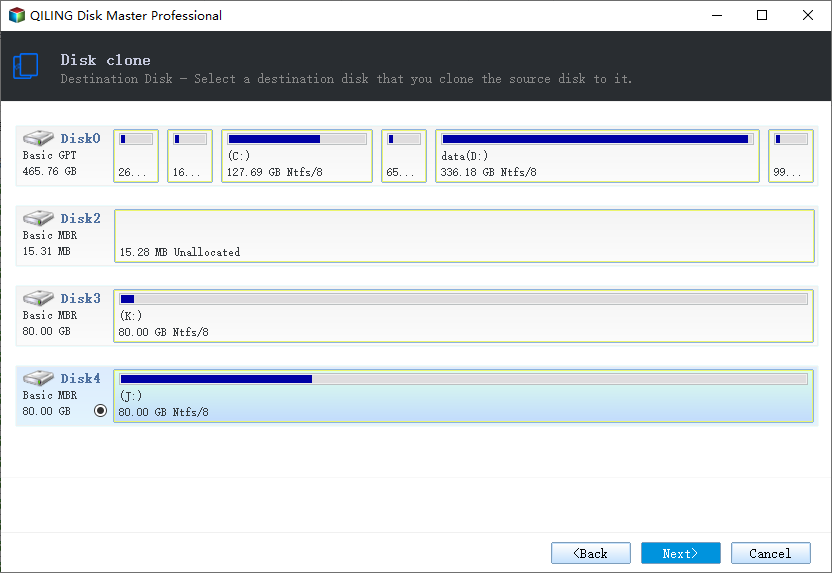
Step 4. Choose the clone mode and confirm the system partition gets the C letter on the target.
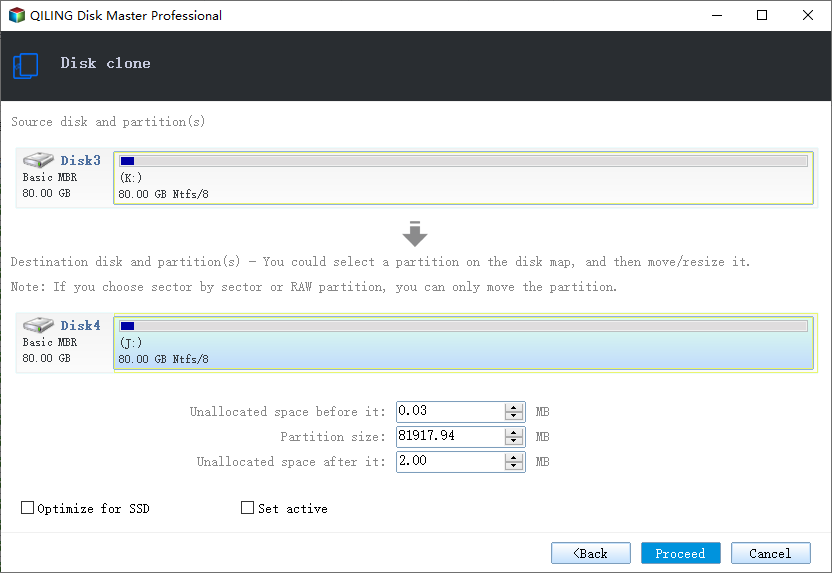
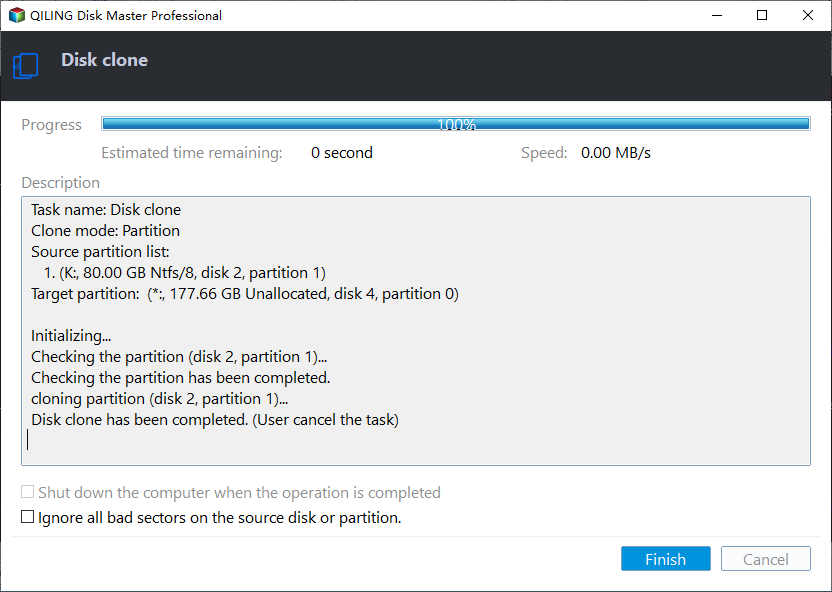
Step 5. Click Proceed, wait for the copy to finish, then shut the machine down before you remove any cable.
Confirm Windows Starts
- Boot alone. Start with only the clone connected.
- Reach the desktop. A full sign-in proves the boot files are complete.
- Check the boot mode. msinfo32 shows BIOS mode as UEFI or Legacy as expected.
- Restart twice. The second start confirms the entry is stable.
- Reconnect other disks. Add them back only after the clone boots reliably.
If the machine drops into firmware setup instead of Windows, the boot entry was saved but points at the wrong volume, so revisit the boot order once more.
FAQs About Boot Failures
Why does the new SSD show no bootable device?
Firmware cannot find a boot loader on it, usually because the boot partition was not cloned or the boot order still targets the old disk.
Is my data lost when this message appears?
No. The files are on the disk. Only the boot path is missing, and it can be rebuilt or re-cloned.
Should the cloned disk be MBR or GPT?
Match the firmware: GPT for UEFI boot, MBR for Legacy boot.
Can I boot from a USB to repair the clone?
Yes. A Windows installation USB provides Command Prompt and Startup Repair without touching the cloned files.
Why is the SSD missing from the BIOS list?
A loose cable, a disabled port or an unsupported NVMe generation can hide the drive, so reseat it first.
Back Up Before You Repair
Rebuilding boot records and converting disk styles both carry risk. Image the working system first so a failed repair never costs you the data.
Watch the video tutorial below to back up Windows and restore it if the clone fails.
Step 1. Open Qiling Disk Master and select System Backup to include the boot partitions.
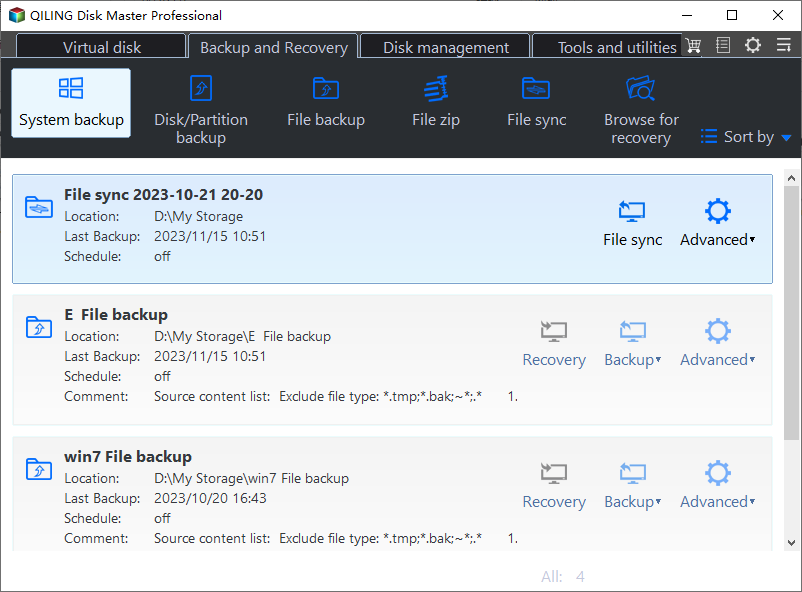
Step 2. Save the image to a drive other than the target disk and start the backup.
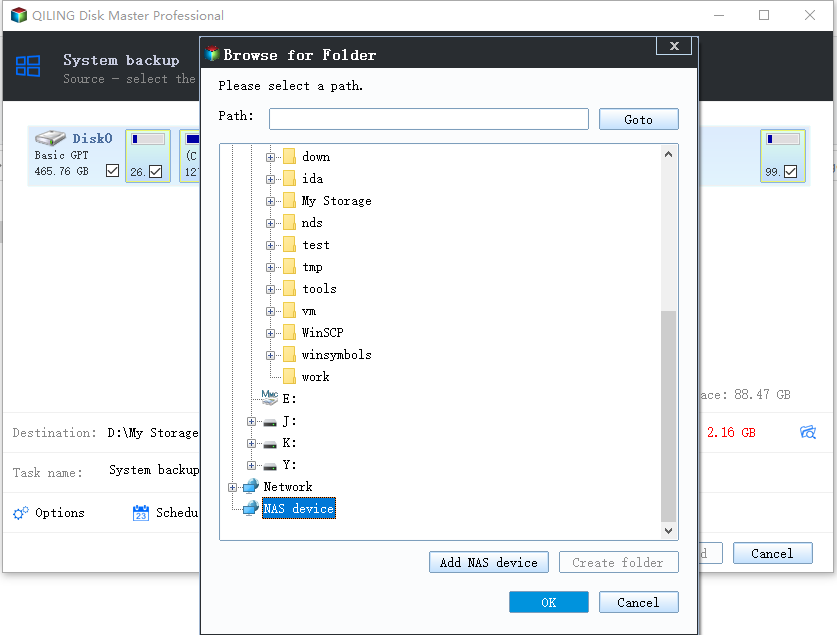
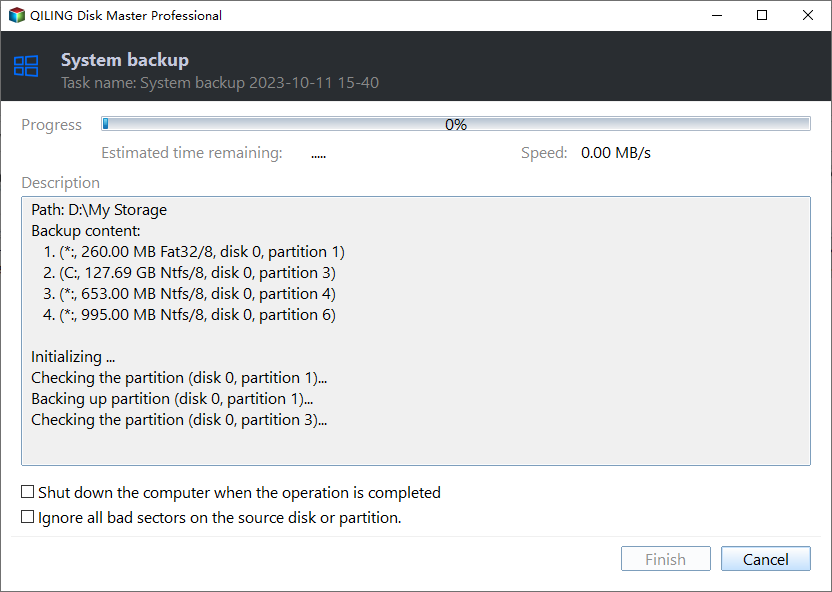
Step 3. Click Proceed to start the system backup and wait patiently until it finishes. You can also tick Shut down the computer when the operation is completed to power off automatically.
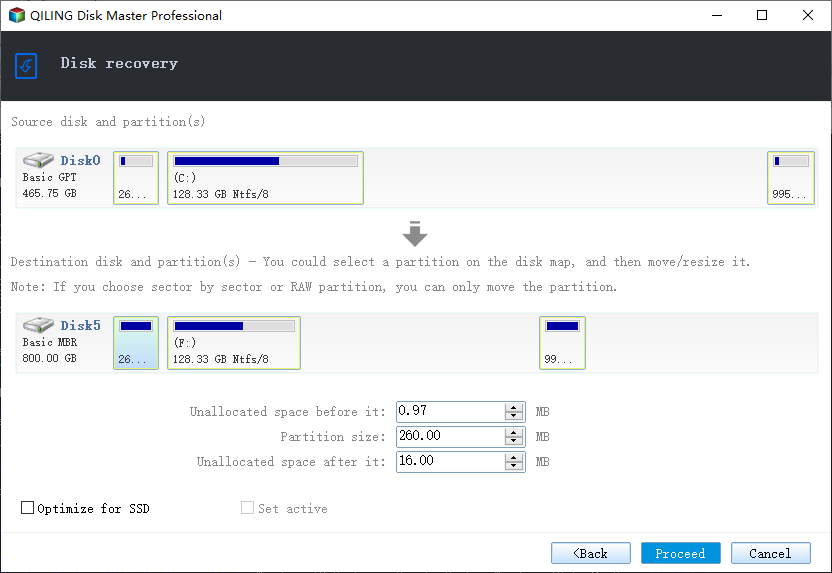
Step 4. If the clone or the boot repair fails, restore the image and then reassign drive letters or rebuild the boot records from Windows Recovery.
Conclusion
No bootable device after cloning is a firmware and partition problem rather than a data problem. Check that the disk is detected, set the SSD first in boot order, and match UEFI with GPT or Legacy with MBR. If the boot partition was never copied, re-clone the whole disk with Qiling Disk Master.
For more on boot repair, see Cloned Drive Won't Boot? Fix It, Fix the Drive Letter After Cloning, Clone an MBR Disk to a GPT SSD, and Clone a Bootable USB Drive.
Related Articles
- Clone a GPT Disk to an MBR Disk
Boot in Legacy mode again. - Switch from IDE to AHCI After Cloning
Avoid the boot loop on mode change. - Clone the System Reserved Partition
Keep the boot files with Windows. - Clone the Recovery Partition to a New SSD
Keep repair options available. - SSD Not Detected After Cloning
Fix a disk the BIOS cannot see.
Products
Articles & Tutorials
- Data Recovery
- Data Backup
- File Recovery
- File Backup
- System Backup and Restore
- Disk and Partition Clone
- Technical articles
- Mobile articles
- Disk Master Help
- Windows Data Recovery Tutorials
- Windows Secure Delete Tutorials
- Windows Partition Management Tutorials
- Windows File Backup and Restore Tutorials
- Windows System Backup and Restore Tutorials
- Windows Disk Backup and Restore Tutorials
- Windows Clone Tutorials