Which One to Choose: Macrium Reflect Free vs Clonezilla
Why Do We Need Cloning Software?
Cloning disks can be a lifesaver when a computer is not booting or is dead, as it allows for the recovery of data, OS settings, and the entire system image, including partitions, drives, software, and drivers, using a disk cloning software that replicates the complete hard drive image. This can also be used to upgrade hard drives, perform multiple installs with the same images, and fix software errors.
Macrium Reflect Free
Macrium Reflect Free is a top-notch disk cloning software that offers a range of features, including cloning, backing up, and imaging disks, all for free. It utilizes the Macrium Backup engine and is known for its efficiency and speed. As the first completely free backup software, it may have fewer features compared to licensed options, but it's ideal for quick imaging and restoration tasks.
Why Macrium Reflect
Macrium Reflect Free is a suitable option for users with basic and minimal requirements, as it is free and has a simple, clutter-free user interface, making it ideal for novice users.
Cons of Macrium Reflect
Reflect only allows you to image partitions or disks, not files or folders. This means you can't do a real clone or file backup with it. However, you can select which partitions to restore from, which is a useful feature. The catch is that to backup folders, you need to pay an additional $70, and even then, it's only folders, not individual files. So, if you need to back up specific files, make sure they're in the folder you're backing up.
Reflect Free allows creating backup schedules with its scheduling options and defining retention rules, deciding what to keep and for how long, which helps manage disk space. The paid version offers password protection and email notifications.
This application supports both GPT disks and MBR disks, and allows for the creation of Windows PE boot media.
While being free is a significant advantage of this software, it also has its downsides. The free version only offers basic features, with additional features requiring a paid upgrade. This means that if you're looking for enhanced features for personal or commercial use, the free version might not be the best choice. Additionally, the software's performance is somewhat slower compared to other cloning software on the market.
Bad sectors on a hard drive can cause data loss and system crashes. To fix bad sectors on a hard drive in Windows, you can use the built-in Check Disk (chkdsk) utility.
To fix or repair bad sectors on a hard disk in Windows 10/8/7, you can try various solutions. The best approach is to use built-in tools like Check Disk (chkdsk) to scan and repair bad sectors, or use third-party disk repair software like Qiling Disk Defrag to fix disk errors and optimize disk performance. If the hard disk is severely damaged, it may be necessary to replace it with a new one.
Clonezilla
Clonezilla is a free and open-source software that caters to those who still enjoy the simplicity of command-line utilities. It supports various operating systems, including Chrome OS, Windows, Mac, and Linux, and offers features like disk and image cloning, system backups, drive cloning, and system deployment. Despite limited user support, Clonezilla stands out for its ability to handle multiple file systems and different bootloaders, a feature not commonly found in other cloning applications. Its versatility and customization options make it a top choice among cloning software.
Why should you go for Clonezilla?
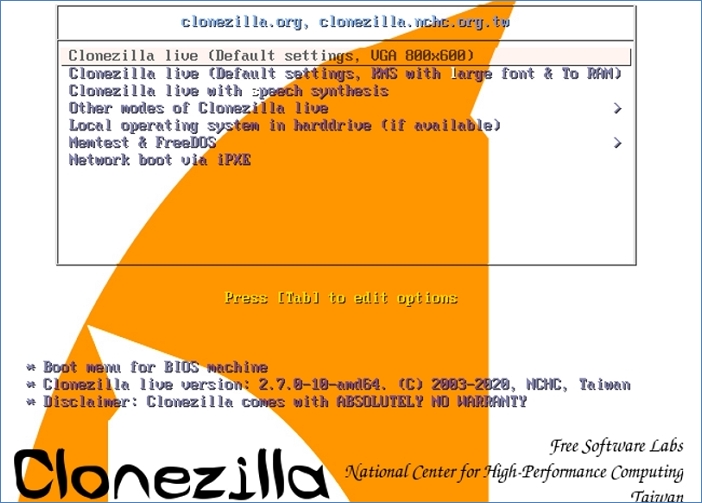
Clonezilla is a free, open-source software package that offers a complete set of features, including a reliable backup engine and multiple cloning options, making it a valuable tool for system administrators. Its independence from the host operating system allows it to run on a CD/DVD or USB stick, and it can also be used as a server utility. With support for multiple file systems, Clonezilla can be used on any system, and its compression algorithm saves space by compressing cloned or backed up data. Additionally, backups can be automated and executed unattended, and a single image can be used to restore multiple devices.
Cons of Clonezilla
The CLI platform-driven system is ideal for system administrators, offering a wide range of commands and switches to handle various tasks. However, this complexity makes it unsuitable for regular users. The free version has basic features, and additional functionality requires a paid subscription.
Clone Software Alternative: Qiling Disk Copy
Besides Macrium Reflect and Clonezilla, you can also consider Qiling Disk Copy, a cloning tool with a simple and intuitive interface. It allows for sector-by-sector cloning, as well as cloning from HDD to SSD, and enables you to adjust disk layout to suit your needs. What sets Disk Copy apart is its ease of use - you don't need to spend time learning how to use it, and its well-functioned capabilities make it a reliable choice for tasks that Macrium Reflect and Clonezilla can also handle.
To see how Qiling Disk Copy clones a hard drive, download the software and follow the on-screen instructions. This gives you a clear view of the cloning process and helps you understand how the software works.
Activate Qiling Disk Copy for a smooth disk copying or cloning process.
1. Download, install and run Qiling Disk Copy on your PC.
To initiate the disk cloning process, click on "Disk Mode" and select the source disk that you wish to copy or clone. Then, click "Next" to proceed with the operation.
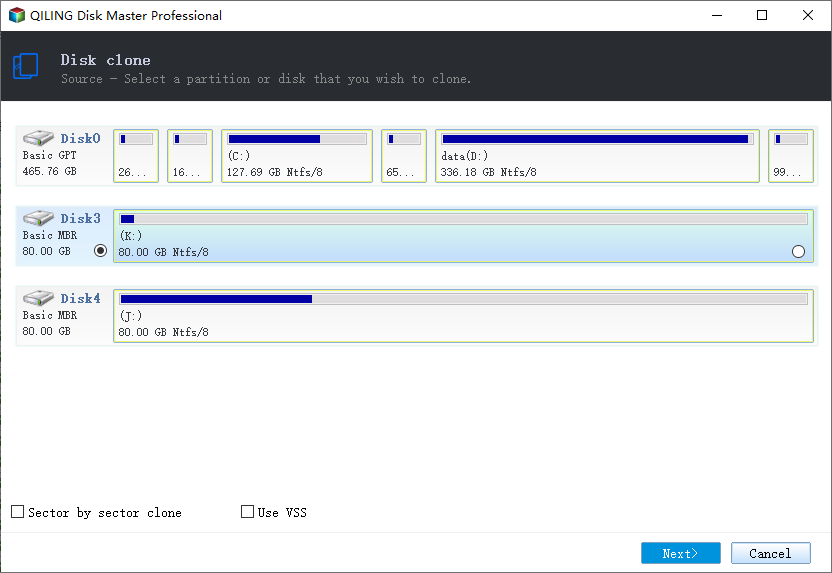
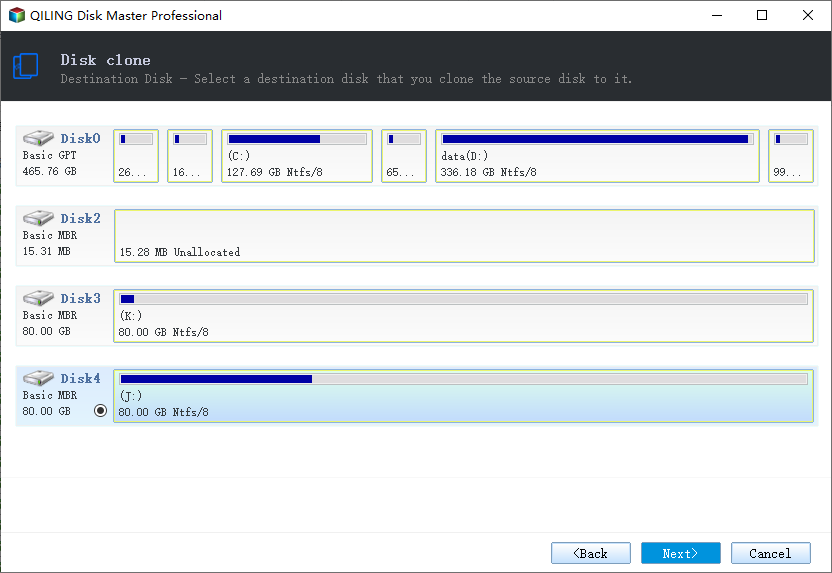
2. Select the destination disk where you want to clone/copy the old disk and click Next to proceed with the cloning/copying process.
A user is prompted to confirm if they want to erase data on the destination disk when running a program, and they click OK to confirm.
3. Check and edit the disk layout by selecting Autofit, Copy as the source, or Edit disk layout to make adjustments as needed.
Autofit the disk is recommended.
- The "Copy as source" option allows you to replicate the exact partition layout from your source disk to your destination disk, ensuring that the destination disk has the same partition structure as the source disk. This feature is useful for maintaining consistency and compatibility between the two disks.
- Edit disk layout allows you to manually resize or move partitions on the destination disk, giving you control over the partition layout.
- If your destination disk is an SSD drive, make sure to select the "Check the option if the target is SSD" box.
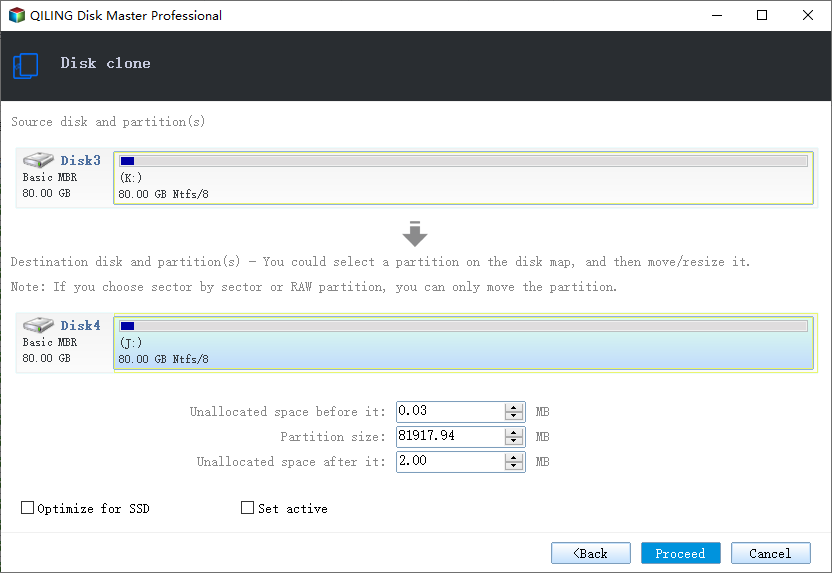
Proceeding with the disk cloning or copying process will create an exact copy of the selected disk, including all files, folders, and operating system. This can be useful for creating a backup or for setting up a new computer with the same configuration.
Conclusion
Macrium Reflect Free is suitable for basic usage, with a user-friendly interface, but limited features compared to the paid version. In contrast, Clonezilla is more geared towards system administrators with its command-line interface, offering more customization options, but also requiring a paid upgrade for additional features.
Related Articles
- Samsung Cloning Software to Clone HDD to SSD Free
- Top 2 Silicon Power SSD Cloning Software (2022 Guide)
- When Should I Replace My HDD? You May Noticed Signs...
- How to Replace/Upgrade Laptop HDD with an SSD
- How to Migrate Hard Drive to SSD without Reinstalling OS?
You can migrate your hard drive to an SSD without reinstalling your operating system using Qiling Disk Master Professional, which makes the process easy and safe. - How do you Migrate OS to SSD from HDD while Keeping Files on HDD?
Learn how to migrate your Windows OS drive from a traditional HDD to an SSD while keeping your files and software on the original HDD using the reliable Qiling Disk Master tool, following a step-by-step process.
Products
Articles & Tutorials
- Data Recovery
- Data Backup
- File Recovery
- File Backup
- System Backup and Restore
- Disk and Partition Clone
- Technical articles
- Mobile articles
- Disk Master Help
- Windows Data Recovery Tutorials
- Windows Secure Delete Tutorials
- Windows Partition Management Tutorials
- Windows File Backup and Restore Tutorials
- Windows System Backup and Restore Tutorials
- Windows Disk Backup and Restore Tutorials
- Windows Clone Tutorials