External SSD Throttles During a Large Copy
Quick Navigation:
- Why the Speed Collapses
- Measure Instead of Guessing
- Improve Cooling and Split the Job
- Copy the Data With Qiling Disk Master
- Frequently Asked Questions
A portable SSD can write at several hundred megabytes per second for the first few gigabytes and then fall to a fraction of that. The drive is not failing; it has filled its cache and reached a temperature it is not willing to exceed. The behaviour is by design, but it changes how a large copy should be planned.
Why the Speed Collapses
Consumer SSDs use a fast cache area that absorbs writes at full interface speed. Once that cache is full, the drive has to fold data into the slower main storage, and the interface rate drops to whatever the storage can sustain.
Heat adds a second limit. A controller that reaches its threshold reduces speed until it cools, which is why an enclosure without airflow throttles sooner than an internal drive with a heatsink.
A third factor is the link. A drive connected through a slower port or a charging-only cable is limited before the drive itself becomes the bottleneck.
Measure Instead of Guessing
Watch the transfer rate during the copy and note the point where it drops. A drop after a consistent amount of data is the cache, while a drop after a consistent time is thermal.
Read the drive temperature if the enclosure reports it. A controller above its throttle point explains the pattern without any other test.
Swap the cable for one rated for the port speed and repeat a short copy. A cable that supports power but not full-speed data produces a low, steady rate rather than a sudden drop.
Improve Cooling and Split the Job
Place the enclosure on a hard surface with airflow rather than on fabric or inside a bag. Some aluminium enclosures benefit from a thermal pad between the drive and the shell.
Copy in batches rather than one enormous selection. The drive can recover between batches, and a failure costs less when the job is smaller.
If the data is irreplaceable, copy the most important folders first rather than starting with the largest archive.
Copy the Data With Qiling Disk Master
Qiling Disk Master shows progress per task and reports skipped files, which makes a throttled or interrupted copy visible instead of silent.
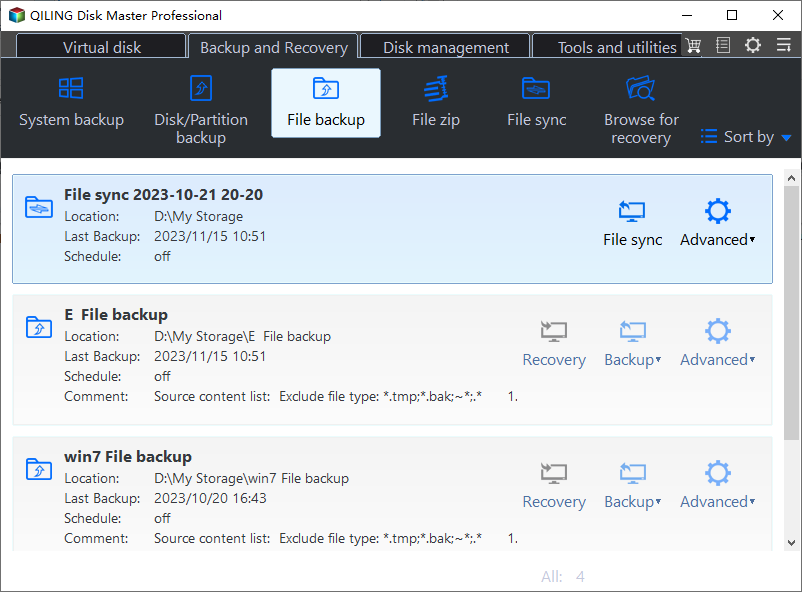
Step 1. Choose File Backup
Open the Backup and Recovery tab and select File Backup. A folder-level job can be repeated later to pick up what changed.
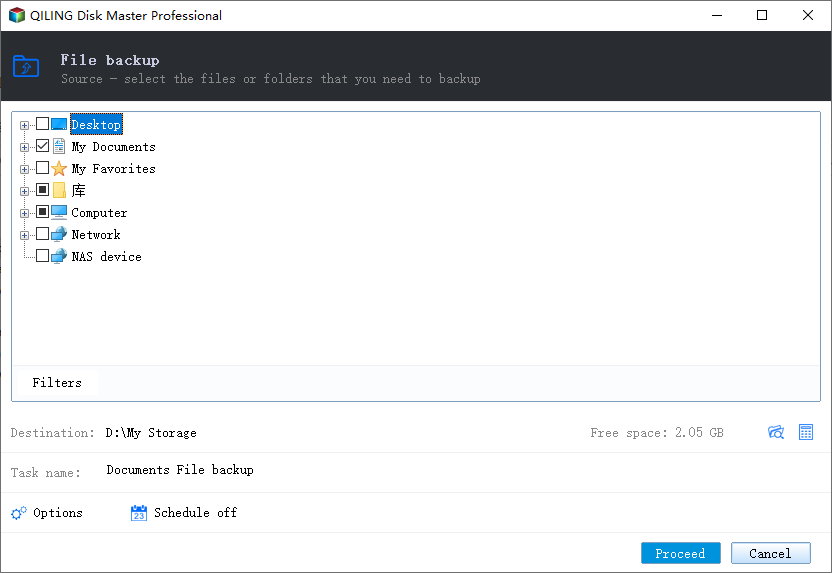
Step 2. Select the External SSD
Expand Computer and tick the drive by its letter, then read the task summary to confirm the size of the selection.
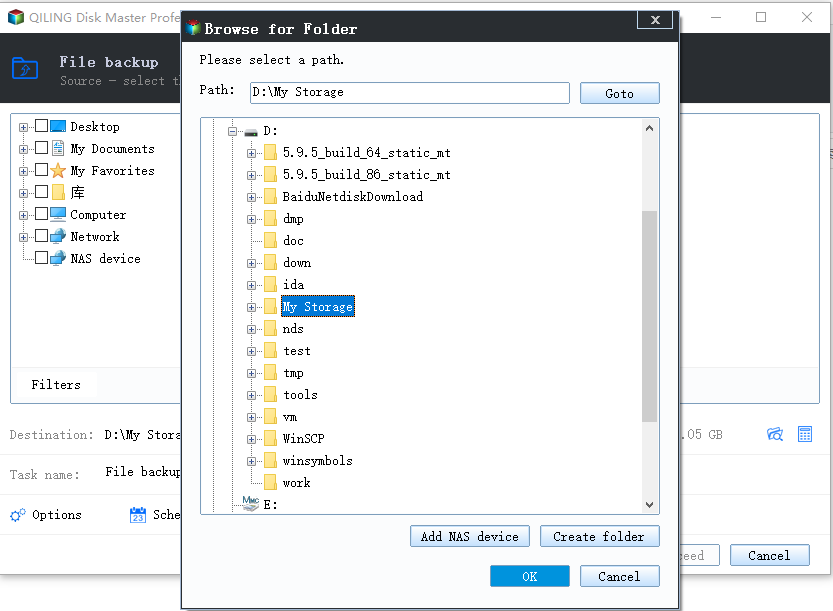
Step 3. Choose an Internal Destination
Write to an internal disk with enough free space. Do not write back to the same enclosure.
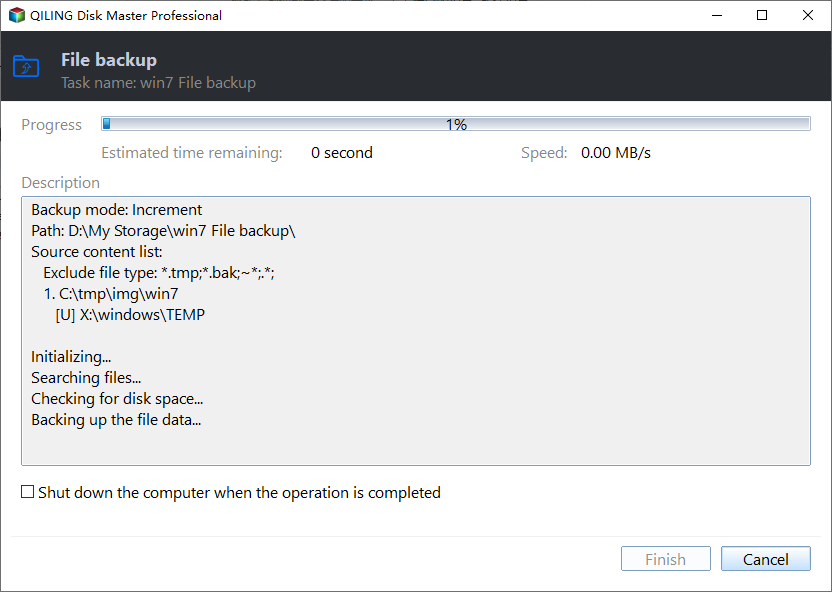
Step 4. Preview and Proceed
Start the job and watch the rate. A rate that collapses and stays low is thermal; a rate that drops to zero is a link problem.
Frequently Asked Questions
Is throttling a sign of a failing drive?
Not by itself. Sustained speed reduction with recovery after cooling is normal behaviour for many portable SSDs.
Will a faster cable fix it?
It raises the ceiling, but not the sustained write speed of the drive. It does help when the current cable is limiting the link.
Why does an internal SSD not do this?
Internal drives usually have a heatsink or airflow, and many have a larger cache. The same underlying limits apply.
Should I stop the copy when it slows down?
No. A slower copy still completes. Stop only if the drive disconnects or reports an error.
For a drive that disconnects instead of slowing down, see an external drive that disconnects during a copy.
Related Articles
- External Hard Drive Disconnects During Copy
- How to Check SSD Temperature
- USB4 SSD Enclosure Randomly Disconnects
- Does an SSD Slow Down Over Time
- SSD Wear Level Is High: What to Do
Products
Articles & Tutorials
- Data Recovery
- Data Backup
- File Recovery
- File Backup
- System Backup and Restore
- Disk and Partition Clone
- Technical articles
- Mobile articles
- Disk Master Help
- Windows Data Recovery Tutorials
- Windows Secure Delete Tutorials
- Windows Partition Management Tutorials
- Windows File Backup and Restore Tutorials
- Windows System Backup and Restore Tutorials
- Windows Disk Backup and Restore Tutorials
- Windows Clone Tutorials