Mapped Network Drive Keeps Disconnecting on Windows 11
Quick Navigation:
- Why a Mapped Drive Drops
- Fix the Connection Layer First
- Fix Credentials and Reconnect at Sign-In
- Copy the Data Before You Keep Troubleshooting
- Frequently Asked Questions
A mapped drive that turns into a red cross every few minutes is rarely a failing disk. Windows 11 manages network connections more aggressively than older releases: it powers down the adapter to save energy, it revalidates credentials after sleep, and it enforces SMB signing on connections that never needed it before. The order below moves from the cheapest cause to the most involved one.
Why a Mapped Drive Drops
Four causes account for most cases. The network adapter is allowed to power down and never wakes cleanly. The machine sleeps, and the credential session expires before it resumes. SMB signing or an SMB dialect mismatch makes the server drop an idle connection. Or the share is reached through a VPN that reconnects with a new address.
Each cause leaves a different trace. A drop after idle time points to power management. A drop only after sleep points to the credential or Fast Startup. A drop under load points to the link, the cable, or the server itself.
Record when the drop happens before changing anything. A fix applied to the wrong cause usually hides the symptom for a day and then fails again.
Fix the Connection Layer First
Open Device Manager, expand Network adapters, and open the properties of the adapter in use. On the Power Management tab, clear the option that allows Windows to turn off the device to save power. Repeat for every adapter that might carry the traffic, including a USB Ethernet dongle.
In the advanced settings of the adapter, disable green Ethernet, energy efficient Ethernet, and any idle power-down option. These features are the usual reason a connection stalls after a few quiet minutes and recovers only when a program touches the drive again.
Prefer a cable over Wi-Fi for a mapped drive that carries large files. If Wi-Fi is unavoidable, reduce roaming aggressiveness and confirm that the access point does not put idle clients to sleep.
Fix Credentials and Reconnect at Sign-In
Windows 11 drops a connection whose stored credential has expired, and it refuses a plain password to a server that requires signing. Open Credential Manager, remove stale entries for the server, then reconnect and save the credential again.
Enable Reconnect at sign-in when you map the drive, so that the connection is rebuilt after a restart instead of waiting for the first click. A drive mapped without that option appears valid until the session ends, then fails.
Elevated applications have a separate credential context, which is why a share works in Explorer and fails in a backup tool. The built-in registry value that allows linked connections resolves that split, and it is a Windows setting rather than a feature of this software.
Copy the Data Before You Keep Troubleshooting
Every reconnect carries a small risk of a partially written file, and a share that drops during a large copy can leave an archive truncated. Qiling Disk Master can copy the contents of the mapped drive to a local disk, so the troubleshooting work no longer touches the only copy.
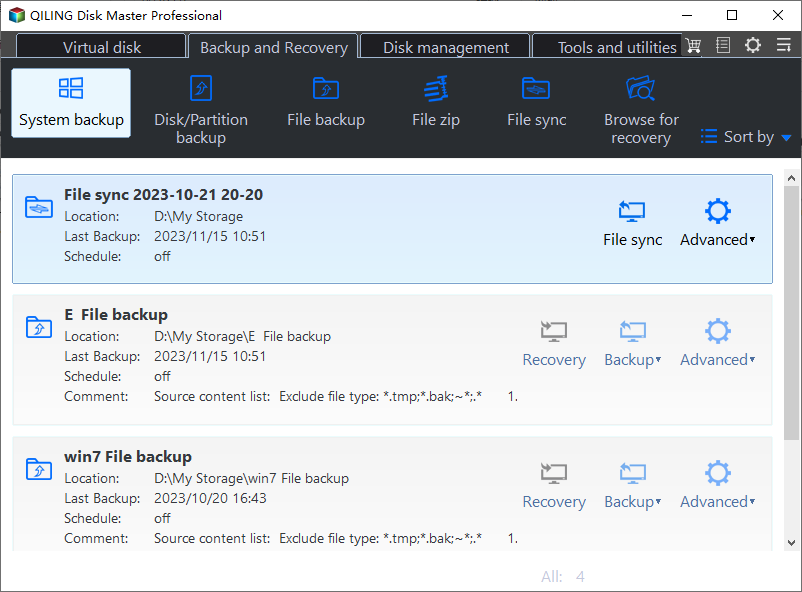
Step 1. Choose File Backup
Open Backup and select File Backup. A folder-level job is enough here, and it can run again later to pick up changes.
Step 2. Select the Mapped Drive
Choose the mapped letter and the folders that matter. If the drive shows a red cross, reconnect it first; the backup cannot read a disconnected share.
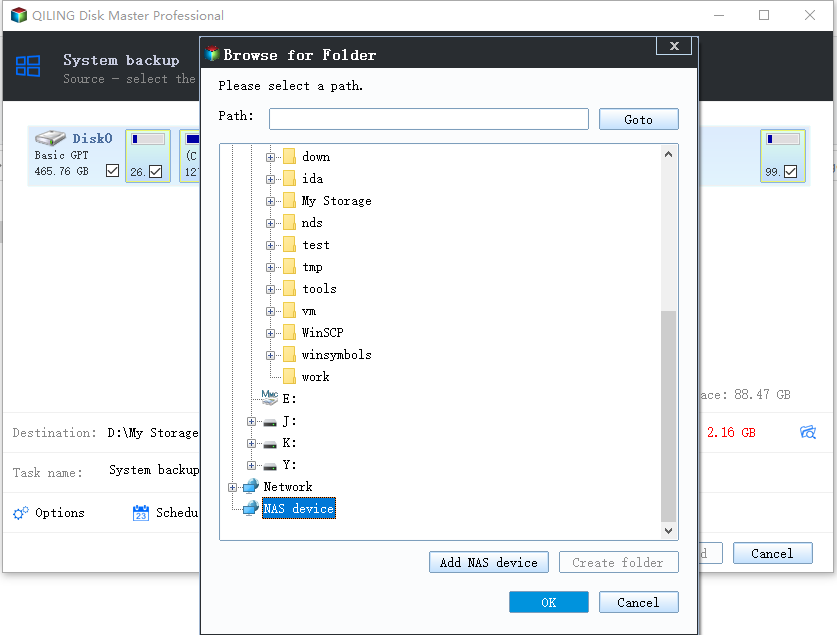
Step 3. Choose a Local Destination
Write the copy to an internal disk or an external drive, never back to the same share. Keep the local copy until the connection has been stable for several days.
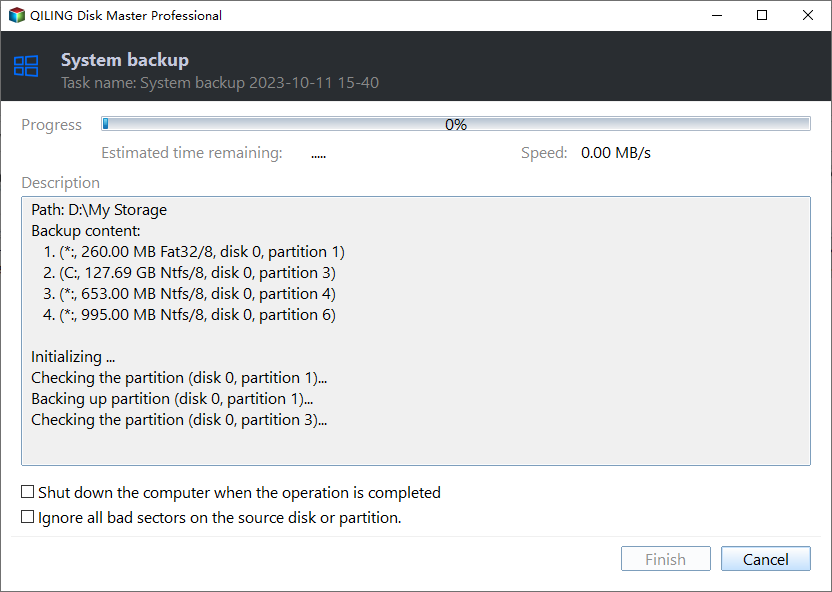
Step 4. Run the Job and Check the Log
Run the task and read the result rather than assuming success. A job that reports skipped files is telling you the connection dropped again during the copy.
Frequently Asked Questions
Why does the drive work in Explorer but fail in another program?
Because the program runs elevated and cannot see the credentials of the interactive session. Mapping the drive from an elevated context, or enabling linked connections, fixes that split.
Does SMB signing cause disconnects?
It can, when a client and server cannot agree on a dialect. The event log on the client records the negotiation failure, which is the quickest confirmation.
Should I use a drive letter or a network location?
A network location survives reconnects better for scripts, while a letter is easier for applications that only accept a drive path. Neither fixes a link that is actually dropping.
Could the server be the problem?
Yes. Check the server event log for session timeouts and the switch port for errors. A duplex mismatch produces exactly the pattern described here.
For the same symptom on a directly attached disk, see an external hard drive that disconnects during a copy.
Related Articles
- External Hard Drive Disconnects During Copy
- Cannot Safely Eject an External Hard Drive
- Back Up Windows 10 to a Network Drive
- USB4 SSD Enclosure Randomly Disconnects
- Back Up an External Hard Drive to the Cloud
Products
Articles & Tutorials
- Data Recovery
- Data Backup
- File Recovery
- File Backup
- System Backup and Restore
- Disk and Partition Clone
- Technical articles
- Mobile articles
- Disk Master Help
- Windows Data Recovery Tutorials
- Windows Secure Delete Tutorials
- Windows Partition Management Tutorials
- Windows File Backup and Restore Tutorials
- Windows System Backup and Restore Tutorials
- Windows Disk Backup and Restore Tutorials
- Windows Clone Tutorials