NVMe SSD Disappears Under Sustained Write Load
Quick Navigation:
- Why the Drive Leaves the Bus
- Find the Moment It Dropped
- Fix Cooling, Power, and Firmware
- Back Up Before You Test
- Frequently Asked Questions
An NVMe SSD that disappears during a large file copy, a clone, or a long render usually leaves the system completely rather than returning errors. It is gone from Disk Management, often gone from the firmware list as well, and it comes back after a reboot or a full power cycle. That pattern describes a link or power event on the drive, not a full volume.
Why the Drive Leaves the Bus
A drive that overheats normally throttles first and keeps working at a lower speed. Some controllers, however, reach their critical limit and reset the link, and the operating system sees a device that no longer answers.
Desktop M.2 slots often sit under a graphics card with no airflow, and a drive with a thin heatsink or none at all can pass 80 degrees Celsius during a sustained write. Laptop slots are worse, because the drive shares a heat pipe with components that are already hot.
Power management causes the same symptom. ASPM and the deepest L1 substates can drop the link when the drive is busy, and a slot fed from a marginal rail can brown out during a write burst. Firmware defects in early releases of some models produce identical dropouts.
Find the Moment It Dropped
Open Event Viewer, look in the System log, and filter for StorPort, disk, and Kernel-Power entries around the time the copy stopped. A reset or a surprise-removal record with a timestamp is worth more than any guess about the cause.
Match that timestamp with what the machine was doing. A drop at the start of a large write points at power or ASPM; a drop after twenty minutes of writing points at heat.
Windows built-in Event Viewer, Device Manager, and Reliability Monitor provide this history and are Microsoft tools, not part of Qiling Disk Master. Record the drive temperature from the vendor utility before and during the load as well.
Fix Cooling, Power, and Firmware
Fit a heatsink that actually contacts the controller, not just the flash chips, and make sure the case moves air across the slot. A thermal pad that has dried out or a heatsink held on by a loose clip does very little.
Move the drive to another M.2 slot if the board offers one, and turn off PCIe power saving for that link in the firmware settings. Reverting an overclock on the memory or the base clock is also worth testing, because an unstable bus drops devices under load.
Update the drive firmware from the vendor and the chipset driver from the board maker. Both fix link-training problems that no amount of cooling will solve.
Replace the drive when SMART shows uncorrectable errors, a rising unsafe shutdown count, or media errors that grow with every dropout. A drive that disappears repeatedly risks corrupting the file system on the next event.
Back Up Before You Test
Qiling Disk Master can image the drive while it is still visible, and its surface test exercises the media without writing user data. Run the backup first: every load test is another chance for the drive to drop.
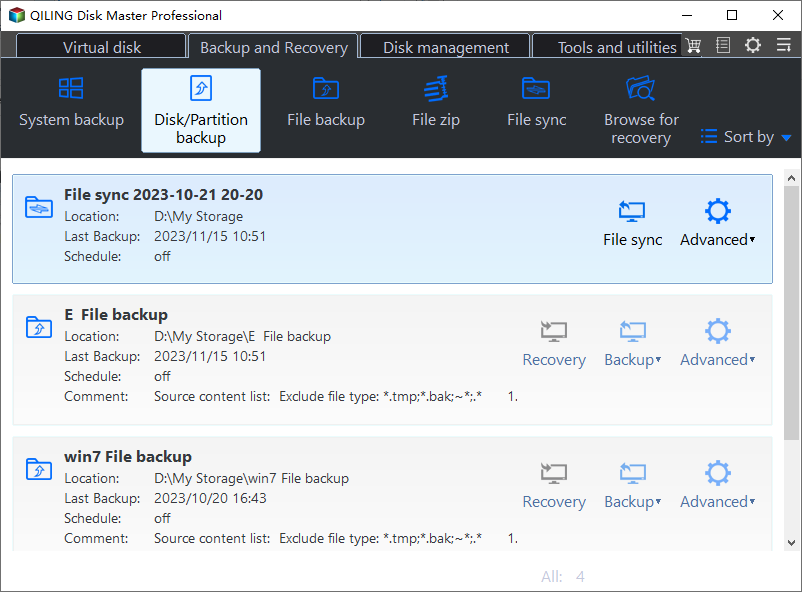
Step 1. Open Disk Backup
Choose Disk Backup on the Backup and Recovery tab. An image captures the whole drive, including the partitions that Windows cannot read while the volume is in use.
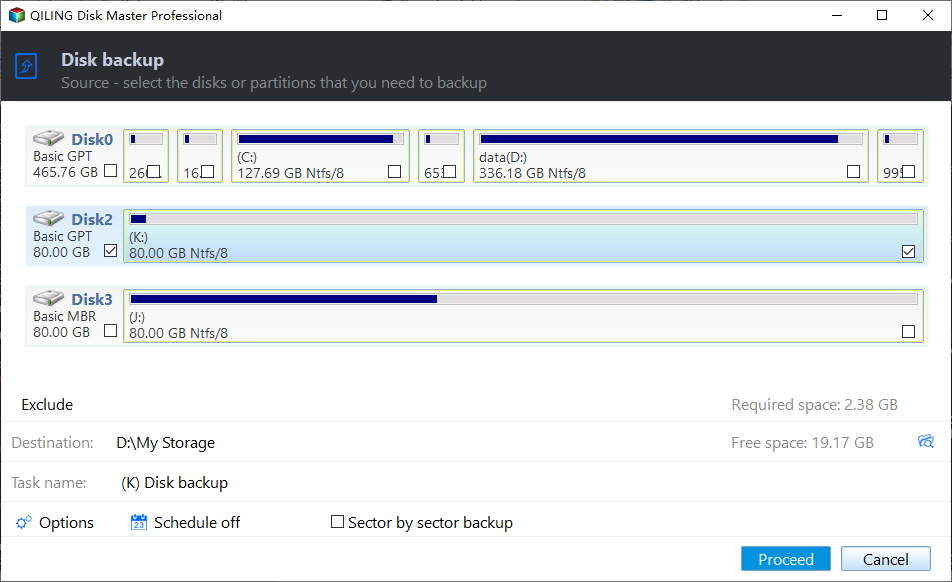
Step 2. Select the NVMe Disk
Tick the NVMe drive directly in the source list, then confirm the disk number and capacity against Disk Management. Copying the wrong disk wastes the window in which the drive is still answering.
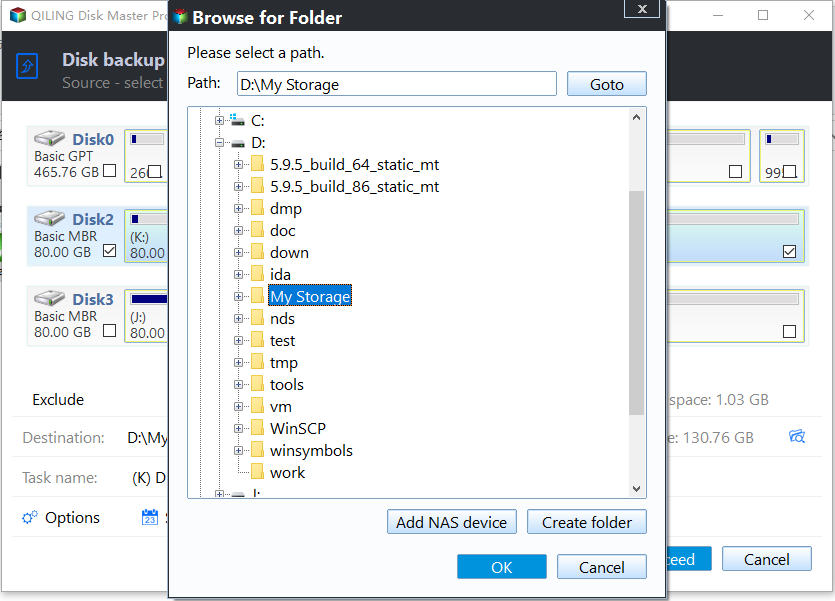
Step 3. Set the Destination and Proceed
Point the image at a disk on another controller, such as a SATA drive or an external enclosure, so one link failure cannot take out both the source and the copy. Click Proceed and let the job finish.
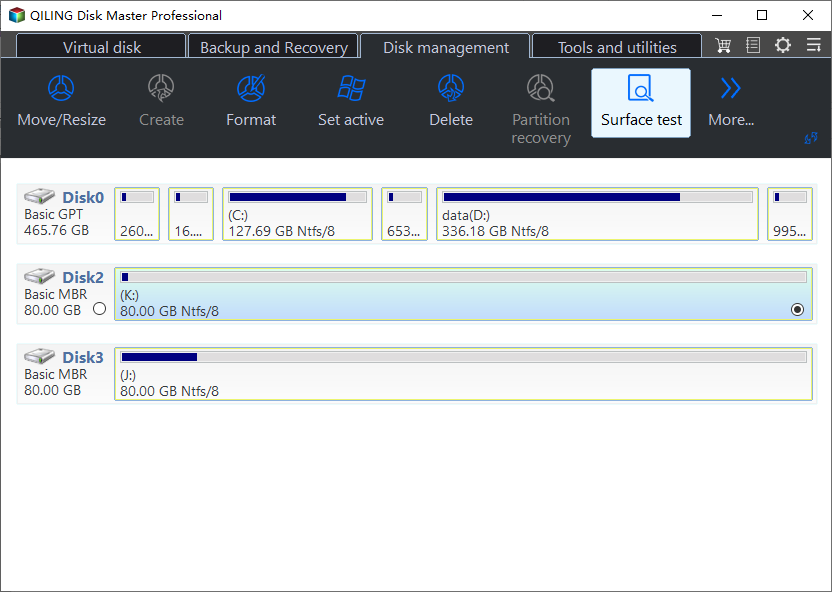
Step 4. Test the Surface
After the image is verified, run the surface test to read every sector and watch for errors or a dropout. A test that stops at the same point on every run is strong evidence of a failing drive rather than a cooling problem.
Frequently Asked Questions
Is the data gone when the drive disappears?
Usually not. The data stays on the flash, but each dropout risks a half-written file system, so copy the important files as soon as the drive is visible again.
Will a different M.2 slot really help?
Sometimes. Slots differ in power delivery and in which PCIe lanes they use, and moving the drive off a shared or marginal link often ends the dropouts.
Should I keep using a drive that dropped once?
Only after it survives a full-surface read and a sustained write without another event. A second dropout at the same temperature or the same workload is a reason to replace it.
For temperature readings and SMART values, see how to check an NVMe SSD for health.
Related Articles
- How to Check NVMe SSD for Health
- NVMe SSD Disappears From BIOS Intermittently
- M.2 SSD Overheating and Throttling in a Laptop
- NVMe SSD Disappears After a Windows 11 Update
- External SSD Throttles During a Large Copy
Products
Articles & Tutorials
- Data Recovery
- Data Backup
- File Recovery
- File Backup
- System Backup and Restore
- Disk and Partition Clone
- Technical articles
- Mobile articles
- Disk Master Help
- Windows Data Recovery Tutorials
- Windows Secure Delete Tutorials
- Windows Partition Management Tutorials
- Windows File Backup and Restore Tutorials
- Windows System Backup and Restore Tutorials
- Windows Disk Backup and Restore Tutorials
- Windows Clone Tutorials