ReFS Volume Slows Down After the Backup Window
Quick Navigation:
- Why ReFS Reacts Badly to Memory Pressure
- Tell Memory Pressure From a Failing Disk
- Set the Backup Window and the Order of Work
- Image the Volume While It Is Quiet
- Frequently Asked Questions
ReFS writes file data with an integrity stream and keeps metadata in structures that are updated in place with checksums. A backup job that touches millions of files at once, together with an agent that trims its working set or reserves a large block of memory, can push the volume into a state where metadata writes wait on memory instead of on the disk. The volume then looks slow or briefly unresponsive without any hardware error.
Why ReFS Reacts Badly to Memory Pressure
ReFS checksums every metadata block and verifies it when it is read back. When memory is short, the cache that holds those blocks is trimmed, so blocks written moments ago have to come from the disk again and be verified a second time, which turns a write-heavy backup into a read-heavy verification.
Backup agents commonly trim their own working set or lock a large buffer to keep the job stable. That is not a fault in the file system, but the volume sees the effect as a stall while the memory manager reclaims pages and the metadata checkpoint waits.
Integrity scrubbing adds a second reader to the same volume. A scrub that overlaps the backup window doubles the load on both memory and disks, and the resulting slowness is often blamed on the array when the schedule is the cause.
Tell Memory Pressure From a Failing Disk
If the stall starts and ends with the backup window, and memory use is high while the disk queue length stays low, the bottleneck is memory. If the disk stays busy with a long queue and the health counters show errors, the disk is the cause, and the volume may go offline exactly as described in a ReFS volume that takes itself offline.
Record the timing before changing anything: the start and end of the backup job, the volume's response time, and the free memory at the peak. A stall that repeats at the same minute of the window is a scheduling or memory problem rather than a drive problem.
Read the drive's SMART counters for reallocated sectors and uncorrectable errors, because a drive can slow down before it fails. Task Manager, Resource Monitor, and Event Viewer are Windows built-in tools and are not part of Qiling Disk Master.
Set the Backup Window and the Order of Work
Run one large job at a time. Put full backups outside business hours, and avoid overlapping an integrity scrub, a deduplication job, or a storage replication cycle with the same window, because each of them reads or writes the whole volume.
Cap the backup agent's memory and turn off working-set trimming where the agent offers the option. A job that finishes twenty minutes later without stalling the volume is a better trade than one that finishes early and makes the volume unavailable.
When the volume is already slow, copy the data out before you repair anything. The order matters: a copy taken while the volume is quiet is worth more than a repair that runs on a volume under load, and the repair itself is described in ReFS block-level reconstruction.
Image the Volume While It Is Quiet
Qiling Disk Master images a whole disk to another disk, so the copy does not compete with the file-level backup for the same metadata. Schedule it after the backup window, when the volume is idle.
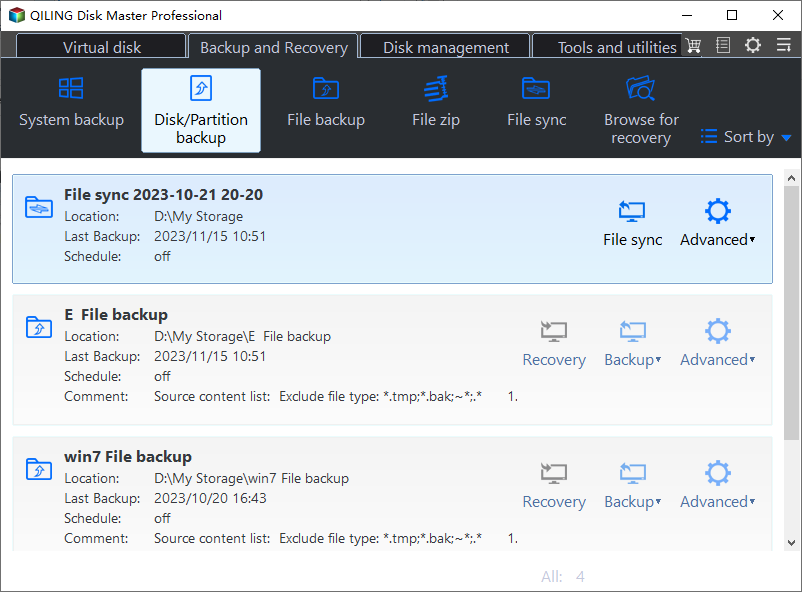
Step 1. Open Disk Backup
Go to the Backup and Recovery tab and choose Disk Backup. A disk image captures the ReFS metadata as it stands, which is what you want while the volume is still mounted and readable.
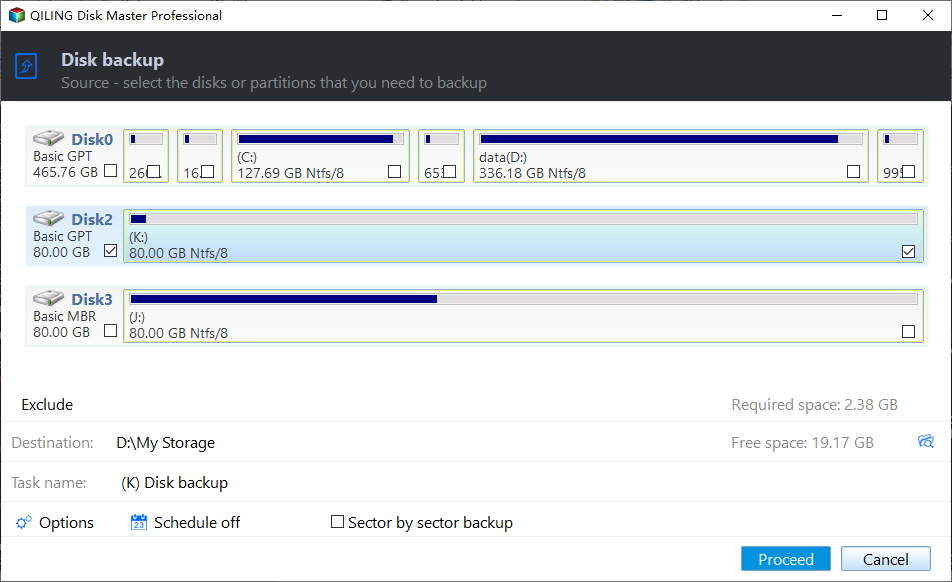
Step 2. Select the ReFS Disk
Tick the disk that holds the slow ReFS volume directly in the source list. Confirm the disk number and capacity so the image is taken from the volume you have been measuring, not from a similar disk in the same server.
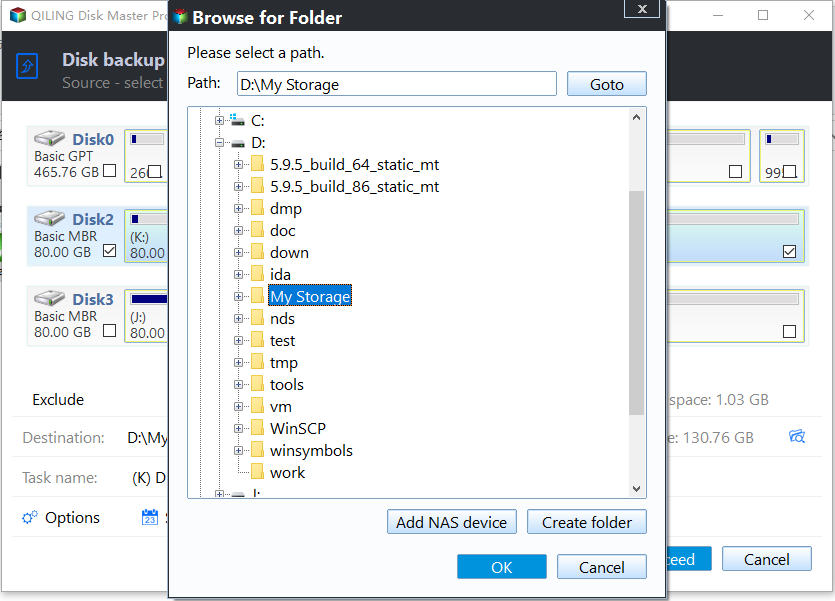
Step 3. Set a Destination on Another Disk
Choose a folder on a different physical disk with enough free space for the used data. Keep the image off the array that is under memory pressure, so the copy does not add load to the component being measured.
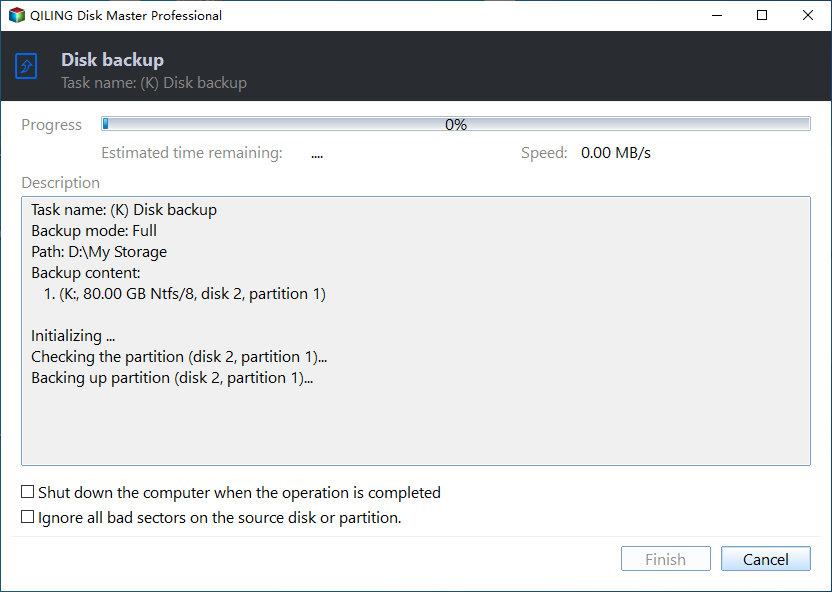
Step 4. Proceed and Check the Duration
Click Proceed and note how long the job takes when the volume is idle. That figure is a baseline: a later job that takes far longer or stalls signals either memory pressure again or a disk that has started to fail.
Frequently Asked Questions
Is a slow ReFS volume a sign of corruption?
Not by itself. Integrity streams catch corruption and would take the volume offline instead. A slow volume with no offline flag and no reset events is usually resource contention.
Should the backup run during an integrity scrub?
No. Both jobs read or verify the whole volume, and running them together doubles the memory and IO demand at the worst possible time.
Does defragmentation help ReFS?
No. ReFS is copy-on-write and does not benefit from traditional defragmentation, so a scheduled optimizer is not the fix for a slow backup window.
If the slowdown spreads to every volume on the machine, compare it with an SSD that slows down over time before you change the backup schedule.
Related Articles
- ReFS Volume Offline: Metadata Write Failed to the Disk
- ReFS Block-Level Reconstruction and What It Repairs
- Does SSD Slow Down Over Time, How to Optimize It
- QLC SSD Slows Down After the SLC Cache Runs Out
- External SSD Throttles During a Large Copy
Products
Articles & Tutorials
- Data Recovery
- Data Backup
- File Recovery
- File Backup
- System Backup and Restore
- Disk and Partition Clone
- Technical articles
- Mobile articles
- Disk Master Help
- Windows Data Recovery Tutorials
- Windows Secure Delete Tutorials
- Windows Partition Management Tutorials
- Windows File Backup and Restore Tutorials
- Windows System Backup and Restore Tutorials
- Windows Disk Backup and Restore Tutorials
- Windows Clone Tutorials