ReFS Block-Level Reconstruction and What It Repairs
Quick Navigation:
- How ReFS Protects Data
- When Reconstruction Runs
- Run the Repair
- Copy the Data Before You Touch the Volume
- Frequently Asked Questions
ReFS stores a checksum with every block and, on a mirrored or parity space, keeps more than one copy of the data. When a block fails its checksum, the file system can rebuild that block from a healthy copy instead of failing the whole volume. That is what block-level reconstruction means, and it is why a ReFS volume can survive corruption that would leave an NTFS volume unreadable.
1 How ReFS Protects Data
Every metadata block carries a checksum, so a structure that is silently corrupted on disk is detected the next time it is read rather than being trusted. Integrity streams extend the same idea to file data, adding a checksum to each block of a file.
On a Storage Spaces mirror or parity space, each block exists in more than one place. Reconstruction reads a good copy, verifies it against the checksum, and writes a fresh copy over the damaged block, so the application never has to know that a repair happened.
Integrity streams are not always enabled: default settings in some roles and some older volumes protect metadata only. Without them, damaged file data can still be detected on a mirror through the copy comparison, but a single-disk volume has nothing to compare against.
2 When Reconstruction Runs
Reconstruction starts on a read. When a checksum fails, ReFS repairs the block before it returns the data, so the application sees a short delay instead of an error message.
It also runs during an integrity scan and while a degraded space is being repaired. A scheduled scrub is what catches damage in blocks that no application has touched, which is why it is worth leaving enabled on volumes that hold long-term data.
If no healthy copy survives, reconstruction cannot run. The volume records the error, may switch to read-only, and after repeated failures can stop mounting altogether. The event log names the volume and the failing block, and that entry is the evidence to check before you try anything else.
3 Run the Repair
Check the volume state in the storage console first. A volume that is Warning or Degraded still has a copy to rebuild from, while one that is already detached has nothing left to read, and a repair cannot create data that no longer exists anywhere.
Windows Server exposes the volume repair as a built-in system utility that runs from an elevated prompt. It scans the volume block by block, rebuilds what the checksums and copies allow, and reports the number of repaired and unrepairable blocks. Treat it as a separate task from any third-party software, and let it finish before you open the volume again.
If the scan reports unrepaired errors, or the volume drops out again shortly afterwards, do not keep repeating it. Each pass pushes a weak disk harder, and the next step is to copy the data off rather than to repair in place.
4 Copy the Data Before You Touch the Volume
Reconstruction rewrites blocks, which means the drive performs extra reads and writes at the moment it is least reliable, so copy the files to another disk before a long repair rather than after it fails. Qiling Disk Master copies folders from a mounted ReFS volume without changing the source, so the volume keeps its current state while a second copy exists.
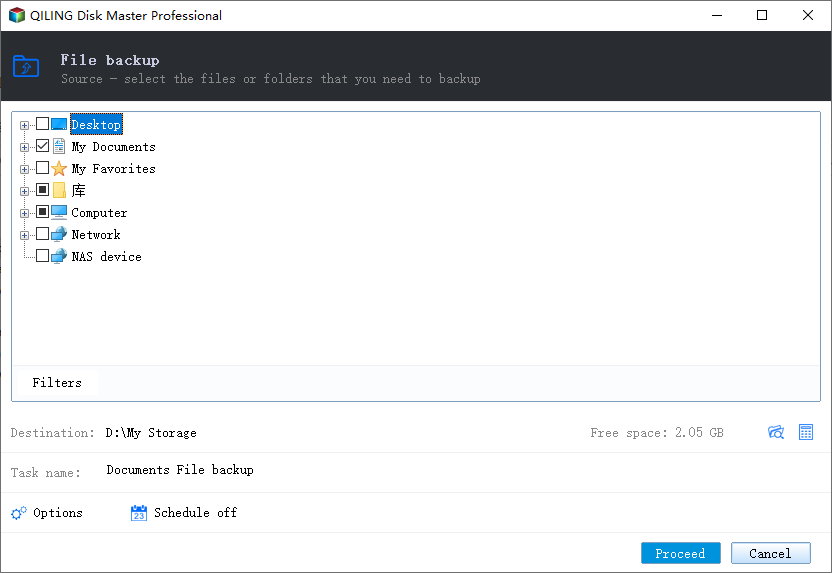
Step 1. Select the Files to Copy
Open the program, go to Backup and Recovery, and choose File Backup. Expand the ReFS volume in the source tree and tick the folders that matter most, starting with the ones that would be hardest to rebuild.
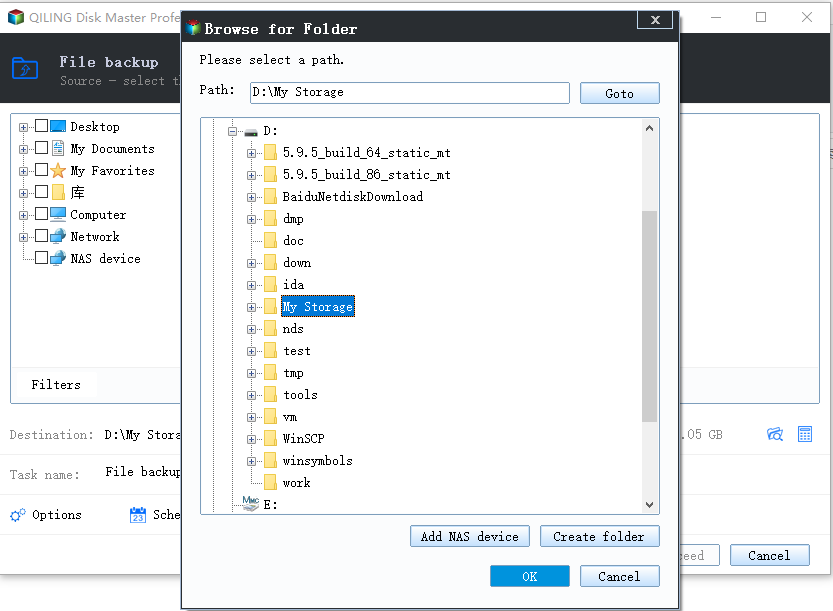
Step 2. Choose a Destination and Start
Choose a destination on a different physical disk, confirm that it has enough free space, and start the task. When it finishes, open a sample of the copied files to confirm that they read normally before you begin the repair.
With a verified copy in place, a repair that goes badly costs time rather than data, and a volume that drops offline can be rebuilt or reformatted without further loss.
5 Frequently Asked Questions
Does reconstruction replace a backup?
No. It repairs blocks that still have a healthy copy and a valid checksum. A deleted file, a formatted volume, or a block with no surviving copy is outside what it can recover.
Why did the volume turn RAW after a repair?
When too many blocks fail and no copy can be rebuilt, ReFS stops mounting the volume. The data is often still there, so recover it before the volume is reformatted.
Does ReFS reconstruction work without Storage Spaces?
Metadata repair works on a single disk, but file data can only be rebuilt where a second copy exists, which in practice means a mirror or a parity space.
Related Articles
- Storage Spaces Reduce Resiliency Warning
- Recover Deleted Files From a Storage Spaces Volume
- Back Up Windows Server 2025 Storage Spaces
- RAW External SSD: Recover Files Before Repair
- Storage Spaces Disk Missing and Cannot Be Removed
Products
Articles & Tutorials
- Data Recovery
- Data Backup
- File Recovery
- File Backup
- System Backup and Restore
- Disk and Partition Clone
- Technical articles
- Mobile articles
- Disk Master Help
- Windows Data Recovery Tutorials
- Windows Secure Delete Tutorials
- Windows Partition Management Tutorials
- Windows File Backup and Restore Tutorials
- Windows System Backup and Restore Tutorials
- Windows Disk Backup and Restore Tutorials
- Windows Clone Tutorials