Write Amplification on SSDs: Why It Shortens Drive Life
An SSD that receives 10 GB of writes from Windows may write 20 GB or 30 GB to its NAND flash. The extra work is called write amplification, and it is the main reason two drives with the same capacity and the same TBW rating can age at very different rates under different workloads.
The ratio is not fixed by the hardware. It changes with how full the drive is, whether TRIM is enabled, and whether the workload writes large sequential blocks or tiny scattered updates. That means you can influence it.
What Write Amplification Means
Write amplification (WA) is the ratio of data written to the flash to data written by the host:
WA = bytes written to NAND / bytes received from the host
A value of 1.0 means every byte is stored once. Values between 1.1 and 2 are normal for desktop use. Heavy small-file workloads on a nearly full drive can push the ratio above 5.
Why NAND Cannot Overwrite in Place
NAND flash is organized in pages for reading and writing, typically 4 KB to 16 KB, and in blocks for erasing, often several megabytes. A page can be written once after it is erased. Changing a single 4 KB block of a file therefore cannot modify the existing page; the controller writes the new version to a fresh page and marks the old one invalid.
Eventually free pages run low. The controller then runs garbage collection: it copies the still-valid pages out of a block, erases the whole block, and returns the space to the free pool. Those copied pages are extra writes the host never requested, and they are the core of write amplification.
What Pushes the Ratio Up
- Small random writes. Updating a database, running virtual machines or downloading many torrents produces scattered 4 KB changes that each occupy a full page.
- A full drive. With little free space the controller has fewer empty blocks to choose from, so it must collect garbage more often and copy more valid data.
- TRIM disabled. Without TRIM, the SSD does not know which pages belong to deleted files, so it preserves them during collection instead of discarding them.
- SLC cache flushes. Fast SLC writing is later folded into slower TLC or QLC blocks, which adds a second write for the same data.
- Misaligned partitions. Writes that straddle a 4 KB physical page force the controller to touch two pages for one logical write.
How It Affects SSD Lifespan
Endurance is usually quoted as TBW, the total bytes the host may write before the warranty ends. The NAND, however, sees host writes multiplied by WA. A 1 TB drive rated at 600 TBW can absorb 600 TB of host writes at WA 1.0, but only about 200 TB at WA 3.0.
For a typical desktop that writes 10 GB per day, 200 TB is still decades of use. For a drive that records video, runs databases or hosts virtual machines, the difference matters. This is why data-centre drives quote higher TBW figures and why QLC drives, which often show higher amplification, are a poor fit for write-heavy roles.
How to Estimate It on Your Drive
Most consumer drives expose Total Host Writes or a similar SMART attribute, readable with tools such as CrystalDiskInfo or the vendor utility. Far fewer expose the NAND-side write count, so WA usually has to be inferred from the model's behavior rather than measured directly.
What you can measure is the host side: compare total host writes over a week with the amount of data you actually saved. If the number is much larger than expected, look for a background process, a sync client or a virtual machine writing continuously.
How to Keep It Low
- Keep at least 15% of the drive free. The empty space acts as over-provisioning and gives garbage collection room to work.
- Confirm TRIM is active with
fsutil behavior query DisableDeleteNotify. A result of 0 means TRIM is enabled. - Keep virtual machines, databases and download folders off a nearly full system SSD, or give them their own drive.
- Let large sequential operations finish in one pass instead of interrupting and restarting them.
- Align partitions to 1 MB boundaries, which every modern Windows setup does by default.
Disk images and clones are a common source of large writes. When you clone a drive, the default mode copies only the sectors that contain data, while the sector-by-sector option copies the entire capacity, including empty space. Choose the sector-by-sector mode only when you need an exact replica, for example for forensic work or a drive with unusual metadata.
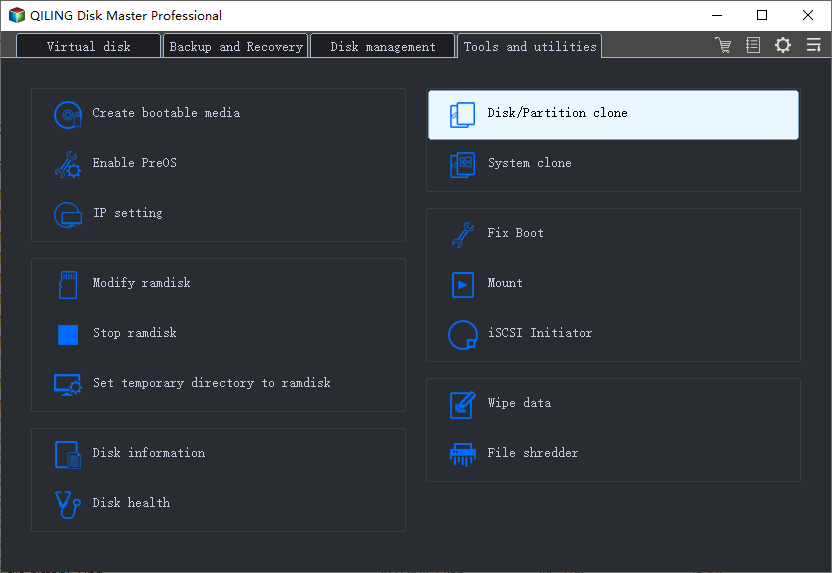
Step 1. Launch Qiling Disk Master, open the Tools and utilities tab and click Disk/Partition clone.
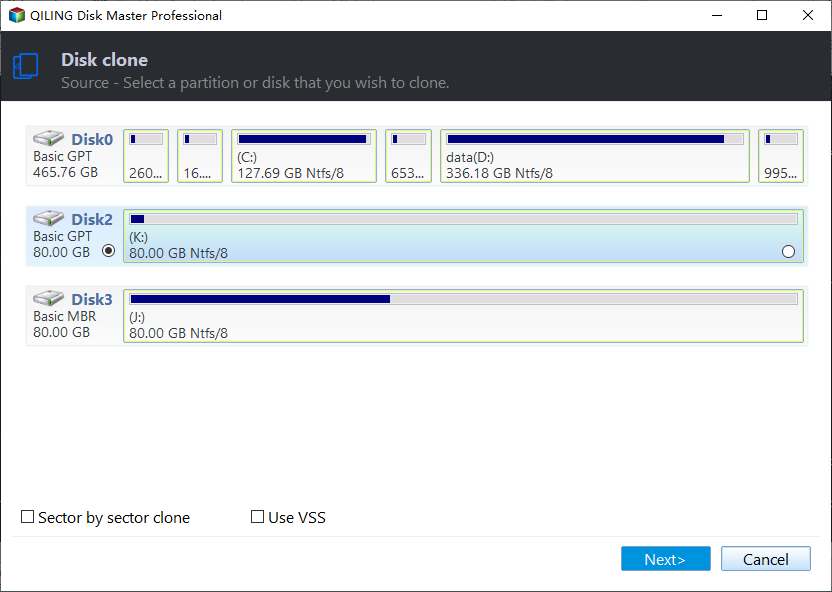
Step 2. Select the source disk and click Next.
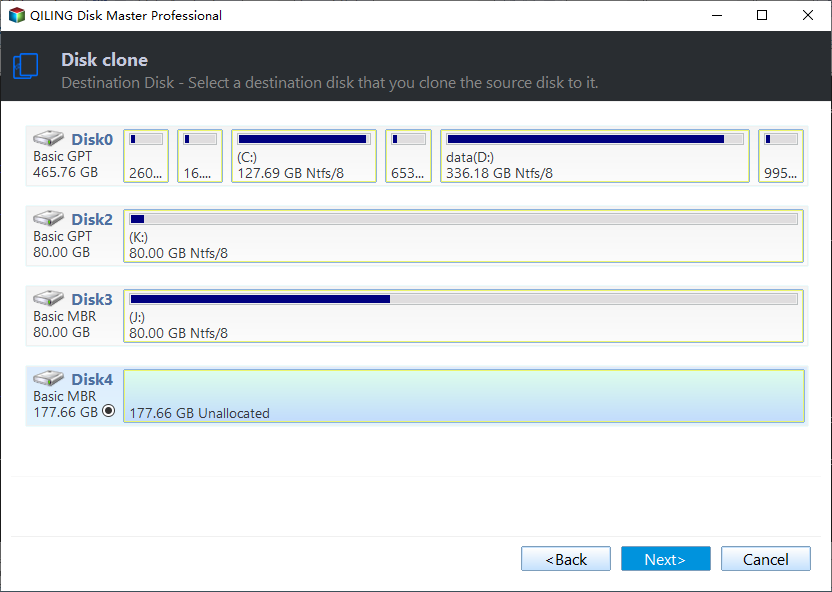
Step 3. Select the destination disk and click Next.
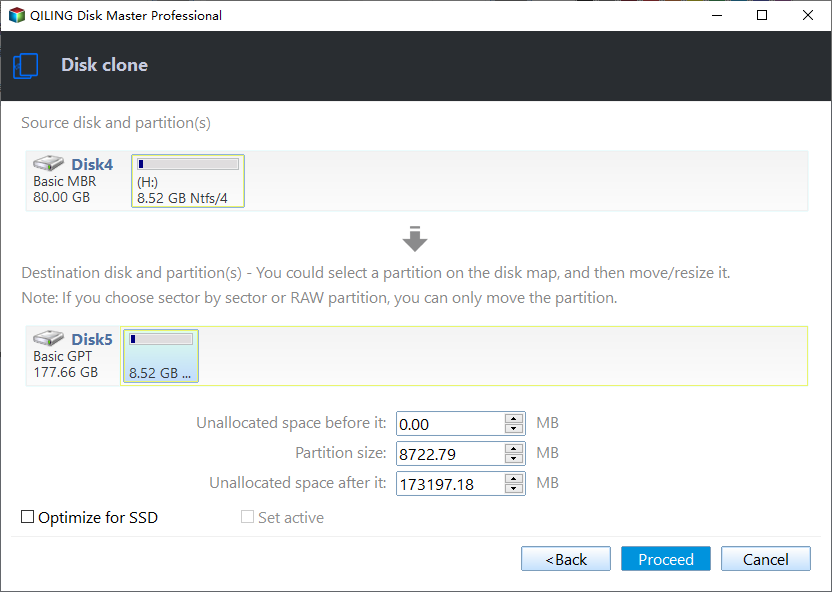
Step 4. Review the layout, click Proceed and wait for the clone to finish.
For regular backups, use incremental mode so each run writes only the changed blocks instead of the whole disk.
Is write amplification the same as wear leveling?
No. Wear leveling spreads writes across blocks so no single block wears out first. Write amplification measures how much extra data that process and garbage collection generate.
Does formatting an SSD reset its wear?
No. Formatting clears the file table but does not restore NAND endurance. Only the SMART counters and the physical flash state tell you how much life has been used.
Do NVMe drives have lower write amplification than SATA drives?
Not inherently. The interface is faster, but the ratio depends on the controller, the amount of over-provisioning and the workload, not on the cable.
Related Articles
- Slack Space: Why Size on Disk Is Bigger Than File Size
How allocation units turn small files into larger on-disk footprints. - SSD Secure Erase in Windows 10/11
How a secure erase returns an SSD to a clean state and why it differs from formatting. - Clone a Drive with an NVMe Enclosure
A practical walkthrough for cloning to an NVMe drive through a USB enclosure.
Products
Articles & Tutorials
- Data Recovery
- Data Backup
- File Recovery
- File Backup
- System Backup and Restore
- Disk and Partition Clone
- Technical articles
- Mobile articles
- Disk Master Help
- Windows Data Recovery Tutorials
- Windows Secure Delete Tutorials
- Windows Partition Management Tutorials
- Windows File Backup and Restore Tutorials
- Windows System Backup and Restore Tutorials
- Windows Disk Backup and Restore Tutorials
- Windows Clone Tutorials