Intel-Based Mac | What Is Intel Mac and Why Differs from Apple Silicon
Apple transitioned to Intel x86 CPUs in 2006, allowing Intel-based Macs to run either macOS or Windows via Boot Camp.
For the newer Mac architecture, compare this page with the guide to Apple Silicon Mac.
Intel Macs allow for the exchange of data between PCs and Macs, with some file formats, like TIFF photos, requiring a conversion before sharing.
Apple's transition from Intel to ARM CPUs for the Mac series began in 2020, aiming to unify the CPU architecture across all its desktop and mobile platforms. Let's dive deeper into this topic!
How Do I Know if My Mac Is Intel-Based
Apple transitioned its Macs from Intel CPUs to its M1 Apple silicon chips in 2020, followed by the release of the M2 chip, which offers enhanced performance.
The resulting Mac models, whether Intel or Apple silicon-based, have become increasingly similar in design, making it challenging to distinguish between them despite the significant advancements in processor performance.
To determine if your Mac is intel-based, you can use the "About this Mac" feature. Here's how: Open the Apple menu and click on "About this Mac." This will open a window with information about your Mac, including its processor type.
Step 1. To access the Apple menu, click on the Apple icon, which is located at the top-left edge of the menu bar.
Step 2. Opt for the "About This Mac" option.
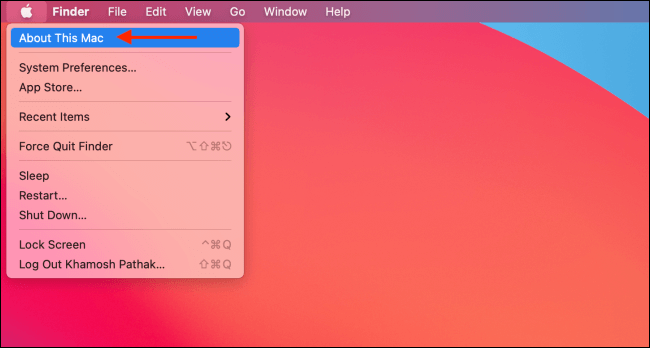
Step 3. The Intel Macs will have "Processor: Intel Core i5/i7."
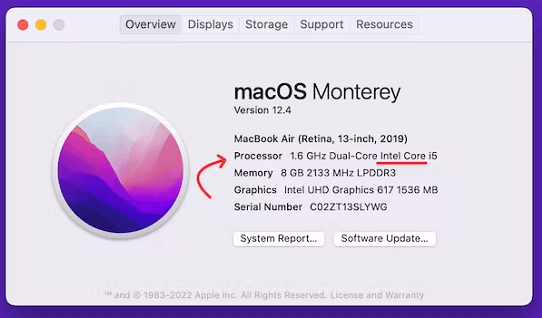
If your Mac has an Intel chip, About This Mac will show an item called "Processor" with the official name and model number of the Intel processor.
Pros and Cons of Apple Silicon VS. Intel Mac
To help you decide between Intel Mac and Apple Silicon, let's weigh the pros and cons of each. Intel Macs offer a wider range of software compatibility and more flexibility in hardware upgrades, but may be more prone to overheating and have shorter battery life.
Pros
Apple's influence will be more significant when new Macs are released, as Intel's flaws and inefficiencies, such as the cancellation of the Cannon Lake processor generation, will no longer be a concern.
- Improving battery capacity is achievable due to the unparalleled productivity per watt in the market.
- Apple is well-positioned to lead the market in hardware development for mobile devices, tablets, and Macs, thanks to its ability to manage Intel's chip delivery timeline.
- Programmers will find it easier to optimize programs for the entire Apple ecosystem, including Mac, iPhone, and iPad, with the introduction of Silicon Macs. These devices should be able to run iOS apps seamlessly, but programmers will need to prepare them for the Apple App Store.
- Apple's iPhone and iPad CPUs are already powerful enough to run Macs, allowing for seamless hardware and software integration.
- With their cutting-edge power efficiency, access to deep learning capabilities, the Private Enclave, the Cognitive Engine, and Apple's proprietary GPU, these CPUs can provide a robust and efficient computing experience, setting them apart from other ARM-based processors.
- The ARM architecture continues to gain traction across the computing industry, from mobile devices to high-performance systems. By designing its own ARM-based chips, Apple can achieve greater operating margins and potentially reduce Mac costs.
- Superior-Performance GPUs should enable more advanced professional applications and high-end gaming, while ARM-based CPUs use fewer semiconductors, saving energy and reducing heat. This allows engineers to leverage machine learning algorithms using the Neural Engine for faster access.
Cons
Since ARM is incompatible with x86 or x64 software, most Windows programs won't work on a Mac without an emulator, which is expected to be a significant issue for Mac users.
- Intel remains the dominant player in the CPU market, and despite ARM and AMD's growing presence, software developers will continue to prioritize Intel compatibility.
- This means some professional applications may not be fully optimized for Apple Silicon, creating compatibility challenges for Mac users transitioning to the new architecture.
- The ARM-based Surface Pro faces several challenges, mainly due to software incompatibility issues, particularly with professional-grade applications.
- Apple's switch to Intel in 2006 had a significant advantage: Mac users could now install Windows on their computers, making the Mac more appealing to those who were hesitant to leave Windows behind.
- The initial phase of any device can be considered a trial process, and Apple Silicon, being a relatively new technology, has not yet been thoroughly tested on Macs. As a result, its full potential and capabilities are still unknown, leaving room for Apple to innovate and improve.
Final Verdict
The Intel Mac series has been a significant part of Apple's history, offering a range of benefits and drawbacks compared to Apple Silicon. Understanding the differences between the two is crucial for making informed decisions about your computing needs.
Knowing how to check if your Mac is Intel-based can be a game-changer. By grasping the pros and cons of Intel Macs, users can better navigate the transition to Apple Silicon in the future.
Related Articles
- How to Map a Network Drive in Windows 11? Your Complete Guide Is Here
- Windows 11 Taking Forever to Install? Get Complete Guide to Fix Windows 11 Slow to Install Issue
- HP Recovery Manager in Windows 10 [Free Download]
- Windows 11 Is Affecting Performance on AMD CPUs, Fixes Are Coming Soon
- Don't Pass: Is It Safe to Update BIOS?🔥
Is it safe to update BIOS? That's the question on a lot of users' minds, and this article answers that question thoroughly. It'll also tell users what to do to avoid data loss and important things about updating BIOS. - Is Primary and Active Partition the Same [Beginner's Guide]
Learn whether primary and active partitions are the same. Compare their meanings, roles in booting Windows, and how to manage partitions.
Products
Articles & Tutorials
- Data Recovery
- Data Backup
- File Recovery
- File Backup
- System Backup and Restore
- Disk and Partition Clone
- Technical articles
- Mobile articles
- Disk Master Help
- Windows Data Recovery Tutorials
- Windows Secure Delete Tutorials
- Windows Partition Management Tutorials
- Windows File Backup and Restore Tutorials
- Windows System Backup and Restore Tutorials
- Windows Disk Backup and Restore Tutorials
- Windows Clone Tutorials