Which Command Is Used to Format a Disk Partition as EXT4? Check and Find Answer Here
In this article, you'll learn:
- EXT4 is a popular file system used in Linux operating systems, known for its reliability, efficiency, and high performance. It's widely used for storing data on hard drives and solid-state drives.
- The `mkfs.ext4` command is used to format a disk partition as EXT4. This command creates a new file system on the specified partition, making it ready for use.
- To format a disk partition as EXT4 with the command line in Linux, follow these steps:
- To format a disk partition as EXT4 on Windows, you can use the Easier Disk Formatter tool. This tool allows you to easily format the partition with the EXT4 file system, making it compatible with Linux systems.
The EXT4 file system is a popular choice for Linux users due to its improved performance and increased capacity compared to its predecessor, EXT3, and is widely used as the default file system on many Linux distributions. To use EXT4 on a disk partition, it must first be formatted using the appropriate command.
To format a disk partition as EXT4 in Linux, you can use the command `mkfs.ext4` followed by the device name of the partition you want to format. For example, if you want to format the first partition on the first hard drive, you would use `sudo mkfs.ext4 /dev/sda1`.
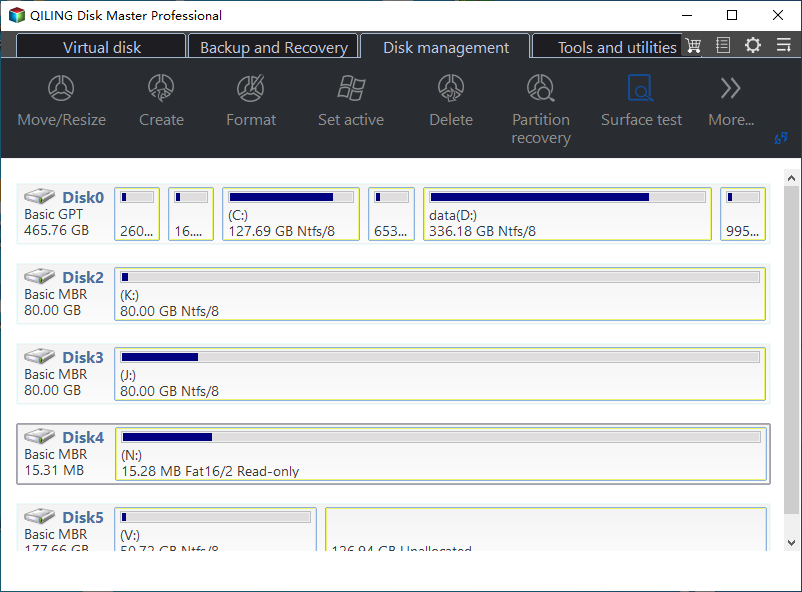
What Is EXT4 File System and Why Need to Format Disk Partition as EXT4
EXT4, the successor to EXT3, is a popular file system for Linux systems, released in 2006. It offers significant improvements over its predecessor, including increased capacity, supporting file sizes and volumes up to 16TB and 1EB, respectively. Additionally, EXT4 features several enhancements that enhance performance and reliability, making it a reliable choice for storing large amounts of data.
- Online defragmentation: EXT4 can defragment files while in use, improving overall file system performance.
- Faster file system checks: EXT4 uses a new data structure called the Flexible Block Group Descriptor, which enables faster file system checks and reduces downtime required for maintenance.
- Extents: EXT4 uses extents to store file data, which can improve performance for large files by reducing the number of metadata updates required, allowing for more efficient storage and retrieval of file information.
- Multi-block allocation: EXT4 can allocate multiple data blocks simultaneously, enhancing performance for specific types of file access.
In situations where a Linux user needs to format a disk partition as EXT4, they often encounter issues such as incorrect file system type, missing or corrupted file system, or an existing file system that needs to be reformatted. To resolve these problems and successfully format the partition as EXT4, the user can use the mkfs command with the -t option followed by the file system type, which in this case is ext4.
- Installing a new Linux operating system: If you're installing a new Linux OS, consider using the EXT4 file system for your root partition to take advantage of its improved performance and increased capacity.
- Upgrading from an older file system: If a user is currently using an older file system such as EXT3, they may want to upgrade to EXT4 to take advantage of its improved performance and increased capacity.
- Changing the file system for a specific partition: You can change the file system of a specific partition, like your home partition, to EXT4 for better performance or increased capacity.
- Repairing a damaged file system: If a file system becomes damaged, a user may need to format the partition as EXT4 to repair it, which will erase all data on the partition, so it's essential to back up any important data beforehand.
Also Read: How to Access Linux EXT4 Partition and Data on Windows.
Which Command Is Used to Format a Disk Partition as EXT4? Your Answer Is Here
To format a disk partition as EXT4 in Linux, you can use the 'mkfs' command. The exact command will be: `mkfs.
- mkfs.ext4 /dev/[device]
Format the partition [device] using the following command: `sudo mkfs.ext4 /dev/[device]`
To format a disk partition as EXT4, you can use the `mkfs.ext4` command, which is a part of the `e2fsprogs` package.
- disk: To delete and recreate a partition, and then format it as EXT4, use the following command: fdisk /dev/[device], delete the partition, create a new one, and then use the mkfs.ext4 command to format the newly created partition.
- mke2fs: creates an EXT4 file system on a specified device
How to Format Disk Partition as EXT4 with Command Line Linux
Before formatting your disk partition as EXT4 in Linux, it's essential to back up any valuable files to avoid losing important data, which can be a frustrating and time-consuming experience. Once you've taken the necessary precautions, you can proceed with formatting the disk partition using the command `mkfs.ext4 /dev/sdx` (replace `/dev/sdx` with the actual device name of the partition you want to format). This command will erase all data on the partition, so make sure to double-check the device name to avoid formatting the wrong partition. After formatting, you can create a file system on the partition using the same command.
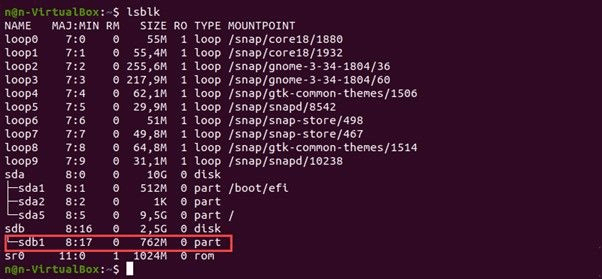
To format a disk partition as EXT4 with Command Line Linux, first, open the terminal and use the `lsblk` command to identify the disk partition you want to format. Then, use the `mkfs.
Step 1: To format a partition as EXT4, open a terminal window and use the command `lsblk` to list the available disk partitions and their mount points. Identify the device name of the partition you want to format, which will be listed in the first column of the output. Then, use the command `sudo mkfs.ext4 /dev/ device_name` to format the partition as EXT4, replacing `/dev/ device_name` with the actual device name you identified. This will create a new EXT4 file system on the specified partition, overwriting any existing data.
Step 2: To unmount a partition, you need to first identify the mount point of the partition. The mount point is the directory where the partition is mounted. Once you have the mount point, use the umount command followed by the mount point of the partition. This will unmount the partition, making it available for formatting.
umount /path/to/mount/point
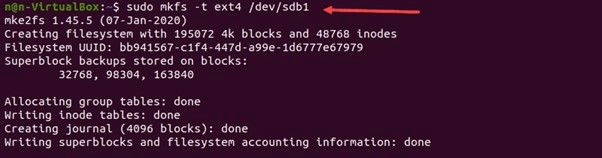
Step 3: To format a partition as EXT4, use the command `mkfs.ext4 [device]`, replacing [device] with the name of the drive representing the partition you want to format, such as sda1 or hda2.
sudo mkfs.ext4 -t /dev/[device]
Step 4: To mount a partition, use the `mount` command followed by the device name and the desired mount point. For example, if you want to mount the partition `/dev/sda1` at `/mnt`, you would use the command `mount /dev/sda1 /mnt`. If the partition is not already mounted, this will mount it and make it accessible.
mount /dev/[device] /path/to/mount/point
Bonus Tip: Format Disk Partition as EXT4 with Easier Disk Formatter on Windows
If you're a Windows user looking for a reliable tool to help you format a disk partition as EXT4, Qiling Disk Master is a great option. This powerful and easy-to-use disk partition management software allows you to create, delete, resize, and format disk partitions on your Windows computer with ease.
Qiling Disk Master is a user-friendly software that allows users to format a disk partition as EXT4, making it a useful tool for those who need to manage their disk partitions.
Step 1. Launch Qiling Disk Master, right-click the partition you intend to format and choose "Format".
Step 2. Enter the Partition label, choose the FAT32/EXT2/EXT3/EXT4 file system, and set the cluster size according to your needs in the new window.
Step 3. Please proceed with formatting the partition to FAT32/EXT2/EXT3/EXT4.
Step 4. Then you will see a warning window, click "Yes" in it to continue.
Aside from formatting an EXT4 partition, you can also use Qiling Disk Master as a reliable tool for Linux EXT4 Partition Management, which helps to create and manage EXT2/3/4 volumes for different purposes.
Key Features of Qiling Parition Master that You May Like:
- It enables users to manage disk partitions on Windows, allowing them to create, delete, resize, and format partitions as needed.
- It's a tool that converts the file system of a partition to a different one, like from EXT3 to EXT4.
- You can clone an EXT4 partition, merge two adjacent partitions, or split a partition into two.
- It can scan your disk for errors and repair any issues.
- You can use this tool to migrate your operating system to a new hard drive, effectively replacing the old one.
Give Qiling Disk Master a try and see how it can help you easily and effectively format your disk partition as EXT4 on your Windows computer.
Final Verdict
Formatting a disk partition as EXT4 requires using the correct command, which can be found after reading this article. Before proceeding, it's essential to back up any valuable data as formatting will erase all data. Windows users can also use Qiling Disk Master, a reliable software that allows formatting a partition as EXT4 for Linux users, making it a convenient option.
FAQs about Which Command to Format Disk Partition as EXT4
After learning how to format disk partitions as EXT4, many people have questions. Some of the most essential ones include understanding the process of creating a new partition, deleting an existing one, resizing or moving a partition, and formatting an entire disk. Additionally, users may want to know how to check the health of their partitions, recover lost data, and troubleshoot common issues that may arise during the formatting process.
1. Which command is used to format a partition on a hard disk drive with the EXT4 file system
To format a partition on a hard disk drive with the EXT4 file system in Linux, simply use the mkfs.ext4 command followed by the device name you want to format, such as mkfs.ext4 /dev/sdb1. This command will erase all data on the partition, so be sure to back up any important files first.
2. How do you format an EXT4 partition
To format an EXT4 partition in Linux, you can follow the same process, and for Windows users, using a disk formatter like Qiling Disk Master is recommended.
3. What is the name of the command that creates an EXT4 file system
The command to create an EXT4 file system in Linux is mkfs.ext4, which allows you to create an EXT4 file system on a specified device.
4. What is EXT4 format in Linux
EXT4 is a popular file system for Linux systems, offering increased capacity and improved performance and reliability compared to its predecessor.
Related Articles
- How to Change File Type in Windows 10
- How to Reset Windows Password When Locked Out🔥
- How to Create Password Reset Disk Windows 10
- Can't Format/Clean USB Bootable Flash Drive, How to Fix
Why can't format/clean WinTo USB bootable flash drive? How can you fix this error efficiently? This article will guide you on how to remove this error. - How to Create Volume/Partition Using Diskpart? [Full Guide]
Diskpart is a built-Disk Utility is a disk utility that offers multiple ways to assist with creating partitions and handling volumes in Windows 11/10. - How to Create Qiling WinPE Bootable Disk in Windows 10/8/7
Download the Qiling Partition Manager Software to create a Qiling Partition Master WinPE bootable disk, compatible with Windows Server 2003/2008/2012 and Windows XP/Vista/Windows 7/8.
Products
Articles & Tutorials
- Data Recovery
- Data Backup
- File Recovery
- File Backup
- System Backup and Restore
- Disk and Partition Clone
- Technical articles
- Mobile articles
- Disk Master Help
- Windows Data Recovery Tutorials
- Windows Secure Delete Tutorials
- Windows Partition Management Tutorials
- Windows File Backup and Restore Tutorials
- Windows System Backup and Restore Tutorials
- Windows Disk Backup and Restore Tutorials
- Windows Clone Tutorials