What Is Ext2/Ext3/Ext4 File System Format? What's The Difference [Full Guide]
What is Ext2/Ext3/Ext4 File System Format and What's The Difference [Full Guide]
Choosing between Ext2, Ext3, and Ext4 file systems can be confusing, but this article aims to clarify the differences among them. Ext2, Ext3, and Ext4 are file systems that are commonly used in Linux operating systems, and each has its own strengths and weaknesses. The key differences among these partitions include their features, such as journaling in Ext3 and Ext4, which provides faster recovery in case of a system crash. A third-party utility can also be used to set up and create Ext 2/3/4 partitions on a Windows PC, making it easier to manage these file systems.
| Workable Solutions | Step-by-step Troubleshooting |
|---|---|
| 1. What is Linux File System Format? | The Linux File System is a structured collection of files on a disk drive or a partition. It is used for data...Full steps |
| 2. What are Ext2, Ext3, Ext4 File Systems? | The Ext2 is defined as a second extended file system. It was introduced in 1993, and it is the first...Full steps |
| 3. What's the Difference Between Ext2, Ext 2, and Ext 4? | Pros are It supports a maximum file size of 4TB...and cons include a waste block size and no file journaling...Full steps |
| 4. Which is Better, Ext 2, Ext3, or Ext4? | Ext4 is a better option to use on modern Windows and Linux hard drives. Because Ext4 not only runs...Full steps |
| 5. When Should I Use Ext 2/3/4? | Ext 2/3/4 are used when you need to manage data. These file systems allow easy and quick files...Full steps |
| 6. How to Create Ext2/3/4 Linux Partition on Windows? | Here is a guide on how you can set up a Linux file system format drive on a Windows PC. To create partitions...Full steps |
Linux File System Format
The Linux File System is a structured collection of files stored on a disk drive or partition, used for efficient data management. It systematically stores data, allowing for quick access to files, and manages information such as file size, creation date, and file name.
The Linux File System Format is compatible with Windows operating systems and supports various file systems, including Ext2, Ext3, Ext4, JFS, ReiserFS, XFS, btrfs, and swap file systems.
What are Ext2, Ext3, and Ext4 File Systems?
Ext2
Ext2, or second extended file system, was introduced in 1993 to overcome the limitations of the Ext file system. It does not have a journaling feature and is suitable for flash drives and USB, but not recommended for commercial use. Ext2 supports individual file sizes of up to 2TB and can range from 4TB to 32TB depending on the block size.
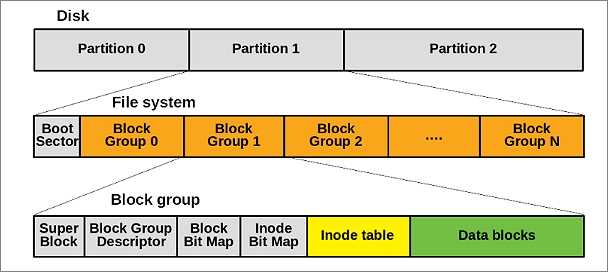
Ext2 is a simple and portable file system, making it suitable for use on flash-based storage devices like SD cards and USB drives. Unlike other file systems, Ext2 does not use journaling, which reduces the number of writers and improves performance, making it a good choice for these types of devices.
Ext3
Ext3 is a file journaling system used on multiple Linux distributions, allowing for improved reliability and reduced file system corruption by tracking changes made to the file system. It also enables upgrading from Ext2 without the need for backing up and restoring data.
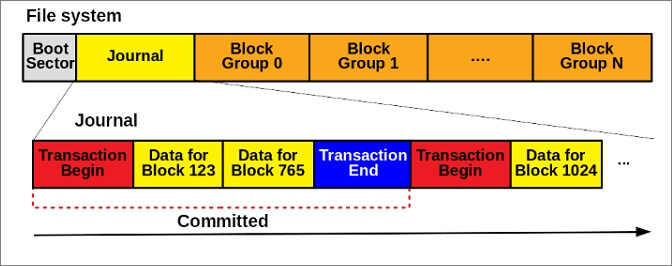
Ext2 and Ext3 use e2fsprogs as a standard utility, making communication between the two file systems seamless. Ext3, in particular, is designed with advanced features like journaling, online file system growth, and HTree indexing for large directories, making it more efficient and safer than other Linux file systems, while also using less CPU power. This makes Ext3 a relatively safer and more reliable option for data recovery.
Ext4
Ext4 is a series of backward-Ext4 is a file system that is a compatible extension to Ext2 and is used by most Linux distributions. It is also supported by other operating systems such as Windows, FreeBSD, macOS, and KolibriOS (read-only).
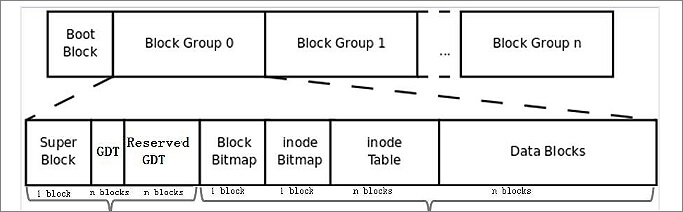
Ext4 was initially introduced to extend storage limits and improve system performance. It can support up to 1EB volume size and single files up to 16TB, a significant improvement over the previous Ext system.
What's the Difference Between Ext2, Ext 2, and Ext 4
| Feature | Ext2 | Ext3 | Ext4 |
|---|---|---|---|
| Individual File Size | 16GB-2TB | 16GB-2TB | 16GB-16TB |
| Volume file system size | 4TB-32TB | 4TB-32TB | 4TB-1EB |
| Default inode size | 128 bytes | 128 bytes | 256 bytes |
| Time Stamp | No support | Second | Nanosecond |
| Defragmentation | No | No | Yes |
| Directory Indexing | Disabled | Disabled | Enabled |
| Multiple Block Allocation | Basic | Basic | Advanced |
| Preallocation | No | In-core reservation | For extend file |
| Delayed Allocation | No | No | Yes |
Ext2
Pros
- It supports a maximum file size of 4TB
- The maximum file name length is 255 bytes characters.
- It can track the state of the file system.
Cons
- Includes a waste block size
- No file journaling
Ext3
Pros
- The filename supports all characters except NULL and '/.'
- Journal, order, and writeback are available.
- Converting an Ext2 file system to Ext3 can be done without backing up and restoring files, but it's essential to take necessary precautions to avoid data loss. To accomplish this, you can use the `tune2fs` command to convert the file system to Ext3, and then reboot the system.
- Basic multiple book allocation
- Second-time stamp
- The journaling mechanism ensures that updates are applied in a way that makes them appear as individual, atomic transactions. This makes the updates safer because even if one update fails, the others will be rolled back, maintaining the integrity of the system.
Cons
- The system lacks basic features such as the ability to extend, dynamically allocate, manage inodes, and sub-allocate blocks, making it difficult to scale and manage large amounts of data.
- Hard to recover deleted files
- Write a journal on a storage device with an extra cache.
- Gives no snapshot support
Ext4
Pros
- The file system has the largest individual file size and volume file system size.
- Support all characters except NULL and '/.'
- You can convert the Ext3 file system to Ext4
- This tool includes advanced features such as extend, directory indexing, delayed allocation, and defragmentation, among others.
- Unlimited subdirectory
- Nanosecond timestamp
- Preallocation for extended files
- Multiple block allocation
Cons
- It does not provide data security
- Difficult to create a snapshot on different volume
- Uses more disk space
Ext2 vs. Ext3, Which is Better?
Ext3 is considered better than Ext2 because it features journaling, a crucial component for a file system, which helps maintain data integrity and ensures a smooth recovery process in case of a system crash.
Ext2 vs. Ext4, Which is Better?
Ext4 outshines Ext2 due to its superior features, including reduced file fragmentation, enhanced file memory, and the ability to store larger files, making it a more efficient and capable file system.
Ext3 vs. Ext4, Which is Better?
While Ext3 and Ext4 share similarities in functionality, Ext4 stands out as a better option due to its advanced file system features, making it a superior choice over Ext3.
Here are some benefits of Ext4 over Ext3:
- Flexible block groups
- Supports huge files
- More subdirectories
Overall, Ext4 provides better performance, reliability and scalability.
Which is Better, Ext 2, Ext3, or Ext4?
Ext4 is a better option to use on modern hard drives, as it runs on both Windows and Linux operating systems and supports other platforms. It's also the default file system for many Linux distributions, including Debian and Ubuntu.
Ext4 offers greater flexibility in data storage, allowing for larger files and advanced features compared to Ext2 and Ext3. It also provides an unlimited number of subdirectories. Notably, Ext4 is designed to be backward compatible, meaning that if you still want to use Ext2 or Ext3, you can mount the Ext4 system as Ext3 or Ext2, and vice versa.
Ext4 has more advantages than Ext2 and Ext3, including reduced file fragmentation, improved flash memory life, and the ability to store larger files.
When Should I Use Ext 2/3/4?
Ext 2/3/4 file systems are used for managing data, providing easy and quick file management. They each have unique features and work well, but Ext4 is particularly compatible with Linux and Windows operating systems.
How to Create Ext2/3/4 Linux Partition on Windows
To set up a Linux file system format drive on a Windows PC, you can use Qiling Partition Manager, which supports Linux-based file systems such as Ext2, Ext3, and Ext4. This tool allows you to create partitions, format the hard drive, and even create partitions with two file systems, namely Ext2 and Ext3.
Qiling Partition Master offers several useful features, including the ability to resize, split, merge, and delete partitions, as well as convert between different file systems. It also allows users to create, format, and check partitions, and supports various file systems such as FAT, NTFS, and EXT.
- Formats and changes ext to NTFS, FAT32
- Capable of extending Ext
- It can shrink the partition to a specified size
- Merges partition to extend disk space
- Fixes low disk space error
- Migrates Windows 11 to SSD
- Clones system, file, and data
To achieve an Ext2/3/4 Linux partition on Windows, you can use this convenient software. The steps are straightforward and easy to follow.
Step 1. Launch Qiling Partition Master. On the main window, right-click on the unallocated space on your hard drive or external storage device and select "Create" to partition the unallocated space.
Step 2. Adjust the partition size, file system, label, etc. for the new partition, choosing the file system based on your specific needs.
Step 3. Click on the "Proceed" button to create a new partition.
Watch a video tutorial to learn how to create a partition in various file systems, including NTFS, FAT, and EXT.
Conclusion
The Linux file system is a structured collection of files primarily used for data management. It supports various file systems, including Ext2, Ext3, and Ext4, each with its own features. For newer devices and modern computers, Ext4 is a more suitable option, as it supports not only Linux but also other operating systems, and offers a large volume size of up to 1EB.
Related Articles
- Resize Partition Windows 11/10: Use 3 Tools to Shrink/Extend Volume in Windows 11/10
- 2022 Best FAT32 Format Tool/Formatter Free Download for Windows 10/8.1/8/7/XP/Vista
- How to Repair MBR in Windows 11? Here Is Your Guide
- How to Convert Primary to Logical or Logical to Primary in Windows Server
- Is Partition Magic Server Edition Crack Safe? No, You Have a Better Choice
To manage your server partitions and disk drive space effectively, you'll need a reliable partition magic server software. While cracked versions may seem appealing, they are not safe to use. This will ensure your server's disk drives are managed safely and efficiently. - Partition SSD for Windows 10 Installation, Full Guide with Pictures
Need to install partition SSD for Windows 10? Follow this comprehensive guide to access the simplified solutions for this process.
Products
Articles & Tutorials
- Data Recovery
- Data Backup
- File Recovery
- File Backup
- System Backup and Restore
- Disk and Partition Clone
- Technical articles
- Mobile articles
- Disk Master Help
- Windows Data Recovery Tutorials
- Windows Secure Delete Tutorials
- Windows Partition Management Tutorials
- Windows File Backup and Restore Tutorials
- Windows System Backup and Restore Tutorials
- Windows Disk Backup and Restore Tutorials
- Windows Clone Tutorials