Seagate Hard Drive Repair Tool Free [Fix Seagate Errors Quick & Easy]
Hard drives, a crucial component in the tech world, store valuable data and ensure the smooth functioning of devices. However, like any technology, they can sometimes encounter issues that require repair. A well-known brand in this field is Seagate, recognized for its reliability and performance.
If you're a Seagate hard drive user experiencing difficulties with your device, you can seek a solution to repair it effectively and efficiently. Qiling aims to provide valuable insights and information regarding a Seagate hard drive repair tool, which can help you address common hard drive issues, and its features and benefits will be discussed.
What Is Seagate Hard Drive Repair Tool
Seagate's SeaTools is a software utility developed by Seagate Technology, designed specifically for Seagate hard drives, providing diagnostic and repair functionalities to identify and resolve issues affecting the performance or functionality of your Seagate hard drive.
The Seagate hard drive repair tool, SeaTools, scans for and detects potential issues such as bad sectors, firmware errors, or mechanical problems, and provides repair options to fix identified problems, including repairing or replacing faulty sectors, updating firmware, or performing other necessary repairs to restore your hard drive's functionality.
However, there exist some limitations to SeaTool. To solve more problems, we will also recommend another hard drive repair tool for you. Keep reading. And if you like this tutorial, share it with others by clicking the buttons below. The limitations of SeaTool are not specified in the provided text.
Seagate Hard Drive Repair Tool Download
While SeaTools is a Seagate-specific tool for diagnosing and repairing Seagate hard drives, Qiling Disk Master is an alternative tool that provides comprehensive disk management functionalities, including repair capabilities for Seagate hard drives.
| Comparison | 🏅Qiling Disk Master | 🥈SeaTools |
|---|---|---|
| 💡Functions |
✔️Disk Health ✔️Disk Surface Test ✔️Change Cluster Size ✔️4K Alignment ✔️Partition Recovery |
✔️Health Tab ✔️Firmware Update ✔️Erase Features ✔️Multiple Test Options |
| 👍Pros |
|
|
| 👇Con |
|
|
We recommend Qiling Disk Master as the go-to tool for Seagate hard drive repair, as it offers a broader range of disk management features that can benefit beyond just repairing Seagate hard drives.
Qiling Disk Master is a powerful tool that enables users to resize, move, merge, and clone partitions, recover lost or deleted partitions, convert disk formats, and repair disk issues, providing a comprehensive solution for disk management.
Qiling Disk Master Download Link:
Seagate SeaTools Download Link: https://www.seagate.com/in/en/support/downloads/seatools/
How to Use Seagate Hard Drive Repair Tool
If your Seagate hard drive is malfunctioning, you'll need a reliable repair tool to diagnose and fix the issue. Fortunately, there are two excellent options available: SeaTools and Qiling Disk Master. Both tools offer detailed guides on how to use them, including step-by-step instructions on how to diagnose and repair your Seagate hard drive.
1. Use Qiling Disk Master to Check Seagate Hard Drive
We recommend using Qiling Disk Master to manage and repair Seagate hard drives. This software offers various functions to check the health of your Seagate hard drive, identify bad sectors, and provide advanced solutions to fix corrupted MBR on Seagate hard drives, including checking Seagate hard drive health and repairing issues.
Option 1: Check Seagate Hard Drive Health
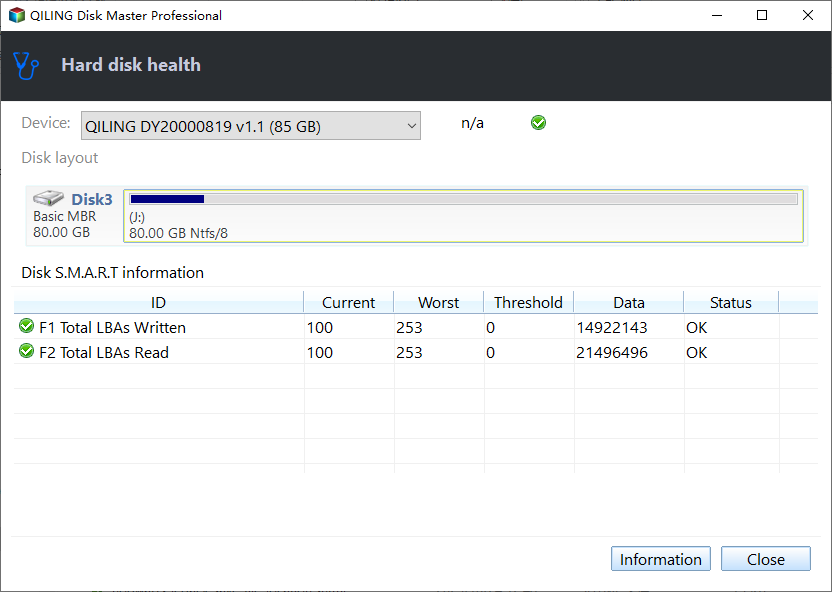
Qiling Disk Master, a free disk health checker, includes a "Disk Health" function that allows you to assess the overall health and status of your Seagate hard drive, providing information such as temperature, power-on hours, and the number of bad sectors detected.
Regular health checks on Seagate hard drives can help identify potential issues early on, allowing for proactive measures to prevent data loss or hardware failures. To check Seagate hard drive health, you can use the Seagate DiscWizard software, which provides a comprehensive diagnostic report, or the Seagate Dashboard app, which offers a user-friendly interface to monitor drive health and receive alerts for any issues that may arise. By performing regular checks, you can ensure your Seagate hard drive remains in good working condition and your valuable data stays safe.
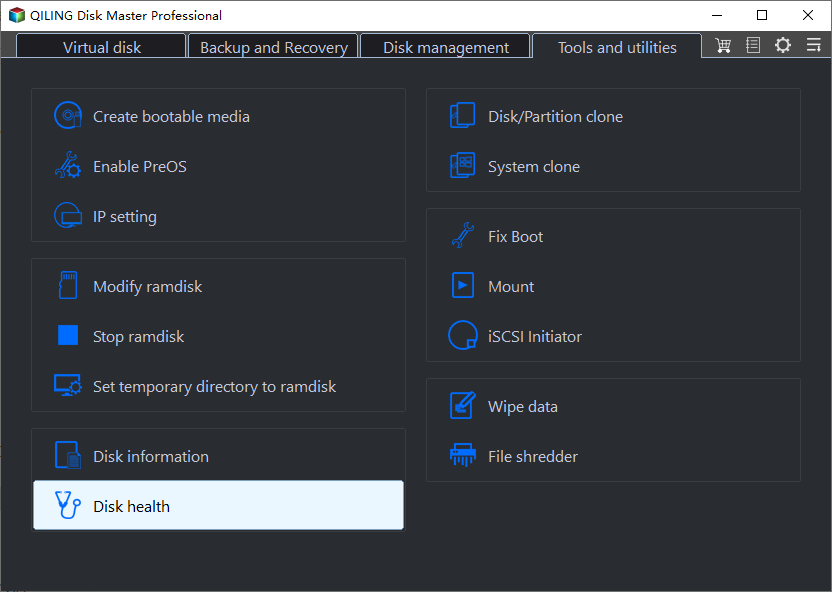
Step 1. Launch Qiling Disk Master and click the blue arrow to activate the "Disk Health" feature under the "Tools" section.
Step 2. To check the health condition of your disk, select the target disk and click the "Refresh" button. This will display the current health status of your disk.
Video Tutorial on Checking Seagate Hard Drive Health
Option 2: Check Seagate Hard Drive Bad Sectors
Qiling Disk Master offers a feature called the "Disk Surface Test" which scans the surface of a Seagate hard drive to detect bad sectors, areas that cannot store data reliably, helping to prevent data corruption or system crashes.
To identify and isolate problematic sectors on your disk, run the Disk Surface Test. This test can help you repair or recover data from these sectors, which can be causing issues with your system. To run the test, follow these steps: (insert steps here).
Step 1. Open Qiling Disk Master, right-click the target disk and select "Surface Test" to initiate a surface test.
Step 2. The operation will be performed immediately, and all bad sectors will be marked as red.
Option 3: Repair Seagate MBR
When the MBR on a Seagate external hard drive becomes corrupted, it prevents access to any partitions and all data stored on the drive, but Qiling Disk Master offers a solution to repair the MBR and recover the data.
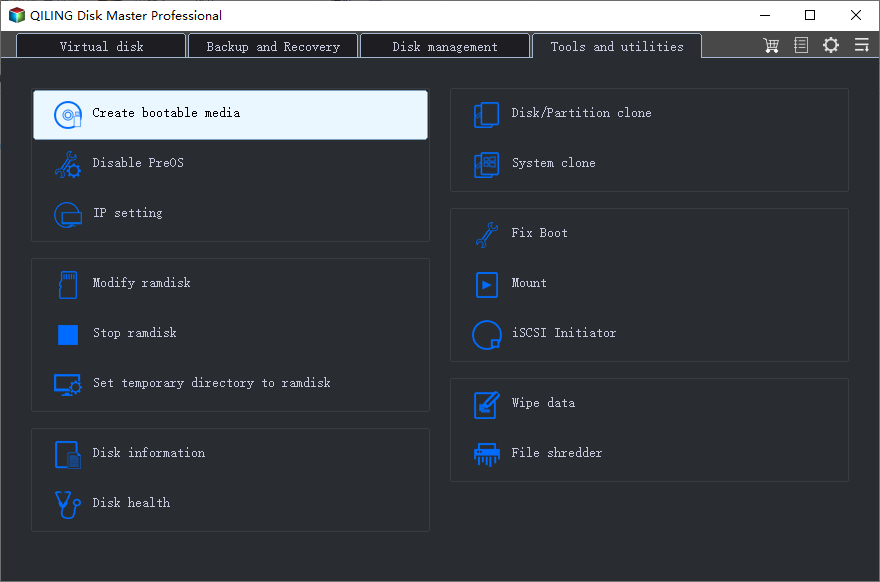
Step 1. Create a WinPE bootable disk
- Launch Qiling Disk Master, click "Bootable Media" on the toolbar, and select "Create bootable media".
- Click "Next" to finish the process.
Step 2. Boot Qiling Disk Master Bootable USB
- Connect the bootable USB or CD/DVD to your PC.
- To enter the BIOS screen, press F2 or Del when restarting the computer. Once in the BIOS, set the boot order to "Removable Devices" or "CD-ROM Drive". After doing so, the computer will automatically run Qiling Disk Master.
Step 3. Rebuild MBR
- Click "Toolkit" and choose "Rebuild MBR".
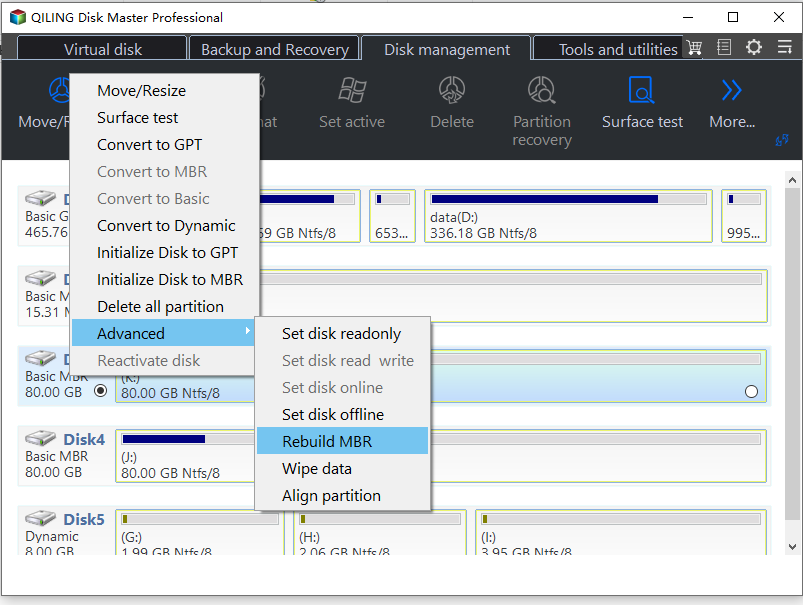
- Select the disk and the type of MBR. Then, click "Proceed".
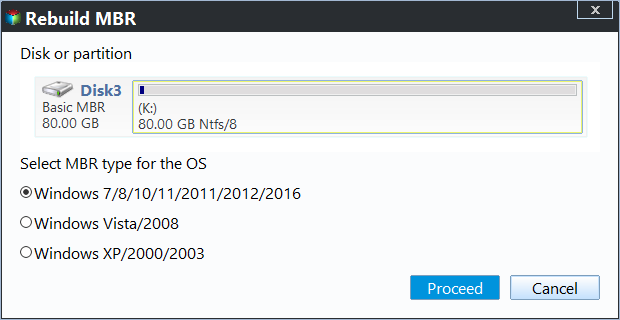
- The message indicates that the Master Boot Record (MBR) has been successfully rebuilt on the specified disk, which is identified as Disk X. This process is typically performed when the MBR becomes corrupted or damaged, and it's usually done using a tool or software designed for this purpose.
We highly recommend trying Qiling Disk Master for managing and repairing your Seagate hard drive. This Seagate hard drive repair tool provides comprehensive features, a user-friendly interface, and compatibility with various Windows versions, making it a great option to download from the official Qiling website or trusted software download platforms.
2. Use SeaTools to Diagnose Seagate Hard Drive
SeaTools is a software utility developed by Seagate Technology to diagnose and repair Seagate hard drives. It allows users to identify and potentially fix issues with their Seagate hard drives by following a series of steps.
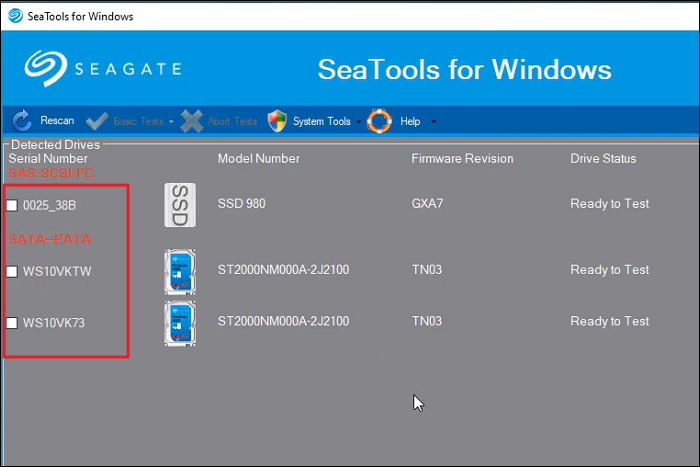
Step 1: To launch the SeaTools, select the drive you want to test, and make a checkmark on the box near your targeted hard drive.
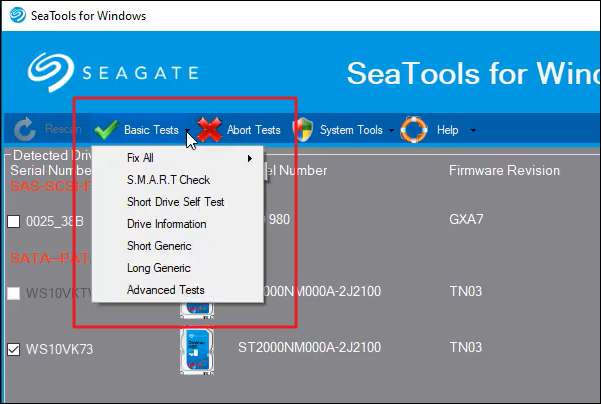
Step 2: Select the test you want to run from the five available options, which are data-safe and read-only, and may take anywhere from seconds to hours to complete.
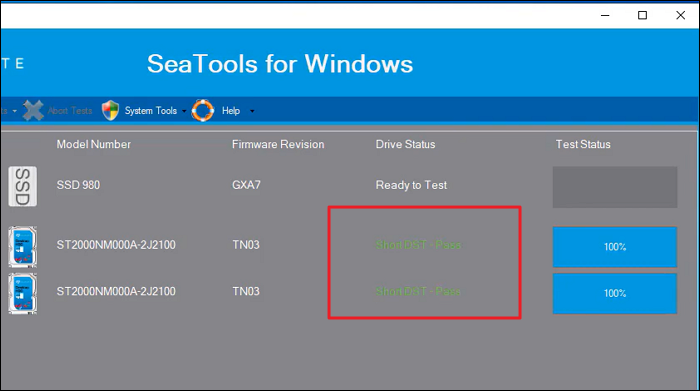
Step 3: To abort a long test, press the "Abort Tests" icon in the SeaTools menu bar. After a test is completed, view the log file by selecting "View Log File" in the "Help" menu.
Bonus Tip: Major Seagate Hard Drive Disk Problems
Here are some common issues with Seagate hard drives:
1. Clicking or Beeping Sounds: If your Seagate hard drive is beeping, it may be a sign of a mechanical failure, likely due to issues with the read/write heads or other internal components. To prevent further damage, it's essential to back up your data immediately and seek professional help.
2. Not Recognized by the Computer: If your computer is not detecting your Seagate hard drive, there are several possible causes. Firstly, check the connections and try connecting the drive to a different USB port. Also, ensure the drive is properly powered. If the issue persists, it may indicate a problem with the drive's circuit board or firmware.
3. Slow Performance: If your Seagate hard drive is slow, it could be due to fragmentation, excessive disk usage, or a failing disk. To fix this, run disk optimization tools, check for background processes consuming excessive resources, and monitor the drive's health using diagnostic software. If the issue persists, further investigation or replacement may be needed.
4. Bad Sectors: Bad sectors on a hard drive can cause data loss and system crashes, making it unreadable or corrupt. Seagate hard drives often come with built-in tools like SeaTools that can detect and repair bad sectors, but if the issue persists, it may indicate a failing drive that requires immediate attention, prompting you to back up your data and consider replacing the drive.
5. Data Corruption or Loss: Seagate hard drives can experience data corruption or loss due to various reasons, such as power outages, improper ejection, or software errors. To prevent permanent loss, it's essential to regularly back up your data. If data loss occurs, avoid further use of the drive and consider using data recovery software or seeking professional help.
Windows 11 has several built-in tools that can help you troubleshoot and repair common issues, such as the System File Checker (SFC), the Deployment Image Servicing and Management (DISM) tool, and the Windows Recovery Environment (WinRE). These tools can help you identify and fix problems with your system files, registry, and other system components.
Conclusion
If you're in need of a reliable and effective Seagate hard drive repair tool, Qiling Disk Master is an excellent choice. It offers a user-friendly interface and powerful features that provide a comprehensive solution for diagnosing and repairing common issues that may arise with Seagate hard drives.
Qiling Disk Master is the best alternative to examine and rectify Seagate hard drive errors due to its versatility and extensive functionality, allowing for convenient error checking, problem solving, and performance enhancement, and is freely downloadable.
FAQs About Seagate Hard Drive Repair Tool
What is the Seagate hard drive repair tool, and how does it work? The Seagate hard drive repair tool is a software designed to help repair and recover data from damaged Seagate hard drives. It works by scanning the drive, identifying the damaged areas, and then attempting to recover the data from those areas.
1. Is Seagate Toolkit Necessary?
Seagate Toolkit is a software suite that provides additional features to manage and maintain Seagate storage devices, although it is not required for basic functionality.
The toolkit provides automated backups, synchronization, encryption, and drive health monitoring, making it a valuable addition for Seagate drive users who want to leverage these extra features.
2. How can I fix a corrupted Seagate hard drive?
Here is how you can fix a corrupted hard drive:
Step 1: To resolve the issue, run Command Prompt as an administrator on your computer. To do this, type the following command in the Command Prompt window and press Enter: "netsh int ip reset reset.
"CHKDSK H: /F /R /X"
Step 2: Replace "H" with your Seagate hard drive. The process will take some time and fix problems with the corrupted Seagate hard drive.
3. What is the best tool to repair a Seagate hard drive?
Qiling Disk Master is a tool that can repair a Seagate hard drive by scanning for errors, fixing issues, and optimizing drive performance.
Qiling Disk Master offers an effective solution for Seagate hard drive repairs, with a user-friendly interface that makes it a reliable choice for resolving common hard drive problems.
Related Articles
- 2 Ways to Partition C Drive in Windows 7 Without Formatting
- How to Fix BOOTMGR Is Missing in Windows
- What Is New Simple Volume, How to Create New Simple Volume [2 Reliable Ways]
- How to Partition SSD From BIOS [2024 New Guide]
To partition an SSD from BIOS, follow these steps: Enter the BIOS settings by pressing the designated key (usually F2, F12, or Del) when your computer starts. Navigate to the “Boot” or “Storage” section and select the SSD as the first boot device. Save the changes and exit the BIOS settings. - Everything to Learn About SD Card Copier Software
You're looking for an SD Card Copier Software? this guide can help! SD Card Copier has become a lot trendier than before, and we're here to help you find the best one for your needs. Keep reading to learn more! - How to Fix Second Hard Drive Not Showing Up (Updated)
You are going to learn at least four ways if the second hard drive not showing up in Windows 10. Among them, the first solution can satisfy your needs best. Qiling Partition Master can make your second hard drive show up with simple steps.
Products
Articles & Tutorials
- Data Recovery
- Data Backup
- File Recovery
- File Backup
- System Backup and Restore
- Disk and Partition Clone
- Technical articles
- Mobile articles
- Disk Master Help
- Windows Data Recovery Tutorials
- Windows Secure Delete Tutorials
- Windows Partition Management Tutorials
- Windows File Backup and Restore Tutorials
- Windows System Backup and Restore Tutorials
- Windows Disk Backup and Restore Tutorials
- Windows Clone Tutorials