Unable to Install Windows 10 on Dynamic Disk? 3 Fixes 💡
Key Takeaways:
This article is dedicated to explaining and solving the following issues:
1. The reasons why we can't install Windows 10 on a dynamic disk.
2. 3 ways to convert a dynamic disk into a basic disk to install Windows 10.
You can install Windows 10 on a dynamic disk, but it may require additional steps and troubleshooting. To install Windows 10 on a dynamic disk, you can create a new partition on the dynamic disk, convert the dynamic disk to a basic disk, or use a third-party tool to assist with the installation. If you're unable to install Windows 10 on a dynamic disk, you can try converting the dynamic disk to a basic disk, using a different installation method, or seeking help from a technical support specialist.
Unable to Install Windows 10 on the Dynamic Disk - 3 Hot Fixes
If you're having trouble installing Windows 10 on a dynamic disk, you can resolve the issue by converting the dynamic disk to a basic disk. This can be done through three different methods, which can be chosen based on your specific situation. By making this conversion, you can successfully install Windows 10 on the disk and boot it without any issues.
| Comparison | Data Loss | Target User | Difficulty |
|---|---|---|---|
| Qiling Disk Master | No data loss | Beginners and Advanced Users | Easy |
| Disk Management | Yes, deleting all partitions | Beginners | Medium |
| Diskpart | Yes, deleting all partitions | Advanced Users | Difficult, requires typing commands |
Qiling Disk Master is the easiest and safest way to convert a dynamic disk to a basic one. With this tool, you can easily follow the guide to convert your dynamic disk to a basic one, making the process quick and hassle-free.
Fix 1. Use Qiling Disk Master
Using Qiling Disk Master Professional, you can convert dynamic disks to basic disks without losing any data, providing a solution to convert dynamic disks to basic disks without deleting all volumes on the disk.
Step 1. To get started, install and open Qiling Disk Master, and then navigate to the Disk Converter.
Step 2. Select the disk conversion mode that suits your need:
- Convert Basic to Dynamic: change a Basic disk to Dynamic.
- Convert Dynamic to Basic: change a Dynamic disk to Basic.
Step 3. Select the target disk, confirm it's the correct disk, and click "Convert" to start the process.
To confirm the successful conversion, you can click the link below to learn how to install Windows 10.
Read Also: How to Install Windows 10 From USB
Fix 2. Use Disk Management
With the built-in Windows program Disk Management, you may manage partitions without the need for interruptions or reboots. Let's now examine how to use Disk Management to convert a disk to a basic.
Step 1. To open the Run window, press Windows + R.
Step 2. To launch Disk Management, type the command "diskmgmt.msc" into the Run window and press "Enter".
Step 3. In Disk Management, the dynamic disk that has to be converted will be shown. Select "Delete Volume" when you right-click on each volume on the dynamic disk.
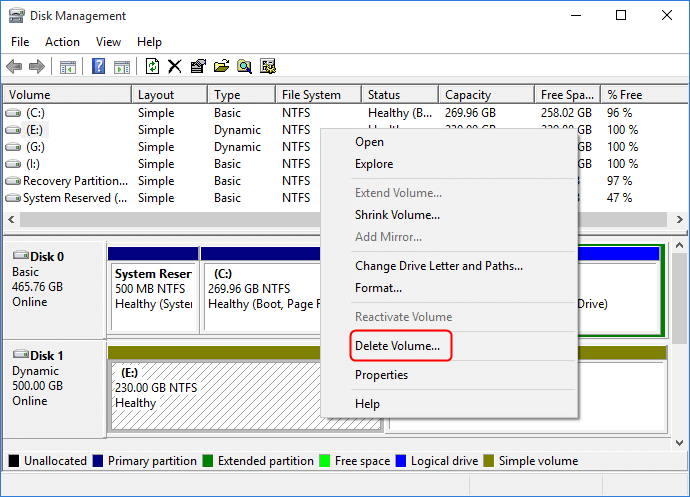
Step 4. After clearing all partitions from the dynamic disk, right-click it and select "Convert to basic Disk" when it appears as unallocated disk space.
You May Also Like:
Fix 3. Use Diskpart
A Windows snap-in tool called Diskpart uses the command line to convert dynamic disk to basic (But it can be difficult for beginners). It can also facilitate easy and efficient disk partition management. Here are thorough instructions for using Diskpart to convert a disk to a basic.
- Notice:
- Deleting a volume from a dynamic disk will erase all data stored on that volume, so it's essential to back up any critical data before proceeding with the deletion.
- You can convert a dynamic disk containing the current operating system by deleting the dynamic disk and connecting it to another working computer.
Step 1. To launch Diskpart, open the Run box, type "cmd" and press "Enter" to open the Command Prompt, then type "diskpart" and press "Enter" to open the Diskpart utility.
Step 2. Execute the following instructions in the Diskpart interface:
- diskpart
- list disk
- select disk 1 (the disk number of the dynamic disk)
- detail disk
- select volume 2 (volume number on the dynamic disk)
- delete volume (repeat if there is more than one partition)
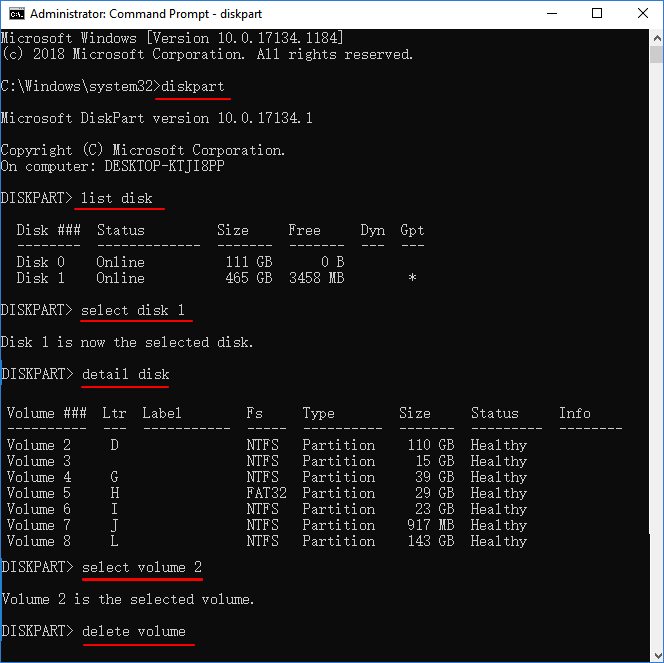
When you have multiple volumes on a dynamic disk, you can delete all volumes by repeatedly selecting the volume and deleting it, starting with volume 1. This process can be repeated until all volumes have been deleted.
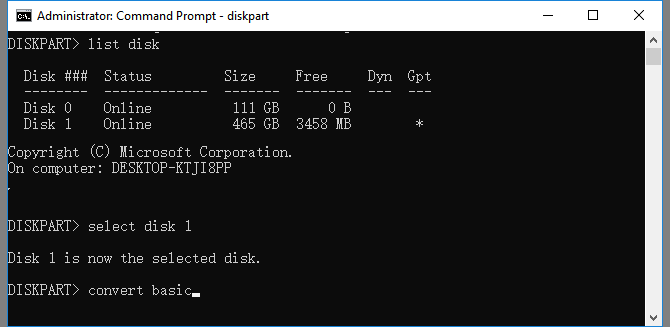
Step 3. Run the following commands:
- list disk
- select disk 1
- convert basic
If you're not a pro or don't want to risk losing data, consider using Qiling Disk Master Professional instead of Diskpart commands, which can be challenging.
Why Can't I Install Windows 10 on a Dynamic Disk?
In Windows 10 systems, dynamic disks are a common configuration that divides storage space into multiple partitions, using volumes to store data. Unlike basic disks, dynamic disks are managed by the Logical Disk Manager (LDM) rather than partition tables. They can create five types of dynamic volumes, including simple, mirrored, striped, spanned, and RAID-5 volumes, offering flexibility and redundancy in data storage.
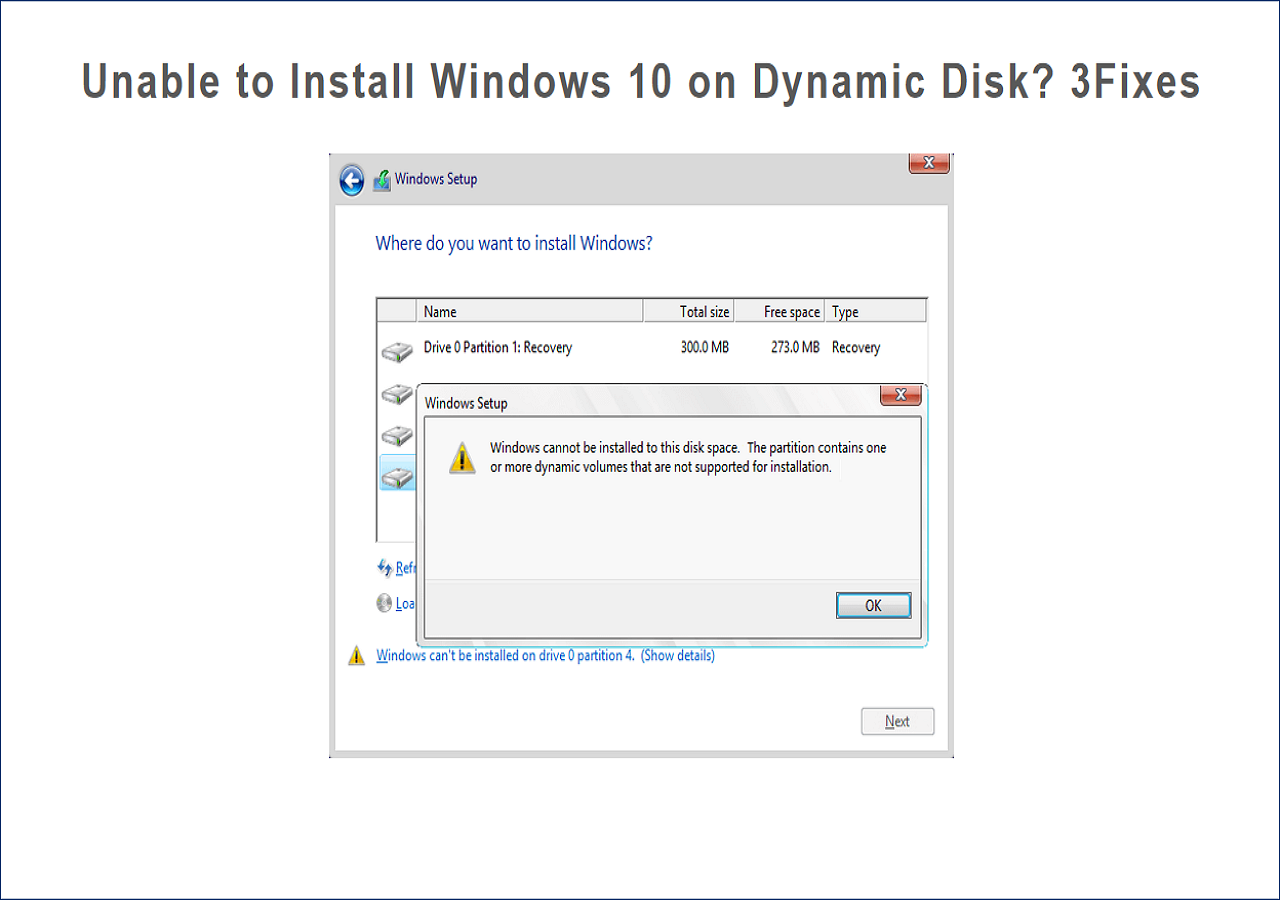
The "The partition with one or more dynamic volumes that are not supported for installation" error occurs when trying to install Windows 10 on a dynamic disk. This error can be resolved by converting the dynamic disk to a basic one, which is a simple and efficient solution.
Conclusion
Users may encounter various issues when using dynamic and basic disks simultaneously, such as the "Windows cannot be installed to this hard drive space" error. When trying to install Windows 10 on a dynamic disk, a "The partition contains one or more dynamic volumes that are not supported for installation" error may occur. This article provides a solution to resolve these problems, and if helpful, it can be shared with others.
Can't Install Windows 10 on Dynamic Disk FAQs
Many users are unable to install Windows 10 on a dynamic disk due to a compatibility issue. To resolve this error, users can try creating a new partition on the dynamic disk, or converting the dynamic disk to a basic disk, which will allow Windows 10 to be installed on it. This can be done by using the built-in Disk Management tool in Windows. By following these steps, users should be able to successfully install Windows 10 on their dynamic disk.
1. Can I install Windows on a dynamic disk?
Microsoft reports that Windows only supports mounting system volumes on dynamic disks in "mirror" mode, as this is the only mode supported by the minimal driver used by the Windows boot loader before loading the Windows operating system.
Windows 10 can't boot from a dynamic disk if the bootloader can't boot from it, but it can be installed on a dynamic disk or volume that is a boot partition or system partition.
2. How do we fix the "can't install Windows 10 on dynamic partition issue?
Step 1. To start, install and open Qiling Disk Master, then navigate to the Disk Converter section.
Step 2. Choose the disk conversion mode that suits your needs:
- Convert Dynamic to Basic: change a Dynamic disk to Basic.
Step 3. Select the target dynamic disk, confirm the correct disk, and click "Convert" to start the conversion process.
3. Is there a way to install Windows onto Dynamic disks?
The "partition containing one or more dynamic volumes is not supported for mounting" error occurs when trying to install Windows 10 on a dynamic disk. However, this issue can be easily resolved by converting the dynamic disk into a basic disk, making it possible to install Windows.
Related Articles
- Your Best Guide for SSD Speed Test on Windows 10 | Step-by-Step Guide 2023
- How to Clone Hard Drive From Boot [Step-by-Step Guide]
- SD Card Shows Read Only? See How to Fix It (4 Solutions)
- How to Securely Erase or Wipe SSD in Windows 11/10
- How to Fix Broken Registry Items on Windows 11 (5 Quick Ways)
The performance of a computer's operating system is largely dependent on the speed of its disk drive, whether it's a Solid-State Drive (SSD) or a Hard Disk Drive (HDD). - Can C Drive Space Be Extended in Windows 11
In Windows 11, the C drive space can be extended, but only if the storage capacity is fixed. This is often necessary when the hard drive is filled, a common issue that may require extending the C drive space to free up space and prevent data loss.
Products
Articles & Tutorials
- Data Recovery
- Data Backup
- File Recovery
- File Backup
- System Backup and Restore
- Disk and Partition Clone
- Technical articles
- Mobile articles
- Disk Master Help
- Windows Data Recovery Tutorials
- Windows Secure Delete Tutorials
- Windows Partition Management Tutorials
- Windows File Backup and Restore Tutorials
- Windows System Backup and Restore Tutorials
- Windows Disk Backup and Restore Tutorials
- Windows Clone Tutorials