USB Flash Benchmark Download with Complete Review in 2024
Key Takeaways of USB Flash Benchmark
- Buying a slow USB Flash drive is not only a waste of money but also inconvenient when transferring files, given the increased storage capabilities of these devices.
- You can compare the performance of your current USB drive to a new one you're considering by using the USB Flash Benchmark software, which can help you learn more about the new drive's capacity and overall performance.
Follow this page to learn about the pros and cons of USB Flash Benchmark, a freeware that tests your USB flash drive performance, and how to apply it.
| ⏱Duration: | 3-5 minutes reading |
| 🧰Tool: | USB Flash Benchmark |
| 💽Supported Devices: | USB flash drive, USB pen drive, USB extenral drives, etc. |
| 📝Reviews: |
Overview: What Is USB Flash Benchmark
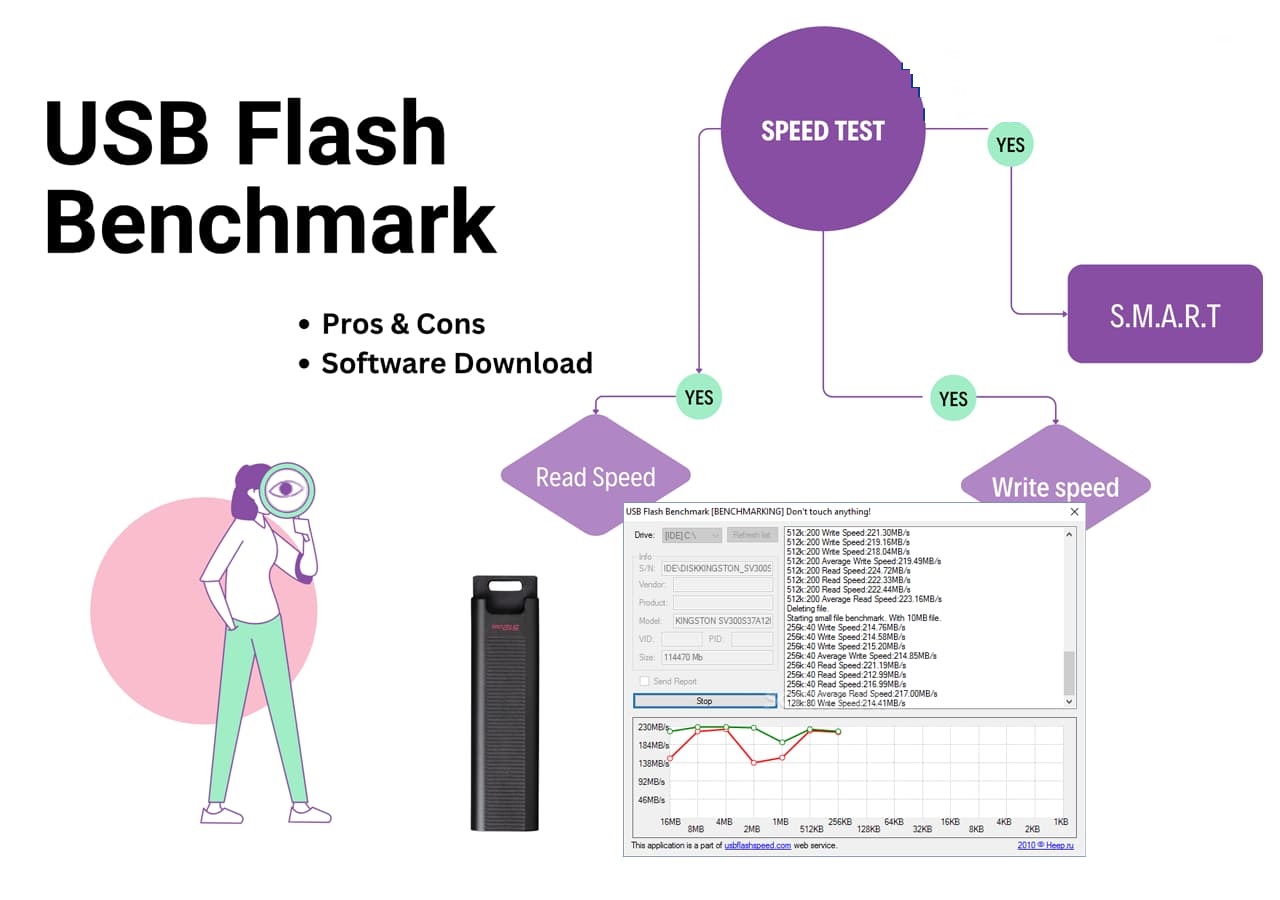
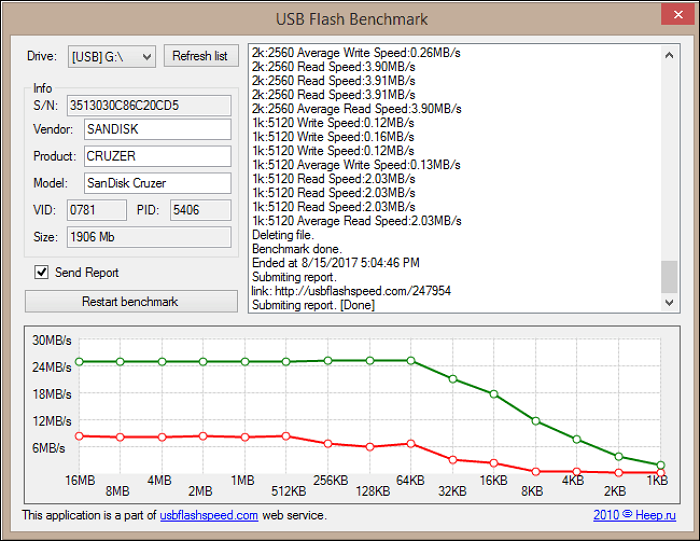
The USB Flash Benchmark, developed by Heep.ru, is a free software utility that allows users to test and compare the read and write speeds of any USB flash drive, thumb drive, or disk. This portable application can test the drive's performance with small (1KB) to large (16MB) file chunks, and the results are displayed in a graph, making it easy to see how well a drive performs with different file sizes.
Main Features of USB Flash Benchmark:
- This tool allows you to view test results in real-time, either as text or a simple graphic display. It also provides details about the drive being tested, such as manufacturer, item, model, and device size. Once you click the Benchmark button, the application will run a test on the chosen drive.
- This tool enables you to upload and compare the performance of different memory drive sticks, allowing you to see the reading and writing speeds of each, and make an informed decision on which one to keep and which to return.
- The USB Flash Benchmark is a tool that helps evaluate the performance of a USB drive by conducting a quick benchmark test, allowing users to confirm that the drive's characteristics match the information provided by the manufacturer.
3. Supported Devices:
The USB flash benchmark supports various types of storage devices, including Memory cards, SD cards, Portable hard drives, and USB flash drives.
Should I Trust USB Flash Benchmark? Pros & Cons, 2026 Review
The USB Flash Benchmark is a reliable software that can be used to check the capacity and overall performance of a USB Flash drive, but it also has pros and cons, making it a suitable choice depending on one's current demands.
Expert's Rating:
 Pros
Pros
- Displays exact, detailed results from the test
- 15 tests are included in the USB tester, providing a comprehensive evaluation of USB capabilities, including data transfer, power delivery, and device recognition. This extensive testing suite is designed to ensure the reliable operation of USB devices and interfaces, making it an essential tool for developers, engineers, and quality assurance teams.
- This feature allows users to view detailed device information, including storage size, product ID (PID), vendor ID (VID), and vendor name, providing a comprehensive understanding of the device's characteristics.
- Support Windows 10/8/7/XP/Vista
- Support customizing the appearance
- Display USB speed, capacity, and overall performance benchmark result
 Cons
Cons
- The USB stick is not stable and not compatible with newer flash drives, making it unsuitable for use.
- The website is currently unable to process data uploads or compare outcomes due to technical limitations. This means that users cannot upload data or compare their results with others on the platform.
- Not compatible with Windows 11
- No further features for optimizing USB flash drive performance
- It is pretty unstable, and server connection errors may occur
- No further update since 2016
Our Verdict
USB Flash Benchmark is a simple tool that allows you to test your USB flash drive's speed, capacity, and overall performance.
Personal Thought:
The tool was easy to download and use, requiring only a few minutes to generate a report that provided clear and easily understandable results, including metrics such as Read Speed and Average Read Speed.
USB Flash Benchmark Download
So, here is the official access link for users to download this software for benchmarking their USB flash drives or USB disk drives.
You can follow the provided link and open it in your browser to download the genuine USB Flash Benchmark.
When Will You Need USB Flash Benchmark
Here are some situations or symptoms that indicate the need to benchmark your USB flash drives:
- USB flash drive suddenly gets stuck
- USB flash drive slow to transfer files
- Speed-test a variety of storage devices
- Formats write-protected USB
- Benchmarking the performance, capacity, and speed of your USB flash drive involves testing its capabilities to ensure it meets your needs. This can be done using software tools that measure read and write speeds, as well as the drive's overall capacity.
Tutorial: How to Test USB Performance with USB Flash Benchmark
To test USB performance using USB Flash Benchmark, follow these steps: First, download and install the software on your computer. Next, insert the USB drive you want to test into a free USB port.
- Download the USB Flash Benchmark software from the link below and install it on your PC. Then, plug in your USB flash drive into your PC.
- Open the USB Flash Benchmark tool and click on the drop-down menu next to Drive. If the USB drive letter is not in the menu, click the Refresh list button and recheck the drop-down list, then select your USB drive letter.
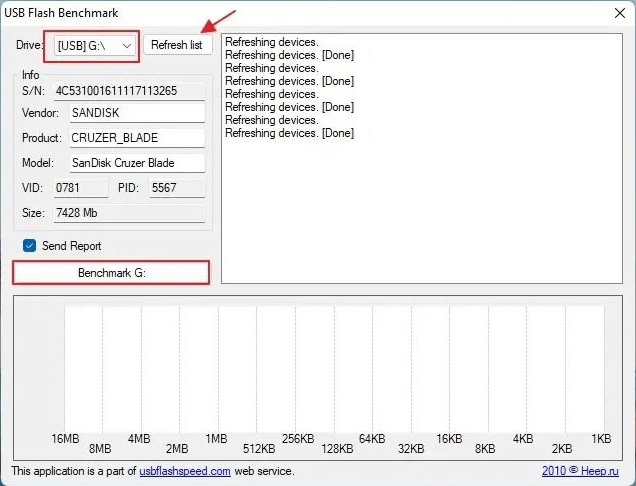
- To generate a report on your USB flash drive, click the Benchmark button, wait for a few minutes, and you will receive a report of your USB flash drive's performance after scanning.
Bonus Tip: USB Flash Benchmark Alternative for Windows 11
Due to compatibility issues, USB Flash Benchmark does not support Windows 11, but users can use an alternative benchmark software for assistance.
I recommend downloading and using the Qiling Disk Master Free Edition for help. This software provides a DiskMark feature for USB owners to define their USB flash drive performance.
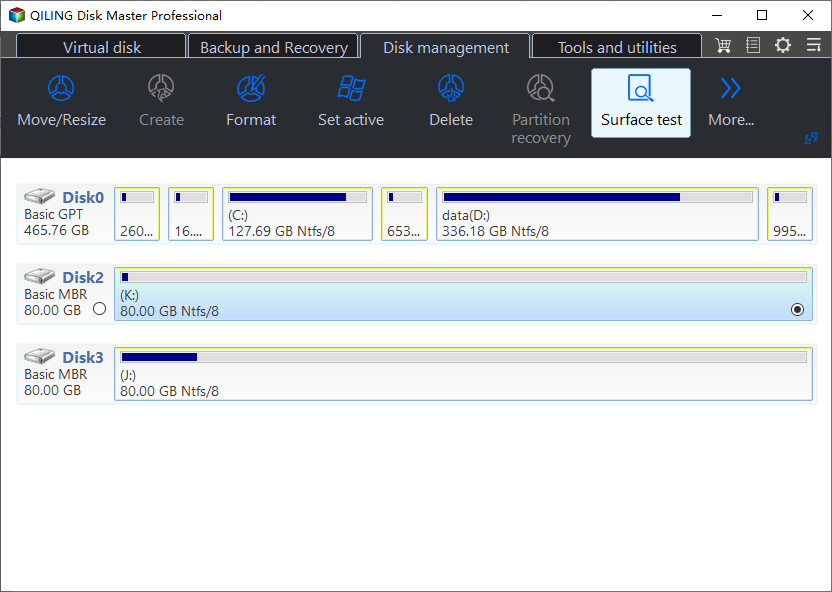
USB users can apply various tools such as Disk Health, Disk Space Analyzer, Check File System, Format, etc. to monitor and improve the performance of their USB flash drives efficiently.
You can download the Qiling Disk Master Free Edition software to test and monitor your USB drive's performance instantly.
Feel free to share this amazing tool with your friends online to help them benchmark their USB drives for free, allowing them to compare and optimize their storage devices with ease.
Final Verdict
The USB Flash Benchmark software is a useful tool that allows users to test and compare the performance of their USB flash drives. To use it, users can download and install the software, which is particularly handy for those with older Windows systems, such as Windows 7 or earlier, as it provides a way to benchmark their USB drives in these systems.
Although the software is free, it has some drawbacks, such as no further updates and occasional instability, making it less reliable for comprehensive testing. Users seeking a more comprehensive USB flash drive benchmark tool may want to consider alternative software, such as Qiling Disk Master Free Edition, which can provide more thorough testing capabilities.
FAQs About USB Flash Benchmark
If you have more questions about USB Flash Benchmark, check out the frequently asked questions and their answers to learn more about the software.
1. Is USB Flash Benchmark free?
The software USB Flash Benchmark is free and can be used to determine how quickly your USB storage device operates.
2. Is USB Flash Benchmark available online?
The USB Flash Benchmark is available online and can be downloaded from the link https://www.softpedia.com/get/System/Benchmarks/FlashBench.shtml.
3. What is the best USB benchmark tool?
Qiling Disk Master is a USB benchmarking program that supports Windows 11 and features the DiskMark function to test the speed of various storage devices, including HDD, SSD, USB, and SD cards. It also includes a USB Flash Benchmark application to test and compare the Read and Write Speed of USB Flash Drives and other devices, making it a useful tool for evaluating storage performance. It is compatible with older Windows versions.
Related Articles
- Top 6: HP USB Disk Storage Format Tool Alternative Windows
- How to Resize Virtual Hard Disk in 2024 [Efficient & Safe Solutions]
- How to Tell If a Hard Drive Is Dead [Step-by-Step-Guide]
- How to Format to FAT32 in Windows 10 [Step by Step Guides]
- How to Copy Games from PC to USB or Pen Drive Efficiently
How do I copy a game from my computer to a USB flash drive? Read this post and learn how to copy games from PC to USB or pen drive using an easy PC app migration tool. This tool also enables you to transfer games from PC to PC without re-downloading. - How to Clone OS from HDD to SSD Windows 11/10 Easily
With the help of Qiling Partition Master, you can easily clone OS to SSD on Windows 11/10 without reinstalling. Cloning operating system to SSD can improve your computer performance in many aspects, like faster startup process and quicker application response.
Products
Articles & Tutorials
- Data Recovery
- Data Backup
- File Recovery
- File Backup
- System Backup and Restore
- Disk and Partition Clone
- Technical articles
- Mobile articles
- Disk Master Help
- Windows Data Recovery Tutorials
- Windows Secure Delete Tutorials
- Windows Partition Management Tutorials
- Windows File Backup and Restore Tutorials
- Windows System Backup and Restore Tutorials
- Windows Disk Backup and Restore Tutorials
- Windows Clone Tutorials