GPT Backup Header: What It Does and How to Restore It
A GPT disk stores its partition table twice: once near the start of the drive and once at the very end. The second copy is the GPT backup header and the backup partition entry array. It exists so that a damaged primary header does not automatically mean a lost disk, and it is the reason a disk can sometimes be recovered without touching the files.
The catch is that many tools react to a broken primary header by offering to initialise the disk, which writes a new table and turns a recoverable problem into a real data loss. Knowing the layout helps you choose the safe path.
Where the Backup Header Lives
A GPT disk is organised in a fixed order:
- LBA 0: the protective MBR.
- LBA 1: the primary GPT header, which records the disk GUID, the location of the entry array and a CRC32 checksum.
- LBA 2 onwards: the primary partition entry array, usually 128 entries of 128 bytes.
- Middle: the partitions themselves.
- Near the end: a second copy of the entry array.
- Last LBA: the backup GPT header, which points back at the backup entries and at the primary header.
Each header carries a checksum of itself and a checksum of the entry array. Firmware and operating systems verify both before trusting the table.
Why GPT Keeps Two Copies
The duplicate protects against the most common corruption: a stray write to the first sectors of the disk. A boot loader, an old partitioning tool or a failing drive can damage LBA 1 without touching the end of the disk, and the backup still describes the original layout.
The UEFI specification allows firmware to fall back to the backup when the primary header fails its checksum. Windows is more conservative: it may report the disk as unreadable even when the backup is intact, which is why manual repair is often needed.
Symptoms of a Damaged Header
- Disk Management shows the disk as Not Initialized while the capacity is correct.
- The disk appears in Device Manager but its volumes are missing.
- Linux reports GPT checksum errors or warns that the primary and backup headers disagree.
- A partition tool lists no partitions but the disk is not empty.
- The machine stops booting with an error that points at the partition table rather than at Windows files.
A single unreadable partition with the rest of the disk intact is usually a file-system problem, not a header problem. Header damage affects the whole table at once.
What Not to Do
When Windows offers to initialise the disk, choose Cancel. Initialising writes a fresh GPT, which overwrites the remaining metadata and makes recovery harder. The same applies to diskpart clean, to "fix" options in tools that do not understand GPT, and to formatting the unallocated space that appears in place of your volumes.
If the data matters, stop writing to the disk and work from a copy whenever possible.
How to Restore It
The repair uses the surviving copy to rebuild the damaged one. A GPT-aware partition editor such as gdisk or TestDisk can do this, and both run from a Linux live environment or a bootable USB.
- Image the disk first if you have space. A sector-level image lets you retry the repair without risking further changes.
- Open the disk in the partition editor and read the report. It states whether the primary header, the backup header or both are damaged, and whether the entry arrays agree.
- Open the recovery menu and choose the option that rebuilds the primary header from the backup. Then choose the option that reloads the primary entry array from the backup table.
- Verify the table and confirm that every partition start and size matches what you expect.
- Write the changes and reconnect the disk. If the volumes reappear, assign drive letters and copy the data to a healthy disk.
If both headers are damaged but the partitions themselves are intact, a partition-recovery scan can find the file-system boot sectors and rebuild the table from them. That is a slower path and works best when the disk has not been written to.
How to Protect the Table
- Keep a current backup of the data, not just of the partition table. A table repair restores access, not files.
- Avoid tools that write to LBA 0 unless you know they understand GPT.
- Use a UPS on desktop machines. An interrupted write during a partition operation is a common cause of header damage.
- Do not initialise, clean or format a disk until you have confirmed which structure is actually broken.
Before any repair, create a disk image when the disk still responds. Qiling Disk Master can back up the disk at sector level, which preserves the damaged table as well as the data and gives you a safe snapshot to work from.
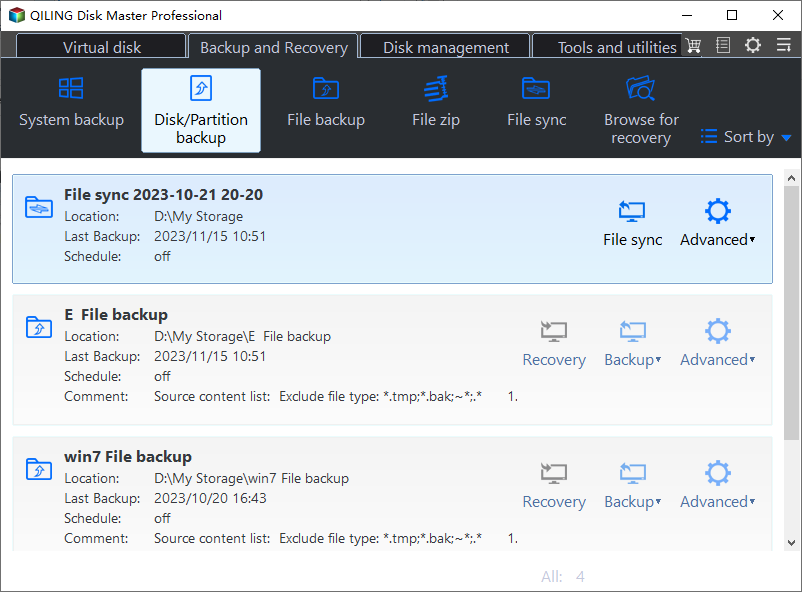
Step 1. Connect a destination drive with enough capacity, launch Qiling Disk Master, open the Backup and Recovery tab and click Disk/Partition backup.
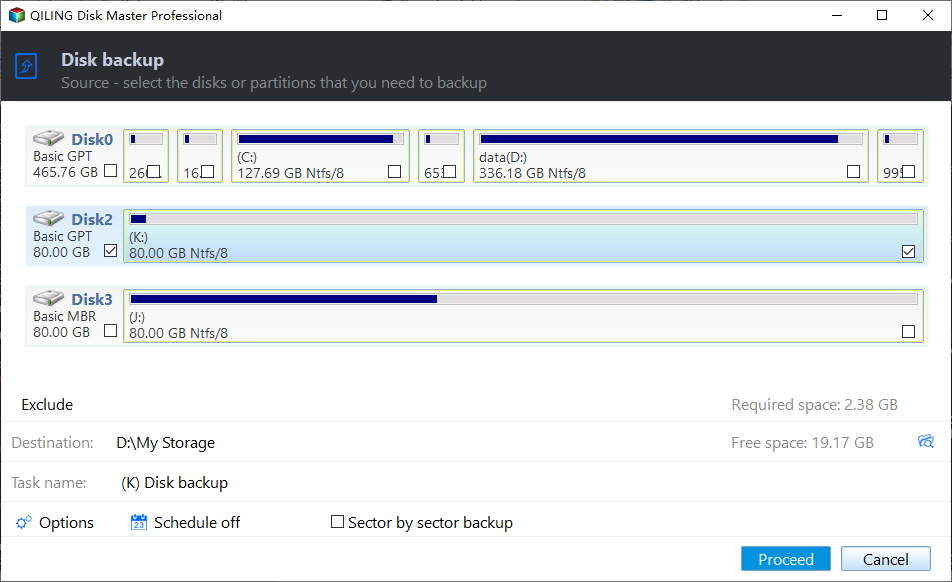
Step 2. Tick the affected disk as the source and click the folder icon to set the destination.
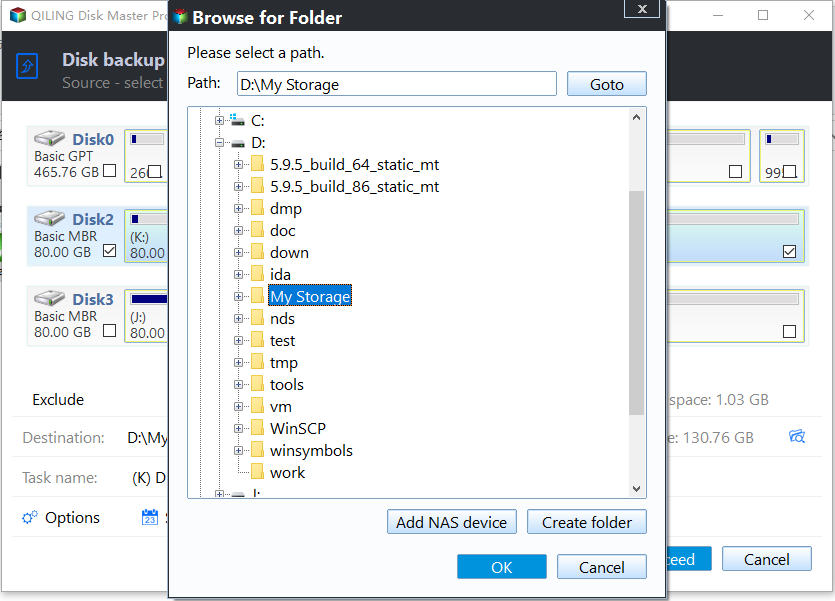
Step 3. Choose a folder on the healthy drive and click OK.
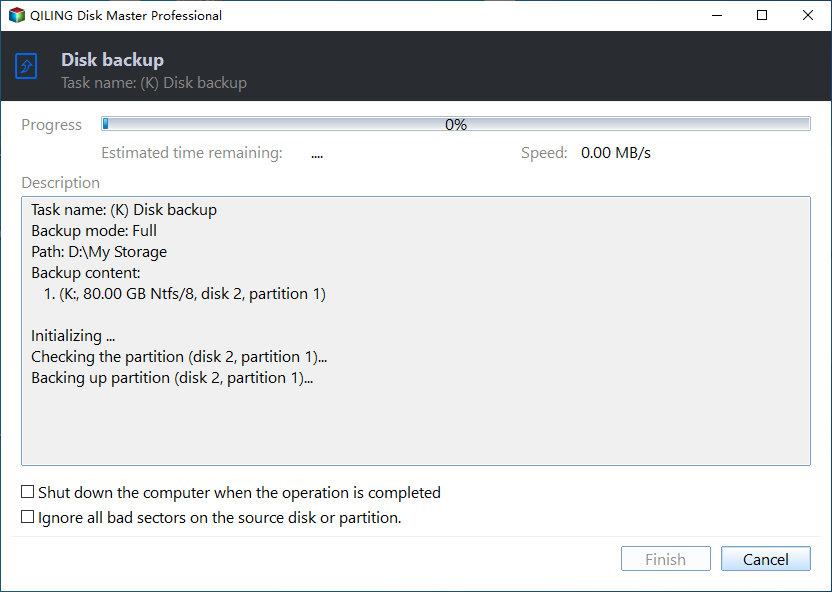
Step 4. Click Proceed to create the image, then run the repair on the original disk. If the repair fails, restore the image and try a different approach.
Can Windows repair the GPT header by itself?
Not reliably. Windows may use the backup during boot on some systems, but Disk Management does not expose a header-repair command. A GPT-aware partition editor is the practical tool.
Is the backup header always usable?
Only if the end of the disk is intact. Damage that affects the whole drive, or a disk that reports the wrong capacity, may have destroyed both copies.
Will repairing the header bring back my files?
It restores access to the partitions. If the file system inside a partition is also damaged, a separate file-system check or recovery step is required.
Related Articles
- Protective MBR: Why Every GPT Disk Still Has an MBR
The first sector of the same layout, and why it must not be overwritten. - Hybrid MBR: Why Some GPT Disks Still Need an MBR Entry
What happens when the MBR copy and the GPT no longer describe the same disk. - Microsoft Reserved Partition Missing on Windows 11
Rebuilding a GPT structure that Windows needs but does not always show.
Products
Articles & Tutorials
- Data Recovery
- Data Backup
- File Recovery
- File Backup
- System Backup and Restore
- Disk and Partition Clone
- Technical articles
- Mobile articles
- Disk Master Help
- Windows Data Recovery Tutorials
- Windows Secure Delete Tutorials
- Windows Partition Management Tutorials
- Windows File Backup and Restore Tutorials
- Windows System Backup and Restore Tutorials
- Windows Disk Backup and Restore Tutorials
- Windows Clone Tutorials