Hybrid MBR: Why Some GPT Disks Still Need an MBR Entry
A GPT disk normally carries a protective MBR that hides its contents from legacy tools. A hybrid MBR does the opposite: it keeps the GPT but also publishes up to three real partitions in the MBR so that old BIOS software can see and boot them. The result is a disk that answers to two partition tables at once, and they must agree.
Hybrid MBRs are uncommon on a normal Windows PC, but they appear on Macs that dual-boot Windows, on disks prepared for legacy BIOS tools, and on machines that were migrated with older utilities. When they go wrong, the symptoms look like a corrupted partition table.
What a Hybrid MBR Is
A hybrid MBR fills the first sector with a protective-style entry of type 0xEE plus up to three additional entries that mirror actual GPT partitions. Each mirrored entry carries a normal type code, such as 0x07 for NTFS, 0x0C for FAT32 or 0xAF for HFS+, and points at the same start and size as the corresponding GPT partition.
The GPT remains the authoritative table. The MBR copy is a compatibility view, written for software that never learned to read GPT. If you change a partition with a GPT-aware tool and do not update the MBR copy, the two views disagree.
Why It Exists
- Mac dual-boot. Older Intel Macs used a hybrid MBR so that Windows installed in BIOS mode could see its partition while macOS continued to use GPT.
- Legacy BIOS boot managers. Some boot loaders and recovery tools read only the MBR and need an entry for the partition they are supposed to start.
- Old imaging and partitioning utilities. A few tools wrote a hybrid MBR as a workaround when they could not handle GPT natively.
On a modern UEFI machine, none of these reasons apply. Windows installs to GPT and boots through the EFI system partition, and a hybrid MBR adds risk without benefit.
How It Differs from a Protective MBR
A protective MBR contains one entry of type 0xEE that covers the whole disk and exists only to keep legacy tools away. A hybrid MBR keeps that entry and adds real partition entries. The protective entry may be shortened to cover only the space before the first mirrored partition, which is why some tools report the disk as partly unallocated.
This is also why a hybrid disk can show up differently in different programs: one tool reads the GPT and sees the true layout, another reads the MBR and sees only the mirrored partitions.
Why It Breaks
- Resizing or moving a partition. A GPT-aware tool updates the GPT but leaves the MBR copy at the old offsets, so legacy tools read the wrong sectors.
- Cloning. A clone copies both tables, but a later resize on the destination only updates one of them.
- Operating system updates. macOS and Windows installers have both rewritten partition tables during upgrades, sometimes dropping the hybrid entries.
- Partition-table repair tools. A tool that "fixes" the MBR may overwrite the protective entry and damage the GPT header that follows it.
The usual symptoms are a partition that appears in one tool and not another, a disk that shows unallocated space where data should be, or a boot loader that cannot find the partition it was configured to start.
How to Inspect a Disk
Windows tools do not display hybrid MBRs directly. Disk Management reads the GPT and shows a normal layout, and diskpart reports the disk style as GPT. To see both tables, use a GPT-aware utility from a Linux live environment or a dedicated partition editor.
gdisk -l /dev/sdX prints the GPT and labels the MBR type as protective, hybrid or transparent. fdisk -l may warn about a GPT disk with an unusual MBR. Read the warnings before you change anything: both tools are telling you that two descriptions of the disk exist.
How to Repair or Remove It
If the disk boots correctly and the hybrid entries match the GPT, the safest action is to leave it alone. If the tables disagree, or if the machine now uses UEFI, removing the hybrid layer is the cleaner fix.
- Back up the data before touching either table. A partition editor can rewrite the MBR and the GPT in one operation.
- Record the current layout from a GPT-aware tool, including start sectors and sizes.
- Rebuild the MBR from the GPT in the partition editor's recovery menu, choosing the option that writes a standard protective MBR. Do not delete partitions to do this.
- Verify that the GPT still lists every partition and that Windows or macOS boots normally.
If the goal is to move the disk to a legacy BIOS system, converting the whole disk to MBR is a different operation. Qiling Disk Master can convert a disk between MBR and GPT, but the conversion rewrites the partition table and should follow a full backup.
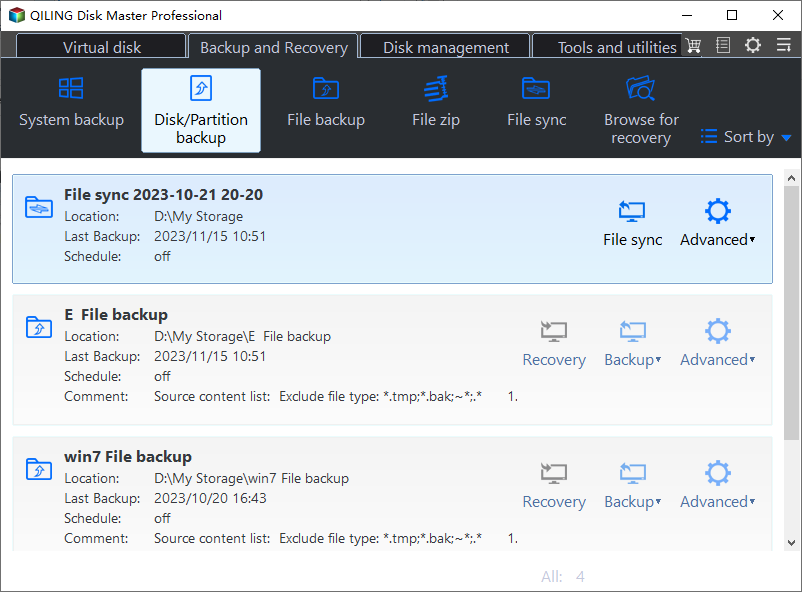
Step 1. Back up the disk before touching either partition table.
Step 2. Launch Qiling Disk Master, right-click the disk and choose Convert to MBR, or open the More menu and select GPT -> MBR.
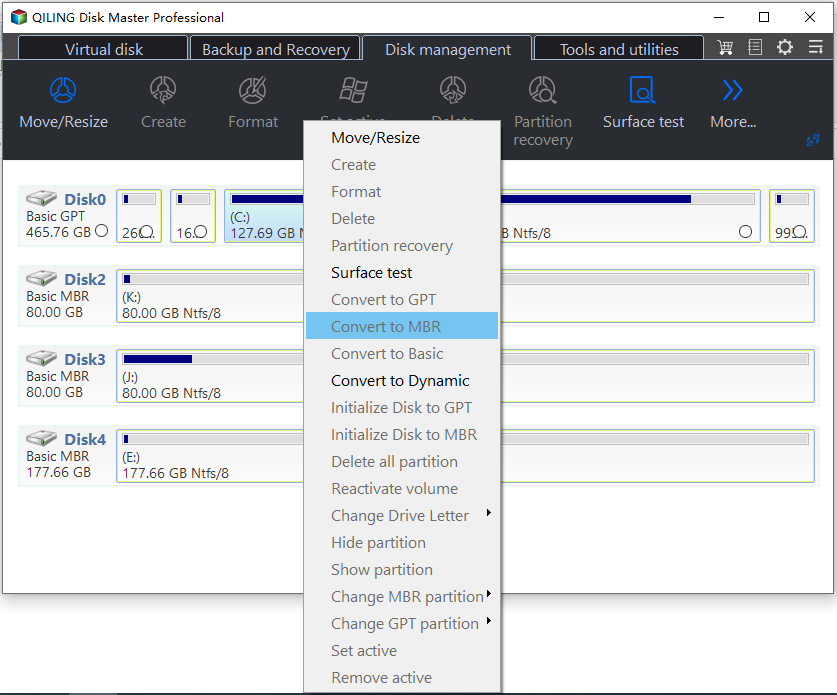
Review the warning about the four-partition and 2 TB limits, then click Proceed to complete the conversion.
Does Windows create hybrid MBRs?
No. Windows uses a protective MBR on GPT disks. Hybrid tables come from Mac dual-boot setups, legacy tools or manual partitioning.
Can I delete the hybrid entries?
Yes, if the system no longer needs BIOS compatibility. Rebuild a standard protective MBR instead of deleting the entries one by one, so the GPT stays intact.
Will removing the hybrid MBR break my Mac?
It can break a BIOS-mode Windows installation that depends on those entries. Check how Windows boots before you change the table.
Related Articles
- Protective MBR: Why Every GPT Disk Still Has an MBR
The single-entry guard that a hybrid MBR extends with real partition records. - GPT Backup Header: What It Does and How to Restore It
The second copy of the partition table that can save a disk after header damage. - Microsoft Reserved Partition Missing on Windows 11
Another GPT structure that Windows expects to find, and how to rebuild it.
Products
Articles & Tutorials
- Data Recovery
- Data Backup
- File Recovery
- File Backup
- System Backup and Restore
- Disk and Partition Clone
- Technical articles
- Mobile articles
- Disk Master Help
- Windows Data Recovery Tutorials
- Windows Secure Delete Tutorials
- Windows Partition Management Tutorials
- Windows File Backup and Restore Tutorials
- Windows System Backup and Restore Tutorials
- Windows Disk Backup and Restore Tutorials
- Windows Clone Tutorials