The Pros and Cons of Partitioning Hard Drive | Why Partition A Hard Drive
Partitioning your hard drive in Windows 10 can be a good idea, but it's essential to understand the pros and cons first. As a beginner, you might have come across the term "disk partition" online, but not know what it means to partition a hard drive. A reliable hard drive partition software, Qiling Partition Master, can help you manage your hard drive partitions, but it's crucial to weigh the advantages and disadvantages before making a decision. This article aims to provide a comprehensive guide on partitioning hard drives, including the benefits and drawbacks, and how to use Qiling Partition Master to partition your hard drive.
P.S. After reading the article, if your questions are still resolved, please contact us, we are ready to help you.
Quick Navigation:
The Pros/Advantages of Partitioning Hard Drive
A Disadvantages of Partitioning is: See Cons Here
How to Partition A Hard Drive - Qiling Partition Master
Conclusion
What Does It Mean to Partition Hard Drive/External Hard Drive
Disk partitioning is a way to optimize your hard disk by dividing it into multiple partitions, similar to cutting a large cake into smaller pieces. This allows for better organization and management of your data, making it easier to access and utilize your storage space.
Disk partitioning involves dividing a physical disk into several logical parts, or volumes, using a tool. Once this process is complete, files can be stored in these separate volumes.
The Pros/Advantages of Partitioning Hard Drive
Here we list a few points about why partition a hard drive.
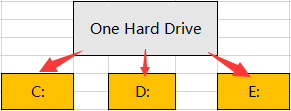
1. Well-organized:
A well-organized drive can save your time in management.
Partitioning your drive allows you to organize your files more efficiently by creating separate sections for different types of content. This is especially useful if you have a large drive with various files such as music, videos, and other miscellaneous files. By creating multiple partitions, you can categorize and store your files in a more logical and personalized way, making it easier to manage and access the content you need.
2. Create Backup Easily:
To ensure an accurate backup plan, consider opting for a partition backup, which is a common and wise choice. This approach involves backing up only the specific data you need, rather than the entire drive, making it a more efficient and targeted backup strategy.
3. Apply Multiple File System and Partition Style:
Partitioning a hard drive allows for different file systems to be used, such as NTFS, FAT32, or EXT 2/3/4, enabling easier management and updating of data. With the help of hard drive software, converting between file systems like NTFS to FAT32 or MBR to GPT becomes a straightforward process.
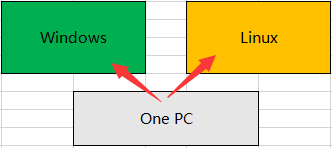
4. Easy to Install Multiple Operating Systems:
Many users install dual systems to resolve software compatibility issues, and the process is relatively straightforward. The dual system is installed on a separate partition, which means it won't overwrite the existing system, and each system has its own partition format, allowing for easy coexistence.
5. Protect Important Files:
Storing important files on separate partitions can help minimize the risk of data loss and corruption by isolating them from the operating system and other files. This way, if the OS or other files become corrupted, the important files on separate partitions remain unaffected.
While partitioning a hard drive may seem like a good idea, it's not always the best approach. Splitting a hard drive into multiple partitions can offer benefits such as improved organization and security, but it also has its downsides. Let's move on to the cons of partitioning a hard drive.
A Disadvantages of Partitioning is: See Cons Here
1. Partition Operation Error:
Splitting too many partitions can lead to issues, including insufficient partition space and incorrect resize or format operations. This can cause problems with hard drive management, making it difficult to effectively utilize your storage.
2. Non-necessity for Beginners:
If your PC doesn't store files that need to be managed or has a single system, partitioning a hard drive is unnecessary.
3. Data Loss:
All partitions on a single hard drive will be lost if the hard drive is damaged.
How to Partition A Hard Drive - Qiling Partition Master
Qiling Partition Master is a reliable partition manager used by Microsoft, HP, and SONY. It simplifies disk management with its "smart space management" feature, allowing users to easily manage their disks by clicking buttons and seeing the results.
P.S. In the event of data loss, creating a backup beforehand can be a helpful measure.
The "Resize/Move" feature allows you to adjust the size and position of a selected disk partition as needed. This can be used to shrink a volume, extend another one, or create unallocated space for specific purposes.
The "Clone" feature is used to create an exact copy of a hard disk or partition, duplicating its layout and content, allowing for tasks such as upgrading a hard disk, replacing a failing one, or backing up drive data.
The "Delete" method is used to remove an unwanted disk partition, turning it into unallocated space.
Formatting a drive partition allows you to change the file system, resolve some corruption issues, and in some cases, remove viruses and malware by altering the partition.
Allocating space from a partition with too much free space to one with inadequate space can be beneficial when dealing with drive partition space disparities.
The "Migrate OS" feature allows for the easy transfer of a Windows installation from one drive to another, eliminating the need for a full reinstall.
Qiling Partition Master customers are increasingly converting between GPT and MBR, as well as between NTFS and FAT32, and from Basic to Dynamic, taking advantage of the benefits of these conversions. Along with these conversions, there are many other functional and practical features waiting to be explored in the software.
Should I Partition My Hard Drive in Windows 10? Have a Try!
This article provides helpful information on partitioning hard drives, including SSDs and HDDs, using Qiling Partition Master. It also offers some tips on the pros and cons of partitioning hard drives, which can be useful for users who want to optimize their storage space.
If you encounter any technical issue with our product, please send an email to support@idiskhome.com
Related Articles
- Slow Boot Time! SSD Taking Long Time to Boot in Windows 11/10
- Fix DiskPart I/O Device Error in Windows 10/8/7
- Windows 11/10 Boot Repair: Fix UEFI Boot Issue on Windows 11/10/8/7
- How to Fix SSD Full for No Reason
- Fix Error Code 0x8007025D When Installing Windows
If you're encountering Error Code 0x8007025d while installing Windows on your computer, this post will provide troubleshooting steps to help you successfully install Windows on your device. - How to Extend Partition Using Diskpart [Step-by-Step Guide]
Do you need to re-Learn how to extend partitions using Diskpart in this article. The article explains how to use the Diskpart command-line utility to extend the size of a partition on your hard disk.
Products
Articles & Tutorials
- Data Recovery
- Data Backup
- File Recovery
- File Backup
- System Backup and Restore
- Disk and Partition Clone
- Technical articles
- Mobile articles
- Disk Master Help
- Windows Data Recovery Tutorials
- Windows Secure Delete Tutorials
- Windows Partition Management Tutorials
- Windows File Backup and Restore Tutorials
- Windows System Backup and Restore Tutorials
- Windows Disk Backup and Restore Tutorials
- Windows Clone Tutorials